
1. Product Overview
The Shimano XTR M9250 Di2 Wireless 12-Speed Drivetrain Upgrade Kit provides a high-performance electronic shifting solution for mountain bikes. This system features fully wireless communication for precise and rapid gear changes, eliminating the need for traditional shift cables. The core components are designed for durability and reliability in demanding off-road conditions.
Key features include the RD-M9250-SGS rear derailleur with SHADOW ES design and Automatic Impact Recovery, the SW-M9250 shifter with customizable controls, and the BT-DN320 battery for extended ride times. The system is compatible with Shimano's HYPERGLIDE+ 12-speed drivetrain components.
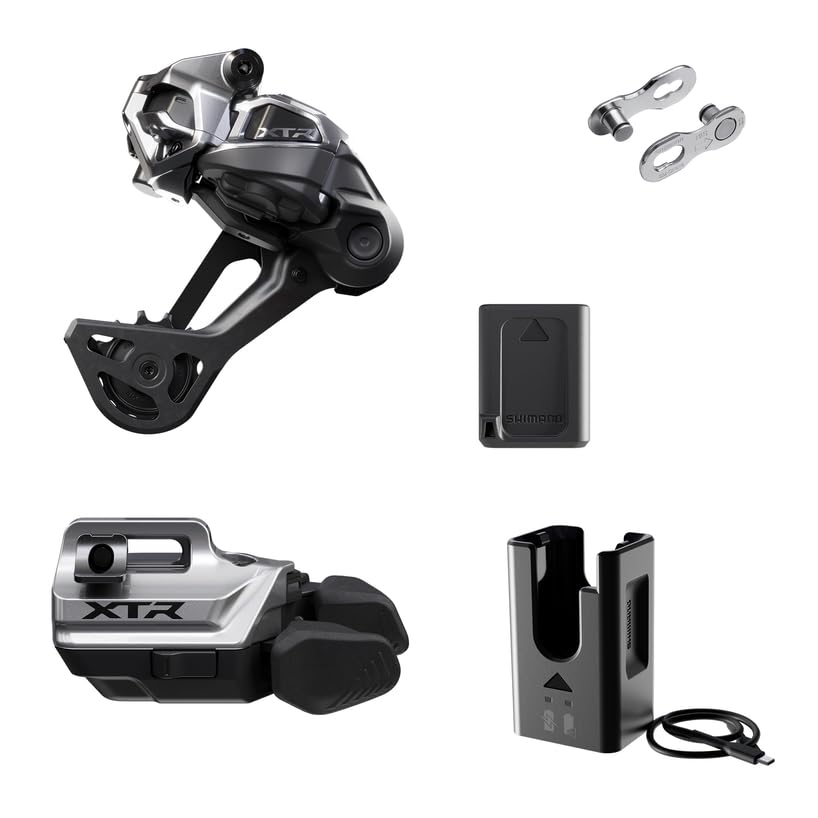
Image 1.1: The Shimano XTR M9250 Di2 Rear Derailleur, a central component of the wireless drivetrain system.
2. What's Included
The Shimano XTR M9250 Di2 Wireless 12-Speed Drivetrain Upgrade Kit typically includes the following components:
- Rear Derailleur: RD-M9250-SGS (SGS with IR-SPEC clamp)
- Di2 Wireless Shifter: SW-M9250
- Battery: BT-DN320
- Charger: EC-DN100 (compact charger)
- Chain: SM-CN9120 12-Speed Chain with Quick Link
Note: Specific kit contents may vary. Please refer to your product packaging for an exact list of included items.
3. Setup and Installation
Proper installation is crucial for optimal performance and safety. It is recommended that installation be performed by a qualified bicycle mechanic. This section provides an overview of the installation process.
3.1 Rear Derailleur Installation
Mount the RD-M9250-SGS rear derailleur to your bike's derailleur hanger. Ensure the IR-SPEC clamp is securely fastened according to Shimano's technical documentation. The low-profile SHADOW ES design helps protect the derailleur from trail impacts.
3.2 Shifter Installation and Customization
Install the SW-M9250 wireless shifter on your handlebar. The shifter features adjustable paddles and programmable controls. Refer to the Shimano E-TUBE Project software for detailed customization options, including button assignments and shift modes.
3.3 Battery Installation and Connection
Install the BT-DN320 battery into its designated location, typically within the seatpost or frame. Ensure a secure connection to the system. The battery powers all electronic components of the Di2 system.
3.4 Chain Installation
Install the SM-CN9120 12-speed chain, ensuring proper length and routing. Use the quick link for easy connection. This chain is designed for seamless compatibility with HYPERGLIDE+ cassettes.
3.5 Initial Setup and Pairing
After physical installation, power on the system and perform the initial pairing process between the shifter and derailleur. Use the Shimano E-TUBE Project software for firmware updates, fine-tuning, and system diagnostics.
4. Operating Instructions
The Shimano XTR M9250 Di2 system offers intuitive and precise electronic shifting.
4.1 Shifting Gears
Press the shifter paddles to initiate gear changes. The system provides rapid and consistent shifts across the 12-speed cassette. The customizable shifter allows you to configure the function of each paddle.
4.2 Automatic Impact Recovery
The RD-M9250-SGS rear derailleur features Automatic Impact Recovery. In the event of an impact, the derailleur's motorized system is designed to swiftly return it to its correct operating position, maintaining optimal shifting performance.

Image 4.1: Internal view illustrating the Dual Spring Chain Stabilizer mechanism, contributing to consistent chain tension and shifting stability.
4.3 Battery Status and Charging
Monitor the battery level through the system indicator or the E-TUBE Project app. When the battery level is low, use the EC-DN100 compact charger to recharge the BT-DN320 battery. A full charge provides up to 340 km of ride time, depending on usage and conditions.
5. Maintenance
Regular maintenance ensures the longevity and performance of your Di2 drivetrain.
- Cleaning: Keep the derailleur, chain, and shifter clean from dirt and debris. Use a soft cloth and mild detergent. Avoid high-pressure washing directly on electronic components.
- Chain Lubrication: Regularly lubricate the SM-CN9120 chain to reduce wear and ensure smooth operation.
- Battery Charging: Recharge the BT-DN320 battery as needed. Avoid completely draining the battery for extended periods.
- Firmware Updates: Periodically check for and install firmware updates using the Shimano E-TUBE Project software to ensure optimal performance and access to new features.
- Connection Checks: Ensure all electronic connections are secure and free from corrosion.
6. Troubleshooting
If you encounter issues with your Shimano XTR M9250 Di2 system, consider the following common troubleshooting steps:
- No Shifting Response: Check the battery level. Ensure the battery is properly connected and charged. Verify that the shifter and derailleur are paired.
- Inconsistent Shifting: Check for debris in the derailleur or chain. Ensure the chain is properly lubricated. Verify that the derailleur hanger is not bent. Perform a system calibration using E-TUBE Project.
- Battery Not Charging: Ensure the EC-DN100 charger is correctly connected to the battery and a power source. Check for any damage to the charger or battery port.
- Wireless Connection Issues: Ensure there are no obstructions between the shifter and derailleur. Re-pair the components if necessary.
For more detailed troubleshooting guides and technical support, please refer to the official Shimano website or consult with an authorized Shimano dealer.
7. Specifications
| Model Name | XTR M9250 |
| Part Number | IGPM9250UPG02 |
| Brand | SHIMANO |
| UPC | 192790928265 |
| Drivetrain Speed | 12-Speed |
| Rear Derailleur Type | SGS (Long Cage) with IR-SPEC clamp, SHADOW ES design |
| Battery Life (Approx.) | Up to 340 km per charge |
| Material | Aluminum, Carbon Fiber |
| Mounting Type | Clamp-On Mount |
| Package Weight | 2 Pounds (approx.) |
8. Warranty and Support
8.1 Warranty Information
This Shimano product comes with a 2-year warranty. The warranty covers defects in materials and workmanship under normal use. Please retain your proof of purchase for warranty claims.
For full warranty terms and conditions, please refer to the official Shimano warranty policy available on their website or contact your authorized dealer.
8.2 Customer Support
For technical assistance, spare parts, or service, please contact your local authorized Shimano dealer or visit the official Shimano website for support resources and contact information.
Shimano Official Website: bike.shimano.com