
1. Introduction
This manual provides essential information for the safe and effective use of your FUJIFILM X100VI Digital Camera. The X100VI combines advanced digital imaging technology with a classic, tactile design, offering a 40.2MP X-Trans CMOS 5 HR sensor, X-Processor 5, and up to 6 stops of in-body image stabilization (IBIS). It supports 6.2K/30P video recording and features 20 Film Simulation modes, including REALA ACE. Please read this manual thoroughly before using your camera and keep it for future reference.
2. What's in the Box
Verify that all items are present in the package:
- Camera Body
- Accessories (e.g., battery, USB cable, strap, lens cap)
3. Camera Layout and Controls
Familiarize yourself with the various parts and controls of your X100VI camera.

Figure 3.1: Front View. Shows the lens, built-in flash, optical viewfinder window, and focus assist lamp.

Figure 3.2: Top View. Displays the shutter speed dial, exposure compensation dial, shutter button, and ON/OFF switch.

Figure 3.3: Rear View. Features the LCD monitor, viewfinder, control dial, and various function buttons (e.g., MENU/OK, PLAY, DISP/BACK).

Figure 3.4: Tilting LCD Screen. The rear LCD monitor can be tilted for flexible shooting angles.

Figure 3.5: Left Side View. Shows the HDMI port, USB-C port, and microphone input.

Figure 3.6: Right Side View. Features the focus mode selector switch (M: Manual, C: Continuous, S: Single).
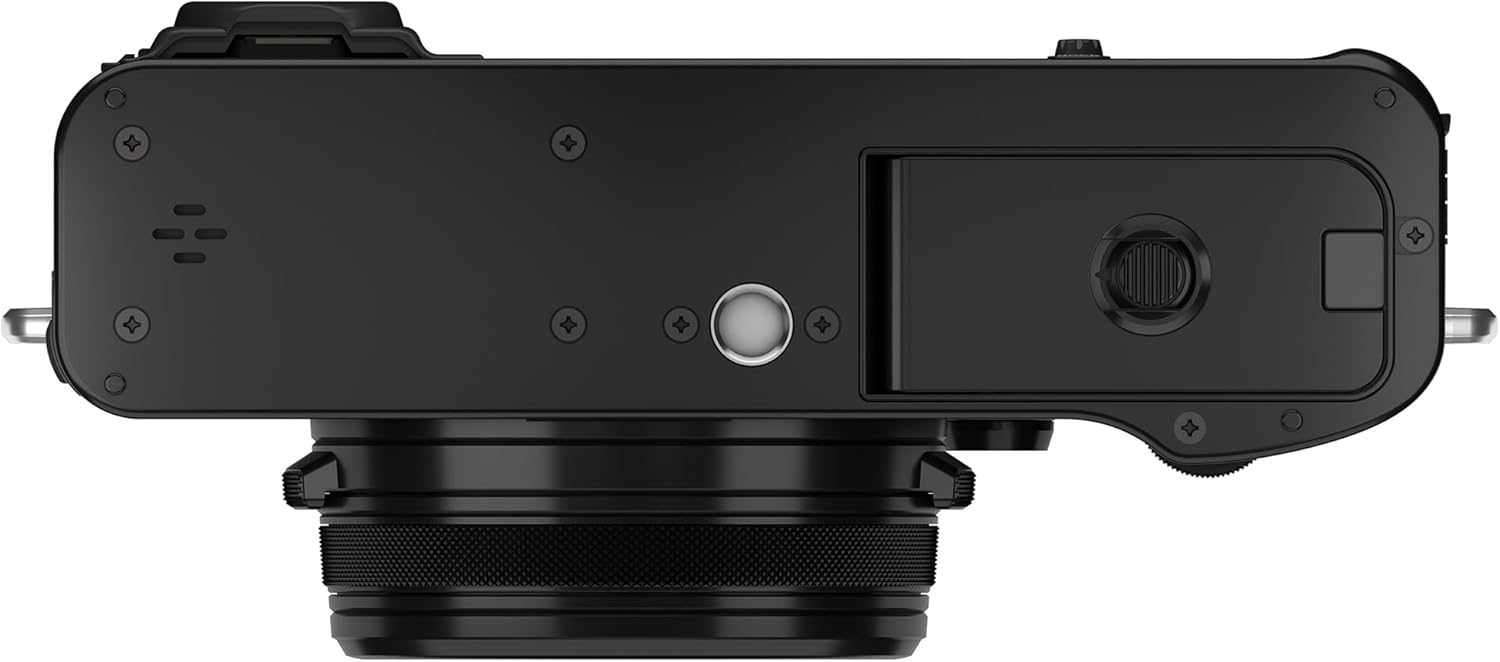
Figure 3.7: Bottom View. Displays the battery/memory card compartment and tripod socket.
4. Setup
4.1. Charging the Battery
Before first use, fully charge the supplied battery. Connect the camera to a USB power source using the provided USB cable. The charging indicator will illuminate during charging and turn off when complete.
4.2. Inserting the Battery and Memory Card
- Open the battery/memory card compartment cover located on the bottom of the camera.
- Insert the battery with the contacts facing the correct direction, pushing it in until it clicks into place.
- Insert a compatible SD/SDHC/SDXC memory card into the card slot with the label facing the front of the camera, pushing it in until it clicks.
- Close the compartment cover securely.
4.3. Initial Settings
When you turn on the camera for the first time, you will be prompted to set the language, date, time, and time zone. Follow the on-screen instructions to complete these settings.
5. Operating the Camera
5.1. Power On/Off
To turn the camera on or off, rotate the ON/OFF switch located around the shutter button.
5.2. Basic Photography
- Shutter Speed: Adjust using the shutter speed dial on the top plate.
- Aperture: Adjust by rotating the aperture ring on the lens.
- ISO Sensitivity: Adjust using the ISO dial (often integrated with the shutter speed dial).
- Focusing: Use the focus mode selector on the side of the camera (S for single AF, C for continuous AF, M for manual focus). Half-press the shutter button to focus.
- Taking a Picture: Fully press the shutter button to capture an image.
5.3. Film Simulation Modes
The X100VI offers 20 unique Film Simulation modes, allowing you to reproduce the look and feel of classic Fujifilm film stocks. Access these modes through the camera's menu system. Experiment with options like PROVIA (standard), Velvia (vivid), ASTIA (soft), ACROS (monochrome), and the new REALA ACE to find your preferred aesthetic.
5.4. Video Recording
The X100VI can record high-quality video up to 6.2K/30P. To start recording, set the camera to video mode (if available via a dedicated switch or menu option) and press the video record button. Adjust video settings such as resolution and frame rate in the shooting menu.
5.5. Connectivity
- Wi-Fi/Bluetooth: Use the built-in Wi-Fi and Bluetooth to connect to a smartphone or tablet via the FUJIFILM Camera Remote app for remote control, image transfer, and geotagging.
- Frame.io Camera to Cloud: The X100VI supports native Frame.io integration, allowing you to upload photos and videos directly to the cloud for collaborative workflows.
6. Maintenance
6.1. Cleaning
- Lens: Use a blower brush to remove dust, then gently wipe with a lens cleaning cloth and lens cleaning fluid if necessary.
- Camera Body: Wipe with a soft, dry cloth. For stubborn dirt, use a cloth lightly dampened with water.
- Sensor: If dust appears on images, use a blower to gently remove it. For persistent dust, consult a professional service center.
6.2. Storage
When not in use, store the camera in a cool, dry, well-ventilated area away from direct sunlight, high temperatures, and humidity. Remove the battery if the camera will not be used for an extended period.
7. Troubleshooting
If you encounter issues with your camera, refer to the following common solutions:
- Camera does not turn on: Ensure the battery is fully charged and correctly inserted.
- Cannot take pictures: Check if the memory card is inserted correctly and has sufficient free space. Ensure the lens cap is removed.
- Images are blurry: Check focus mode, ensure proper focus, and verify shutter speed is fast enough to prevent camera shake.
- No image on LCD: Press the DISP/BACK button to cycle through display modes.
For more complex issues, consult the full user manual available on the Fujifilm support website or contact customer service.
8. Specifications
| Feature | Specification |
|---|---|
| Model Name | X100VI |
| Sensor | 40.2MP X-Trans CMOS 5 HR |
| Image Processor | X-Processor 5 |
| Image Stabilization | Up to 6.0 stops In-Body Image Stabilization (IBIS) |
| Lens | FUJINON 23mm F2 (equivalent to 35mm in 35mm format) |
| Video Resolution | Up to 6.2K/30P |
| Film Simulation Modes | 20 modes (including REALA ACE) |
| Connectivity | Wi-Fi, Bluetooth, Frame.io Camera to Cloud |
| Display | 3-inch Tilting LCD |
| Storage Media | SD/SDHC/SDXC Card |
| Weight | Approx. 2 pounds (with battery and memory card) |
9. Warranty and Support
9.1. Warranty Information
This FUJIFILM X100VI Digital Camera comes with a 1-year manufacturer's warranty. Please retain your proof of purchase for warranty claims. The warranty covers defects in materials and workmanship under normal use. It does not cover damage caused by misuse, accidents, unauthorized repairs, or normal wear and tear.
9.2. Customer Support
For further assistance, technical support, or warranty service, please visit the official Fujifilm website or contact Fujifilm customer service in your region. You can find detailed contact information and additional resources on their support pages.