
GOLD NOTE PSU-5
GOLD NOTE PSU-5 Inductive Power Supply User Manual
Model: PSU-5 | Brand: GOLD NOTE
1. Introduction
The GOLD NOTE PSU-5 is an external inductive power supply specifically designed to enhance the performance of the Gold Note PH-5 phono stage. It provides ultra-clean power to optimize audio signal integrity and improve the overall vinyl reproduction experience.
Inspired by the design philosophy of other Gold Note external power supplies like the PSU-10 and PSU-1000, the PSU-5 features a linear power supply with custom-made transformers and an inductive filter to effectively prevent noise and interference from the AC power grid.
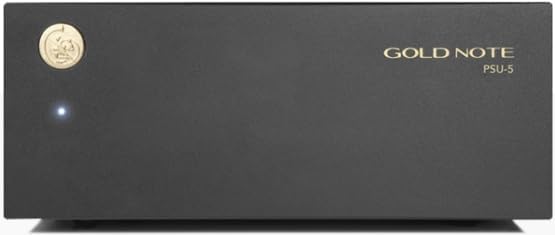
Figure 1: Front view of the GOLD NOTE PSU-5 Inductive Power Supply.
This manual provides essential information for the proper setup, operation, and maintenance of your PSU-5 unit.
2. What's in the Box
Upon opening the packaging, please verify that all components are present and undamaged. The box should contain:
- 1 x GOLD NOTE PSU-5 Inductive Power Supply Unit
- 1 x Power Cable (region specific)
- 1 x Connection Cable for PH-5 Phono Stage
- 1 x User Manual (this document)
If any items are missing or damaged, please contact your authorized Gold Note dealer or customer support immediately.
3. Setup
Follow these steps to properly set up your GOLD NOTE PSU-5 Inductive Power Supply:
- Placement: Place the PSU-5 on a stable, level surface, away from direct sunlight, heat sources, and excessive moisture. Ensure adequate ventilation around the unit. Avoid placing it directly on top of or underneath other audio components to minimize potential interference.
- Power Off: Before making any connections, ensure that both the PSU-5 and your Gold Note PH-5 phono stage are powered off and disconnected from the AC mains.
- Connect to PH-5: Connect one end of the supplied connection cable to the dedicated power input port on the rear of your Gold Note PH-5 phono stage. Connect the other end of this cable to the corresponding output port on the rear of the PSU-5. Ensure a firm and secure connection.
- Connect to AC Mains: Connect the supplied power cable to the AC inlet on the rear of the PSU-5. Then, plug the other end of the power cable into a suitable AC wall outlet. It is recommended to use a high-quality surge protector or power conditioner.
- Power On Sequence: First, power on the PSU-5 using its power switch. Wait a few moments for the unit to stabilize. Then, power on your Gold Note PH-5 phono stage.
Important: Always ensure all connections are secure before powering on the units. Incorrect connections can lead to damage or improper operation.
4. Operation
The GOLD NOTE PSU-5 is designed for straightforward operation, primarily serving as a dedicated power source for the PH-5 phono stage.
- Power Indicator: A small LED indicator on the front panel of the PSU-5 illuminates when the unit is powered on and operating correctly.
- Automatic Operation: Once connected and powered on, the PSU-5 automatically provides the optimized, ultra-clean power to the PH-5 phono stage. There are no user-adjustable settings on the PSU-5 itself.
- Power Off Sequence: To power down your system, first power off the PH-5 phono stage, then power off the PSU-5. This sequence helps prevent any potential transient noises or stresses on the components.
For detailed operation of your PH-5 phono stage, please refer to its dedicated user manual.
5. Maintenance
To ensure the longevity and optimal performance of your GOLD NOTE PSU-5, follow these simple maintenance guidelines:
- Cleaning: Disconnect the unit from the power outlet before cleaning. Use a soft, dry, lint-free cloth to wipe the exterior surfaces. Do not use abrasive cleaners, waxes, or solvents, as these can damage the finish.
- Ventilation: Ensure that the ventilation openings are not blocked. Do not place the unit in an enclosed cabinet without proper airflow.
- Environmental Conditions: Avoid exposing the unit to extreme temperatures, high humidity, or dusty environments.
- Cable Connections: Periodically check all cable connections to ensure they are secure. Loose connections can degrade performance.
The PSU-5 contains no user-serviceable parts. Do not attempt to open the chassis, as this will void the warranty and may expose you to dangerous voltages.
6. Troubleshooting
If you encounter issues with your GOLD NOTE PSU-5, please consult the following troubleshooting guide before contacting customer support:
| Problem | Possible Cause | Solution |
|---|---|---|
| PSU-5 does not power on (no LED indicator). |
|
|
| PH-5 phono stage does not receive power from PSU-5. |
|
|
| Humming or buzzing sound from audio system after connecting PSU-5. |
|
|
If the problem persists after trying these solutions, please contact Gold Note customer support or your authorized dealer for further assistance.
7. Specifications
| Feature | Detail |
|---|---|
| Power Supply Type | Linear Power Supply with Inductive Filter |
| Dedicated For | Gold Note PH-5 Phono Stage |
| Transformer Circuit | 2-transformer circuit for linear power stage |
| Voltage Regulators | 3 ultra-low noise voltage regulators |
| Audio Grade Power Supply Rails | 3 rail audio grade power supply |
| Maximum Variation of Output Voltage | 0.05 % |
| Line Noise Rejection | >80dB |
| Common Mode Noise Rejection | >80dB |
| Full Power Response Time | <2.5µsec |
| Manufacturer | GOLD NOTE |
| ASIN | B0FC75H86B |
| Date First Available | June 6, 2025 |
Specifications are subject to change without notice for product improvement.
8. Warranty and Support
GOLD NOTE products are manufactured to the highest quality standards. This product is covered by a limited warranty from the date of purchase. Please refer to the warranty card included with your product or visit the official Gold Note website for detailed warranty terms and conditions.
For technical support, service, or warranty claims, please contact your authorized Gold Note dealer or distributor. You can also visit the official Gold Note website for frequently asked questions (FAQs) and contact information:
Gold Note Official Website: www.goldnote.it
When contacting support, please have your product model (PSU-5) and serial number (if applicable) ready.
Related documentsPSU-5


Ask a question about this manual
Ask about setup, troubleshooting, compatibility, parts, safety, or missing instructions. Manuals+ will review the question and use this page’s manual context to help answer it.