
Introduction
Thank you for choosing the MENERESAS M37-B2 Wireless Lavalier Microphone. This 3-in-1 wireless microphone system is designed to provide high-quality audio recording with noise reduction capabilities for various devices, including cameras and Android smartphones. Please read this manual carefully to ensure proper setup, operation, and maintenance of your device.
Package Contents
Before proceeding, please verify that all items listed below are present in your package:
- 1 x Wireless Microphone Transmitter
- 1 x Wireless Receiver (Lightning Connector)
- 1 x USB Charging Cable
- 1 x User Manual
- 1 x Carrying Pouch (may vary)
Setup
1. Charging the Devices
The microphone transmitter and receiver are equipped with built-in Lithium Ion batteries. For optimal performance, fully charge both devices before first use.
- Connect the USB charging cable to the charging port on both the transmitter and receiver.
- Plug the other end of the USB cable into a standard USB power adapter (not included) or a computer's USB port.
- The indicator light will typically show red during charging and turn off or change color when fully charged. Charging usually takes approximately 1-2 hours.
2. Connecting to Your Device
The M37-B2 receiver features a Lightning connector for direct compatibility with iOS devices. For Android devices, an appropriate adapter (not included) may be required.
- Power On: Press and hold the power button on the microphone transmitter until the indicator light illuminates.
- Connect Receiver: Plug the receiver directly into the Lightning port of your iOS device or the appropriate port on your Android device (via adapter if necessary).
- Pairing: The transmitter and receiver should automatically pair. A solid blue or green light on both devices typically indicates a successful connection. Refer to the indicator light section for specific meanings.
- Test: Open your recording application (e.g., camera app, voice recorder) and perform a test recording to ensure audio is being captured by the external microphone.
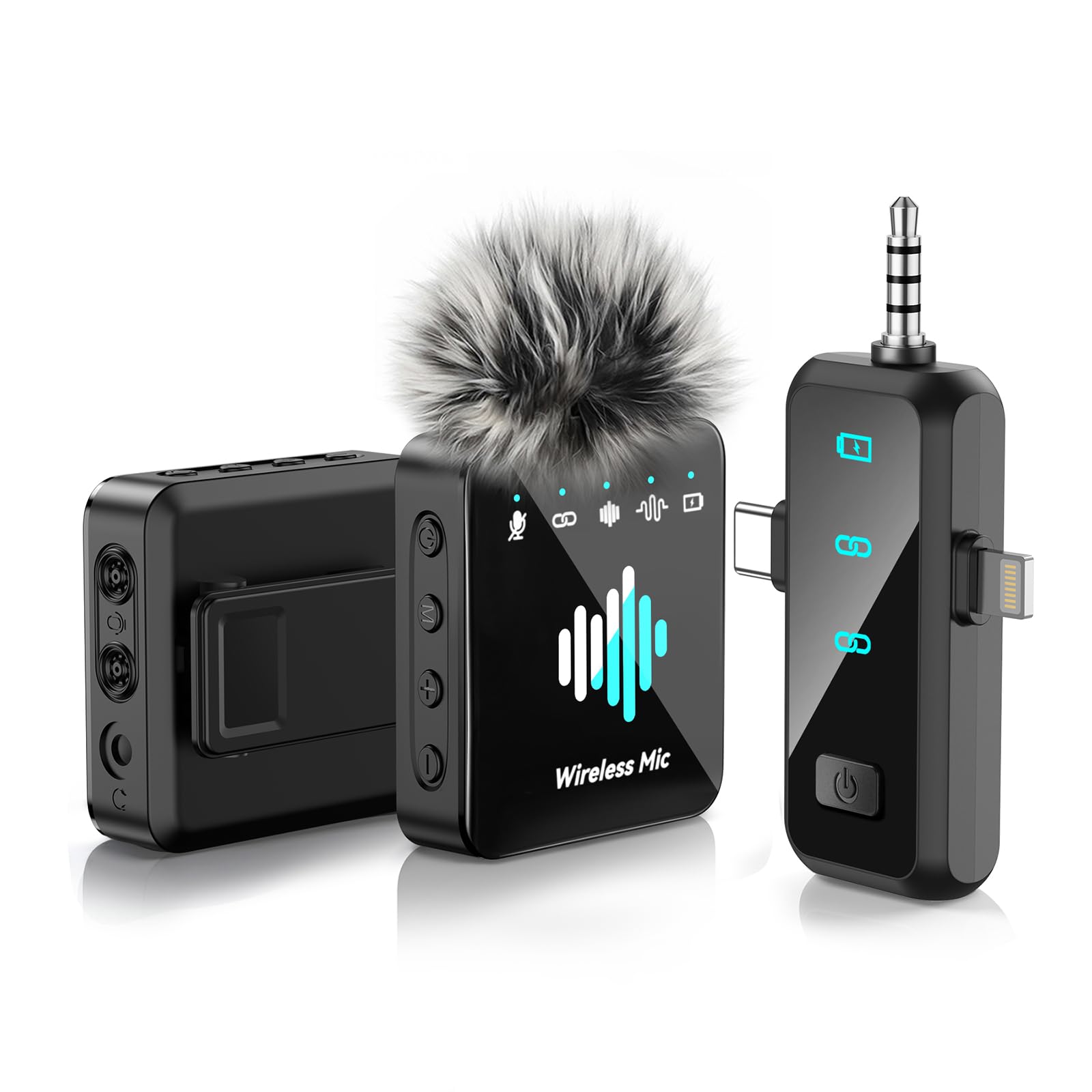
Image: The MENERESAS M37-B2 Wireless Lavalier Microphone system, showing the compact transmitter and receiver units.
Operating Instructions
1. Power On/Off
- To Power On: Press and hold the power button on the transmitter for approximately 3 seconds until the indicator light turns on.
- To Power Off: Press and hold the power button on the transmitter for approximately 3 seconds until the indicator light turns off.
2. Noise Reduction Feature
The M37-B2 features an integrated noise reduction function to minimize ambient sound interference.
- Activate Noise Reduction: Short press the power button on the transmitter once while the device is on. The indicator light may change color or pattern to confirm activation (e.g., from solid blue to flashing blue).
- Deactivate Noise Reduction: Short press the power button again. The indicator light will revert to its original state.
3. Indicator Lights
Understanding the indicator lights is crucial for proper operation:
- Transmitter (Mic):
- Solid Blue: Powered on, connected, and ready for recording.
- Flashing Blue: Powered on, noise reduction active.
- Flashing Red: Low battery. Please charge immediately.
- Solid Red (while charging): Charging in progress.
- Light Off (while charging): Fully charged.
- Receiver:
- Solid Blue: Powered on and connected to the transmitter.
- Flashing Blue: Powered on, searching for transmitter.
Maintenance
1. Cleaning
To maintain the appearance and functionality of your microphone:
- Use a soft, dry cloth to wipe the surfaces of the transmitter and receiver.
- Do not use harsh chemicals, solvents, or abrasive cleaners.
- Avoid getting moisture into any openings.
2. Storage
When not in use, store the microphone system in a cool, dry place, away from direct sunlight and extreme temperatures. Use the provided carrying pouch to protect the devices from dust and scratches.
3. Battery Care
To prolong the life of the built-in Lithium Ion batteries:
- Avoid fully discharging the batteries frequently.
- Charge the devices regularly, even if not used for extended periods (e.g., once every 3 months).
- Do not expose the devices to high temperatures, as this can degrade battery performance.
Troubleshooting
If you encounter issues with your MENERESAS M37-B2, please refer to the following common problems and solutions:
| Problem | Possible Cause | Solution |
|---|---|---|
| No sound or low volume | Microphone not powered on; Not paired; Receiver not fully inserted; Device volume too low; App settings. | Ensure both transmitter and receiver are powered on and paired (solid blue light). Reinsert receiver firmly. Check device volume and app microphone input settings. |
| Poor audio quality / Static | Interference; Distance too far; Low battery; Noise reduction not active (if desired). | Move away from other wireless devices. Ensure transmitter is within range of receiver. Charge devices. Activate noise reduction feature. |
| Device not connecting | Transmitter/Receiver not powered on; Pairing failed; Receiver not compatible with device (e.g., Android without adapter). | Ensure both devices are on. Power cycle both devices and try pairing again. Verify receiver compatibility or use appropriate adapter for Android. |
| Short battery life | Battery degradation; Not fully charged. | Ensure devices are fully charged before use. Follow battery care guidelines in the Maintenance section. |
Specifications
Key technical specifications for the MENERESAS M37-B2 Wireless Lavalier Microphone:
- Model Number: M37-B2
- Brand: MENERESAS
- Microphone Form Factor: Lavalier
- Connectivity Technology: RF (Radio Frequency)
- Connector Type: Lightning (for receiver)
- Special Feature: Noise Reduction
- Power Source: Battery Powered
- Battery Type: Lithium Ion
- Number of Batteries: 3 (Unknown type, included)
- Number of Channels: 1
- Item Weight: Approximately 5 ounces (0.14 Kilograms)
- Product Dimensions: 5.24 x 4.33 x 1.54 inches (L x W x H)
- UPC: 792105683980
Warranty and Support
Limited Warranty
This product is covered by a limited warranty against defects in materials and workmanship under normal use. The warranty period and terms may vary by region and retailer. Please retain your proof of purchase for warranty claims.
Customer Support
For technical assistance, troubleshooting beyond this manual, or warranty inquiries, please contact MENERESAS customer support through the retailer's platform or the official MENERESAS website. Please have your model number (M37-B2) and purchase information ready when contacting support.
