
WEIBEIQI YYK-Q16S
WEIBEIQI YYK-Q16S Open Ear Bluetooth Headphones User Manual
Model: YYK-Q16S
1. Introduction
Thank you for choosing the WEIBEIQI YYK-Q16S Open Ear Bluetooth Headphones. These headphones are designed to provide a comfortable listening experience while allowing you to remain aware of your surroundings. This manual will guide you through the setup, operation, and maintenance of your new headphones.
2. Package Contents
- WEIBEIQI YYK-Q16S Open Ear Bluetooth Headphones (Left and Right)
- Charging Case
- USB Type-C Charging Cable
- User Manual (this document)
3. Product Overview
Familiarize yourself with the components of your headphones and charging case.

Image: The WEIBEIQI YYK-Q16S Open Ear Bluetooth Headphones shown inside their charging case, displaying the LED battery indicator.
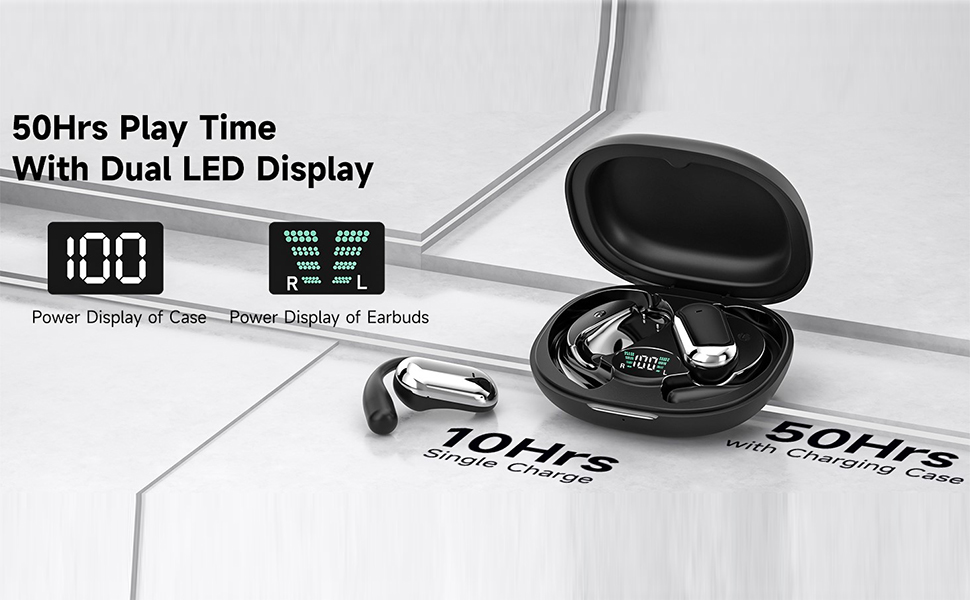
Image: Illustration of the LED digital display on the charging case showing total battery percentage and individual earbud charge levels.
4. Setup
4.1 Charging the Headphones and Case
Before first use, fully charge the headphones and charging case.
- Place the earbuds into the charging case. Ensure they are properly seated.
- Connect the USB Type-C charging cable to the charging port on the case and to a power source (e.g., USB wall adapter, computer USB port).
- The LED digital display on the charging case will show the battery level during charging. A full charge for the case takes approximately 1 hour.
- The earbuds provide up to 10 hours of continuous playtime on a single charge, and the charging case provides an additional 40 hours, totaling 50 hours of playtime.

Image: The charging case with earbuds inside, connected to a USB-C cable, illustrating the charging process and LED display.
4.2 Bluetooth Pairing
Pair your headphones with your Bluetooth-enabled device.
- Initial Pairing: Open the lid of the charging case. The earbuds will automatically enter pairing mode.
- On your device (smartphone, tablet, etc.), go to Bluetooth settings and turn on Bluetooth.
- Look for "YYK-Q16S" in the list of available devices and select it to connect.
- Once connected, you will hear an audio prompt, and the device will show "Connected."
- Automatic Reconnection: After initial pairing, the headphones will automatically connect to the last paired device when the case lid is opened, provided Bluetooth is enabled on the device.
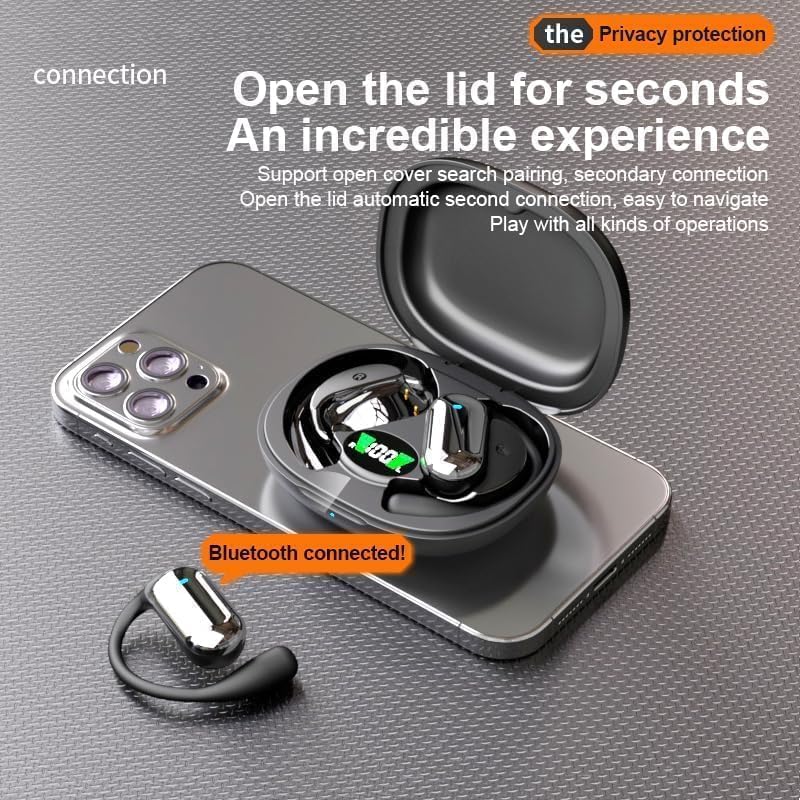
Image: A smartphone displaying a "Bluetooth connected!" notification, with the open charging case and one earbud nearby, demonstrating the quick pairing process.
4.3 Wearing the Headphones
The YYK-Q16S features an open-ear design with ear hooks for a secure and comfortable fit.
- Take the earphones out of the charging case.
- Hang the end of the earphone over your ear bone.
- Turn the earphones and slide them behind your ear.
- Adjust the ear hook for a secure and comfortable fit. The design ensures comfort for prolonged wear without entering the ear canal.

Image: A four-step visual guide demonstrating how to correctly wear the open-ear headphones, from taking them out to adjusting for a secure fit.

Image: The headphones and case, highlighting the comfortable, non-in-ear design, emphasizing light and unflattering wear.
5. Operating Instructions
5.1 Touch Controls
The YYK-Q16S headphones feature intuitive touch controls on each earbud.

Image: A diagram illustrating the touch control functions for the left and right earbuds, including volume, playback, calls, and voice assistant.
| Function | Action (Left Earbud) | Action (Right Earbud) |
|---|---|---|
| Volume + | Tap 2 times | N/A |
| Volume - | N/A | Tap 2 times |
| Play/Pause | Tap 1 time | Tap 1 time |
| Answer Call | Tap 1 time | Tap 1 time |
| Reject Call / Hang Up | Long Press 1s | Long Press 1s |
| Previous Song | Tap 1 time | N/A |
| Next Song | N/A | Tap 1 time |
| Activate Voice Assistant (Siri) | Tap 3 times | Tap 3 times |
| Reset Earbuds (Unpairing) | Tap 2 times + Long Press 2s | Tap 2 times + Long Press 2s |
Warming Tips: To reset earbuds, disconnect from the phone and quickly press the left button 5 times at the same time to reset.
6. Maintenance
Proper care will extend the lifespan of your headphones.
- Cleaning: Use a soft, dry cloth to clean the earbuds and charging case. Avoid using harsh chemicals or abrasive materials.
- Storage: When not in use, store the headphones in their charging case to protect them from dust and damage. Store in a cool, dry place.
- Water Resistance: The headphones are water resistant (IPX7 rated). This means they can withstand sweat and light rain, making them suitable for sports and fitness. However, they are not designed for swimming or submersion in water. Ensure the charging port is dry before charging.
- Battery Care: To preserve battery life, avoid fully discharging the battery frequently. Charge regularly.
7. Troubleshooting
If you encounter issues, refer to the following common problems and solutions:
- Headphones not pairing:
- Ensure Bluetooth is enabled on your device.
- Make sure the earbuds are charged and out of the case.
- Try resetting the earbuds as per the instructions in Section 5.1.
- Delete "YYK-Q16S" from your device's Bluetooth list and attempt to pair again.
- No sound from one earbud:
- Place both earbuds back into the charging case, close the lid, then open it again to re-establish the connection.
- Ensure both earbuds are charged.
- Perform a full reset of the earbuds.
- Charging case not charging:
- Check the USB Type-C cable and power adapter for damage.
- Ensure the charging cable is securely connected to both the case and the power source.
- Try a different charging cable or power adapter.
- Poor sound quality or disconnections:
- Ensure there are no obstructions between the headphones and your device.
- Move closer to your device to reduce interference.
- Avoid using the headphones in environments with strong electromagnetic interference.
8. Specifications
| Feature | Specification |
|---|---|
| Model Name | YYK-Q16S |
| Bluetooth Version | 5.4 |
| Connectivity Technology | Bluetooth |
| Ear Placement | Open Ear |
| Audio Driver Type | Bone Conduction Driver |
| Battery Life (Earbuds) | Up to 10 Hours |
| Total Playtime (with Case) | Up to 50 Hours |
| Charging Time | Approximately 1 Hour (Case) |
| Control Method | Touch |
| Water Resistance Level | Water Resistant (IPX7) |
| Item Weight | 0.26 ounces (each earbud) / 4.6 ounces (total) |
| Material | Plastic, Skin-friendly Silicone |
| Recommended Uses | Running, Fitness |
9. Warranty and Support
WEIBEIQI products are manufactured to high quality standards. For warranty information or technical support, please refer to the contact details provided with your purchase or visit the official WEIBEIQI website. Keep your proof of purchase for warranty claims.