Introduction to Pokémon Legends: Z-A
Pokémon Legends: Z-A invites players to experience life as a Pokémon Trainer within Lumiose City, which has been enhanced for the Nintendo Switch 2 system. The game features an urban redevelopment plan by Quasartico Inc., integrating lush parks with advanced technology. Players will choose a first partner Pokémon from Chikorita, Tepig, or Totodile and embark on an adventure through Lumiose City's streets, including shops, restaurants, and wild zones where Pokémon roam freely. The journey involves catching, training, and battling Pokémon, alongside meeting various characters such as AZ, owner of Hotel Z, and Team MZ, dedicated to maintaining peace in Lumiose.
Setup and Installation
System Requirements
- Console: Nintendo Switch 2 system
- Game Type: Video Game (Physical Cartridge or Digital Download)
- Storage: Ensure sufficient storage space is available on your console or microSD card for digital versions and updates.
Installation (Physical Cartridge)
- Insert the Pokémon Legends: Z-A game card into the Nintendo Switch 2 console's game card slot.
- Select the game icon from the HOME Menu to start the game.
- Follow any on-screen prompts for initial setup or software updates.
Installation (Digital Download)
- Access the Nintendo eShop from your Nintendo Switch 2 HOME Menu.
- Search for "Pokémon Legends: Z-A" and proceed with the purchase and download.
- Once downloaded, select the game icon from the HOME Menu to start.
Gameplay Overview
Exploration and Interaction
Players navigate Lumiose City, exploring various districts, shops, restaurants, and "wild zones" where Pokémon reside. Interaction with non-player characters (NPCs) is key to progressing the story and undertaking side quests. The city's layout is centered around Prism Tower, offering diverse environments for discovery.

Image: A trainer character running through a city street with buildings and trees, showcasing the game's urban environment.

Image: A trainer character standing on a rooftop with a view of Lumiose City, highlighting vertical exploration.
Real-Time Battles
For the first time in the Pokémon RPG series, battles occur in real-time. Trainers and their Pokémon can move freely on the battlefield, and Pokémon unleash moves upon command. Strategic positioning, timing of moves, and understanding area-of-effect attacks are crucial for success. This dynamic combat system requires active participation from the player beyond traditional turn-based commands.
Catching and Training Pokémon
Players can catch wild Pokémon encountered in various zones. Training involves battling other Pokémon and completing tasks to increase their strength and learn new abilities. The game emphasizes building a strong team to overcome challenges.
Key Game Features
- Live as a Pokémon Trainer and help protect the peace in Lumiose City—enhanced for the Nintendo Switch 2 system.
- For the first time in the Pokémon RPG series, command your Pokémon in real-time battles.
- Use the power of Mega Evolution in battle and take on rampaging Rogue Mega-Evolved Pokémon.
- Compete in the Z-A Royale each night to test your skills and try to become the strongest Pokémon Trainer.
- Visit shops, restaurants, and places called wild zones—where Pokémon roam free—all centered around Prism Tower.
- Meet all kinds of interesting characters on your journey—including AZ, the enigmatic owner of Hotel Z, and Team MZ, the crew that aims to keep Lumiose a peaceful place.
Game Modes
Daytime Exploration and Missions
During the day, players focus on exploring Lumiose City, collecting Pokémon, training their team, and completing various missions that advance the storyline. This period is ideal for discovery and preparation.
Z-A Royale (Nighttime Activity)
When night falls, players can participate in the Z-A Royale, a competition designed for Pokémon Trainers to test their skills. A battle zone appears nightly, where trainers can engage in real-time battles against other players (locally or online). Success in the Z-A Royale allows players to rank up from Rank Z to Rank A, with strategic bonus card challenges available. The Z-A Battle Club also offers opportunities to test skills against friends or global trainers in frenetic real-time battles.
*Note: Online features require a Nintendo Switch Online membership (sold separately) and a Nintendo Account. Membership auto-renews unless canceled. Internet access is required for online features. Terms apply.
Harnessing Mega Evolution
Mega Evolution allows players to unleash a Pokémon's hidden energy, temporarily transforming its appearance and enhancing its capabilities, potentially even changing its type. This power is vital for overcoming tough challenges, such as battling rampaging Rogue Mega-Evolved Pokémon across Lumiose City. Investigating these incidents may lead to encounters with new Mega-Evolved Pokémon.

Image: A trainer character with a glowing wristband, indicating the activation of Mega Evolution.

Image: A Mega-Evolved Ampharos, surrounded by sparkling energy, demonstrating the visual effect of the transformation.
Bonus Content
Early Purchase Bonus
Players who purchase Pokémon Legends: Z-A or Pokémon Legends: Z-A – Nintendo Switch 2 Edition early can receive a Ralts holding a Gardevoirite. This bonus can be claimed via the Mystery Gift function ("Get via Internet") in your game until Saturday, February 28, 2026. The Ralts can be received in either the physical or digital version. Evolving Ralts into Kirlia and then Gardevoir allows for Mega Evolution once the player obtains the Mega Ring.
Digital Purchase Bonus
Players who purchase and download the game from Nintendo eShop before Saturday, February 28, 2026, will receive an email with a code for 100 Poké Balls. This code can be redeemed through the Mystery Gift function in your game until Tuesday, March 10, 2026.
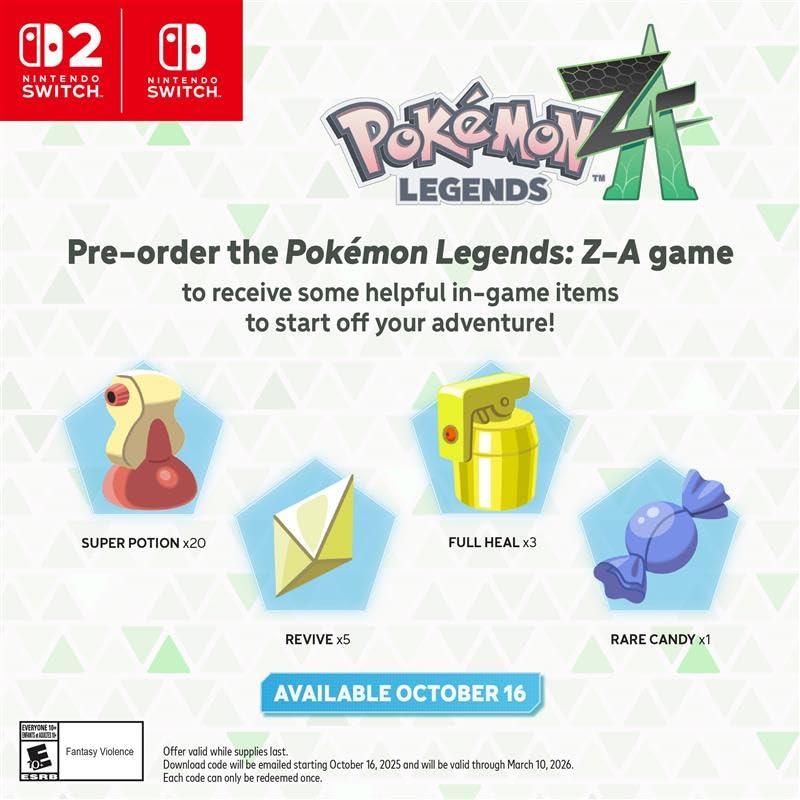
Image: Promotional image detailing in-game items received as a pre-order bonus, including Super Potions, Revives, Full Heals, and Rare Candy.
Game Maintenance
- Software Updates: Ensure your Nintendo Switch 2 system and game software are regularly updated to the latest version for optimal performance and access to new features.
- Game Card Care: For physical copies, handle the game card carefully. Avoid touching the gold connectors and keep it free from dust and moisture.
- Saving Progress: Regularly save your game progress to prevent data loss. The game may feature auto-save functionality, but manual saves are recommended before significant events or ending play sessions.
- Taking Breaks: Remember to take breaks during extended play sessions to rest and recharge. This helps maintain focus and enjoyment.
Troubleshooting
- Game Freezing/Crashing: If the game freezes or crashes, try restarting the Nintendo Switch 2 console. Ensure the game software is updated.
- Connectivity Issues: For online features, verify your internet connection and Nintendo Switch Online membership status.
- Performance Issues: If experiencing slowdowns, ensure your system is updated and try closing other applications running in the background.
- Contact Support: For persistent issues, refer to the official Nintendo support website or contact customer service for assistance.
Product Specifications
| Attribute | Detail |
|---|---|
| UPC | 045496905989 |
| Compatible Video Game Console Models | Nintendo Switch 2 |
| ASIN | B0FC6J5CMG |
| Release Date | October 16, 2025 |
| Customer Reviews | 4.6 out of 5 stars (1,328 ratings) |
| Best Sellers Rank | #28 in Video Games, #2 in Nintendo Switch 2 Consoles |
| Product Dimensions | 6.61 x 4.13 x 0.47 inches |
| Type of Item | Video Game |
| Language | English |
| Rated | Everyone 10+ |
| Item Model Number | NXSPALZLB |
| Item Weight | 2.4 ounces |
| Manufacturer | Nintendo |
| Date First Available | June 23, 2025 |
| GTIN | 045496905989 |
Warranty and Support
For information regarding product warranty, technical support, or service, please visit the official Nintendo support website or contact Nintendo customer service directly. Keep your proof of purchase for any warranty claims.