
1. Introduction
Thank you for choosing the chartustriable 62-inch Large White Vanity Desk. This manual provides essential information for the safe assembly, operation, and maintenance of your new vanity desk. Please read these instructions carefully before beginning assembly and retain them for future reference.
2. Safety Information
- Adult Assembly Required: This product contains small parts and requires adult assembly. Keep children and pets away during assembly.
- Anti-Tipping Device: Always install the included anti-tipping device to prevent accidental tipping, especially in households with children or pets.
- Electrical Safety: Ensure the charging station is connected to a properly grounded outlet. Do not overload the outlets. Keep liquids away from electrical components.
- Glass Handling: Exercise caution when handling tempered glass components to avoid breakage or injury.
- Weight Limit: Do not place excessively heavy items on the vanity desk or shelves.
3. Package Contents
Before assembly, verify that all parts listed in the packing list (usually found in the product packaging) are present and undamaged. If any parts are missing or damaged, contact customer support immediately.
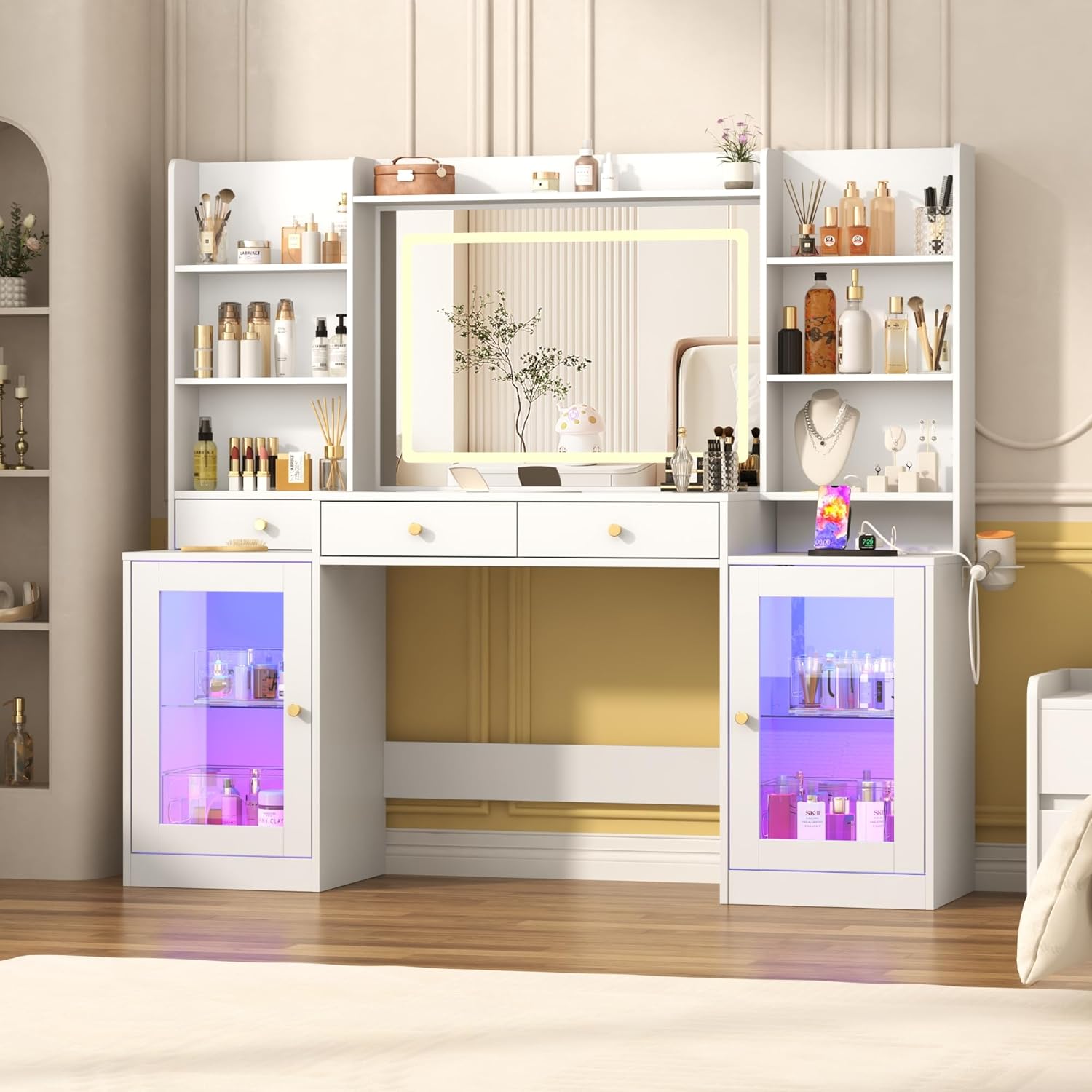
Image 3.1: Overview of the chartustriable 62-inch Large White Vanity Desk.
4. Assembly Instructions
Assembly of this vanity desk requires patience and attention to detail. It is recommended to have at least two adults for assembly. A power drill with appropriate bits can significantly reduce assembly time, though a screwdriver is sufficient for most steps.
4.1. Preparation
- Clear a spacious area for assembly.
- Lay out all components and hardware, organizing them by type.
- Refer to the detailed assembly manual included in your product packaging for step-by-step diagrams and instructions.
- Some users have reported that video instructions are available via a QR code provided in the packaging. Scan the QR code for visual guidance if available.
4.2. Key Assembly Steps (General Guidance)
- Assemble the base frame and side cabinets first.
- Install the drawers, ensuring smooth operation of the silent sliders.
- Attach the upper shelving units and the mirror frame.
- Carefully place the tempered glass tabletop sections.
- Install the LED light strips for the cabinets and mirror. Ensure proper adhesion.
- Connect the charging station and power cord.
- Secure the anti-tipping device to the back of the vanity and to a wall stud.

Image 4.1: Detailed dimensions of the vanity desk components for assembly reference.
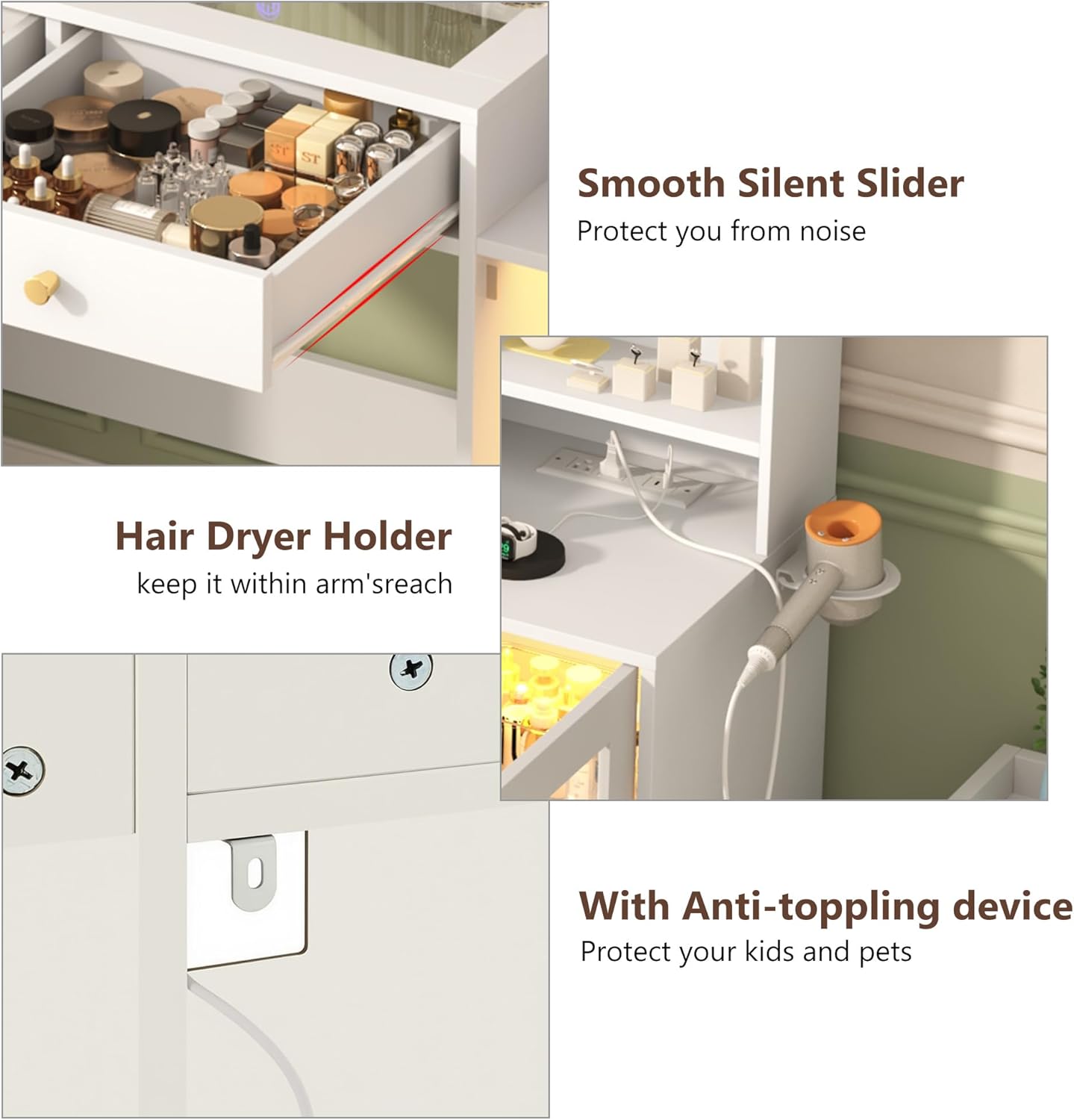
Image 4.2: Close-up of the smooth silent drawer slider, hair dryer holder, and anti-toppling device installation point.
5. Operating Instructions
5.1. LED Mirror Lighting
The vanity mirror features integrated LED lighting with three color modes and adjustable brightness.
- Power On/Off: Tap the touch sensor on the mirror surface to turn the light on or off.
- Change Light Mode: Short press the touch sensor to cycle through Warm Light, Natural Light, and Cold Light modes.
- Adjust Brightness: Long press the touch sensor to continuously adjust the brightness level within the selected light mode. Release when the desired brightness is reached.

Image 5.1: Illustration of the three light color modes (Warm, Natural, Cold) and brightness adjustment for the LED mirror.
5.2. RGB Cabinet LED Lights
The two clear tempered glass cabinets are equipped with RGB LED lights offering 60,000 colors and various lighting modes. These lights can be controlled via a dedicated APP or an RF remote switch.
- Control Methods: Use the provided RF remote control or download the specified mobile application (details typically found in the cabinet LED light packaging) to control the lights.
- Color Selection: Choose from over 60,000 colors to customize the ambiance.
- Lighting Modes: Explore multiple lighting modes, including dynamic effects, music synchronization, microphone synchronization, and a timing function.

Image 5.2: Display of RGB cabinet LED lighting features, including remote and app control options, and various color modes.
5.3. Charging Station
The integrated charging station provides convenient power access for your electronic devices.
- AC Outlets: Two standard 125V/12A AC plug sockets are available for hair dryers, curling irons, or other appliances.
- USB Ports: Two 5V/2A USB ports are provided for charging smartphones, tablets, and other USB-powered devices.
- Power Cord: The vanity includes a 4.9-foot power cord to connect the charging station to a wall outlet.

Image 5.3: Close-up of the charging station featuring AC outlets and USB ports, along with the power cord.
6. Storage Features
The vanity desk is designed with ample storage to organize your cosmetics, accessories, and personal items.
- Tempered Glass Tabletop: The clear tempered glass sections on the desktop allow for easy visibility and access to items stored beneath, while also providing a durable and easy-to-clean surface.
- Middle Drawers: Multiple drawers are integrated into the desk, ideal for smaller items like lipsticks, combs, lotions, skincare products, and makeup tools. These drawers feature smooth, silent sliders for quiet operation.
- Open Shelves: Upper open shelves provide accessible storage for cosmetics, perfumes, jewelry, hair accessories, nail polish, and other frequently used items.
- Glass Cabinets: Two large glass cabinets offer adjustable or removable glass shelves, providing deep storage space for larger items such as skincare products, or even small blankets.
- Hair Dryer Holder: A dedicated holder keeps your hair dryer within easy reach.

Image 6.1: View of the embedded tempered glass tabletop, showcasing organized items beneath.

Image 6.2: Detailed view of the open shelves, middle drawers, and the interior of the glass cabinets.

Image 6.3: The vanity desk with all drawers and cabinet doors open, illustrating its full storage capacity.
7. Maintenance
- General Cleaning: Wipe the vanity surfaces with a soft, damp cloth. Avoid abrasive cleaners or harsh chemicals that may damage the finish.
- Tempered Glass: Clean glass surfaces with a glass cleaner and a lint-free cloth to maintain clarity.
- LED Components: Do not immerse LED lights or electrical components in water. Wipe gently with a dry or slightly damp cloth.
- Dusting: Regularly dust all surfaces to prevent buildup.
8. Troubleshooting
- LED Mirror Light Not Working: Check the power connection. Ensure the touch sensor is clean and unobstructed. If the light touch pad on the back becomes loose, it may need to be re-secured with adhesive.
- RGB Cabinet Lights Not Functioning: Verify power connection to the LED strips. Ensure the remote control batteries are functional or the mobile app is correctly paired.
- LED Strip Adhesive Issues: If LED strips detach, re-secure them using a strong adhesive suitable for the material.
- Loose Assembly Parts: During assembly, if holes appear too large for bolts, ensure you are using the correct hardware for each step. If a part is genuinely defective, contact customer support for a replacement.
- Charging Station Not Working: Confirm the vanity's main power cord is securely plugged into a functional wall outlet. Check for any tripped circuit breakers.
9. Specifications
| Feature | Detail |
|---|---|
| Brand | chartustriable |
| Model Number | Large Vanity Desk |
| Product Dimensions | 15.6"D x 62"W x 54"H |
| Item Weight | 133 pounds |
| Color | White |
| Frame Material | Engineered Wood |
| Furniture Finish | Ivory |
| LED Mirror | 3 Light Modes (Warm, Natural, Cold), Adjustable Brightness |
| RGB Cabinet Lights | 60,000+ Colors, APP/RF Control, Music Sync, Mic Sync, Timing Function |
| Charging Station | 2 x 125V/12A AC Outlets, 2 x 5V/2A USB Ports |
10. Warranty Information
Specific warranty details for the chartustriable 62-inch Large White Vanity Desk are typically provided with your purchase documentation. Please refer to the warranty card or contact the manufacturer directly for information regarding warranty coverage, terms, and conditions.
11. Customer Support
If you encounter any issues, have questions about assembly, operation, or require replacement parts, please contact chartustriable customer support. Contact information is usually provided in the product packaging or on the manufacturer's official website.
No official product videos were found in the provided data.