
1. Introduction
The DC HOUSE 12V 5A Smart Battery Charger is a versatile 9-in-1 device designed for charging, maintaining, and desulfating 12V LiFePO4, AGM, and lead-acid batteries. It features multiple charging modes, advanced protection, and an intelligent LCD display for real-time monitoring. This manual provides essential information for safe and efficient operation of your charger.

Image: Comparison of DC HOUSE 12V 5A Smart Battery Charger features against other chargers.
2. Safety Information
Always read and understand the entire manual before using the charger. Failure to follow these safety instructions may result in electric shock, fire, or serious injury.
- Ensure the charger is compatible with your battery type and voltage (12V LiFePO4, AGM, or Lead-Acid).
- Do not charge frozen or visibly damaged batteries.
- Connect the charger to the battery terminals before plugging it into the AC power outlet. Disconnect in reverse order (unplug AC, then disconnect battery).
- Avoid sparks and flames near the battery, as batteries can produce explosive gases.
- Use the charger in a well-ventilated area to prevent gas accumulation.
- Keep the charger and its components out of reach of children and pets.
- Do not expose the charger to rain, snow, or excessive moisture. The unit is IP64 rated for splash resistance, but not immersion.
- If the charger casing, cables, or connectors are damaged, do not use the device. Contact customer support.
- Do not attempt to open or modify the charger. There are no user-serviceable parts inside.

Image: Intelligent chip diagram highlighting multiple safety protections.
3. Package Contents
Verify that all items are present in the package:
- 1 x DC HOUSE 12V 5A Smart Battery Charger
- 1 x SAE-to-Alligator Clip Cable
- 1 x SAE-to-Ring Terminal Cable
- 1 x User Manual

Image: Product parameters and included accessories.
4. Product Features
- 9-in-1 Smart Charging: Combines charger, maintainer, trickle charger, and desulfator functions in one compact device.
- 0V Activation Function: Automatically activates deeply discharged 12V LiFePO4 batteries, restoring them to a normal voltage for reliable power distribution.
- 15V Pulse Repair Technology: Effectively repairs and restores up to 80% of damaged, stratified, and sulfated 12V lead-acid batteries within 2 hours, extending battery life.
- Low-Temperature Charging: Safely charges 12V lead-acid batteries even at temperatures as low as -10°C (14°F), ideal for cold weather applications.
- Multi-Protection System: Features intelligent 5-stage charging with safeguards against overcharge, short-circuit, reverse polarity, high temperatures, low voltage, and overvoltage.
- Intelligent LCD Display: Provides real-time updates on charging status, battery voltage, charging current, and battery charge percentage.
- Dual Connection Options: Includes both copper bridge terminals and alligator clips with an SAE quick connector for flexible and easy installation.

Image: Charger compatibility with various battery types and vehicles.
5. Setup
Follow these steps to set up your DC HOUSE 12V 5A Smart Battery Charger:
- Identify Battery Type: Ensure your battery is a 12V LiFePO4, AGM, or standard Lead-Acid type. The charger is designed for these specific battery chemistries.
- Connect to Battery: Choose the appropriate connection cable (alligator clips or ring terminals) based on your battery's terminals.
- For Alligator Clips: Connect the RED clip to the positive (+) battery terminal and the BLACK clip to the negative (-) battery terminal.
- For Ring Terminals: Connect the RED ring terminal to the positive (+) battery terminal and the BLACK ring terminal to the negative (-) battery terminal.
- Connect to Power: Plug the charger's AC power cord into a standard 220V AC wall outlet.
The charger will automatically detect the battery type and begin the charging process. The LCD screen will illuminate and display the current status.
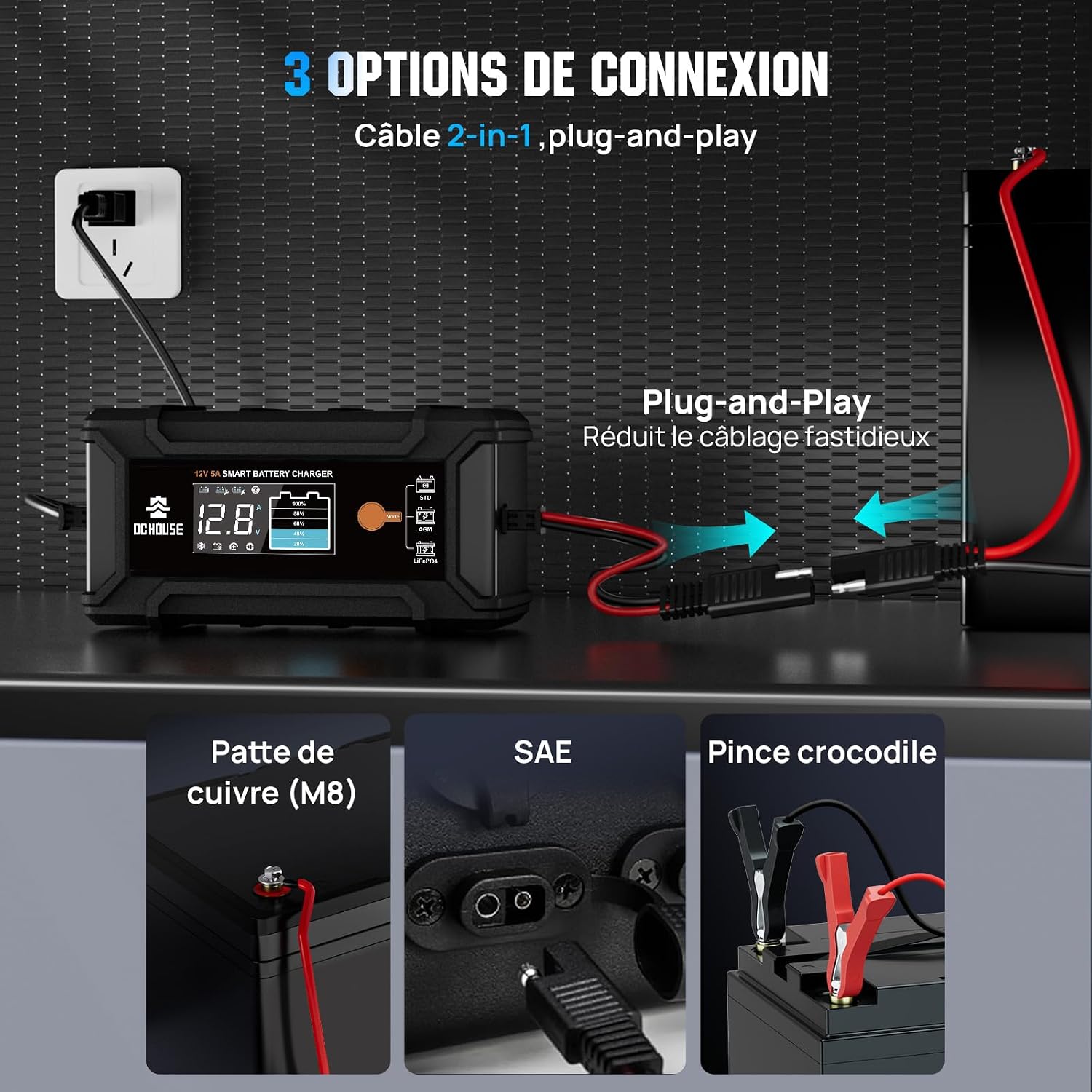
Image: Three connection options for the battery charger.
6. Operating Instructions
The DC HOUSE 12V 5A Smart Battery Charger is designed for ease of use with automatic operation.
6.1 Automatic Charging
Once properly connected to the battery and AC power, the charger automatically detects the battery type and voltage, then initiates the appropriate multi-stage charging mode. No manual mode selection is required for standard operation.
6.2 LCD Display
The intelligent LCD screen provides real-time information about the charging process:
- Charging Modes: Displays the active charging mode based on battery type (LFP for LiFePO4, AGM for AGM, STD for Standard Lead-Acid).
- State of Charge (SOC): Shows the battery's current voltage and corresponding charge percentage.
- Voltage & Current Indicators: Displays the real-time battery voltage and charging current.
- Low Temperature Mode: Indicates when the charger is operating in low-temperature mode (for lead-acid batteries only).
- Battery Damage: An icon will illuminate if battery damage is detected.
- Reverse Polarity: An icon will illuminate if reverse polarity is detected.
- Short-Circuit: An icon will illuminate if a short-circuit is detected.
Note: The LCD screen may turn off automatically after 15 seconds of inactivity to save power. Press the "MODE" button to reactivate the display and cycle through current/voltage information.

Image: LCD display showing charge status at a glance.

Image: Detailed explanation of the intelligent LCD display.
6.3 Battery Activation and Repair
- 0V Activation (LiFePO4): For deeply discharged LiFePO4 batteries that read 0V, the charger will automatically attempt to activate them.
- 15V Pulse Repair (Lead-Acid): The charger employs a 15V pulse repair function to desulfate and restore lead-acid batteries. This process is automatic and aims to recover lost capacity.

Image: Battery activation and repair functions.

Image: 2-in-1 solution for battery activation and repair.
6.4 Disconnection
To safely disconnect the charger:
- First, unplug the charger from the AC power outlet.
- Next, disconnect the negative (-) battery terminal (black clip/ring).
- Finally, disconnect the positive (+) battery terminal (red clip/ring).
7. Maintenance
Proper maintenance ensures the longevity of your battery and charger.
- Trickle Charge Mode: The charger automatically switches to a trickle charge (maintenance) mode once the battery is fully charged. This prevents overcharging and keeps the battery at optimal capacity, allowing for continuous connection (24/7) without harm.
- Clean Connections: Periodically inspect and clean battery terminals and charger connectors to ensure good contact and prevent corrosion. Use a wire brush if necessary.
- Storage: When not in use, store the charger in a dry, cool place, away from direct sunlight and extreme temperatures.

Image: Multi-stage trickle charging process for battery maintenance.
8. Troubleshooting
If you encounter issues with your charger, refer to the following troubleshooting guide:
| Problem | Possible Cause | Solution |
|---|---|---|
| Charger not turning on / LCD not displaying | No AC power; Loose battery connections; Battery voltage too low. | Check AC power outlet; Ensure battery connections are secure; For 0V LiFePO4, the charger attempts activation. |
| Battery not charging | Incorrect battery type; Severely damaged battery; Extreme ambient temperature. | Verify battery type (LiFePO4, AGM, Lead-Acid); If battery is severely damaged, it may not be recoverable; Ensure ambient temperature is within -20°C to 40°C. |
| "Reverse Polarity" icon on LCD | Battery terminals connected incorrectly. | Disconnect AC power, then disconnect battery. Reconnect red to positive (+), black to negative (-). |
| "Short-Circuit" icon on LCD | Short circuit detected in cables or battery. | Immediately disconnect AC power and battery. Inspect cables and battery for damage or unintended contact. |
| "High Temperature" icon on LCD | Charger is overheating. | Disconnect AC power. Allow charger to cool down in a well-ventilated area. Ensure vents are not blocked. |
| "Low Voltage" warning on LCD | Battery voltage is extremely low. | For LiFePO4, the 0V activation function will attempt recovery. For lead-acid, if voltage is too low, the battery may be unrecoverable. |
If issues persist after following these steps, please contact DC HOUSE customer support for further assistance.

Image: Charger features including waterproof and anti-polarity protection.
9. Specifications
Detailed technical specifications for the DC HOUSE 12V 5A Smart Battery Charger:
| Parameter | Value |
|---|---|
| Model | 12V 5A |
| Input Voltage | 220 Volts AC |
| Output Voltage | 12 Volts |
| Rated Current | 5 A |
| Output Power | 70W |
| DC Output Nominal (LiFePO4) | 14.6V 5A |
| DC Output Nominal (AGM) | 14.4V 5A |
| DC Output Nominal (STD Battery) | 14.4V 5A |
| DC Power Supply | 13.5V 5A |
| Battery Voltage | 12V |
| Compatible Battery Types | LiFePO4, AGM, STD (Lead-Acid) |
| Min. Starting Battery Voltage | 0V |
| Protection Functions | Short Circuit, Reverse Polarity, Overvoltage, Overcharge, High Temperature, Low Voltage |
| Ambient Temperature | -20°C to 40°C (-4°F to 104°F) |
| Dimensions (L x W x H) | 7P x 28.5l x 13H centimeters |
| Weight | 1.12 lb |
| Certifications | CE |
| Connector Type | Copper bridge terminals, alligator clips with SAE quick connector |
| Number of Ports | 1 |
| Country of Origin | China |
| UPC | 810127139930 |

Image: Adaptive charging for various climates.
10. Warranty and Support
DC HOUSE is committed to providing quality products and excellent customer service.
- Product Warranty: This DC HOUSE 12V 5A Smart Battery Charger comes with a 2-year warranty from the date of purchase. This warranty covers manufacturing defects and malfunctions under normal use.
- Technical Assistance: DC HOUSE offers 3-year technical assistance to help you with any operational questions or issues you may encounter.
- Customer Service: Our customer support team aims for a 24-hour response time to all inquiries.
For warranty claims, technical support, or any other assistance, please refer to the contact information provided with your purchase or visit the official DC HOUSE website. Please have your purchase receipt and product model number ready when contacting support.
