Introduction
Thank you for choosing the HOMCOM Massage Office Chair. This chair is designed to provide comfort and support during your workday, featuring a multi-point vibration massage, lumbar heating, adjustable recline, and a retractable footrest. Please read this manual thoroughly before assembly and use to ensure proper operation and safety.
Safety Instructions
- Ensure all components are present and undamaged before assembly. Do not use if any parts are missing or broken.
- Follow the assembly instructions carefully. Incorrect assembly can lead to instability and injury.
- Do not stand on the chair or use it as a step stool.
- Do not exceed the maximum weight capacity of 120 kg (approximately 265 lbs).
- Keep children and pets away from the chair during assembly and use.
- Use the chair on a flat, stable surface.
- Unplug the massage and heat functions when not in use or before cleaning.
- Avoid spilling liquids on the control unit or electrical components.
- If you experience any discomfort or pain during massage, discontinue use immediately.
Package Contents
Before beginning assembly, verify that all the following components are included in your package:
- Massage Office Chair (main components: backrest, seat, armrests, base, wheels, gas lift)
- Wired Remote Control for massage and heat functions
- Assembly Hardware (screws, washers, tools if provided)
- User Manual
Note: Specific quantities of hardware may vary. Refer to the assembly diagram for exact counts.
Setup and Assembly
Assembly is required for this chair. It is recommended to have two people for easier and safer assembly. Please follow these general steps. Refer to the included assembly diagram for detailed illustrations.
- Unpack Components: Carefully remove all parts from the packaging and lay them out on a clean, soft surface to prevent scratches.
- Assemble Base: Insert the five castors into the holes at the end of each leg of the chair base.
- Install Gas Lift: Place the gas lift cylinder into the center hole of the assembled base.
- Attach Mechanism to Seat: Secure the seat mechanism to the underside of the seat cushion using the provided screws. Ensure the front of the mechanism aligns with the front of the seat.
- Connect Seat to Gas Lift: Place the assembled seat onto the gas lift cylinder, ensuring it is firmly seated.
- Attach Armrests: Secure the armrests to both the seat and the backrest using the designated screws. Do not overtighten initially.
- Attach Backrest: Connect the backrest to the seat and armrests. Once all connections are made, tighten all screws securely.
- Connect Power: Plug the power adapter for the massage and heat functions into a suitable electrical outlet. Connect the chair's power cable to the adapter.

Image: Fully assembled HOMCOM Massage Office Chair in grey, positioned in a modern office environment with a desk and bookshelf.

Image: Front and side view diagrams of the HOMCOM Massage Office Chair with key dimensions labeled in centimeters, including overall height, width, seat depth, and backrest height.
Operating Instructions
1. Massage and Heat Functions
The chair features a six-point vibration massage system with eight modes and adjustable intensity, along with a three-stage lumbar heating function. All functions are controlled via the wired remote control located in the side pocket.
- Power Button: Press to turn the massage and heat functions ON/OFF.
- Mode Button: Cycle through the eight different massage modes.
- Intensity Button: Adjust the vibration intensity (low, medium, high).
- Heat Button: Activate or deactivate the lumbar heating function.
- Timer Button: Set a timer for the massage session (e.g., 15, 30, 60 minutes).
- Zone Buttons: Select specific massage zones (e.g., shoulders, waist, thighs).
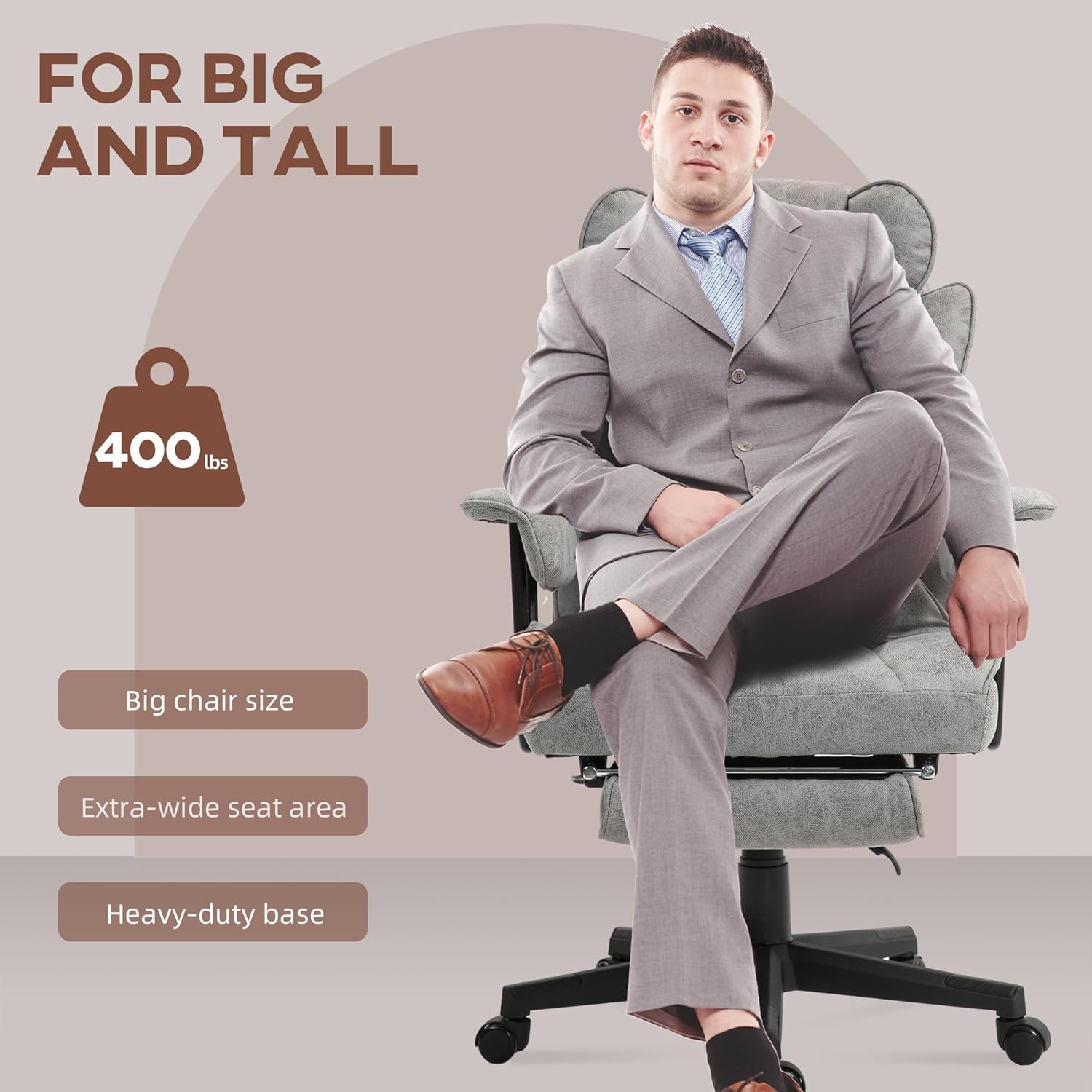
Image: Overhead view of the chair highlighting the six vibration massage points (2 shoulder, 2 waist with heat, 2 thigh) and displaying the wired remote control with its various function buttons.
2. Reclining Function and Footrest
The chair's backrest can recline up to 140 degrees, and it includes a retractable footrest for added comfort during breaks.
- Recline Lever: Locate the lever on the side of the chair (typically on the right). Pull the lever upwards to unlock the backrest, then lean back to your desired angle. Release the lever to lock the backrest in position.
- Retractable Footrest: Pull the footrest out from under the seat. Extend it fully for use. Push it back under the seat when not needed.

Image: Side view of the HOMCOM Office Chair showing the backrest reclining to 140 degrees and the footrest extended. An inset image shows the recline lever.
3. Adjustable Seat Height
Adjust the seat height to find your optimal ergonomic position using the pneumatic gas lift.
- To Raise: While seated, lift the height adjustment lever (typically on the right side, below the seat) and slightly lift your weight off the seat. The seat will rise. Release the lever at the desired height.
- To Lower: While seated, lift the height adjustment lever and apply your full weight to the seat. The seat will lower. Release the lever at the desired height.
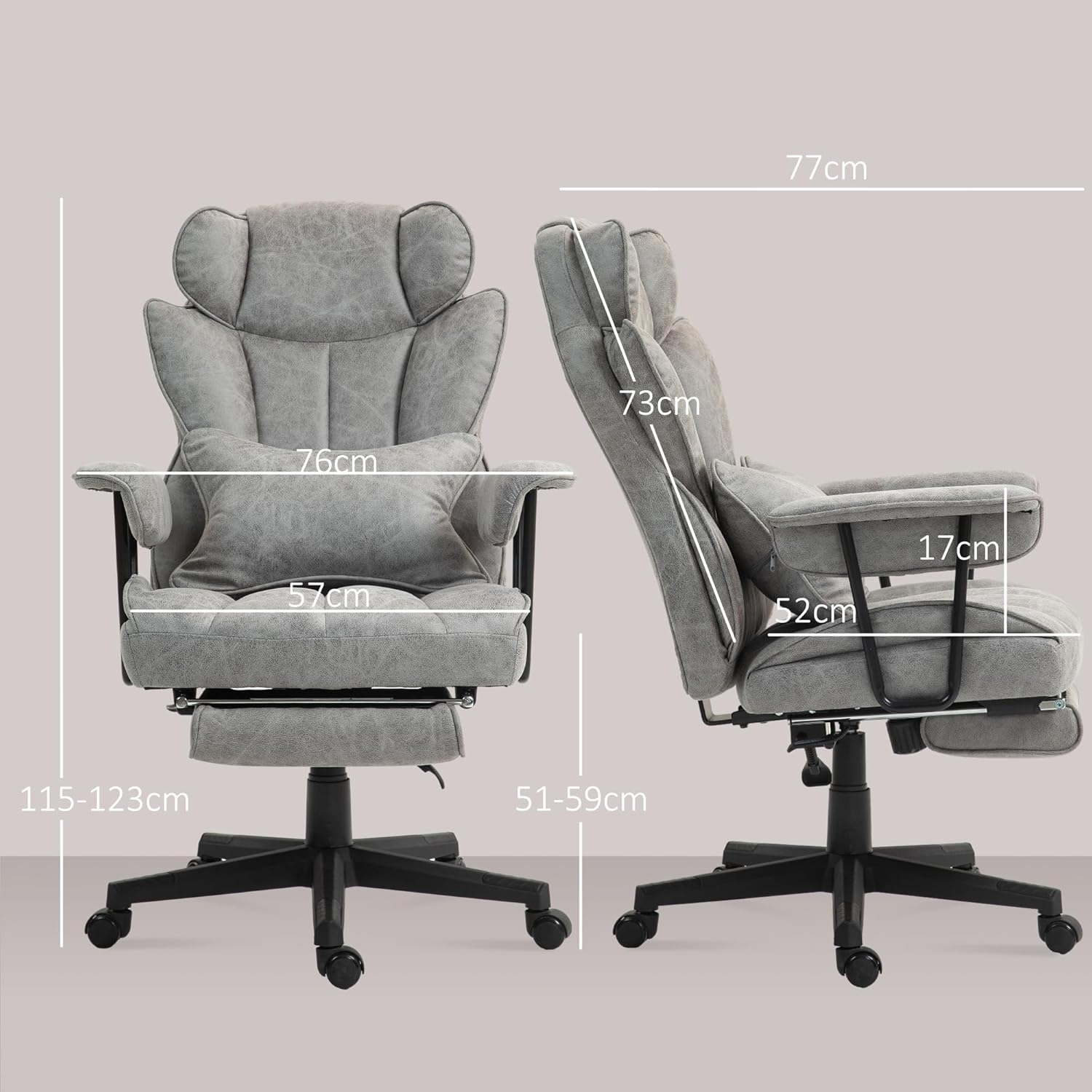
Image: Two side views of the HOMCOM Office Chair demonstrating the adjustable seat height, with arrows indicating upward and downward movement and measurements for different heights.
4. Swivel and Castors
The chair features a 360-degree swivel seat and five smooth-rolling castors for easy mobility around your workspace.
- Swivel: The seat can rotate freely 360 degrees, allowing you to easily turn without moving the base.
- Castors: The five polyurethane castors are designed for smooth movement on various floor types, including hardwood, tile, laminate, and slate.

Image: Front-side view of the HOMCOM Office Chair with an arrow indicating 360-degree swivel motion and an inset image showing a close-up of one of the five smooth-rolling castors.
Maintenance
- Cleaning: For general cleaning, use a soft, damp cloth. For spot cleaning, use a mild fabric cleaner and follow the product instructions. Do not use harsh chemicals or abrasive cleaners.
- Electrical Components: Ensure the chair is unplugged before cleaning any electrical parts. Do not immerse the remote control or power adapter in water.
- Hardware Check: Periodically check all screws and bolts to ensure they are tight. Retighten if necessary to maintain stability.
- Castors: Keep the castors free of hair and debris to ensure smooth movement.
Troubleshooting
| Problem | Possible Cause | Solution |
|---|---|---|
| Chair does not rise or lower. | Gas lift malfunction or lever not engaged correctly. | Ensure the lever is fully engaged. If the problem persists, the gas lift may need replacement. Contact customer support. |
| Massage/Heat function not working. | Power not connected, remote control issue, or internal wiring problem. | Check if the power adapter is plugged in and connected to the chair. Ensure the remote control is functioning. If issues persist, contact customer support. |
| Chair is unstable or wobbly. | Loose screws or uneven floor. | Check and tighten all assembly screws. Ensure the chair is on a flat, level surface. |
| Castors not rolling smoothly. | Debris caught in castors. | Clean any hair or debris from the castor wheels. |
Specifications
| Model Number | 921-759V70GY |
| Color | Grey |
| Materials | Microfiber fabric (100% polyester), Foam, Polyurethane, Alloy Steel frame |
| Overall Dimensions (W x D x H) | 76 x 77 x 115-123 cm (29.9 x 30.3 x 45.3-48.4 inches) |
| Reclined Dimensions (W x D x H) | 76 x 134 x 96-114 cm (29.9 x 52.8 x 37.8-44.9 inches) |
| Seat Dimensions (W x D x H) | 57 x 52 x 51-59 cm (22.4 x 20.5 x 20.1-23.2 inches) |
| Backrest Dimensions (W x H) | 59 x 73 cm (23.2 x 28.7 inches) |
| Footrest Dimensions (L x W) | 38 x 23 cm (15 x 9.1 inches) |
| Lumbar Support Dimensions (L x W) | 45 x 34 cm (17.7 x 13.4 inches) |
| Cord Length | 1.8 m (5.9 feet) |
| Input | 100-240 V, 50/60 Hz |
| Output | 12 V/1 A, 12 W |
| Maximum Weight Capacity | 120 kg (265 lbs) |
| Item Weight | 23 kg (50.7 lbs) |

Image: Side profile diagram of a person sitting in the HOMCOM Office Chair, highlighting ergonomic support for the neck, shoulders, lumbar, and hips.

Image: A tall man sitting comfortably in the HOMCOM Office Chair, with text indicating "FOR BIG AND TALL" and features like "Big chair size," "Extra-wide seat area," and "Heavy-duty base." Note: The maximum weight capacity is 120 kg (265 lbs).
Warranty and Support
Specific warranty information for the HOMCOM Massage Office Chair model 921-759V70GY is not provided in this manual. For warranty details, spare parts availability, or technical support, please contact HOMCOM customer service directly or refer to their official website. Keep your purchase receipt as proof of purchase.
Note: Spare parts availability information is currently unavailable.


