
1. Introduction
This manual provides essential information for the installation, operation, and maintenance of your XFX Swift AMD Radeon RX 9060 XT 16GB SWFT Graphics Card. Please read this manual thoroughly before installation to ensure proper setup and optimal performance.

Image 1.1: The XFX Swift AMD Radeon RX 9060 XT graphics card shown alongside its retail packaging.
2. Package Contents
Verify that all items are present in the package before proceeding with installation.
- XFX Swift AMD Radeon RX 9060 XT 16GB SWFT Video Card
- Quick Install Guide
3. Setup and Installation
3.1 System Requirements
- PCI Express-enabled motherboard with one x16 graphics slot.
- Minimum 650W power supply with two 8-pin PCIe power connectors.
- Minimum 8GB system memory (16GB recommended).
- Supported operating system (Windows 10/11 64-bit or Linux 64-bit).
- Internet connection for driver installation.
3.2 Hardware Installation
- Prepare your system: Power off your computer and disconnect all cables. Open the computer case.
- Locate PCIe slot: Identify an available PCI Express x16 slot on your motherboard. Remove any expansion slot covers that may obstruct the installation.
- Install the graphics card: Carefully align the graphics card with the PCIe slot and press down firmly until it is securely seated. Ensure the retention clip locks into place.
- Connect power: Connect two 8-pin PCIe power cables from your power supply to the corresponding power connectors on the graphics card.
- Secure the card: Use screws to secure the graphics card to the computer case's expansion slot bracket.
- Close case and reconnect: Close your computer case, reconnect all cables, and power on your system.

Image 3.1: Front view of the graphics card, highlighting the triple fan cooling system.

Image 3.2: Side view of the graphics card, illustrating the DisplayPort and HDMI output ports.
4. Operating Instructions
4.1 Driver Installation
After physical installation, the operating system may install a generic display driver. For optimal performance and access to all features, install the latest AMD Radeon drivers.
- Visit the official AMD driver download page: www.amd.com/en/support
- Select your graphics card model (Radeon RX 9060 XT) and operating system.
- Download the latest recommended driver package.
- Run the installer and follow the on-screen instructions. A system restart may be required.
4.2 AMD Software: Adrenalin Edition
The AMD Software: Adrenalin Edition provides a comprehensive interface for managing your graphics card settings, including game optimization, performance monitoring, and display configuration. It is typically installed alongside the graphics drivers.
- Game Optimization: Automatically optimize game settings for the best balance of performance and visual quality.
- Performance Monitoring: Monitor GPU temperature, clock speeds, and utilization in real-time.
- Display Settings: Configure resolution, refresh rate, FreeSync, and color settings.
- Overclocking: Advanced users can adjust GPU clock speeds and memory frequencies (use with caution).
5. Maintenance
5.1 Cleaning
Regular cleaning helps maintain optimal cooling performance and extends the lifespan of your graphics card.
- Frequency: Clean every 3-6 months, or more frequently in dusty environments.
- Procedure:
- Power off your computer and disconnect it from the power outlet.
- Open the computer case.
- Use compressed air to gently blow dust from the fans and heatsink fins. Hold the fans to prevent them from spinning rapidly during cleaning.
- Avoid touching the circuit board directly.
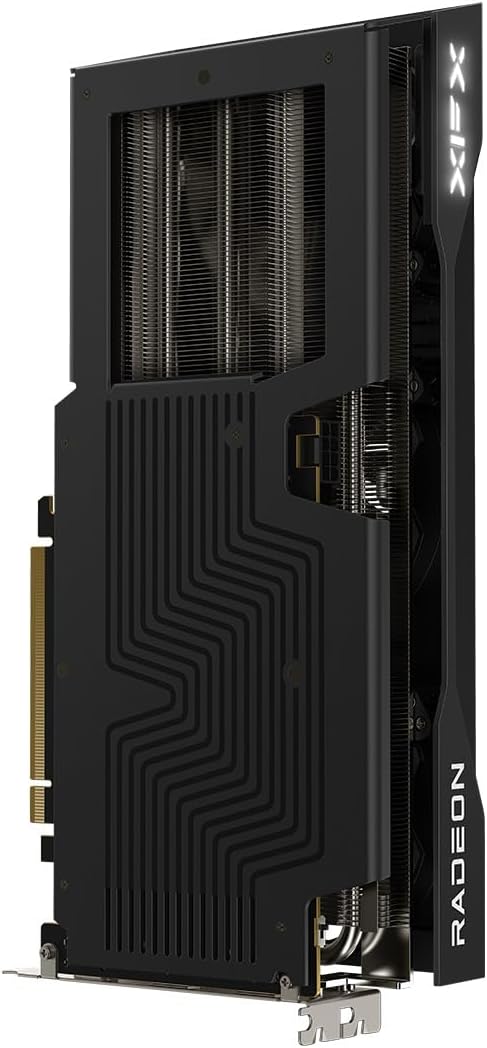
Image 5.1: Backplate of the graphics card, showing the protective metal cover and heat dissipation design.
5.2 Driver Updates
Periodically check for new driver releases on the AMD support website. Updated drivers often include performance improvements, bug fixes, and support for new games and applications.
6. Troubleshooting
- No Display Output:
- Ensure the monitor cable is securely connected to the graphics card and the monitor.
- Verify that the graphics card is fully seated in the PCIe slot.
- Confirm that all required PCIe power connectors are properly attached.
- Check if your monitor is set to the correct input source.
- System Instability or Crashes:
- Ensure your power supply meets the minimum wattage requirement.
- Update to the latest graphics drivers.
- Monitor GPU temperatures to ensure it's not overheating.
- If overclocking, revert to default settings.
- Poor Performance in Games:
- Ensure the latest graphics drivers are installed.
- Check in-game settings; reduce resolution or graphics quality if necessary.
- Verify that your system meets the game's minimum requirements.
- Close unnecessary background applications.
7. Specifications
| Feature | Specification |
|---|---|
| Model Name | XFX Swift AMD Radeon RX 9060 XT 16GB SWFT |
| Model Number | RX-96TS316B7 |
| Graphics Coprocessor | AMD Radeon RX 9060 XT |
| Chipset Brand | AMD |
| Video Memory | 16 GB GDDR6 |
| Memory Speed | 20 GHz |
| GPU Clock Speed | 1900 MHz (Boost Clock Up to 3320 MHz) |
| Max Screen Resolution | 2560x1440 |
| Video Output Interface | DisplayPort, HDMI |
| Cooling Solution | XFX SWFT Triple Fan |
| Item Weight | 3.3 pounds |
| Product Dimensions (LxWxH) | 11.42 x 4.88 x 0.1 inches |
8. Warranty and Support
XFX products are backed by a manufacturer's warranty. For detailed warranty information, technical support, or to register your product, please visit the official XFX support website.
XFX Support Website: www.xfxforce.com/support


