
Welcome to Your DREAME Z30 Essential
This manual provides detailed instructions for the safe and efficient use of your DREAME Z30 Essential Cordless Stick Vacuum Cleaner. Please read it thoroughly before first use and keep it for future reference.

The DREAME Z30 Essential Cordless Stick Vacuum Cleaner, ready for use.
The DREAME Z30 Essential is designed for powerful and versatile cleaning across various surfaces, featuring robust suction, advanced filtration, and intelligent dust detection.
Package Contents
Verify that all components are present in your package.

Illustration of all parts included in the DREAME Z30 Essential package.
- Main Body
- Extension Rod
- Illumination Multi-Surface Brush
- Motorized Mini-Brush
- Combination Tool
- Wide Combination Tool
- Storing Mount
- Power Adapter
Setup
Assembling the Vacuum
Connect the Extension Rod to the Main Body until it clicks into place. Attach the desired cleaning head (e.g., Illumination Multi-Surface Brush) to the other end of the Extension Rod.
Installing the Storing Mount
The provided storing mount allows for convenient storage and charging. Securely mount it to a wall near a power outlet.

The DREAME Z30 Essential stored neatly on its wall-mounted charging station.
Once mounted, place the vacuum cleaner onto the storing mount.
Charging the Battery
Connect the power adapter to the storing mount and plug it into a wall outlet. The vacuum will begin charging. Ensure the battery is fully charged before first use. A full charge provides up to 90 minutes of runtime in Eco mode.
Operating Instructions
Powering On/Off and Mode Selection
Press the power button on the main body to turn the vacuum on or off. Use the mode selection button to switch between different suction modes (e.g., Eco, Standard, Turbo).
CelesTect Lighting
The Illumination Multi-Surface Brush features CelesTect lighting, which illuminates dust and debris on floors, making hidden dirt visible for thorough cleaning.

CelesTect lighting on the brush head highlights dust particles on the floor.
This technology helps ensure no spot is missed, especially in dimly lit areas or under furniture.
Cleaning Different Surfaces
The multi-surface brush is suitable for both carpets and hard floors. The vacuum automatically adjusts suction power based on the detected debris level in Auto mode.

The DREAME Z30 Essential provides consistent whole-house cleaning on various surfaces.
For optimal battery life, utilize Eco mode for lighter cleaning tasks.

The vacuum offers up to 90 minutes of cleaning in Eco mode, covering a large area.
Using Attachments
The DREAME Z30 Essential comes with various attachments for specialized cleaning tasks.
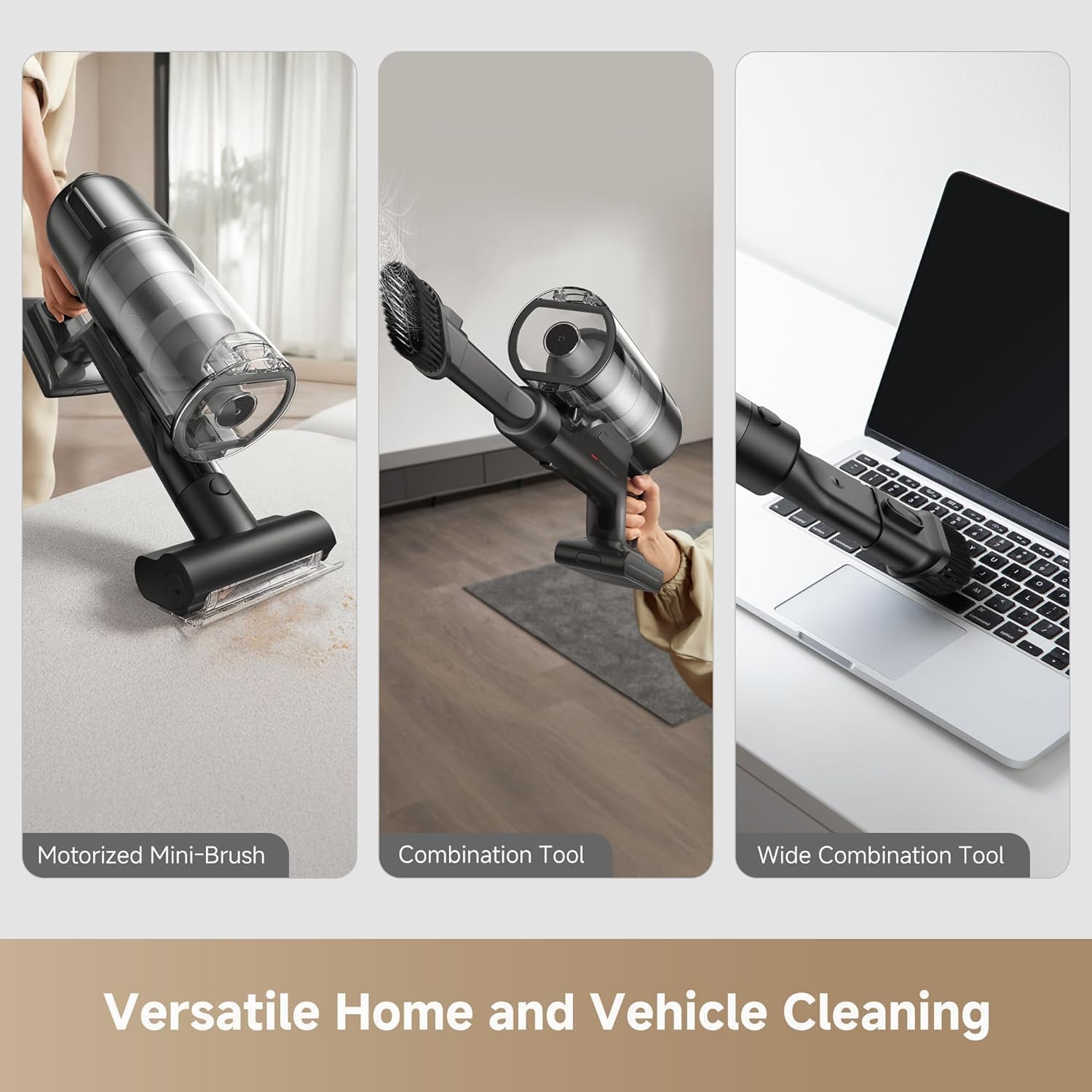
Versatile attachments for cleaning furniture, tight corners, and various surfaces.
- Combination Tool: Ideal for cleaning crevices, corners, and delicate surfaces like keyboards.
- Wide Combination Tool: Suitable for larger surfaces, upholstery, and car interiors.
- Motorized Mini-Brush: Excellent for removing pet hair and deep cleaning fabric surfaces like sofas and mattresses.
To attach, simply click the desired tool onto the main body or extension rod.
Maintenance
Emptying the Dust Cup
The 0.8L dust cup should be emptied regularly to maintain optimal suction performance. Press the release button to open the dust cup and dispose of collected debris.

The 0.8L dust cup offers increased capacity for longer cleaning sessions.
It is recommended to empty the dust cup over a trash bin to prevent dust from escaping.
Cleaning the Filters
The vacuum features a multi-layer filtration system, including a HEPA H14 filter, which traps 99.99% of particles down to 0.3 microns. Regular cleaning of the filters is crucial for maintaining filtration efficiency and suction power.

The HEPA H14 filtration system ensures 99.99% particle capture.
The dust cup and filter components are washable. Remove them from the main body and rinse under running water. Ensure all parts are completely dry before reassembling.

Removable and washable components for effortless maintenance.
Cleaning the Brush Roll
Periodically check the brush roll for tangled hair or debris. Remove the brush roll from the cleaning head and use scissors or the provided cleaning tool to cut and remove any tangled material.
Troubleshooting
Refer to the table below for common issues and their solutions.
| Problem | Possible Cause | Solution |
|---|---|---|
| Vacuum not turning on | Battery is low or depleted | Charge the vacuum fully. |
| Low suction power | Dust cup is full | Empty the dust cup. |
| Low suction power | Filter is clogged | Clean or replace the filters. |
| Low suction power | Brush roll is tangled | Clean the brush roll. |
| Low suction power | Obstruction in the nozzle or extension rod | Check for and remove any blockages. |
| Brush roll not spinning | Obstruction in the brush roll | Remove any tangled hair or debris. |
| Short runtime | Using high suction mode continuously | Use Eco mode for longer cleaning sessions. |
If the issue persists, please contact DREAME customer support.
Technical Specifications
| Feature | Detail |
|---|---|
| Model Name | Z30 Essential |
| Model Number | VZV11B |
| Brand | DREAME |
| Maximum Suction | 210 AW |
| Motor Speed | 120,000 RPM |
| Dust Cup Capacity | 0.8 Liters (0.2 Gallons) |
| Filtration Efficiency | 99.99% (HEPA H14 filter) |
| Battery Life (Max) | Up to 90 minutes (in Eco mode) |
| Power Source | Battery Powered |
| Voltage | 120 Volts (AC) |
| Item Weight | 8 Kilograms |
| Dimensions (L x W x H) | 10.08" x 10.08" x 49.45" |
| Surface Recommendation | All floors (Bare Floor, Carpet, Hard Floor, Hardwood, Rug, Tile Floor) |
| Special Features | Cordless, CelesTect Lighting, Multi-Surface Brush, Anti-Tangle Design |
Warranty Information and Customer Support
Your DREAME Z30 Essential Cordless Stick Vacuum Cleaner is covered by a manufacturer's warranty. Please refer to the warranty card included in your package for specific terms and conditions.
For technical assistance, troubleshooting, or to inquire about replacement parts, please visit the official DREAME website or contact their customer support.