
1. Introduction
This manual provides essential instructions for setting up, operating, maintaining, and troubleshooting your FUNYET 2-in-1 Laptop, Model FUN01-05. This device features a 14.1-inch Full HD touchscreen, an Intel Core i7-1265U processor, 16GB RAM, and a 512GB SSD, running Windows 11 Pro. Its 360-degree reversible screen allows for versatile usage modes.
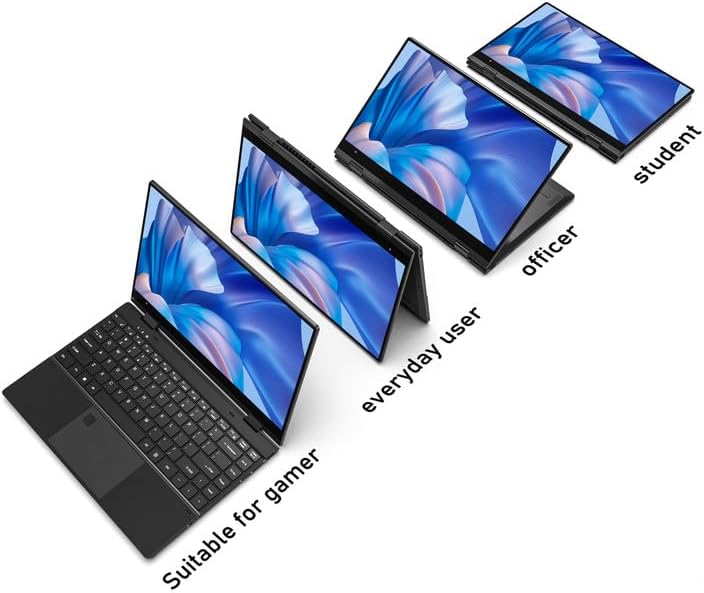
Figure 1: FUNYET 2-in-1 Laptop showcasing its versatile modes.
2. Package Contents
Verify that all items are present in the package:
- FUNYET 2-in-1 Touch Screen Laptop
- AC Adapter
- Warranty Card
- Instructions (this manual)
3. Setup
3.1 Initial Charging and Power On
- Connect the AC adapter to the DC-IN port on the laptop and plug it into a power outlet.
- Allow the laptop to charge for at least 30 minutes before initial use.
- Press and hold the Power Button (located on the side) until the screen illuminates.
3.2 Windows 11 Pro Setup
Follow the on-screen prompts to complete the Windows 11 Pro initial setup. This includes selecting your region, language, connecting to a Wi-Fi network, and creating a user account.
3.3 Fingerprint Reader Setup
For enhanced security and quick access, set up the fingerprint reader:
- Navigate to Windows Settings > Accounts > Sign-in options.
- Under "Windows Hello Fingerprint," click "Set up" and follow the instructions to register your fingerprint.

Figure 2: Backlit keyboard and integrated fingerprint reader.
4. Operating Instructions
4.1 Power Management
- Power On: Press the Power Button.
- Sleep Mode: Briefly press the Power Button or close the lid.
- Shut Down: Go to Start Menu > Power > Shut down.
- Restart: Go to Start Menu > Power > Restart.
4.2 2-in-1 Modes
The laptop's 360-degree hinge allows for four primary modes:
- Notebook Mode: Standard laptop configuration for typing and productivity.
- Stand Mode: Fold the keyboard back to prop up the screen for viewing content.
- Tent Mode: Position the laptop in an inverted 'V' shape, ideal for touch interaction or presentations in confined spaces.
- Tablet Mode: Fold the screen completely back against the base for a tablet experience.

Figure 3: Different operational modes of the 2-in-1 laptop.
4.3 Touchscreen and Keyboard
- Touchscreen: Use gestures similar to a smartphone or tablet for navigation and interaction.
- Backlit Keyboard: The keyboard features a backlight for use in low-light conditions. The backlight can typically be toggled or adjusted using function keys (e.g., Fn + F5).
4.4 Connectivity
Your laptop supports various connectivity options:
- Wi-Fi 6: For high-speed wireless internet access. Connect via Windows Settings > Network & Internet > Wi-Fi.
- Bluetooth 5.2: For connecting wireless peripherals like headphones, mice, or keyboards. Pair devices via Windows Settings > Bluetooth & devices.
- Ports: The laptop includes various ports for external devices.

Figure 4: Laptop ports and their functions.
Available Ports:
- DC-IN (Power Input)
- USB 3.1 Type-C (Video Output, Data Transfer, Charging)
- Audio Port (Headphones/Microphone)
- Power Button
- TF Card Slot (for storage expansion up to 1TB)
- USB 3.1 Type-A
5. Maintenance
5.1 Cleaning
- Use a soft, lint-free cloth to clean the screen and exterior.
- For stubborn smudges, dampen the cloth slightly with water or a screen-safe cleaner.
- Avoid harsh chemicals, abrasives, or excessive moisture.
5.2 Battery Care
- To maximize battery lifespan, avoid fully discharging the battery frequently.
- Store the laptop in a cool, dry place when not in use for extended periods.
- The laptop features a 38 Watt-hour Lithium-Ion battery, providing up to 8 hours of usage.
5.3 Thermal Management
The laptop is designed with an improved thermal system to maintain optimal operating temperatures. Ensure proper airflow by not blocking the ventilation openings, especially during intensive tasks.

Figure 5: Laptop thermal design for efficient cooling.
6. Troubleshooting
If you encounter issues, try the following basic troubleshooting steps:
- No Power: Ensure the AC adapter is securely connected to both the laptop and a working power outlet. Try a different outlet.
- Screen Not Displaying: Connect an external monitor to check if the issue is with the laptop's display. Restart the laptop.
- Slow Performance: Close unnecessary applications. Check for Windows updates. Ensure sufficient free storage space.
- Wi-Fi/Bluetooth Issues: Toggle Wi-Fi/Bluetooth off and on in Windows Settings. Restart the laptop. Check router/device connections.
- Display Glitches: Ensure your Windows operating system and graphics drivers are up to date. This can often resolve display anomalies.
- Unresponsive Touchscreen: Restart the laptop. Ensure the screen is clean and free of debris.
For persistent issues, refer to the support section or contact customer service.
7. Specifications
| Feature | Detail |
|---|---|
| Brand | FUNYET |
| Model Name | Magbook |
| Model Number | FUN01-05 |
| Screen Size | 14.1 Inches |
| Display Resolution | 1920 x 1080 Pixels (FHD) |
| Display Type | LCD, Touchscreen, Glossy Finish |
| Processor | Intel Core i7-1265U (up to 4.8 GHz, 8 Cores, 12 Threads) |
| RAM | 16 GB DDR4 (3733 MHz) |
| Storage | 512 GB SSD (PCIE x 4), expandable up to 1TB with TF card |
| Operating System | Windows 11 Pro |
| Graphics | Integrated Intel Iris Xe Graphics |
| Wireless Connectivity | Wi-Fi 6, Bluetooth 5.2 |
| Ports | USB 3.1 Type-A, USB 3.1 Type-C, DC-IN, Audio Jack, TF Card Slot |
| Camera | Front 2 MP |
| Security | Fingerprint Recognition |
| Battery | 38 Watt Hours Lithium Ion (up to 8 hours) |
| Weight | 3 Pounds |
| Dimensions (L x W x Th) | 12.7" x 8.6" x 0.6" |
8. Warranty and Support
8.1 Warranty Information
Your FUNYET 2-in-1 Laptop comes with a 2-year limited warranty. This warranty covers manufacturing defects and hardware malfunctions under normal use. Please retain your proof of purchase for warranty claims.
Additionally, a 180-day free return policy is offered from the date of purchase.
8.2 Customer Support
For technical assistance, warranty claims, or any product-related inquiries, please contact FUNYET customer support:
- Phone Support: +1 800-986-9631 (English phone support available)
- Online Support: 24/7 instant online support is available. Please visit the official FUNYET website for contact details.