
iJoy DS20570
Disney/Pixar’s Inside Out 2 Bluetooth Speaker User Manual
Model: DS20570
Introduction
Thank you for purchasing the iJoy Disney/Pixar’s Inside Out 2 Bluetooth Speaker. This splashproof wireless speaker is designed to provide high-quality audio with convenient features such as Bluetooth connectivity, an SD card slot, and FM radio. This manual will guide you through the setup, operation, and maintenance of your new speaker.
Package Contents
- Inside Out 2 Bluetooth Speaker
- USB Charging Cable
- Backup Aux Cable
- User Manual (this document)
Product Overview

Figure 1: Speaker Views. This image displays the overall design of the speaker, including the vibrant Inside Out 2 character artwork, the top control panel, and the rear port panel.

Figure 2: Speaker Dimensions. The speaker measures approximately 6.3 inches in height and 2.9 inches in width, making it compact and portable.
Control Buttons

Figure 3: Control Panel. The top panel features five buttons for controlling speaker functions: Volume Down (-), Play/Pause/Call Answer, Mode (M), Volume Up (+), and Power On/Off.
- Volume -: Press to decrease volume.
- Volume +: Press to increase volume.
- Play/Pause/Take Call: Press to play or pause audio. Press to answer or end a phone call.
- M (Mode Switch): Press to cycle through Bluetooth, FM Radio, and SD Card modes.
- Power On/Off: Press and hold to turn the speaker on or off.
Ports
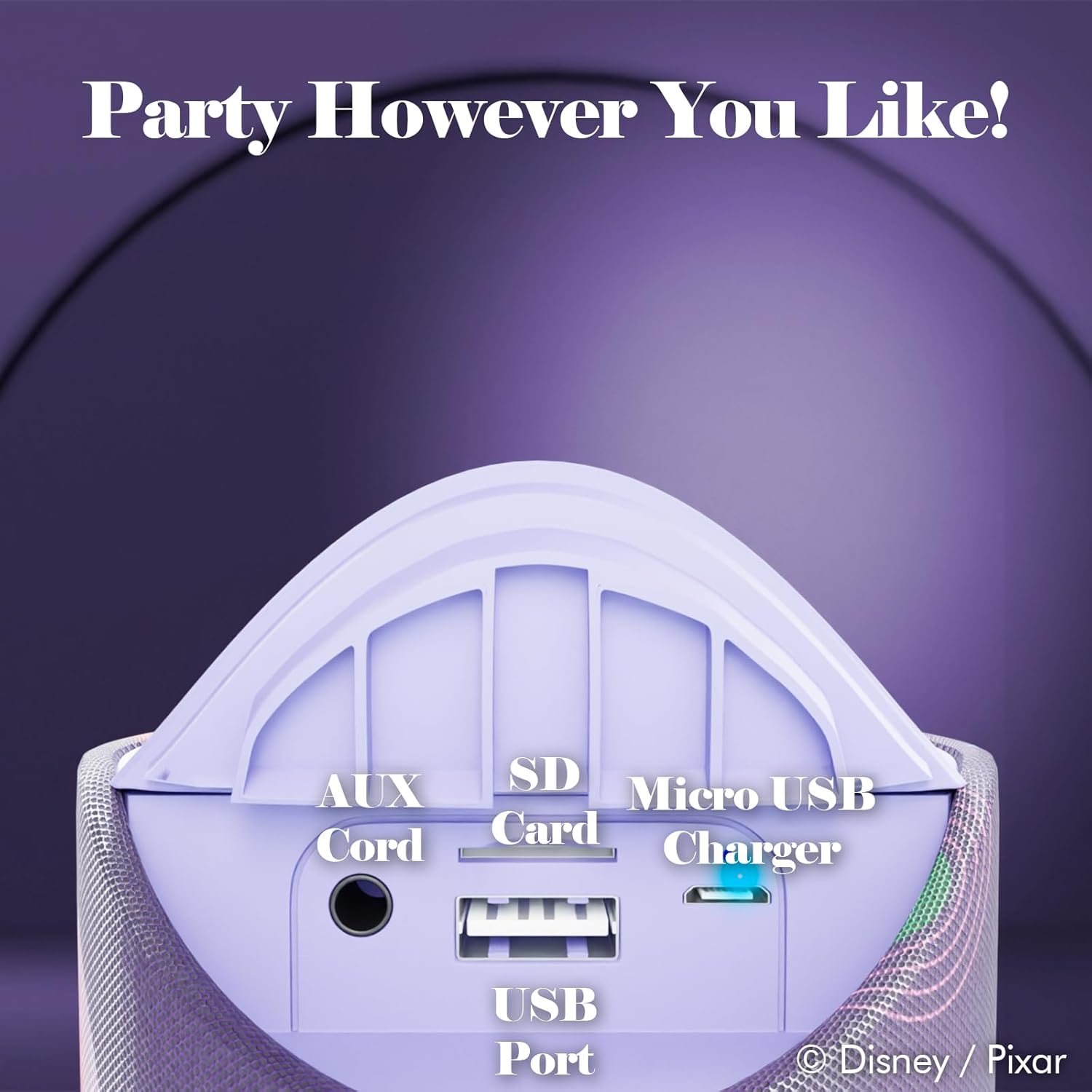
Figure 4: Port Panel. The rear panel, protected by a flap, includes ports for AUX input, SD card, USB, and Micro USB charging.
- AUX Cord Input: For connecting devices via a 3.5mm audio cable.
- SD Card Slot: For playing audio files directly from an SD memory card.
- USB Port: For connecting USB devices (e.g., flash drives) for audio playback.
- Micro USB Charger: For charging the speaker's internal battery.
Setup
Charging the Speaker
Before first use, fully charge the speaker. Connect the supplied USB charging cable to the Micro USB Charger port on the speaker and the other end to a USB power adapter (not included) or a computer's USB port. The charging indicator light will illuminate during charging and turn off when fully charged. A full charge provides approximately 3 hours of playtime.
Powering On/Off
To turn the speaker ON, press and hold the Power On/Off button until you hear an audible prompt. To turn the speaker OFF, press and hold the Power On/Off button again until the speaker powers down.
Bluetooth Pairing
- Ensure the speaker is powered on and in Bluetooth mode. If not, press the M (Mode Switch) button until you hear the Bluetooth pairing prompt.
- Enable Bluetooth on your device (smartphone, tablet, laptop).
- Search for available Bluetooth devices.
- Select "Inside Out 2 Speaker" (or similar name) from the list.
- Once paired, the speaker will indicate a successful connection. You can now play audio from your device.
FM Radio Mode
To use the FM radio function:
- Press the M (Mode Switch) button to switch to FM Radio mode.
- Press the Play/Pause button once to automatically scan and save available FM stations.
- Use the Volume - and Volume + buttons to navigate between saved stations.
SD Card and USB Playback
Insert a compatible SD card or USB flash drive into the respective slot/port. The speaker will automatically switch to SD card or USB mode and begin playing audio files (MP3, WAV, etc.) stored on the media. Use the Play/Pause and Volume buttons for control.
AUX Mode
Connect one end of the supplied 3.5mm AUX cable to the AUX input port on the speaker and the other end to the audio output jack of your external device (e.g., MP3 player, computer). The speaker will automatically switch to AUX mode. Control playback and volume from your connected device.
Operating Instructions
Audio Playback
- Play/Pause: Press the Play/Pause button once to toggle playback.
- Volume Adjustment: Press the Volume + button to increase volume. Press the Volume - button to decrease volume.
Call Handling (Bluetooth Mode)
- Answer Call: When a call comes in, press the Play/Pause/Take Call button once to answer.
- End Call: During a call, press the Play/Pause/Take Call button once to end the call.
- Reject Call: Press and hold the Play/Pause/Take Call button to reject an incoming call.
Maintenance
- Cleaning: Use a soft, dry cloth to clean the speaker's exterior. Do not use abrasive cleaners or solvents.
- Water Resistance: The speaker is splashproof. Avoid submerging it in water or exposing it to heavy rain. Ensure the port flap is securely closed to maintain splash resistance.
- Storage: Store the speaker in a cool, dry place away from direct sunlight and extreme temperatures.
- Battery Care: To prolong battery life, charge the speaker regularly, even if not in frequent use. Avoid fully discharging the battery for extended periods.
Troubleshooting
| Problem | Possible Solution |
|---|---|
| Speaker does not turn on. | Ensure the battery is charged. Connect the speaker to a power source using the USB charging cable. |
| Cannot pair with Bluetooth device. |
|
| No sound from speaker. |
|
| FM radio reception is poor. | Reposition the speaker to improve signal. Ensure you have performed an auto-scan for stations. |
Specifications
| Model Name | Disney / Pixar Inside Out Bluetooth Speaker |
| Model Number | DS20570 |
| Brand | iJoy |
| Connectivity Technology | Bluetooth |
| Bluetooth Range | 33 Feet |
| Speaker Type | Single Speaker |
| Speaker Maximum Output Power | 6 Watts |
| Battery Life | 3 Hours |
| Power Source | Battery Powered |
| Water Resistance Level | Moisture Resistant (Splashproof) |
| Product Dimensions | 3"D x 3"W x 7"H |
| Item Weight | 6 Ounces |
| Control Method | Touch |
| Included Components | Bluetooth Speaker, USB Charging Cable, Backup Aux Cable, User Manual |
| UPC | 810146469834 |
Warranty and Support
This iJoy product is covered by a limited warranty. For detailed warranty information, product support, or to inquire about replacement parts, please visit the official iJoy website or contact their customer service. Keep your purchase receipt as proof of purchase.
For further assistance, please refer to the contact information provided with your product packaging or visit the manufacturer's support page.
Ask a question about this manual
Ask about setup, troubleshooting, compatibility, parts, safety, or missing instructions. Manuals+ will review the question and use this page’s manual context to help answer it.