1. Introduction
This manual provides essential information for the setup, operation, and maintenance of your Westinghouse 32-inch Smart TV. This HD Xumo TV features a voice remote, Dolby Atmos, Bluetooth, Apple AirPlay, Wi-Fi, and mobile connectivity, offering a comprehensive entertainment experience. Please read this manual thoroughly before using your TV to ensure proper and safe operation.

Figure 1.1: Westinghouse 32-inch Smart TV
2. What's Included
Carefully unpack your new Westinghouse Smart TV and ensure all items listed below are present. If any items are missing or damaged, please contact customer support.
- Westinghouse 32 inch XUMO Smart TV
- Voice Remote with Batteries (2 AAA batteries included)
- Stand with Screws
- User Manual (this document)
- Quick Start Guide

Figure 2.1: Package Contents and TV Dimensions
3. Setup
3.1 Attaching the Stand
- Carefully place the TV screen-down on a soft, clean surface to prevent scratches.
- Align the TV stand with the mounting holes on the bottom of the TV.
- Secure the stand using the provided screws. Ensure the stand is firmly attached.
3.2 Wall Mounting (Optional)
If you prefer to wall mount your TV, ensure you use a VESA compatible wall mount (not included). The TV supports VESA 200mm x 100mm with M4x10mm screws (4PCS).

Figure 3.1: VESA Mounting Dimensions
3.3 Power Connection
Connect the power cord to the TV's power input and then plug it into a standard electrical outlet.
3.4 Initial Setup
Upon first power-on, the TV will guide you through the initial setup process, including language selection, network connection (Wi-Fi or Ethernet), and channel scanning. Follow the on-screen prompts to complete the setup.
4. Operating Instructions
4.1 Basic TV Functions
- Power On/Off: Press the Power button on the remote control.
- Volume Control: Use the Volume Up/Down buttons on the remote.
- Channel Selection: Use the Channel Up/Down buttons or the number pad.
- Input Selection: Press the Input button to switch between connected devices (HDMI, USB, etc.).
4.2 Xumo TV Interface
Your Westinghouse Smart TV features the Xumo TV platform, providing access to a wide range of streaming content. The home screen offers instant access to top apps and a curated selection of free live channels and on-demand content via the Xumo Play app.

Figure 4.1: Xumo TV Interface for Endless Entertainment
4.3 Voice Remote and Universal Search
The included voice remote allows for quick navigation and content discovery. Simply speak into the remote to search for titles, genres, actors, or keywords across all your installed streaming applications.

Figure 4.2: Using the Voice Remote for Universal Search
5. Connectivity
5.1 Input/Output Ports
Your TV is equipped with a variety of ports for connecting external devices:
- HDMI (x3): Connect Blu-ray players, game consoles, cable boxes, and other HDMI-enabled devices. HDMI 2 supports ARC (Audio Return Channel).
- USB (x1): For connecting USB storage devices to play media files.
- Composite Video (CVBS): For older devices using RCA cables.
- Optical Digital Audio: For connecting to soundbars or home theater systems for high-quality audio.
- Headphone Output: For connecting headphones.
- LAN (Ethernet): For a wired internet connection.
- RF IN (Antenna): For connecting an antenna for over-the-air broadcasts.

Figure 5.1: TV Connectivity Ports
5.2 Wireless Connectivity
- Wi-Fi: Built-in Wi-Fi allows for wireless internet connection to access streaming services and online features.
- Bluetooth: Connect Bluetooth-enabled devices such as soundbars, headphones, or speakers for immersive audio.
- Apple AirPlay: Stream or mirror content directly from your iPhone, iPad, or Mac to the TV. This includes music, photos, and video.

Figure 5.2: Bluetooth and Apple AirPlay Connectivity
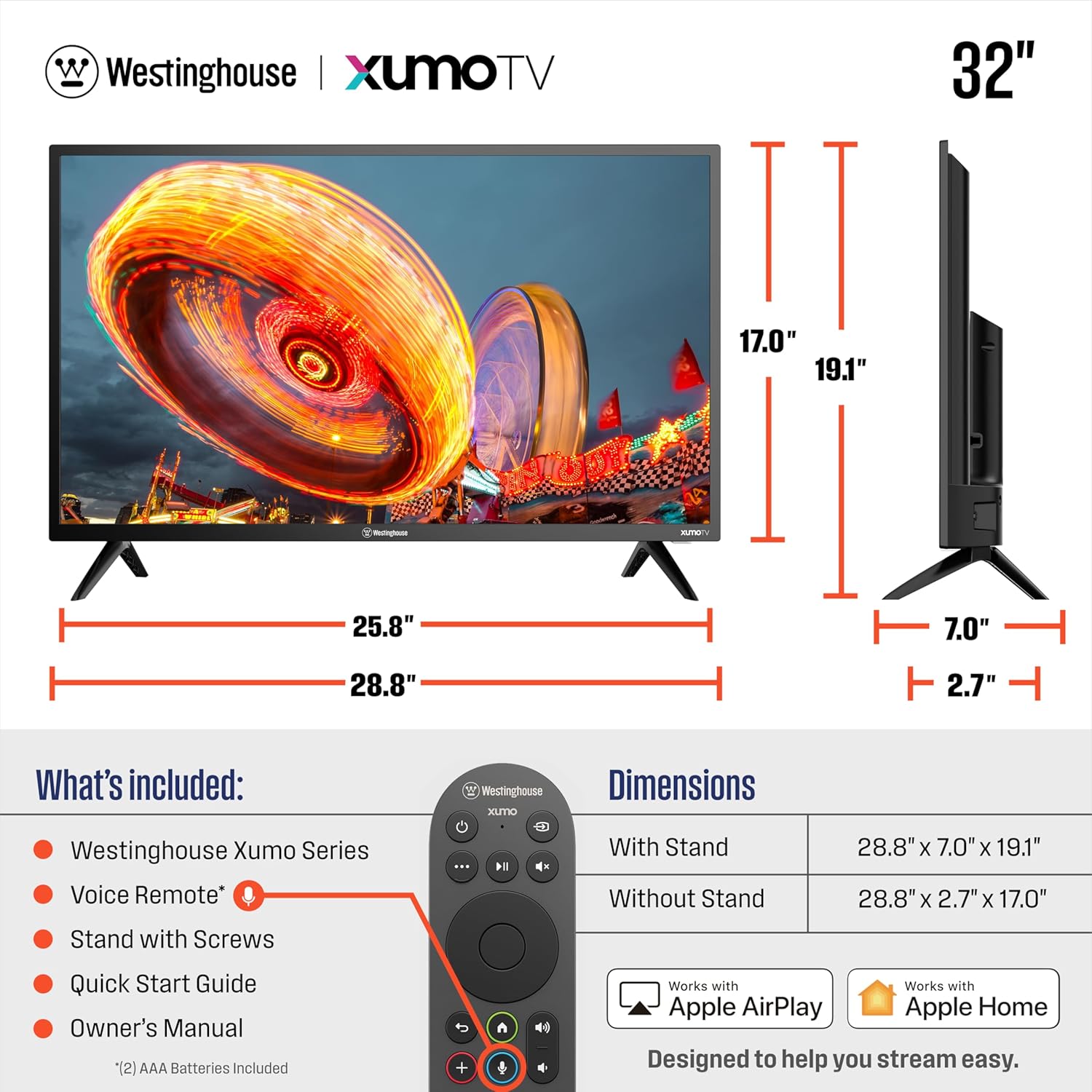
Figure 5.3: More Ways to Play with Screen Mirroring and Casting
6. Maintenance
6.1 Cleaning the TV
- Always unplug the TV before cleaning.
- Use a soft, dry cloth to wipe the screen and cabinet. For stubborn marks, lightly dampen the cloth with water or a mild, non-abrasive cleaner specifically designed for electronics.
- Do not spray cleaners directly onto the TV.
6.2 Software Updates
Your Smart TV may receive periodic software updates to improve performance and add new features. Ensure your TV is connected to the internet to receive these updates automatically or check for them manually through the TV's settings menu.
7. Troubleshooting
If you encounter issues with your TV, refer to the following common problems and solutions:
| Problem | Possible Cause / Solution |
|---|---|
| No Power | Ensure the power cord is securely plugged into the TV and a working electrical outlet. Check if the outlet has power. |
| No Picture, but Sound is Present | Check the input source. Ensure the connected device is powered on and functioning correctly. Try a different HDMI cable. |
| No Sound, but Picture is Present | Check the volume level. Ensure Mute is not activated. Check audio output settings (e.g., internal speakers vs. external sound system). |
| Remote Control Not Working | Replace the batteries in the remote. Ensure there are no obstructions between the remote and the TV's IR sensor. |
| Cannot Connect to Wi-Fi | Ensure your Wi-Fi router is on and working. Re-enter the Wi-Fi password. Try restarting both the TV and the router. |
| Apps Not Loading / Slow Performance | Check your internet connection speed. Try restarting the TV. Ensure the TV's software is up to date. |
8. Specifications
| Feature | Detail |
|---|---|
| Brand | Westinghouse |
| Model Number | WX32HX2800 |
| Screen Size | 32 Inches |
| Display Technology | LED |
| Resolution | 720p (HD) |
| Refresh Rate | 60 Hz |
| Aspect Ratio | 16:9 |
| Product Dimensions (with stand) | 28.8"W x 7"D x 19.1"H |
| Product Dimensions (without stand) | 28.8"W x 2.7"D x 17.0"H |
| Item Weight | 8.8 Pounds |
| On-mode Power Consumption | 55 Watts |
| Estimated Yearly Energy Cost | $11 (based on 16 cents per kWh and 5 hours use per day) |
| Special Features | Airplay 2, Bluetooth, Dolby Atmos, Dynamic Contrast Control, Voice Remote/ Universal Search |
| Connectivity Technology | USB, HDMI, Wi-Fi, Bluetooth, Ethernet |

Figure 8.1: Energy Guide Information
9. Warranty and Support
Westinghouse products are designed for reliability and performance. For specific warranty details regarding your Westinghouse 32-inch Smart TV, please refer to the warranty card included in your product packaging or visit the official Westinghouse Electronics support website. For technical assistance, troubleshooting beyond this manual, or service inquiries, please contact Westinghouse customer support.
You can typically find contact information for support on the manufacturer's website or in the Quick Start Guide provided with your TV.