
Introduction
This manual provides essential information for the safe and effective operation of your Tecnock S8908G RC Stunt Car. Please read it thoroughly before first use and retain it for future reference. This remote control car features 2.4GHz 4WD capabilities, gesture sensing control, 360° rotation, double-sided driving, and LED lights, designed for versatile play across various terrains.
Safety Information
- Age Recommendation: Suitable for users aged 6 years and up. Adult supervision is recommended for younger children.
- Battery Safety: Use only the provided rechargeable batteries and charging cable. Do not attempt to charge non-rechargeable batteries. Do not short-circuit battery terminals. Dispose of batteries responsibly.
- Water Exposure: The RC car is not waterproof. Avoid operating in wet conditions or near water to prevent damage.
- Operating Environment: Operate the car in open areas free from obstacles, people, or pets to prevent collisions and injuries.
- Avoid Obstructions: Do not drive the car into walls, furniture, or other hard surfaces at high speed, as this may cause damage to the car or surroundings.
- Heat Warning: Batteries may become warm during use or charging. If excessive heat or unusual odors are detected, discontinue use immediately.
Package Contents
Verify that all items are present in your package:
- Tecnock S8908G RC Stunt Car
- Standard Remote Control
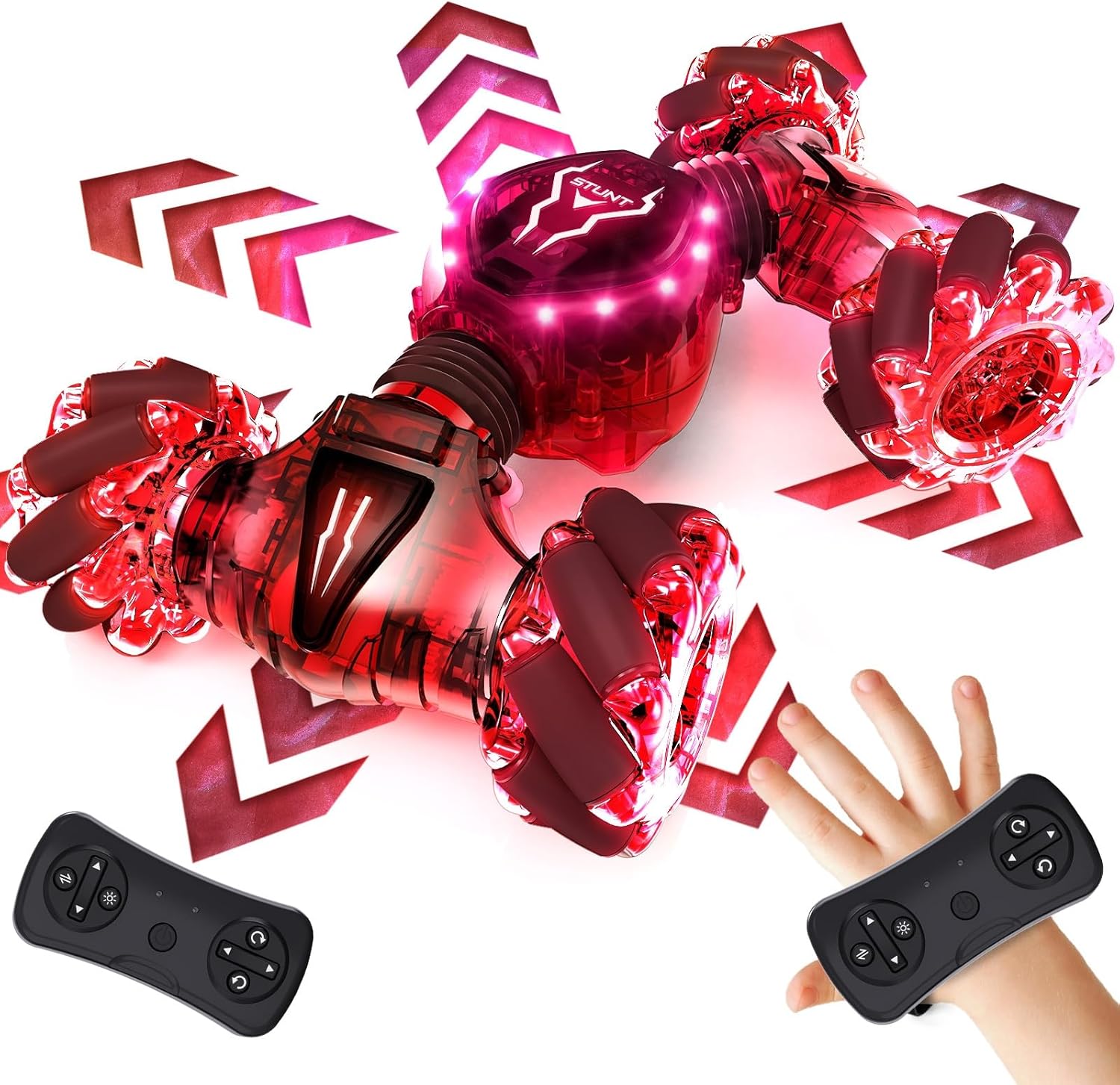
- Gesture Sensing Wristband Controller
- Rechargeable Batteries (2x 500mAh Lithium Ion)
- USB Charging Cable
- Screwdriver
- Instruction Manual (this document)

Setup
- Charge the Car Battery:
- Locate the battery compartment on the underside of the RC car. Use the provided screwdriver to open it.
- Connect one of the rechargeable batteries to the car's battery connector. Ensure a secure connection.
- Close the battery compartment and secure it with the screw.
- Connect the USB charging cable to the battery (if not already connected) and plug the USB end into a compatible USB power source (e.g., computer, USB wall adapter). The indicator light on the charging cable will show charging status (usually red for charging, off or green for fully charged).
- Allow approximately 60-90 minutes for a full charge.
- Note: The package includes two rechargeable batteries for extended playtime. Charge the second battery while using the first.
- Install Batteries in Remote Control:
- The standard remote control requires 2 AAA batteries (not included). Open the battery compartment on the back of the remote and insert the batteries, observing polarity.
- The gesture sensing wristband controller has a built-in rechargeable battery. Charge it using its dedicated charging port if necessary.
- Pairing the Controllers:
- Turn on the RC car using the power button located on its body.
- Turn on your preferred controller (standard remote or gesture wristband). The indicator light on the controller will flash.
- Once the indicator light on the controller becomes solid, pairing is complete.
- To switch between controllers, simply turn off the currently active controller and turn on the desired one. No re-pairing is needed.

Operating Instructions
Standard Remote Control
Use the joysticks and buttons on the standard remote for precise control:
- Left Joystick: Controls forward and backward movement.
- Right Joystick: Controls turning left and right.
- Stunt Button (often labeled with a star or specific icon): Activates 360° spins and other stunt maneuvers.
- Transformation Button: Changes the car's body shape for different driving modes (e.g., flat for speed, raised for off-road).
- LED Light Button: Toggles the LED lights on/off or changes light patterns.
Gesture Sensing Wristband Control
Wear the wristband on your hand and use natural hand movements to control the car:
- Forward/Backward: Tilt your hand forward or backward.
- Left/Right: Tilt your hand left or right.
- Stunts/Transformation: Specific gestures or button presses on the wristband may activate these features. Refer to the wristband's specific button layout for details.
Key Features and Driving Modes
- 360° Rotation: Perform impressive spins with a dedicated button or gesture.
- Double-Sided Driving: The car is designed to drive on both sides, allowing it to continue operating even after flipping.
- On-Road/Off-Road Modes: Transform the car's chassis to adapt to different terrains, from smooth surfaces to grass, sand, or gravel.
- LED Lights: Enjoy vibrant, color-changing LED lights on the car's body and wheels, enhancing visibility and fun, especially in low-light conditions.

Maintenance
- Cleaning: Use a soft, dry cloth to wipe down the car after use. Avoid using water or chemical cleaners, especially near electronic components.
- Battery Care: Always fully charge batteries before storage and recharge them every few months if not in use to prolong battery life. Remove batteries from controllers and the car if storing for extended periods.
- Storage: Store the RC car and its accessories in a cool, dry place away from direct sunlight and extreme temperatures.
- Inspection: Regularly inspect the car for any loose parts, damaged wheels, or worn components. Tighten screws as needed using the provided screwdriver.
Troubleshooting
| Problem | Possible Cause | Solution |
|---|---|---|
| Car does not respond to controller. |
|
|
| Car moves slowly or inconsistently. |
|
|
| LED lights are not working. |
|
|
Specifications
- Model: S8908G
- Brand: Tecnock
- Product Dimensions: 8.3 x 5.3 x 2.3 inches
- Item Weight: 1.3 pounds
- Control Frequency: 2.4GHz
- Drive System: 4WD
- Battery Type (Car): 3.7V 500mAh Lithium Ion (rechargeable)
- Battery Type (Standard Remote): 2 x AAA batteries (not included)
- Recommended Age: 6 years and up
- Features: Gesture Sensing Control, 360° Rotation, Double-Sided Driving, LED Lights, All-Terrain Capability
Warranty and Support
For warranty information or technical support, please refer to the contact details provided on the product packaging or visit the official Tecnock website. Keep your purchase receipt as proof of purchase for any warranty claims.