
1. Introduction
The Fuzion Milligram Scale TGD-50 is a high-precision digital scale designed for accurate weighing of small quantities. It offers a maximum capacity of 50 grams with a readability of 0.001g (1mg) and an accuracy within ±0.003g. This scale is suitable for measuring items such as powders, medicines, jewelry, gold, and gems. It features a large LCD display for clear readings and adjustable feet for stable operation.
2. Package Contents
Verify that all items are present in the package:
- Fuzion Milligram Scale TGD-50
- 50g Calibration Weight
- 2 Silicone Storage Boxes
- 1 Silicone Bowl
- 1 Spoon
- 1 Tweezer
- 1 Cleaning Brush
- USB Cable
- 4 AAA Batteries (may be pre-installed)
- User Manual
3. Setup
3.1 Battery Installation
If batteries are not pre-installed, open the battery compartment cover on the underside of the scale. Insert 4 AAA batteries, ensuring correct polarity. Close the battery compartment. The scale can also be powered via the included USB cable.
3.2 Placement and Leveling
Place the scale on a flat, stable surface free from vibrations and drafts. Use the adjustable feet at the bottom of the scale to level it. Observe the bubble level indicator, typically located near the weighing platform, to ensure the scale is perfectly horizontal for accurate readings.

Image: Adjustable feet and bubble level for ensuring scale balance.
4. Operating Instructions
4.1 Power On/Off
- Press the "ON/OFF" button to turn the scale on.
- Press and hold the "ON/OFF" button to turn the scale off.
4.2 Unit Conversion
The scale supports 6 weighing units: grams (g), ounces (oz), troy ounces (ozt), pennyweights (dwt), carats (ct), and grains (gn).
- Press the "MODE" button to cycle through the available weighing units. The selected unit will be displayed on the LCD screen.
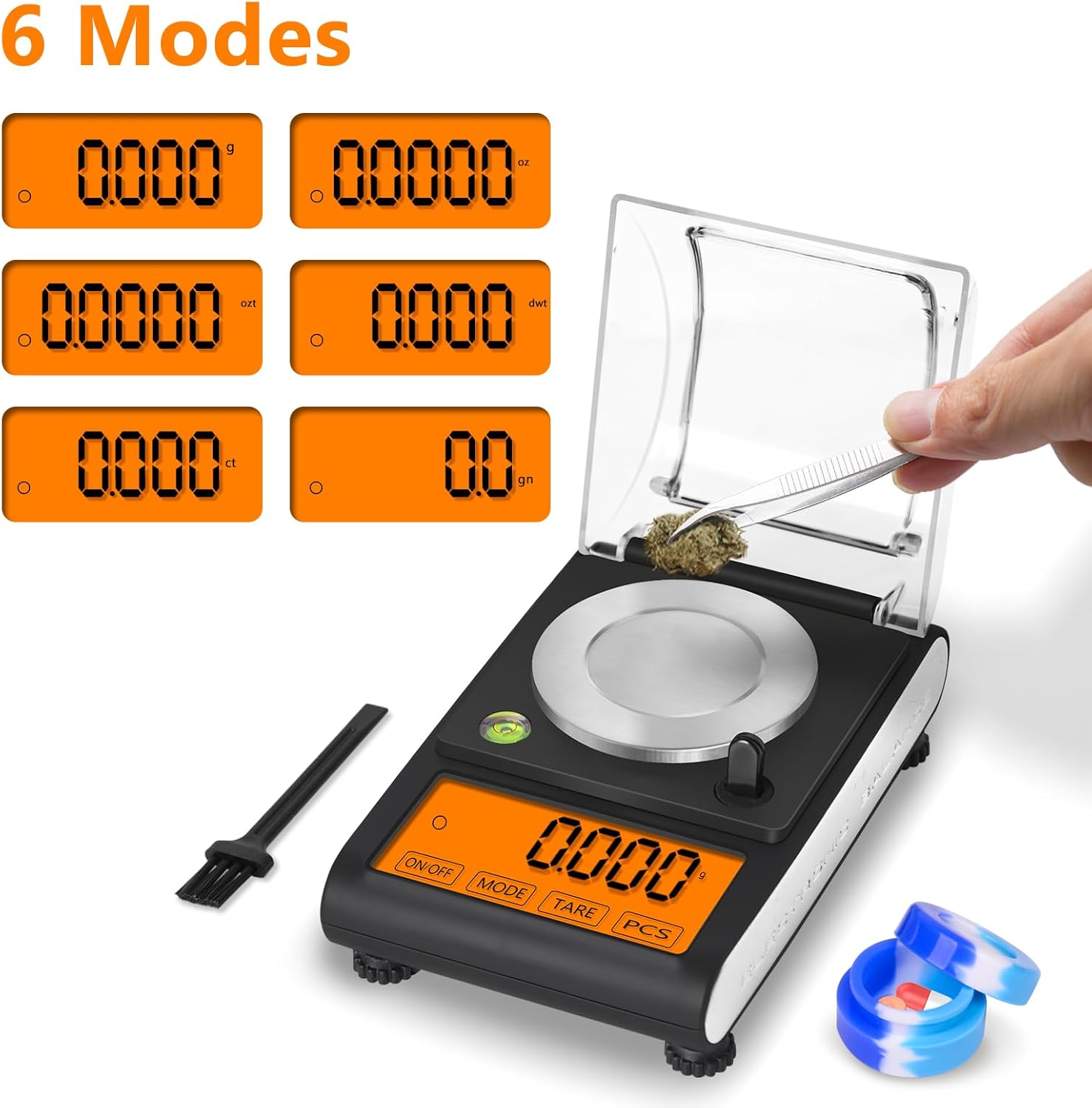
Image: Display showing the six available weighing modes.
4.3 Tare Function
The Tare function allows you to zero out the weight of a container or pan, so you only measure the contents.
- Place an empty container on the weighing platform.
- Press the "TARE" button. The display will reset to zero.
- Add the items to be weighed into the container. The display will show the net weight of the items.
4.4 Counting Function (PCS)
The PCS function allows you to count the number of pieces of an item based on a sample weight.
- Place a sample quantity (e.g., 25, 50, 75, or 100 pieces) of the item on the platform.
- Press and hold the "PCS" button until the display shows a sample size (e.g., "25 PCS").
- Press the "MODE" button to select the correct sample size corresponding to the number of items on the platform.
- Press "PCS" again to confirm. The scale is now in counting mode.
- Add more items to the platform, and the display will show the total count.
4.5 Auto-Off Function
To conserve battery life, the scale will automatically shut off after 180 seconds of inactivity. This duration is fixed and cannot be adjusted.

Image: Large, easy-to-read LCD display of the scale.
5. Calibration
Regular calibration ensures the accuracy of your scale. A 50g calibration weight is included for this purpose.
- Turn on the scale.
- Press and hold the "MODE" button until the display shows "CAL".
- The display will then flash "50.000g". Place the 50g calibration weight precisely in the center of the weighing platform.
- Wait for the display to show "PASS" and then return to normal weighing mode. The scale is now calibrated.

Image: Step-by-step guide for easy calibration.
6. Maintenance
6.1 Cleaning
Use the included small brush to gently clean any dust or residue from the weighing platform and surrounding areas. For stubborn dirt, wipe with a soft, damp cloth. Do not use abrasive cleaners or immerse the scale in water.
6.2 Storage
When not in use, store the scale in a dry, stable environment. The scale features a windshield design to protect the weighing mechanism from environmental factors. Keep the protective cover closed during storage.
7. Troubleshooting
If you encounter any issues with your Fuzion Milligram Scale, please try the following:
- Inaccurate Readings: Ensure the scale is on a level, stable surface and recalibrate it using the 50g weight. Check for any obstructions under the weighing platform.
- Display Not Turning On: Verify that the batteries are correctly installed and have sufficient charge. If using USB power, ensure the cable is securely connected.
- Fluctuating Readings: Ensure there are no air currents (e.g., from fans, open windows) affecting the scale.
For further assistance, please contact Fuzion Support.
8. Specifications
| Brand | Fuzion |
| Model | TGD-50 |
| Weight Capacity Maximum | 50 Grams |
| Minimum Readability | 0.001g (1mg) |
| Accuracy | ±0.003g |
| Weighing Units | g, oz, ozt, dwt, ct, gn |
| Display Type | LCD |
| Material | Acrylonitrile Butadiene Styrene, Stainless Steel |
| Item Weight | 0.47 Kilograms |
| Dimensions (Approx.) | 5.90 in x 3.66 in x 1.38 in |
| Power Source | 4 AAA Batteries or USB Cable |

Image: Approximate dimensions of the Fuzion Milligram Scale.
9. Warranty and Support
Fuzion offers a 2-Year warranty and lifetime support for this digital scale. Our dedicated Fuzion support team is available to assist with any questions or concerns you may have. Please refer to the warranty card included in your package for detailed terms and conditions, or contact Fuzion directly for support.
