
1. Introduction
This manual provides essential information for setting up, operating, and maintaining your Omnica 2-in-1 Laptop Computer, Model G3. Please read this guide thoroughly to ensure optimal performance and longevity of your device.
2. Product Overview
The Omnica Model G3 is a versatile 15.6-inch convertible laptop designed for various computing needs. It combines the functionality of a traditional laptop with the flexibility of a tablet, thanks to its 360° rotating touchscreen.
Key Features:
- Powerful AMD Performance: Equipped with an AMD Ryzen 3 3200U processor (up to 3.5GHz) and AMD Radeon Graphics for smooth multitasking.
- FHD Touchscreen & Backlit Keyboard: 15.6" Full HD (1920x1080) touchscreen display and a backlit keyboard for comfortable use in various lighting conditions.
- Ample Storage & Memory: Features 16GB DDR4 RAM and a 512GB SATA SSD for fast boot-ups and efficient data access.
- Versatile Connectivity: Includes USB 3.0, 2x USB 2.0, USB Type-C (3.2 Gen1), HDMI 1.4, RJ45 Ethernet, 3.5mm audio jack, WiFi 5 (802.11ac), and Bluetooth 5.1.
- 360° Convertible Design: Easily switch between laptop, tablet, tent, and stand modes.

Figure 2.1: Omnica 2-in-1 Laptop in its convertible form, highlighting the 15.6-inch FHD touchscreen and key specifications.

Figure 2.2: Visual representation of the laptop's core components and features.
3. Setup
3.1 Initial Power On
- Unpack the laptop and all accessories from the box.
- Connect the power adapter to the laptop's power port and then to a wall outlet.
- Press the power button located on the side of the laptop to turn it on.
- Follow the on-screen instructions to complete the initial Windows 11 Pro setup, including language, region, network connection, and user account creation.
Video 3.1: Demonstrates the initial power-on sequence and basic interaction with the Omnica 15.6 Laptop, including touchscreen and backlit keyboard features.
3.2 Connecting Peripherals
Utilize the various ports for external devices:
- USB Ports: Connect USB devices such as mice, keyboards, or external storage.
- HDMI Port: Connect to an external monitor or TV for extended display.
- RJ45 Ethernet: For a wired internet connection.
- 3.5mm Audio Jack: For headphones or external speakers.
- USB Type-C: For data transfer and potentially charging with compatible accessories.
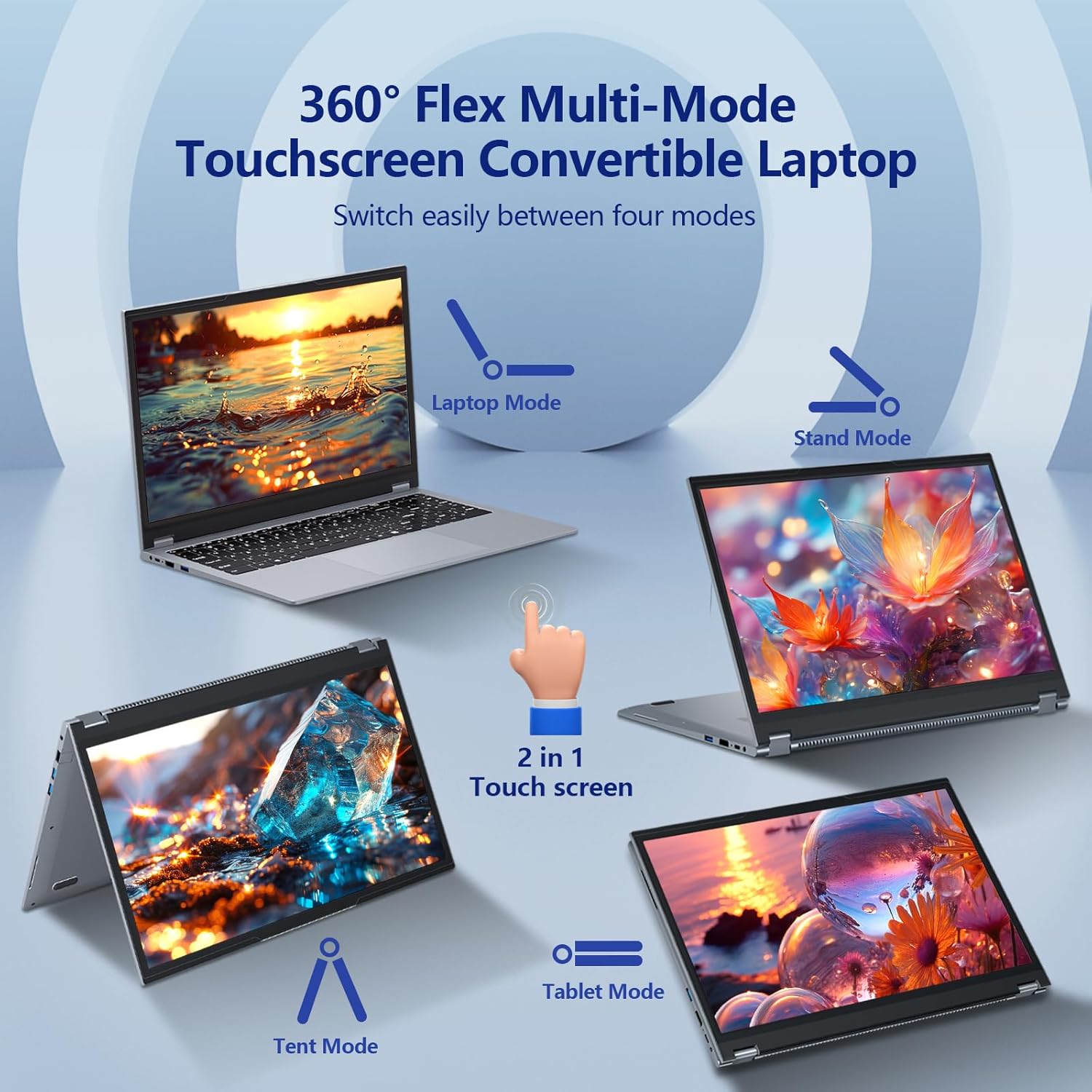
Figure 3.1: Detailed view of the laptop's connectivity ports on both sides.
4. Operating Instructions
4.1 Using the 360° Hinge and Touchscreen
The laptop's 360° hinge allows for flexible usage modes:
- Laptop Mode: Traditional laptop setup for typing and productivity.
- Stand Mode: Fold the keyboard back to prop up the screen for presentations or media viewing.
- Tent Mode: Position the laptop in an inverted 'V' shape, ideal for watching videos in confined spaces.
- Tablet Mode: Fold the screen completely back against the base for a full tablet experience, utilizing the touchscreen.
The touchscreen supports multi-touch gestures for intuitive navigation in all modes.

Figure 4.1: Illustration of the four flexible modes of the convertible laptop.
Video 4.1: Demonstrates the 360-degree folding capability and various usage modes of the Omnica laptop.
4.2 Backlit Keyboard
To turn the keyboard backlight on or off, press the Fn + F9 keys simultaneously.
5. Maintenance
- Keep the laptop clean by regularly wiping the screen and keyboard with a soft, lint-free cloth.
- Avoid exposing the laptop to extreme temperatures, direct sunlight, or high humidity.
- Ensure proper ventilation by not blocking the air vents.
- Handle the convertible hinge gently to prevent damage.
- Regularly back up your data to an external drive or cloud storage.
6. Troubleshooting
6.1 Common Issues and Solutions
- Laptop not powering on: Ensure the power adapter is securely connected and the battery has sufficient charge. Try a different power outlet.
- Screen not responding to touch: Restart the laptop. Check for any physical obstructions on the screen. Ensure drivers are up to date.
- Slow performance: Close unnecessary applications. Check for malware. Ensure sufficient free space on the SSD.
- Wi-Fi connectivity issues: Restart the laptop and your router. Check network settings and ensure Wi-Fi drivers are installed and updated.
- Keyboard backlight not working: Ensure you are using the correct key combination (Fn+F9) to toggle the backlight.
For persistent issues, refer to the Warranty & Support section for contact information.
7. Specifications
| Feature | Detail |
|---|---|
| Brand | Omnica |
| Model Name | G3 |
| Screen Size | 15.6 Inches |
| Screen Resolution | 1920 x 1080 pixels (FHD) |
| Processor | AMD Ryzen 3 3200U (up to 3.5 GHz) |
| Graphics Coprocessor | AMD Radeon Graphics (Integrated) |
| RAM | 16 GB DDR4 |
| Hard Drive | 512 GB SSD (SATA) |
| Operating System | Windows 11 Pro |
| Wireless Type | 802.11ac (WiFi 5), Bluetooth 5.1 |
| Ports | 1x USB 3.0, 2x USB 2.0, 1x USB Type-C (3.2 Gen1), 1x HDMI 1.4, 1x RJ45 Ethernet, 1x 3.5mm Audio Jack |
| Special Features | Lightweight, Numeric Keypad, Support Stylus, 360° Hinge, Backlit Keyboard |
| Item Weight | 5.61 pounds |
| Product Dimensions | 14.13 x 9.25 x 0.8 inches |
| Battery | 1 12V battery (included) |
8. Warranty & Support
Omnica provides a 2-year free repair warranty for this product. Our dedicated customer service team is available 24 hours a day to assist you with any questions or concerns.
For support, please contact Omnica's professional after-sales team. We aim to respond to all inquiries within 24 hours to ensure a smooth and reliable user experience.
For more information, visit the Omnica Store on Amazon.