
1. Introduction
The eppfun Conference Speaker is a portable audio device designed for clear and efficient communication in various settings, from home offices to conference rooms. Featuring advanced noise and echo cancellation, 360° omnidirectional microphone pickup, and versatile connectivity options, this speaker ensures high-quality audio for all participants.
Its compact design and long battery life make it an ideal solution for teleworking, travel, and on-the-go meetings. This manual provides detailed instructions for setting up, operating, and maintaining your conference speaker.

2. What's in the Box
Upon unpacking your eppfun Conference Speaker, please ensure all items are present:
- eppfun Conference Speaker
- USB-A Cable
- USB-C Cable
- User Manual (this document)
3. Product Overview
Familiarize yourself with the physical components of your eppfun Conference Speaker.

Control Buttons:
- Volume Down (-) / Previous Track: Decreases volume or navigates to the previous track.
- Microphone Mute: Toggles microphone mute on/off.
- Volume Up (+) / Next Track: Increases volume or navigates to the next track.
- Power Button: Press and hold to power on/off. Short press to switch modes (e.g., Bluetooth, FM if available).
- Mode (M) / Bluetooth Pairing: Press and hold to enter Bluetooth pairing mode.
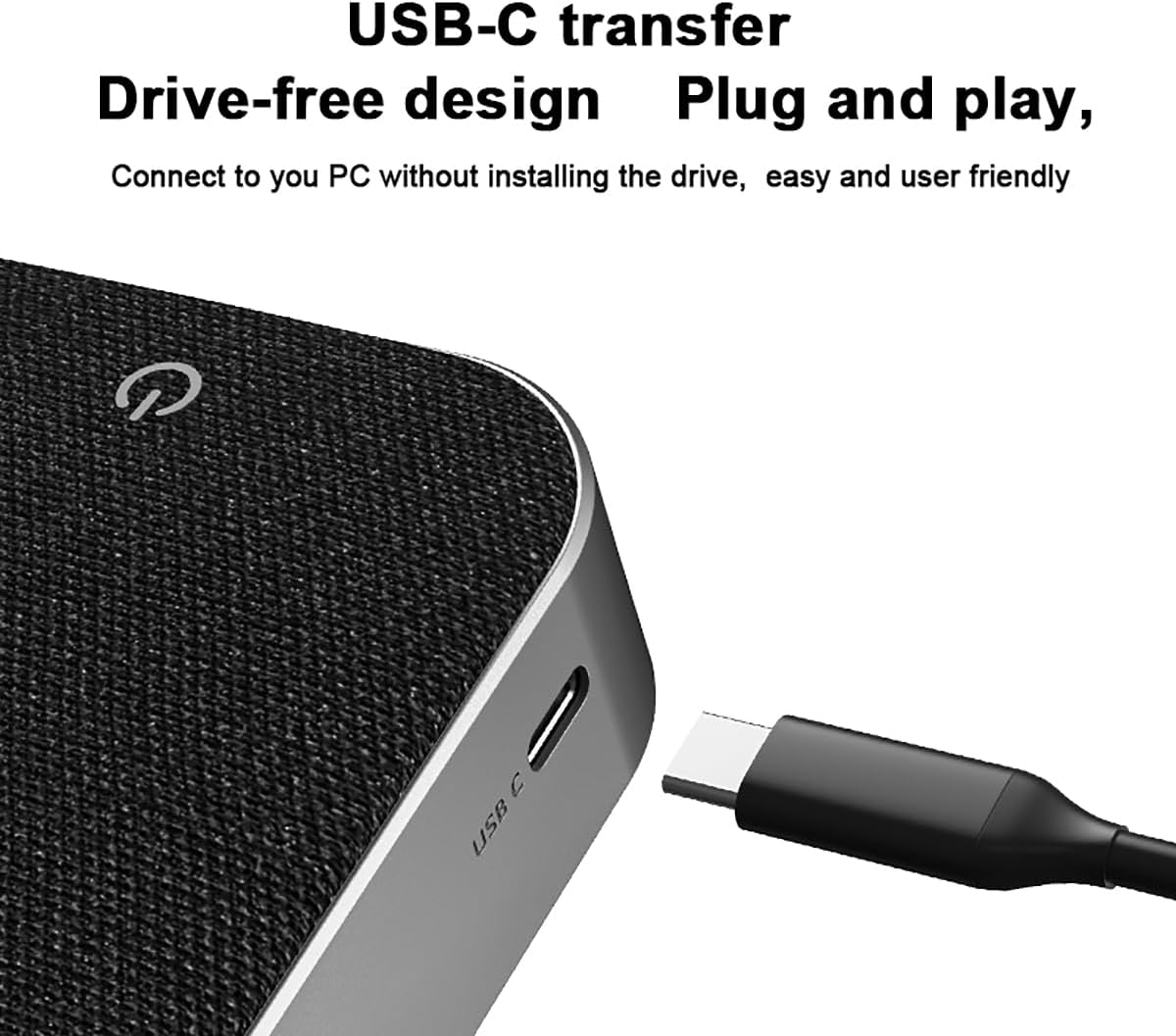
Ports and Indicators:
- USB-C Port: For charging and wired connection to devices.
- LED Indicator: Displays power status, charging status, and Bluetooth connection status.
4. Setup
4.1 Charging the Speaker
Before initial use, fully charge the speaker. Connect the provided USB-C cable to the speaker's USB-C port and the other end to a USB power adapter (not included) or a computer's USB port. The LED indicator will show charging status and turn off when fully charged. A full charge provides up to 20 hours of continuous use.
4.2 Connecting via Bluetooth
- Power on the speaker by pressing and holding the Power button. The LED indicator will flash, indicating it's in Bluetooth pairing mode.
- On your device (smartphone, tablet, laptop), enable Bluetooth and search for available devices.
- Select "eppfun Speaker" (or similar name) from the list of devices.
- Once connected, the LED indicator will turn solid, and you will hear an audible confirmation.
4.3 Connecting via USB-C (Plug and Play)
For a wired connection, use the provided USB-C cable to connect the speaker directly to your computer. The speaker will be recognized automatically as an audio input/output device without requiring additional drivers.

5. Operating Instructions
5.1 Power On/Off
- Power On: Press and hold the Power button for 2-3 seconds.
- Power Off: Press and hold the Power button for 2-3 seconds.
5.2 Adjusting Volume
- Increase Volume: Press the "+" button.
- Decrease Volume: Press the "-" button.
5.3 Muting the Microphone
During a call or meeting, press the Microphone Mute button to mute or unmute the microphone. The LED indicator may change color or flash to indicate mute status.
5.4 Answering/Ending Calls
When connected via Bluetooth to a smartphone, you can manage calls directly from the speaker:
- Answer Call: Short press the Power button.
- End Call: Short press the Power button during an active call.
- Reject Call: Press and hold the Power button for 2 seconds when a call comes in.
5.5 Noise and Echo Cancellation
The eppfun Conference Speaker features an integrated DSP processor for intelligent noise and echo cancellation. This function operates automatically to provide clear audio by eliminating background noise and echo during calls, ensuring smooth conversations even in noisy environments.
5.6 Multi-person Meeting Usage
With its 360° omnidirectional microphones, the speaker is designed to pick up voices from all directions within a 4-meter radius, making it suitable for small to medium-sized meeting rooms. Position the speaker centrally on the table for optimal voice pickup.

6. Maintenance
- Cleaning: Use a soft, dry cloth to clean the speaker's surface. Do not use abrasive cleaners or solvents.
- Storage: Store the speaker in a cool, dry place away from direct sunlight and extreme temperatures.
- Battery Care: To prolong battery life, avoid fully discharging the speaker frequently. Charge it regularly, even if not in use for extended periods.
- Water Exposure: This device is not waterproof. Avoid exposure to water or high humidity.
7. Troubleshooting
7.1 No Power
- Ensure the speaker is fully charged. Connect it to a power source using the USB-C cable.
- Press and hold the Power button for 3-5 seconds to ensure it's powered on correctly.
7.2 No Sound
- Check the volume levels on both the speaker and your connected device.
- Ensure the speaker is correctly connected via Bluetooth or USB-C. Re-pair or reconnect if necessary.
- Verify that the correct audio output device is selected on your computer or smartphone.
7.3 Bluetooth Connection Issues
- Ensure the speaker is in pairing mode (LED flashing).
- Disable and re-enable Bluetooth on your device.
- Move the speaker closer to your device to ensure it's within the 10-meter range.
- Clear the speaker from your device's Bluetooth history and attempt to re-pair.
7.4 Microphone Not Working
- Ensure the microphone is not muted (check the mute button and LED indicator).
- Verify that the eppfun speaker is selected as the input device in your meeting software (e.g., Zoom, Teams) or system audio settings.
- Check for any physical obstructions blocking the microphone grilles.
8. Specifications
| Feature | Specification |
|---|---|
| Model Number | 717382572574 |
| Brand | eppfun |
| Connectivity Technology | Bluetooth, USB-C |
| Speaker Type | Portable Conference Speaker |
| Microphones | 4 Omnidirectional Microphones |
| Special Features | Built-in Microphone, Portable, Noise Cancellation, Echo Cancellation |
| Maximum Speaker Output Power | 4 Watts |
| Frequency Response | 20 KHz |
| Audio Output Mode | Mono |
| Average Battery Life | Up to 20 Hours |
| Compatible Devices | Smartphone, Tablet, Laptop, Desktop Computer |
| Dimensions (Package) | 21.9 x 14.8 x 5 cm |
| Weight (Package) | 350 g |
| Color | Grey |
9. Warranty and Support
The eppfun Conference Speaker comes with a standard manufacturer's warranty. For specific warranty terms, duration, and to register your product, please refer to the official eppfun website or contact their customer support directly.
If you encounter any issues not covered in this manual or require further assistance, please visit the eppfun support page or contact their customer service team. Keep your purchase receipt and product model number (717382572574) handy for faster service.