
Kinhank K9
Contents
Kinhank K9 8K Hard Drive Media Player User Manual
Model: K9
1. Introduction
The Kinhank K9 is an advanced 8K Hard Drive Media Player designed to deliver an immersive audio-visual experience. Featuring a powerful 5-core 64-bit S928X processor, 4GB LPDDR4 RAM, and 64GB eMMC storage, it ensures fast and stable performance. This device supports 8K UHD output, AV1 decoding, HDR10+, and HDMI 2.1, providing crystal-clear visuals at 60fps. It also includes WI-FI 6, Bluetooth 5.2, and Gigabit Ethernet for robust connectivity. This manual provides essential information for setting up, operating, and maintaining your K9 media player.
2. Safety Information
- Do not expose the device to rain or moisture.
- Do not disassemble the device. Refer all servicing to qualified personnel.
- Ensure proper ventilation around the device to prevent overheating.
- Use only the provided power adapter.
- Keep the device away from direct sunlight, heat sources, and strong magnetic fields.
3. What's in the Box
Verify that all items are present:
- K9 Hard Drive Player
- Remote Control
- Power Adapter
- HDMI Cable
- User Manual (this document)
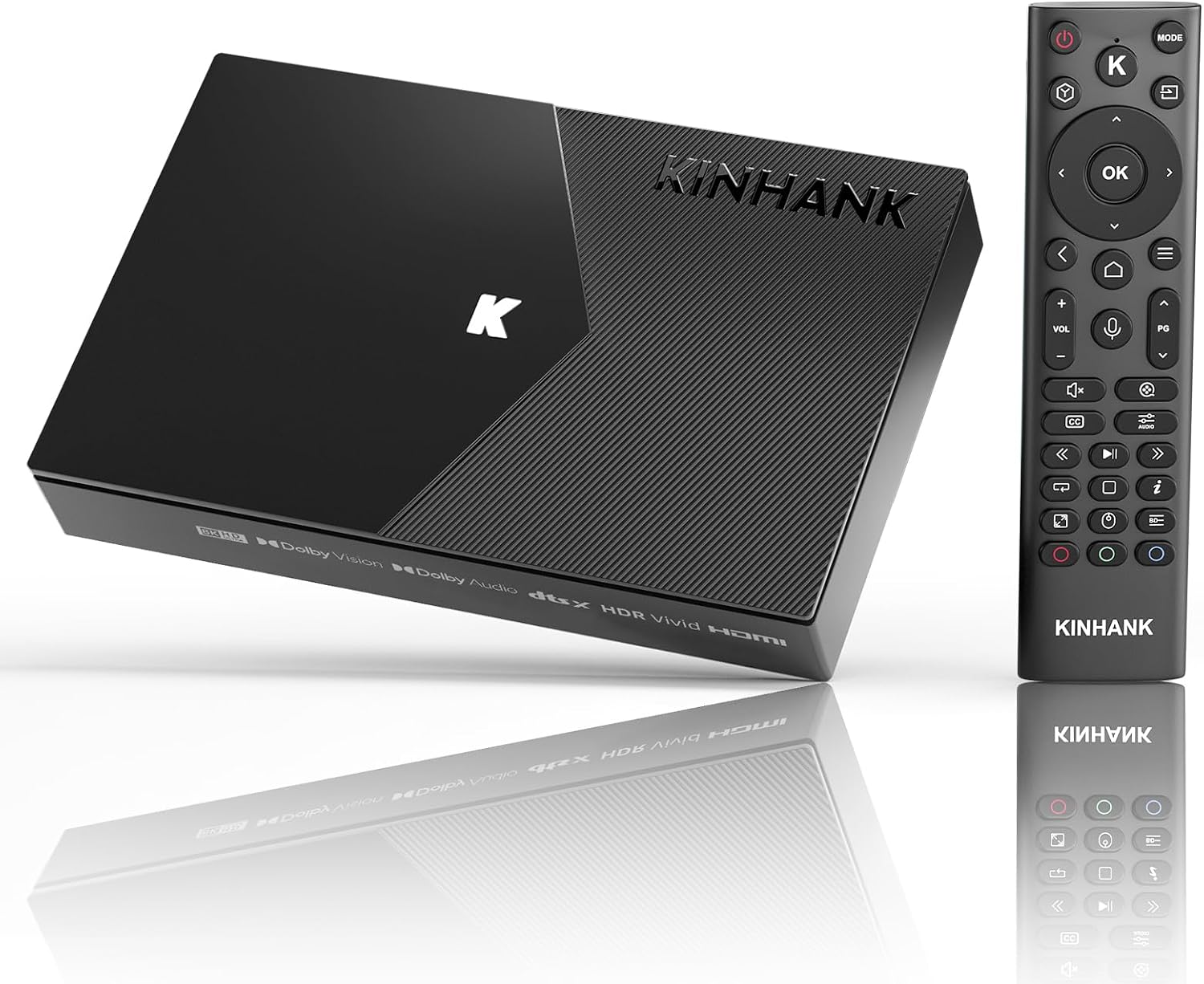
Image: The Kinhank K9 media player unit shown alongside its remote control, highlighting the sleek design of both components.
4. Product Overview
Front Panel
The front panel features the power indicator and an IR receiver for the remote control.
Rear Panel (Ports)

Image: A detailed view of the Kinhank K9's rear panel, illustrating the various input and output ports available for connectivity.
- DC IN: Power input port.
- USB 3.0: High-speed USB port for external storage or peripherals.
- USB 2.0: Standard USB port for external storage or peripherals.
- NET (RJ45): Gigabit Ethernet port for wired network connection.
- HDMI 2.1: High-definition multimedia interface for connecting to a TV or monitor.
- OPTICAL AUDIO: Optical digital audio output.
- AUDIO (3.5mm): Analog audio output.
5. Setup
5.1 Connecting to Your TV
- Connect one end of the HDMI cable to the HDMI OUT port on the K9 media player.
- Connect the other end of the HDMI cable to an HDMI IN port on your TV or display.
5.2 Powering On
- Connect the power adapter to the DC IN port on the K9 media player.
- Plug the power adapter into a wall outlet.
- The power indicator on the K9 will light up, and the device will automatically power on or enter standby mode.
- Turn on your TV and select the correct HDMI input source.
5.3 Network Connection
The K9 supports both wired and wireless network connections.
Wired Connection (Ethernet)
- Connect an Ethernet cable from your router to the NET port on the K9 media player.
- The device will automatically detect and connect to the wired network.

Image: A close-up of the Kinhank K9's Gigabit Ethernet port with an Ethernet cable connected, illustrating its high-speed data transfer capabilities.
Wireless Connection (Wi-Fi)
- Navigate to the Settings menu on the K9 interface.
- Select 'Network & Internet'.
- Turn on Wi-Fi and select your desired network from the list.
- Enter the Wi-Fi password if prompted.

Image: An illustration demonstrating the enhanced speed and stability of Wi-Fi 6 and Bluetooth 5.2 connectivity within a home environment, supported by the Kinhank K9.
6. Operating Instructions
6.1 Basic Navigation
Use the provided remote control to navigate the K9 interface. The directional pad and OK button are used for selection, while the Back button returns to the previous screen.
6.2 4-in-1 Multifunction Media
The K9 functions as a versatile media hub, supporting:
- Hard Disk Player: Play content directly from connected USB hard drives.
- Cloud Drive Player: Access and play media from cloud storage services like Google Drive and OneDrive.
- TV Box: Stream content from various online platforms.
- Home Sharing Server: Share media across your local network, accessible by mobile phones and computers.

Image: A visual representation of the Kinhank K9's 4-in-1 multifunction media capabilities, including Hard Disk Player, Cloud Drive Player, TV Box, and Home Sharing Server, with icons for Google Drive and OneDrive.
6.3 Montage Poster Wall Function
The Montage player allows for localized management of media from USB, SMB, NFS, and DAV sources. It automatically scrapes movie posters and organizes your video library, supporting NFO parsing and automatic classification.

Image: A screenshot of the Montage Poster Wall interface on a large screen, showing a categorized movie library with various posters, demonstrating its automatic scraping and organization features.
6.4 8K Ultra HD Resolution and HDR10+
The K9 supports true 8K@60fps output via HDMI 2.1, utilizing AV1 decoding technology and HDR10+ for enhanced picture quality. This delivers an immersive visual experience with vibrant colors and sharp detail.

Image: A split-screen comparison showing the difference between 8K and 4K resolution on a vibrant floral image, highlighting the superior detail and clarity of 8K provided by the Kinhank K9.
6.5 Playing BD Original Movies
The K9 media player is capable of smoothly playing ISO/BDMV BD original discs and supports a wide range of audio and video formats, ensuring compatibility with your existing media library.

Image: A large screen displaying a movie scene with vibrant colors, indicating the Kinhank K9's capability to play 8K BD HDD media smoothly, positioned on a media console below.
6.6 Audio Output
The K9 supports advanced audio formats including Dolby Atmos, Dolby TrueHD, Dolby Digital Plus, DTS-X, and DTS HD MA, providing a rich and immersive sound experience.

Image: A person relaxing on a couch, watching a concert on a large TV screen, with the Kinhank K9 media player visible. Overlays indicate support for Dolby Vision, Dolby Atmos, Dolby TrueHD, HDR10+, and DTS:X, emphasizing immersive audio and visual quality.
6.7 Wireless Connectivity
Equipped with WI-FI 6 and Bluetooth 5.2, the K9 ensures faster and more stable wireless connections for streaming and connecting peripherals.
- WI-FI 6: Supports 2.4G+5G dual-band for high-speed internet access.
- Bluetooth 5.2: For connecting wireless devices such as headphones, game controllers, and keyboards.

Image: A group of people watching content on a TV, with a smartphone in the foreground demonstrating screen mirroring capabilities via DLNA, Airplay, and Miracast, indicating seamless wireless content sharing with the Kinhank K9.
7. Maintenance
- Cleaning: Use a soft, dry cloth to clean the device. Do not use liquid or aerosol cleaners.
- Ventilation: Ensure the ventilation openings are not blocked to prevent overheating.
- Storage: When not in use for extended periods, store the device in a cool, dry place.
8. Troubleshooting
| Problem | Possible Cause | Solution |
|---|---|---|
| No power | Power adapter not connected or faulty. | Check power connections. Ensure the power outlet is working. |
| No picture on TV | Incorrect HDMI input selected on TV; HDMI cable loose or faulty. | Select the correct HDMI input on your TV. Reconnect or replace the HDMI cable. |
| No sound | Volume too low; audio settings incorrect; faulty audio cable. | Increase volume on TV/receiver. Check audio output settings on K9. Ensure audio cables are connected correctly. |
| Cannot connect to Wi-Fi | Incorrect password; out of range; router issue. | Verify Wi-Fi password. Move K9 closer to router. Restart router. |
| Remote control not working | Batteries low or inserted incorrectly; IR receiver blocked. | Replace batteries. Ensure line of sight to the K9's IR receiver. |
9. Specifications
| Feature | Detail |
|---|---|
| Model | K9 |
| Processor | 5-core 64bit S928X (1xA76+4xCortex-A55) |
| RAM | 4GB LPDDR4 |
| ROM | 64GB eMMC |
| GPU | ARM Mali-G57 MC2 |
| NPU | Up to 3.2TOPS |
| Video Output | 8K@60fps via HDMI 2.1 |
| Video Decoding | AV1, H.265, VP9, AVS3, etc. |
| HDR Support | HDR10+, Dolby Vision |
| Audio Support | Dolby Atmos, Dolby TrueHD, Dolby Digital Plus, DTS-X, DTS HD MA |
| Wi-Fi | Wi-Fi 6 (2.4G+5G Dual Band) |
| Bluetooth | BT 5.2 |
| Ethernet | 1000M Gigabit Ethernet |
| Ports | DC IN, USB 3.0, USB 2.0, NET (RJ45), HDMI 2.1, Optical Audio, 3.5mm Audio |
| Dimensions | 8 x 6 x 3 inches |
| Item Weight | 14.4 ounces |

Image: A detailed diagram of the Amlogic S928X-K chip, highlighting its key specifications including RAM, ROM, CPU, GPU, NPU, Process Node, Wi-Fi 6, BT 5.2, and Gigabit Ethernet, emphasizing the powerful internal components of the Kinhank K9.
10. Warranty and Support
Warranty Information
The Kinhank K9 media player comes with a standard manufacturer's warranty. Please refer to the warranty card included in your package for specific terms and conditions, including warranty period and coverage details. Keep your purchase receipt as proof of purchase for warranty claims.
Customer Support
For technical assistance, troubleshooting, or warranty inquiries, please contact Kinhank customer support through the following channels:
- Website: Visit the official Kinhank website for FAQs, support resources, and contact forms.
- Email: Refer to your product packaging or the official website for customer support email addresses.
- Online Retailer: For purchase-related issues, you may also contact the retailer where you purchased the product.
Ask a question about this manual
Ask about setup, troubleshooting, compatibility, parts, safety, or missing instructions. Manuals+ will review the question and use this page’s manual context to help answer it.