
CATLINK Luxury Pro-X Automatic Cat Litter Box User Manual
Model: PRO X (CL-06-N) | Brand: CATLINK
Introduction
Thank you for choosing the CATLINK Luxury Pro-X Automatic Cat Litter Box. This device is designed to simplify cat care by offering automatic self-cleaning, health monitoring, and odor control features. Please read this manual thoroughly before setup and operation to ensure proper use and maintenance of your litter box.
Safety Information
Your safety and the safety of your pet are paramount. Observe the following precautions:
- Pinch-Free Design: The unit incorporates smart sensors that detect movement and instantly pause cleaning cycles when a cat is nearby.
- Weight Sensors: Equipped with 4 gravity sensors for weight detection protection.
- Motor Protection: Features 2 motor protection programs, including startup self-check and anti-jamming.
- Safety Devices: Includes radar and anti-pinch sensors for enhanced safety.
- Placement: Always place the litter box on a firm, level surface. Avoid placing on carpets to prevent sensor interference and ensure stable operation.
- Weight Limit: Suitable for cats weighing between 3.5 lbs (1.6 kg) and 22 lbs (10 kg).
- Electrical Safety: Ensure the power cord is not damaged and is connected to a grounded outlet. Keep the unit away from water sources.
- Children and Pets: Do not allow children or pets to play with the device or its components.

This diagram highlights the safety mechanisms of the CATLINK Luxury Pro-X, such as gravity sensors for weight detection, motor protection, and anti-pinch sensors.
Package Contents
Verify that all items are present in the package:
- CATLINK Luxury Pro-X Automatic Cat Litter Box Unit
- Power Adapter
- Waste Liners (quantity may vary based on package)
- User Manual
Optional Accessories (Sold Separately)
- Trash Liner refills
- Ramp
- Litter Mat
- Cleaning Brush
- Smart Deodorizer
- Activated Carbon Filter Box
- Activated Carbon Filter
- C70 Odor Eliminator

A selection of optional accessories available for the CATLINK Luxury Pro-X, such as trash liners, ramps, litter mats, cleaning brushes, smart deodorizers, and activated carbon filters.
Product Overview
The CATLINK Luxury Pro-X is an advanced automatic litter box designed for multi-cat households, offering convenience and health monitoring capabilities.

The CATLINK Luxury Pro-X Automatic Cat Litter Box, shown with a cat, the companion mobile application, and a roll of waste liners.
Main Components
- Globe: The rotating chamber where the cat uses the litter.
- Base Unit: Contains the motor, sensors, and control panel.
- Waste Drawer: Located at the bottom front, collects waste.
- Control Panel: Buttons and indicators for manual operation and status.
- Litter Bed: The area inside the globe where litter is placed.

A visual representation of the spacious interior and wide entrance of the CATLINK Luxury Pro-X, suitable for cats weighing between 3.5 and 22 pounds.
Setup
Follow these steps to set up your CATLINK Luxury Pro-X:
- Unpacking: Carefully remove all components from the packaging. Retain packaging for future transport or storage.
- Placement: Place the litter box on a firm, level, and dry surface. Ensure there is sufficient space around the unit for proper ventilation and access for cleaning. Avoid placing it on carpets or uneven surfaces.
- Litter Filling: Open the globe and fill it with clumping cat litter. The unit is compatible with various litter types, including Bentonite, Mineral, Mixed, and Tofu litter. Do not exceed the maximum fill line.

The CATLINK Luxury Pro-X is compatible with various litter types, including Bentonite, Mineral, Mixed, and Tofu litter, using interchangeable filters.
- Power Connection: Connect the power adapter to the unit and then plug it into a wall outlet. The unit will perform an initial self-check.
- App Setup:
- Download the CATLINK Exclusive APP from your smartphone's app store.
- Create an account or log in.
- Follow the in-app instructions to connect your litter box to your home Wi-Fi network. Note: Requires a 2.4 GHz Wi-Fi connection.
- Once connected, you can monitor and control the device remotely.
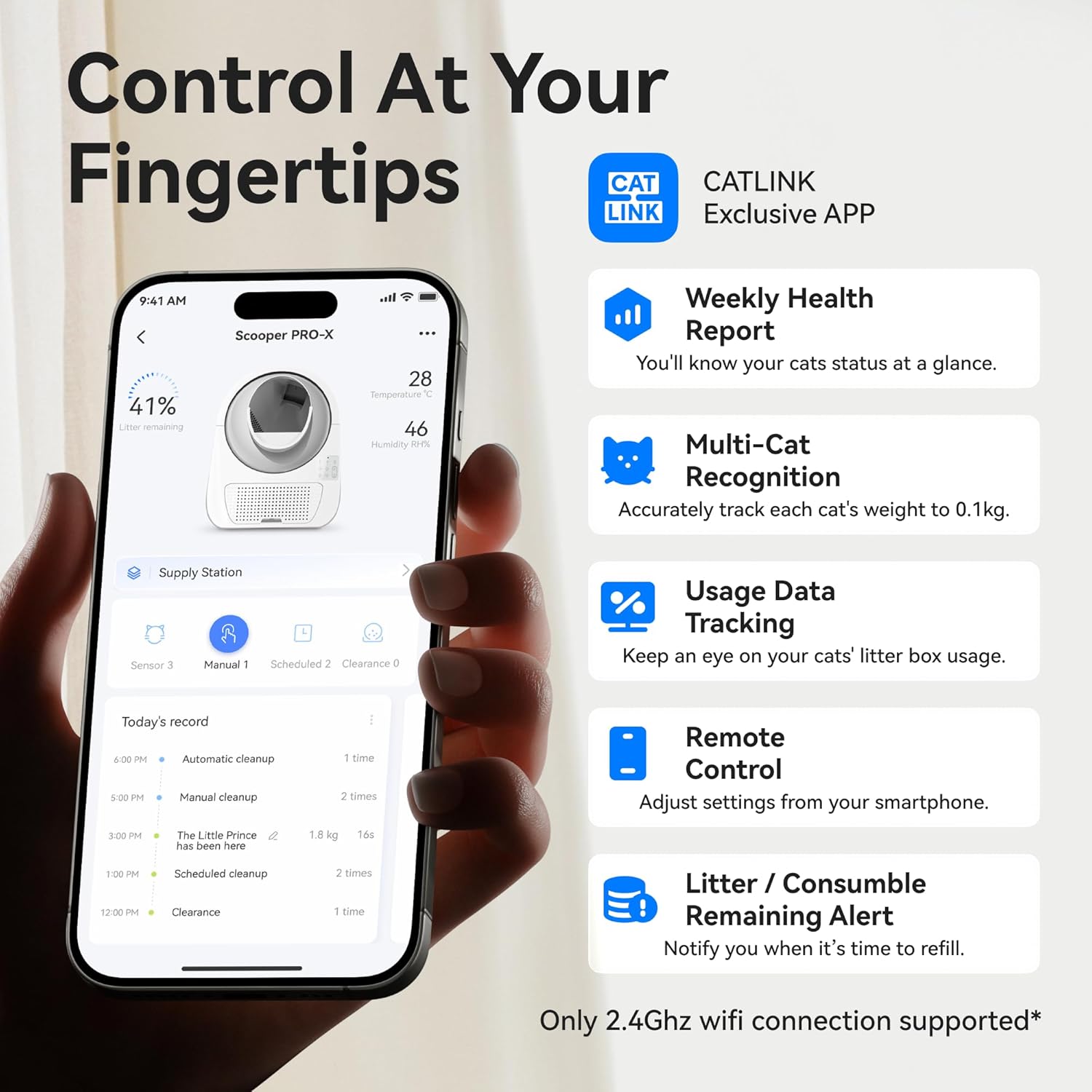
The CATLINK mobile application interface, demonstrating features such as health reports, multi-cat identification, usage statistics, and remote control capabilities.
Operating Instructions
The CATLINK Luxury Pro-X offers multiple operating modes and smart features:
Control Modes
- Auto Mode: The litter box automatically cleans after your cat uses it, based on preset delay times.
- Timer Mode: Schedule specific cleaning times through the app.
- Remote Mode: Initiate a cleaning cycle manually via the CATLINK app from anywhere.
- Manual Mode: Use the physical buttons on the control panel for immediate cleaning or other functions.

The CATLINK Luxury Pro-X offers convenient one-click cleaning, simplifying the process of emptying the litter box.
App Features
The CATLINK app provides comprehensive control and monitoring:
- Health Monitoring: Tracks cat weight, frequency of use, ambient temperature, and humidity. Provides daily alerts and 12-month wellness reports.
- Multi-Cat Recognition: Identifies individual cats (within the 3.5-22 lbs range) by weight, allowing you to monitor each cat's usage. Note: Cats weighing within 400g of each other may not be accurately distinguished.
- Usage Data Tracking: Records and displays historical usage data.
- Remote Control: Adjust settings, initiate cleaning, and receive notifications from anywhere.
- Litter/Consumable Alerts: Notifies you when it's time to refill litter or replace consumables.

An illustration of the CATLINK Luxury Pro-X's multi-cat recognition feature, where the app tracks individual cat usage and weight for households with multiple felines.
Cleaning Cycle and Odor Control
The unit automatically initiates a cleaning cycle after your cat exits. The globe rotates to sift waste into the sealed waste drawer. The integrated triple odor control system includes:
- Carbon Filter: Removes up to 90% of odors.
- Sealed Globe Chamber: Traps dust and scent.
- Built-in Active Deodorization System: Features an ozone generator, odor eliminator, and deep deodorization for a hygienic environment.

An overview of the CATLINK Luxury Pro-X's active deodorization system, featuring an ozone generator, odor eliminator, and deep deodorization for a fresh environment.
Customizing Scooping Time
To minimize litter sticking and maintain optimal hygiene, it is recommended to allow sufficient litter clumping time before initiating the cleaning cycle. This can be adjusted via the CATLINK app.

The CATLINK app allows users to customize scooping times, and the litter box features a non-stick bottom to prevent litter adhesion.
Maintenance
Regular maintenance ensures optimal performance and hygiene:
- Emptying the Waste Bin: The 13L waste bin can hold waste for up to 14 days for one cat. When the app indicates the bin is full, remove the drawer, tie the waste liner, and dispose of it. Replace with a new liner.
- Cleaning the Globe: The smooth, dirt-resistant PP interior of the globe can be wiped down or rinsed. For thorough cleaning, the globe is designed for easy disassembly. Ensure it is completely dry before reassembling and operating the unit.
- Carbon Filter Replacement: Replace the carbon filter periodically to maintain effective odor control. Refer to the app for alerts or recommended replacement intervals.
- General Cleaning: Wipe the exterior of the unit with a damp cloth. Do not submerge the base unit in water.

The CATLINK Luxury Pro-X is designed for easy maintenance, with a detachable globe that can be rinsed for thorough cleaning. Ensure all parts are completely dry before reassembly.
Troubleshooting
If you encounter issues with your CATLINK Luxury Pro-X, refer to the following common problems and solutions:
- Unit Not Cleaning:
- Check if the unit is powered on and properly connected.
- Ensure the waste drawer is correctly inserted.
- Verify that no cat is currently inside or near the unit, as safety sensors will pause operation.
- Check the litter level; if too low, it may prevent cleaning.
- App Connectivity Issues:
- Confirm your Wi-Fi network is 2.4 GHz.
- Ensure the litter box is within range of your Wi-Fi router.
- Restart your router and the litter box.
- Re-pair the device with the app if necessary.
- Inaccurate Cat Identification:
- The system may have difficulty distinguishing between cats with very similar weights (within 400g).
- Ensure the unit is on a stable, level surface, not on carpet, to prevent sensor interference.
- Odor Persistence:
- Check if the waste drawer is full and needs emptying.
- Replace the carbon filter if it's old.
- Ensure the waste drawer is sealed properly.
- Unusual Noise:
- Check for any obstructions inside the globe or waste drawer.
- Ensure the globe is properly seated and assembled.
For issues not covered here, please contact customer support.
Specifications
| Model Name | PRO X (CL-06-N) |
| Brand | CATLINK |
| Item Weight | 22 pounds (10 kg) |
| Product Dimensions (LxWxH) | 23.62 x 23.62 x 27.95 inches (60 x 60 x 71 cm) |
| Material | Acrylonitrile Butadiene Styrene (ABS) |
| Litter Box Type | Automated Self-Cleaning Litter Box |
| Target Audience | Cats (3.5 - 22 lbs / 1.6 - 10 kg) |
| Wi-Fi Connectivity | 2.4 GHz |
| Waste Bin Capacity | 13 Liters |
| Noise Level | Approximately 35 dB during operation |

The CATLINK Luxury Pro-X operates at an ultra-quiet 35 dB, ensuring minimal disturbance for both pets and owners, as depicted by a sleeping cat.
Warranty
The CATLINK Luxury Pro-X Automatic Cat Litter Box comes with a 1-year warranty from the date of purchase. This warranty covers manufacturing defects under normal use. Please retain your proof of purchase for warranty claims. For detailed terms and conditions, refer to the warranty card included with your product or contact customer support.
Customer Support
If you require further assistance, have questions about your product, or need to make a warranty claim, please contact CATLINK customer support. Refer to the contact information provided in your product packaging or on the official CATLINK website.


