
Introduction
This instruction manual provides detailed guidance on the safe and effective use of your tenwin TW9103 Electric Pencil Eraser. Please read this manual thoroughly before operating the device to ensure optimal performance and longevity. This battery-operated eraser is designed for precision erasing in various applications, including sketching, drafting, and general drawing.
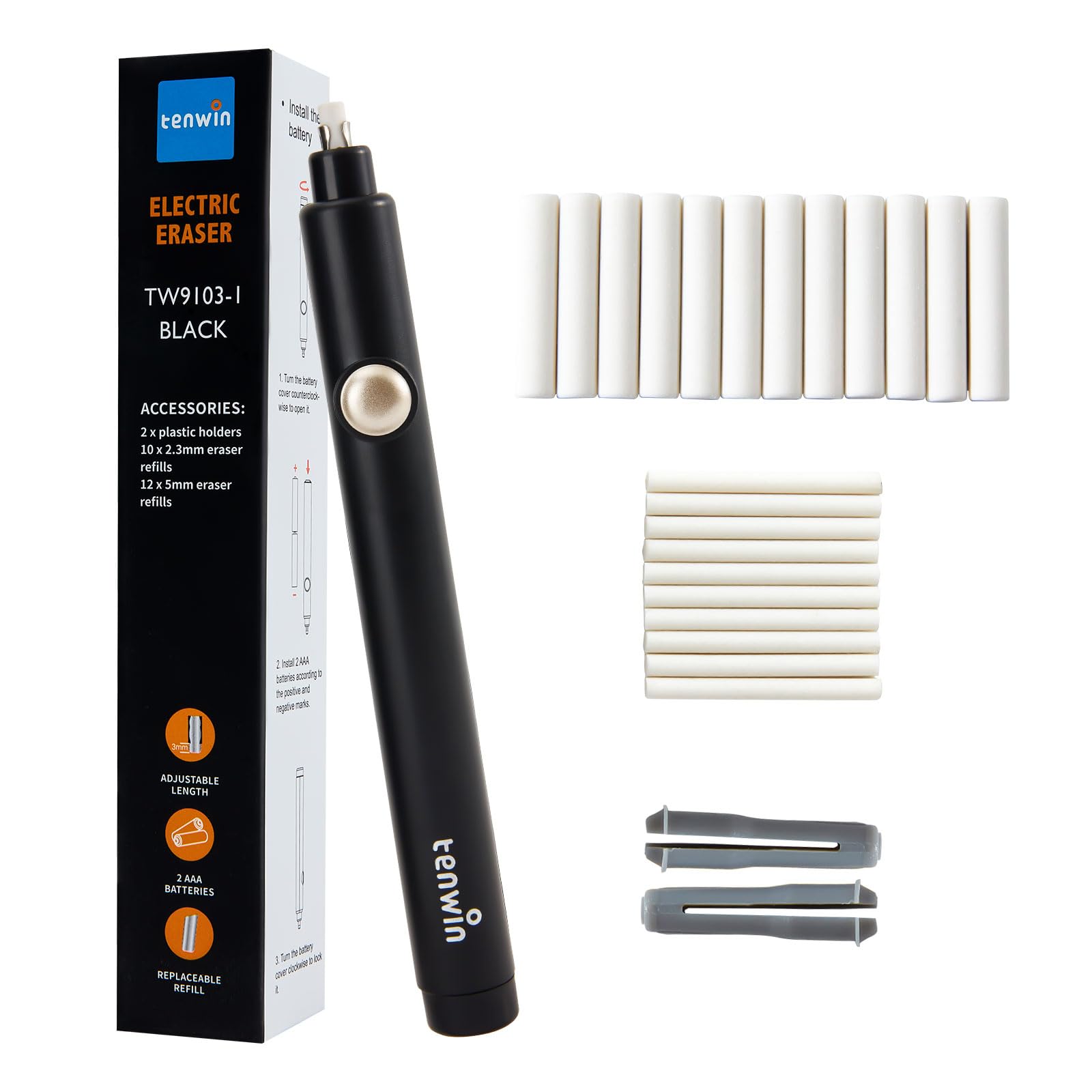
Image: The complete tenwin Electric Pencil Eraser kit, including the main electric eraser unit, 10 small eraser refills, 12 large eraser refills, and 2 plastic holders for the refills.
Setup
Battery Installation
- Gently push down and remove the battery cover from the rear of the eraser unit.
- Insert two AAA batteries, ensuring the positive (+) and negative (-) terminals align correctly as indicated inside the compartment.
- Replace the battery cover, aligning it properly and snapping it securely into place.

Image: Visual guide on how to correctly insert two AAA batteries into the eraser.
Eraser Refill Installation
- Remove the metal or plastic eraser holder from the tip of the electric eraser.
- Select the desired eraser refill (0.1-inch thin tip for precision or 0.2-inch thick tip for broader areas).
- Insert the chosen eraser refill into the holder, ensuring it is firmly seated.
- Reinsert the eraser holder with the refill into the electric eraser. For optimal performance, expose approximately 3-5mm of the eraser tip.
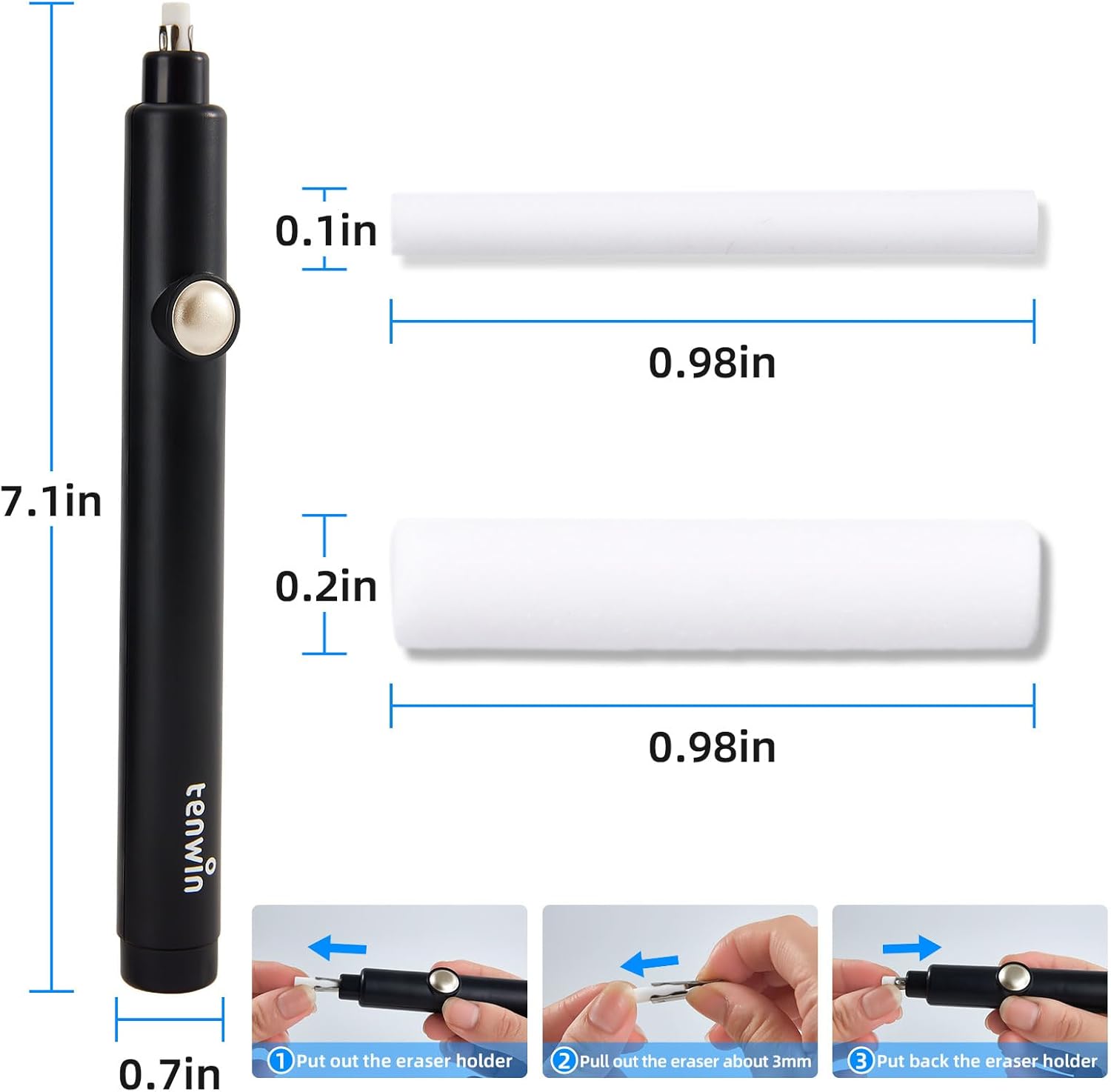
Image: This diagram illustrates the dimensions of the electric eraser and provides a step-by-step visual on how to properly insert and adjust the eraser refills.
Setup Demonstration Video
Video: This video demonstrates the unboxing, battery installation, and refill replacement process for a similar electric eraser, providing a visual guide for initial setup.
Operating Instructions
- Hold the electric eraser comfortably like a pen.
- Position the eraser tip over the area you wish to erase.
- Press and hold the power button located on the side of the eraser. The eraser tip will begin to rotate at high speed.
- Gently touch the rotating eraser tip to the pencil mark. Apply light pressure and move the eraser slowly over the area to be corrected. Avoid excessive pressure to prevent damage to the paper or the eraser mechanism.
- Release the power button to stop the eraser's rotation.
- Use the thin eraser tip for fine details and small corrections, and the thick eraser tip for larger areas or creating highlight effects.

Image: This visual guide outlines the essential steps for preparing and using the electric eraser, including activating it for erasing.

Image: A close-up view of both the thick and thin eraser tips, highlighting their different sizes for varied erasing needs.
Video: A brief user guide video demonstrating the basic function of an electric eraser, including activation and simple erasing tasks.
Maintenance
Replacing Eraser Refills
- When an eraser refill becomes worn or too short, turn off the device and remove the eraser holder.
- Carefully pull out the old eraser refill from the holder.
- Insert a new refill into the holder and reattach the holder to the eraser unit, exposing 3-5mm of the tip.

Image: This diagram illustrates the process of adjusting and replacing eraser refills, ensuring proper length for effective erasing.
Cleaning
- Periodically clean the eraser tip and the surrounding area of the device to remove eraser dust and debris.
- Use a soft, dry cloth or a small brush to gently wipe away any residue.
- Do not use water or chemical cleaners on the device.
Troubleshooting
Eraser not turning on
- Check if the batteries are correctly installed with the correct polarity.
- Replace the batteries with fresh AAA batteries if they are depleted.
Eraser not erasing effectively
- Ensure the eraser tip is extended sufficiently (3-5mm) from the holder.
- Replace the eraser refill if it is worn down or hardened.
- Apply gentle, consistent pressure. Excessive pressure can slow down the motor or damage the paper.
Eraser making unusual noise
- Check for any obstructions around the eraser tip or within the holder.
- Ensure the eraser refill is properly seated and not loose.
Specifications
| Feature | Detail |
|---|---|
| Brand | tenwin |
| Model Number | TW9103 |
| Item Weight | 2.08 ounces |
| Package Dimensions | 7.13 x 1.26 x 1.26 inches |
| Color | Black |
| Shape | Round |
| Material Type | Acrylonitrile Butadiene Styrene (ABS) |
| Power Source | 2 AAA batteries (not included) |
| Eraser Sizes | 0.1 inch (thin), 0.2 inch (thick) |
| Special Feature | Cordless, Refillable |
| Recommended Uses | Drawing, Sketching, Drafting |
Warranty
This product is covered by a 30-day return/replacement policy from the date of purchase. Please refer to your retailer's return policy for specific details.
Support
For any questions, concerns, or technical assistance, please contact tenwin customer support through the retailer's platform or visit the official tenwin store online.