
1. Introduction
The Guide TB 630 LRF is a compact and lightweight thermal imaging clip-on system designed to transform your daylight riflescope into a high-definition thermal imaging scope. It features a 640x512 resolution thermal sensor, an integrated laser rangefinder, and compatibility with the TargetIR app for advanced functionalities. This manual provides essential information for the proper setup, operation, and maintenance of your device.
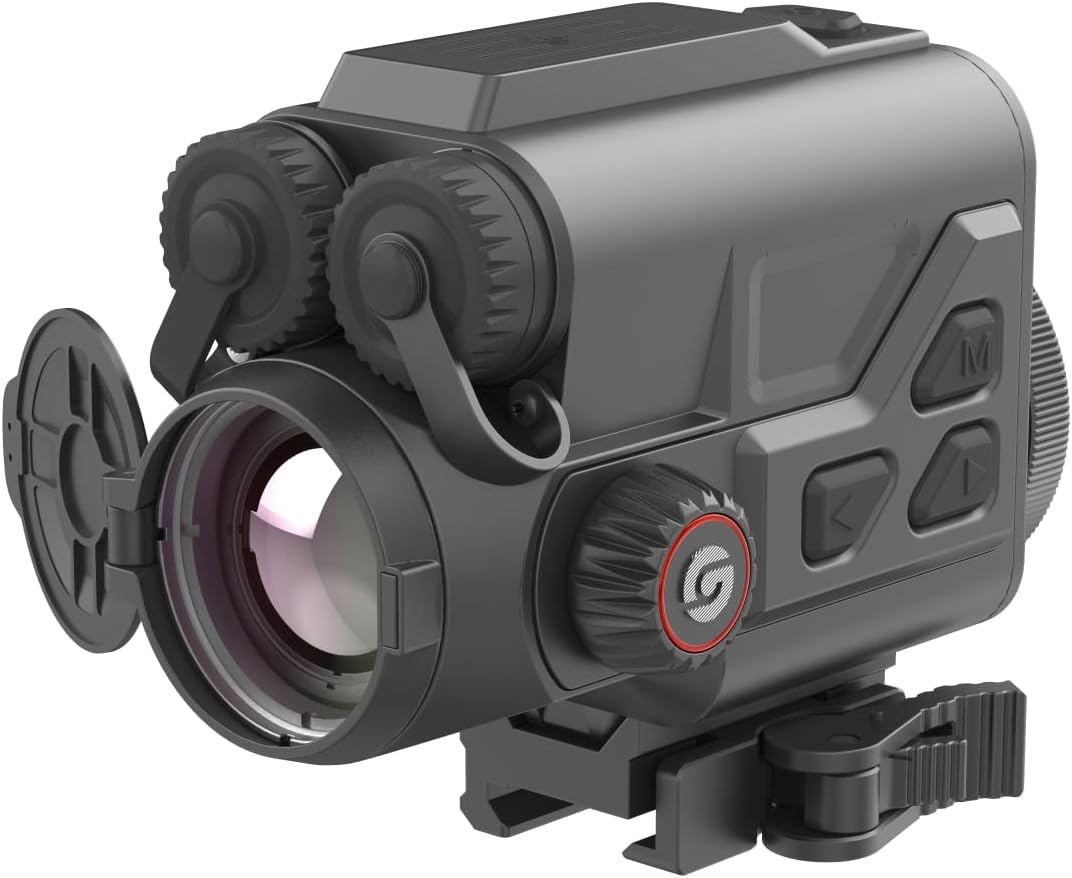
Figure 1.1: Guide TB 630 LRF Thermal Imaging Clip-On System, front-side view.
2. Safety Information
Please read and understand all safety warnings and instructions before using the device. Failure to do so may result in injury or damage to the device.
- Do not look directly at the sun or other strong light sources through the device, as this may cause permanent eye damage.
- Keep the device away from extreme temperatures, humidity, and direct sunlight.
- Do not attempt to disassemble or modify the device. Refer all servicing to authorized personnel.
- Use only the specified batteries and charging accessories.
- Ensure the device is securely mounted before use to prevent accidental drops.
- Dispose of batteries according to local regulations.
3. Package Contents
Verify that all items are present in the package:
- Guide TB 630 LRF Thermal Clip-On System
- Picatinny Mount
- User Manual (this document)
- Charging Cable
- Protective Carrying Case
4. Product Overview
The Guide TB 630 LRF is engineered for precision and ease of use, offering advanced thermal imaging capabilities for various applications.
Key Features:
- High-Sensitivity Thermal Sensor: Features a 640x512 resolution thermal sensor with a 12µm high-sensitivity detector and 20mK NETD for precise thermal imaging.
- Integrated Laser Rangefinder: Provides accurate distance measurements up to 1090 yards.
- Quick Release Picatinny Mount: Allows for rapid attachment and detachment to your daylight riflescope without tools.
- Long Operation Time: Up to 6 hours of continuous operation on a single charge with replaceable and rechargeable batteries.
- TargetIR App Compatibility: Supports built-in recording, picture capture, Wi-Fi hotspot, and a ballistic calculator via the TargetIR app (available on App Store and Google Play).
- Full HD Display: 1920x1080 display ensures optimal viewing experience, even at higher magnification.
- Durable Design: IP68 protection rating for robust performance in various environments.

Figure 4.1: Side view of the Guide TB 630 LRF, highlighting control buttons.
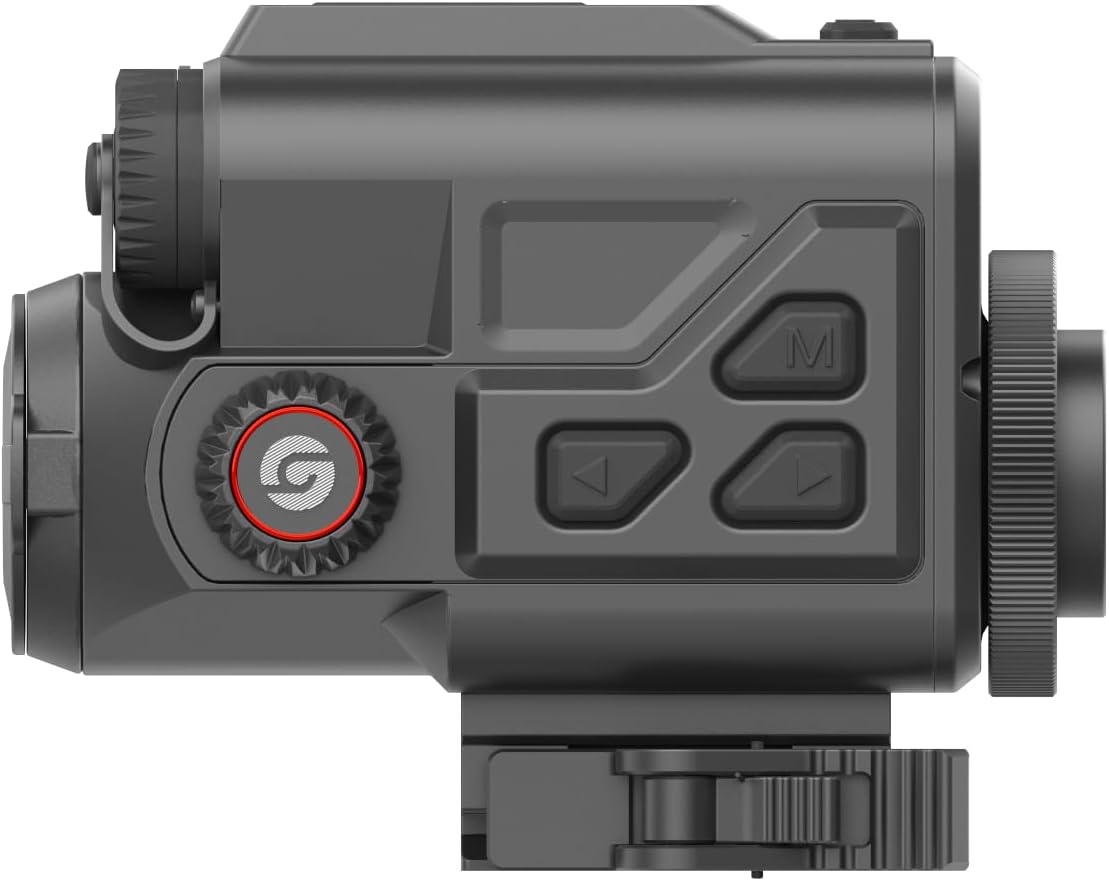
Figure 4.2: Top view of the Guide TB 630 LRF, showing the focus and diopter adjustments.
5. Setup
5.1 Battery Installation
- Locate the battery compartment on the device.
- Open the battery compartment cover.
- Insert the rechargeable batteries according to the polarity indicators.
- Close the battery compartment cover securely.
- Charge the device fully before first use using the provided charging cable.
5.2 Mounting the Device
The Guide TB 630 LRF utilizes a quick-release Picatinny mount for easy attachment to your daylight riflescope.
- Ensure your riflescope has a compatible Picatinny rail.
- Align the Picatinny mount on the TB 630 LRF with the rail on your riflescope.
- Engage the quick-release mechanism to secure the device firmly to the rail.
- Verify that the device is stable and does not wobble.
5.3 Initial Power On
- Press and hold the power button (usually marked with a power symbol) for a few seconds until the display illuminates.
- Allow the device to complete its startup sequence.
- Adjust the diopter and focus rings for a clear image.
6. Operating the Device
6.1 Basic Operation
- Power On/Off: Press and hold the power button.
- Menu Navigation: Use the directional buttons (up, down, left, right) and the 'M' (Menu/Confirm) button to navigate through the device's settings and options.
- Brightness/Contrast: Adjust display settings via the menu for optimal viewing in different light conditions.
6.2 Thermal Imaging
The device automatically displays thermal imagery upon power-on. You can adjust various thermal settings:
- Color Palettes: Select from different color palettes (e.g., White Hot, Black Hot, Red Hot) to best suit your observation needs.
- Digital Zoom: Use the zoom function to magnify the thermal image.
- Image Calibration: Perform NUC (Non-Uniformity Correction) or shutter calibration as needed to maintain image quality.
6.3 Laser Rangefinder (LRF)
To use the integrated laser rangefinder:
- Aim the device at your target.
- Press the dedicated LRF button (refer to your device's button layout).
- The measured distance will be displayed on the screen.
6.4 Recording and Sharing
The TB 630 LRF supports built-in recording and picture capture, along with Wi-Fi hotspot functionality for seamless integration with the TargetIR app.
- Photo/Video Capture: Press the designated button to capture still images or start/stop video recording.
- Wi-Fi Hotspot: Activate the Wi-Fi hotspot from the device menu. Connect your smartphone or tablet to the device's Wi-Fi network.
- TargetIR App: Download the TargetIR app from the App Store or Google Play. Use the app to view live feed, manage captured media, and utilize the ballistic calculator.
7. Maintenance
7.1 Cleaning
- Lenses: Use a soft, lint-free cloth specifically designed for optics. Gently wipe the lens surfaces. For stubborn smudges, use a small amount of lens cleaning solution.
- Device Body: Wipe the exterior with a soft, damp cloth. Do not use abrasive cleaners or solvents.
- Ensure all covers and caps are closed when not in use to protect against dust and moisture.
7.2 Storage
- Store the device in a cool, dry place, away from direct sunlight and extreme temperatures.
- If storing for an extended period, remove the batteries to prevent leakage.
- Use the provided protective carrying case for transport and storage.
7.3 Battery Care
- Recharge batteries regularly, even if the device is not in frequent use, to maintain battery health.
- Avoid fully discharging the batteries whenever possible.
- Do not expose batteries to high temperatures or puncture them.
8. Troubleshooting
If you encounter issues with your Guide TB 630 LRF, refer to the table below for common problems and solutions.
| Problem | Possible Cause | Solution |
|---|---|---|
| Device does not power on. | Low or dead battery; Incorrect battery installation; Device malfunction. | Charge or replace batteries; Reinstall batteries correctly; Contact customer support. |
| Poor image quality / Blurry image. | Lens dirty; Focus or diopter not adjusted; NUC needed. | Clean lenses; Adjust focus and diopter; Perform NUC calibration. |
| Laser Rangefinder not working. | Obstructed path; Target too far or too close; Device malfunction. | Ensure clear line of sight; Check target distance within range; Contact customer support. |
| Cannot connect to TargetIR app. | Wi-Fi hotspot not enabled; Incorrect Wi-Fi password; App not updated. | Enable Wi-Fi hotspot on device; Verify password; Update TargetIR app. |
9. Technical Specifications
| Feature | Specification |
|---|---|
| Model Name | Guide TB 630 LRF |
| Brand | Guide Sensmart |
| Thermal Sensor Resolution | 640x512 |
| NETD | 20mK |
| Laser Rangefinder Detection Range | 1090 yards |
| Display Resolution | 1920x1080 (Full HD) |
| Battery Life | Up to 6 hours |
| Product Dimensions | 5"L x 3.5"W x 3.5"H |
| Item Weight | 3 Pounds |
| Material | Metal |
| Mounting Type | Picatinny Mount |
| Color | Black |
| IP Rating | IP68 |
10. Warranty and Support
Guide Sensmart stands behind the quality of its products.
- Warranty: The Guide TB 630 LRF comes with a 10-year warranty on the optic and its thermal sensor.
- Repair Center: For service or repairs, Guide Sensmart operates a Texas-based repair center to ensure prompt assistance.
- Contact Support: For further assistance, technical support, or warranty claims, please refer to the contact information provided on the official Guide Sensmart website or your purchase documentation.