
1. Introduction
This manual provides essential information for the safe and efficient operation, maintenance, and troubleshooting of your Orion Motor Tech 2 Stage A2L Vacuum Pump. Please read this manual thoroughly before using the product to ensure proper function and to prevent injury or damage.
The Orion Motor Tech 2 Stage A2L Vacuum Pump is designed for professional use in various applications, including automotive HVAC servicing, industrial processes, electronics manufacturing, scientific research, and vacuum drying. Its two-stage design ensures high pumping efficiency and a deep vacuum for effective system evacuation.

Image 1.1: The Orion Motor Tech 2 Stage A2L Vacuum Pump, a robust unit with a blue handle and base, designed for efficient vacuum operations.
2. Safety Information
Always observe the following safety precautions to reduce the risk of injury or damage to the equipment.
- Read All Instructions: Familiarize yourself with the pump's operation and safety guidelines before use.
- Personal Protective Equipment (PPE): Always wear safety glasses and gloves when operating or servicing the pump.
- Electrical Safety: Ensure the power supply matches the pump's requirements. Do not operate the pump with damaged cords or plugs. Disconnect power before performing any maintenance.
- Ventilation: Operate the pump in a well-ventilated area.
- Refrigerant Handling: This pump is equipped for A2L and other mildly flammable refrigerants. Always follow industry standards and local regulations for handling refrigerants. The sparkless ignition-proof ON/OFF switch provides an added safety measure for these refrigerants.
- Oil Level: Regularly check and maintain the correct oil level. Operating without sufficient oil can cause damage.
- Hot Surfaces: The pump may become hot during operation. Avoid direct contact with hot surfaces.
- Stable Placement: Place the pump on a stable, level surface to prevent tipping.
- Detachable Cable: Utilize the detachable power cable for safe storage and to prevent cable damage.

Image 2.1: The sparkless ignition-proof design of the vacuum pump, featuring an ignition-proof ON/OFF switch for safe use with A2L and mildly flammable refrigerants.
3. Product Overview
3.1 Key Features
- Safe Sparkless Operation: Equipped with an ignition-proof ON/OFF switch for spark-free operation with A2L or other mildly flammable refrigerants.
- High Pumping Efficiency: Features a 1720 rpm motor, 9 cfm flow rate, and pulls a deep vacuum of 1.5 microns for fast and efficient evacuations.
- Minimized Oil Mist & Noise: Includes an oil mist-limiting cap on the combined oil fill/exhaust port, reducing oil mist. Operates at or below 70 dB for a quieter workspace.
- Safe & Easy to Store: Detachable cable for neat storage and pump protection. Built-in backflow prevention safeguards the pump by stopping gas from reversing after shutdown.
- Wide Application: Compatible with 1/4" SAE, 3/8" SAE, and 1/2" ACME hoses, suitable for automotive HVAC, industrial processing, electronics manufacturing, vacuum packaging, and more.
3.2 Components
The vacuum pump consists of the main pump unit, motor, oil reservoir, inlet ports, exhaust port, and control switch. Refer to the product images for visual identification of components.

Image 3.1: Diagram illustrating the high efficiency of the 2-stage vacuum pump, detailing its 1.5 micron ultimate partial pressure vacuum, 9 cfm flow rate, and 1720 rpm motor speed.
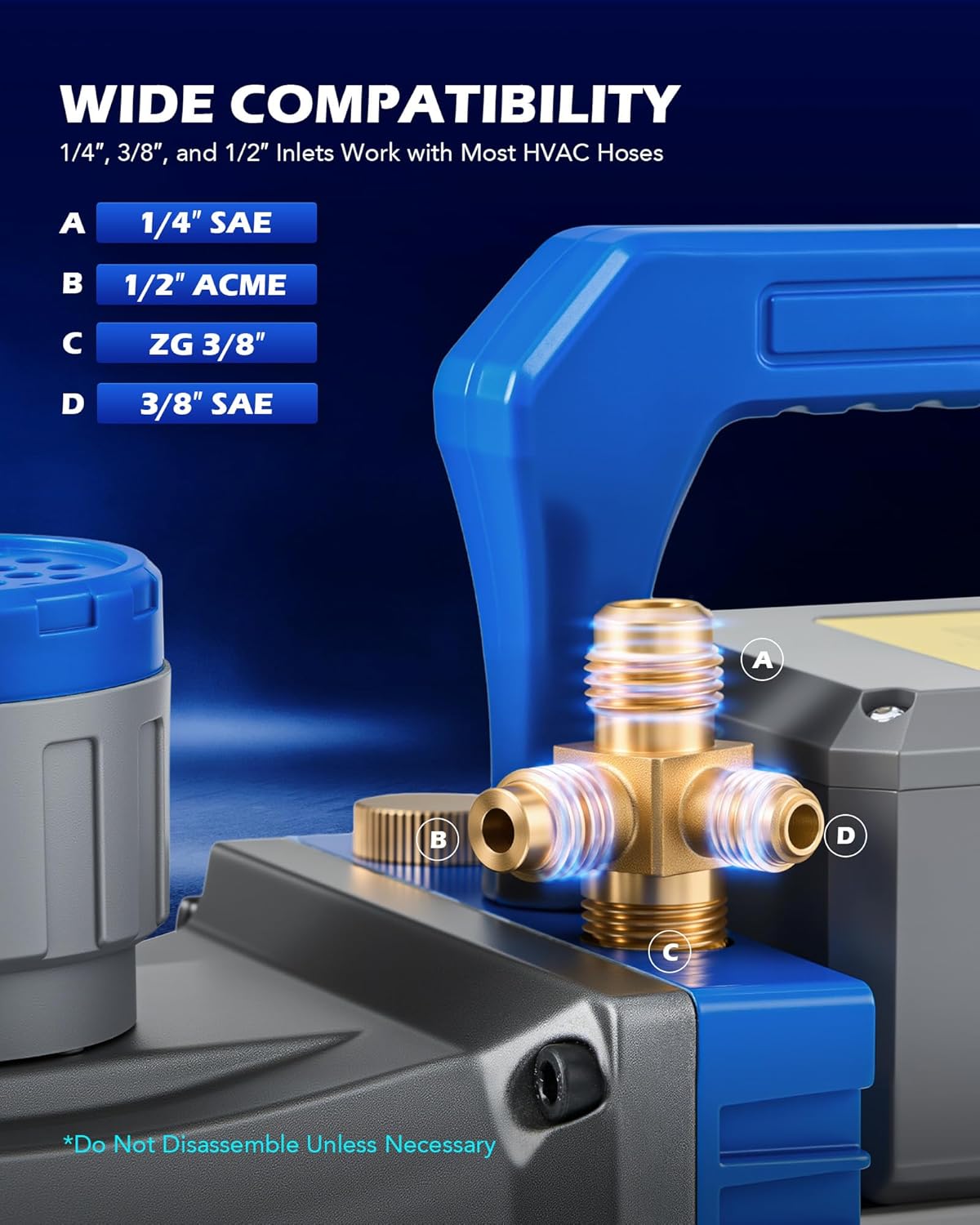
Image 3.2: Close-up of the vacuum pump's inlet ports, showing compatibility with 1/4" SAE, 1/2" ACME, ZG 3/8", and 3/8" SAE hoses.
3.3 Additional Design Features

Image 3.3: Illustrates additional features such as the detachable power cable for easy storage, reinforced bottom for stability, and built-in fan for efficient cooling.
4. Setup
4.1 Unpacking and Inspection
- Carefully remove the pump and all accessories from the packaging.
- Inspect the pump for any signs of shipping damage. If damage is found, do not operate the pump and contact customer support.
- Ensure all items listed in the "What's in the Box" section are present.
4.2 Adding Vacuum Pump Oil
The pump is shipped without oil in the reservoir. It is crucial to add the provided vacuum pump oil before initial operation.
- Locate the oil fill cap, typically on top of the oil reservoir.
- Remove the oil fill cap.
- Slowly pour the provided vacuum pump oil into the reservoir until the oil level is between the MIN and MAX marks on the sight glass. Do not overfill.
- Replace the oil fill cap securely.
4.3 Electrical Connection
- Connect the detachable power cable to the pump's power inlet.
- Plug the power cable into a grounded electrical outlet with the correct voltage and frequency as specified on the pump's label.
5. Operating Instructions
5.1 Pre-Operation Checks
- Verify the oil level is correct.
- Ensure all connections to the system being evacuated are secure and leak-free.
- Confirm the pump is placed on a stable surface.
5.2 Evacuation Procedure
- Connect the appropriate vacuum hose from the system to one of the pump's inlet ports (1/4" SAE, 3/8" SAE, or 1/2" ACME). Ensure a tight seal.
- Open any valves on the manifold or system to allow for evacuation.
- Turn the pump ON using the ignition-proof switch. The pump will begin to pull a vacuum.
- Monitor the vacuum gauge (not included) to observe the evacuation progress. Allow the pump to run until the desired vacuum level is achieved. For deep vacuum applications, this may take some time.
- Once the desired vacuum is reached, close the system's valves to isolate the vacuum.
- Turn the pump OFF.
- Disconnect the vacuum hose from the pump.
Note: The built-in backflow prevention mechanism helps maintain the vacuum in the system after the pump is shut off, preventing gas from reversing.
6. Maintenance
Regular maintenance ensures the longevity and optimal performance of your vacuum pump.
6.1 Oil Change
Vacuum pump oil should be changed regularly, especially after each use or if it appears discolored or contaminated. Contaminated oil reduces pump efficiency and can cause damage.
- Ensure the pump is OFF and disconnected from power.
- Place a suitable container under the oil drain plug, usually located at the bottom or side of the oil reservoir.
- Remove the oil drain plug and allow all old oil to drain completely.
- Replace the oil drain plug securely.
- Remove the oil fill cap and add new, clean vacuum pump oil until the level is between the MIN and MAX marks on the sight glass.
- Replace the oil fill cap.
Dispose of used oil responsibly according to local regulations.
6.2 Cleaning
- Keep the exterior of the pump clean and free of dust and debris. Use a damp cloth for cleaning.
- Periodically check the oil mist-limiting cap for any blockages and clean if necessary to ensure proper exhaust.

Image 6.1: The vacuum pump featuring an oil fill/exhaust port with a mist-limiting cap, designed to reduce oil mist and maintain quiet operation below 70 dB.
7. Troubleshooting
This section addresses common issues you might encounter with your vacuum pump. For problems not listed here, please contact customer support.
| Problem | Possible Cause | Solution |
|---|---|---|
| Pump does not start | No power; faulty switch; motor issue | Check power connection and outlet. Ensure switch is ON. If problem persists, contact support. |
| Pump runs but does not pull vacuum or pulls slowly | Low oil level; contaminated oil; system leak; clogged inlet/exhaust; worn vanes | Check and refill/change oil. Check all system connections for leaks. Inspect inlet/exhaust for blockages. If issue continues, professional service may be required. |
| Excessive noise or vibration | Low oil level; pump not on level surface; internal mechanical issue | Check oil level. Ensure pump is on a stable, level surface. If noise is unusual or severe, discontinue use and contact support. |
| Oil mist from exhaust | Normal during operation; oil mist cap dirty/missing | A slight amount of oil mist is normal. Ensure the oil mist-limiting cap is clean and properly installed. |
8. Specifications
| Feature | Detail |
|---|---|
| Model Number | MPNVPHE002-01 |
| Flow Rate (FAD) | 9 cfm (0.3 m³/min) |
| Motor Speed | 1720 rpm |
| Ultimate Partial Pressure Vacuum | 1.5 Microns (0.2 Pa) |
| Ultimate Total Pressure Vacuum | 37.5 Microns (5 Pa) |
| Number of Stages | 2 |
| Refrigerant Compatibility | A2L (R1234yf, R32), A2 (R142b, R152a), A1 (R134a, R410A, R22) |
| Inlet Port Compatibility | 1/4" SAE, 3/8" SAE, 1/2" ACME |
| Operating Noise Level | ≤70 dB |
| Package Dimensions | 17.5 x 12.5 x 12.5 inches |
| Item Weight | 26.05 Pounds |
| Manufacturer | Orion Motor Tech |
9. What's in the Box
- 1x Orion Motor Tech 2 Stage A2L Vacuum Pump
- 1x Series Vacuum Pump Oil
- 1x Instructions (this manual)
10. Warranty and Support
For warranty information, technical support, or service inquiries, please contact Orion Motor Tech customer service. Refer to the product packaging or the official Orion Motor Tech website for the most current contact details.
When contacting support, please have your product model number (MPNVPHE002-01) and purchase date available.


