
1. Important Safety Instructions
Read all instructions carefully before using this product. Failure to follow these instructions may result in electric shock, fire, or serious injury.
- Always wear eye protection and protective clothing when working with batteries.
- Do not expose the jump starter to rain or wet conditions.
- Do not operate the jump starter if it has been dropped or damaged.
- Keep out of reach of children.
- Ensure proper ventilation during use.
- Avoid creating sparks near the battery.
- Do not short-circuit the output terminals.
- Do not attempt to jump start a frozen battery.
- Disconnect the jump starter from the vehicle battery immediately after the vehicle starts.
2. Product Overview
The ABSAAR AB-MJS 400 is a versatile 3-in-1 device designed for emergency vehicle starting, portable device charging, and illumination. It features a robust 13,800 mAh lithium-ion battery.
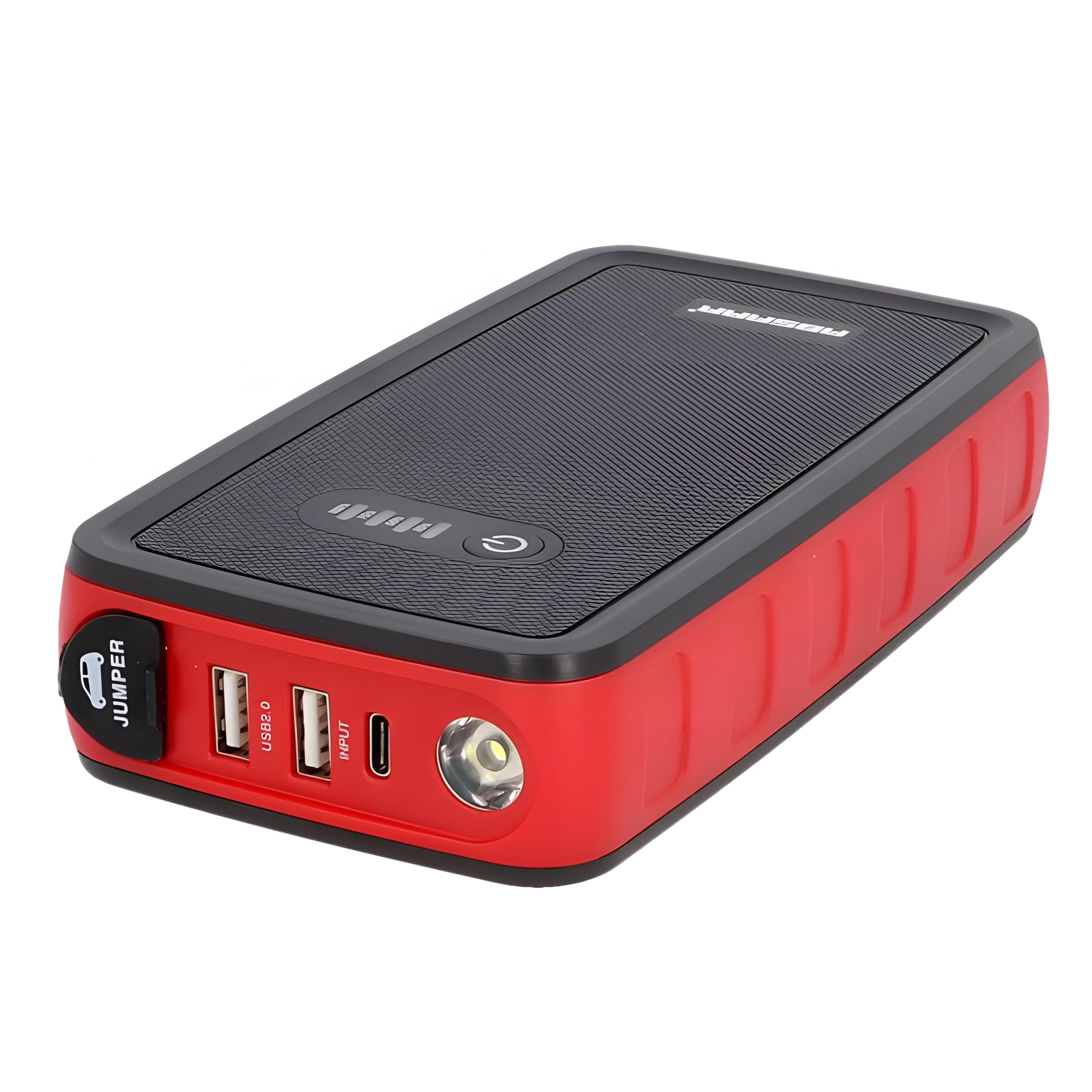
Image: The ABSAAR AB-MJS 400 Jump Starter unit, showing its compact design, integrated LED flashlight, and connection ports for jump cables and USB devices. The jump cables with red and black clamps are also visible.
Key Features:
- 3-in-1 Functionality: Jump Starter, Power Bank, LED Flashlight.
- Battery Capacity: 13,800 mAh.
- Starting Current: 200 A (continuous), 400 A (peak).
- Engine Compatibility: Suitable for gasoline engines up to 3000 cc and diesel engines up to 2000 cc.
- Safety Protections: Reverse polarity and short-circuit protection.
- Charging Output: USB output for charging mobile devices.
- Charging Input: USB-C (5 V/2 A).
Package Contents:
- ABSAAR AB-MJS 400 Jump Starter Unit
- Smart Jump Cables with Clamps (Red for positive, Black for negative)
- USB-C Charging Cable
- User Manual
3. Setup and Initial Charging
Before first use, fully charge the ABSAAR AB-MJS 400 Jump Starter. It is recommended to charge the device after each use and at least every 3-6 months to maintain battery health.
Charging Procedure:
- Connect the supplied USB-C charging cable to the USB-C input port on the jump starter.
- Connect the other end of the USB-C cable to a compatible USB power adapter (5V/2A, not included) or a powered USB port.
- The indicator lights on the jump starter will illuminate to show the charging status. All lights will be solid when fully charged.
- Once fully charged, disconnect the charging cable.
4. Operating Instructions
4.1. Jump Starting a Vehicle
Ensure the jump starter is sufficiently charged (at least 75% battery indicator) before attempting to jump start a vehicle.
- Turn off the vehicle's ignition and all accessories (lights, radio, air conditioning).
- Connect the red (+) clamp of the smart jump cables to the positive (+) terminal of the vehicle's battery.
- Connect the black (-) clamp of the smart jump cables to the negative (-) terminal of the vehicle's battery or to a solid, unpainted metal part of the vehicle's engine block or chassis, away from the battery.
- Plug the smart jump cable connector into the jump start port on the ABSAAR AB-MJS 400 unit. Ensure a secure connection.
- Check the indicator lights on the smart jump cable. A solid green light indicates a correct connection and readiness to start. If a red light or warning sound occurs, check connections for reverse polarity or short circuit.
- Start the vehicle's engine. If it doesn't start immediately, wait at least 30 seconds before trying again. Do not crank for more than 3 seconds per attempt.
- Once the vehicle starts, immediately disconnect the smart jump cable connector from the ABSAAR AB-MJS 400 unit.
- Then, disconnect the black (-) clamp from the vehicle, followed by the red (+) clamp.
Note: The AB-MJS 400 features reverse polarity and short-circuit protection to prevent damage from incorrect connections.
4.2. Using as a Power Bank
The ABSAAR AB-MJS 400 can charge various USB-powered devices.
- Connect your device's USB charging cable to the USB output port on the jump starter.
- Connect the other end of the cable to your mobile phone, tablet, or other USB-powered device.
- The jump starter will automatically begin charging your device.
- Disconnect your device once charging is complete.
4.3. Using the LED Flashlight
The integrated LED flashlight provides illumination in low-light conditions.
- To turn on the flashlight, press and hold the power button for approximately 3 seconds.
- Press the power button again to cycle through different light modes (e.g., solid, strobe, SOS, if available).
- To turn off the flashlight, press and hold the power button again for approximately 3 seconds.
5. Maintenance
Proper maintenance ensures the longevity and optimal performance of your ABSAAR AB-MJS 400 Jump Starter.
- Recharge Regularly: Recharge the unit after each use. If not used, recharge at least every 3-6 months to prevent deep discharge and extend battery life.
- Cleaning: Wipe the unit with a dry, soft cloth. Do not use harsh chemicals or abrasive cleaners. Ensure all ports are free of dust and debris.
- Storage: Store the jump starter in a cool, dry place, away from direct sunlight, moisture, and extreme temperatures. Keep it away from flammable materials.
- Cable Inspection: Periodically inspect the jump cables and clamps for any signs of damage, wear, or corrosion. Replace if necessary.
6. Troubleshooting
If you encounter issues with your ABSAAR AB-MJS 400, refer to the following common troubleshooting steps:
- Unit Not Turning On/Charging:
- Ensure the unit is charged. Connect it to a power source using the USB-C cable.
- Check the charging cable and adapter for damage.
- Vehicle Not Starting:
- Verify the jump starter has sufficient charge (at least 75%).
- Ensure the smart jump cables are correctly connected: red to positive (+), black to negative (-) or chassis.
- Check for a solid green light on the smart jump cable connector. If red, recheck connections.
- Ensure the jump cable connector is fully inserted into the jump starter port.
- The vehicle battery might be severely discharged or damaged. Consult a professional.
- The vehicle's engine size might exceed the jump starter's capacity.
- Device Not Charging from Power Bank:
- Ensure the jump starter has sufficient charge.
- Check the USB cable connecting your device to the jump starter for damage.
- Verify your device is compatible with USB charging.
If problems persist, contact customer support.
7. Specifications
| Feature | Specification |
|---|---|
| Model | AB-MJS 400 |
| Battery Capacity | 13,800 mAh |
| Peak Current (12V) | 400 A |
| Starting Current (12V) | 200 A |
| Voltage | 12 Volts (DC) |
| Gasoline Engine Compatibility | Up to 3000 cc |
| Diesel Engine Compatibility | Up to 2000 cc |
| Charging Input | USB-C: 5 V / 2 A |
| Battery Composition | Lithium-ion |
| Safety Features | Reverse polarity protection, Short-circuit protection |
| Manufacturer Reference | ABS0325_26725 |
8. Warranty and Support
For warranty information, please refer to the documentation provided with your purchase or contact your retailer. Warranty terms and conditions may vary by region and seller.
For technical support, product inquiries, or assistance with troubleshooting beyond this manual, please contact ABSAAR customer service through their official website or the contact information provided in your product packaging.
Keep your purchase receipt as proof of purchase for any warranty claims.