
Pamray S10
Contents
Pamray S10 64-Inch L-Shaped Gaming Desk User Manual
Model: S10
1. Introduction
This manual provides detailed instructions for the assembly, operation, and maintenance of your Pamray S10 64-inch L-Shaped Gaming Desk. Please read this manual thoroughly before assembly and use to ensure proper function and safety.
2. Safety Information
Important Safety Instructions:
- Always assemble the desk according to the provided instructions.
- Ensure all parts are securely fastened to maintain stability.
- Do not use the desk until it is fully assembled.
- The desk can support a maximum weight of 150 pounds. Exceeding this weight limit may cause instability and potential damage.
- Keep children and pets away from the assembly area.
- Do not stand or sit on the desk.
3. Package Contents
Before beginning assembly, verify that all components listed in the packing list are present and undamaged. If any parts are missing or damaged, please contact customer support.
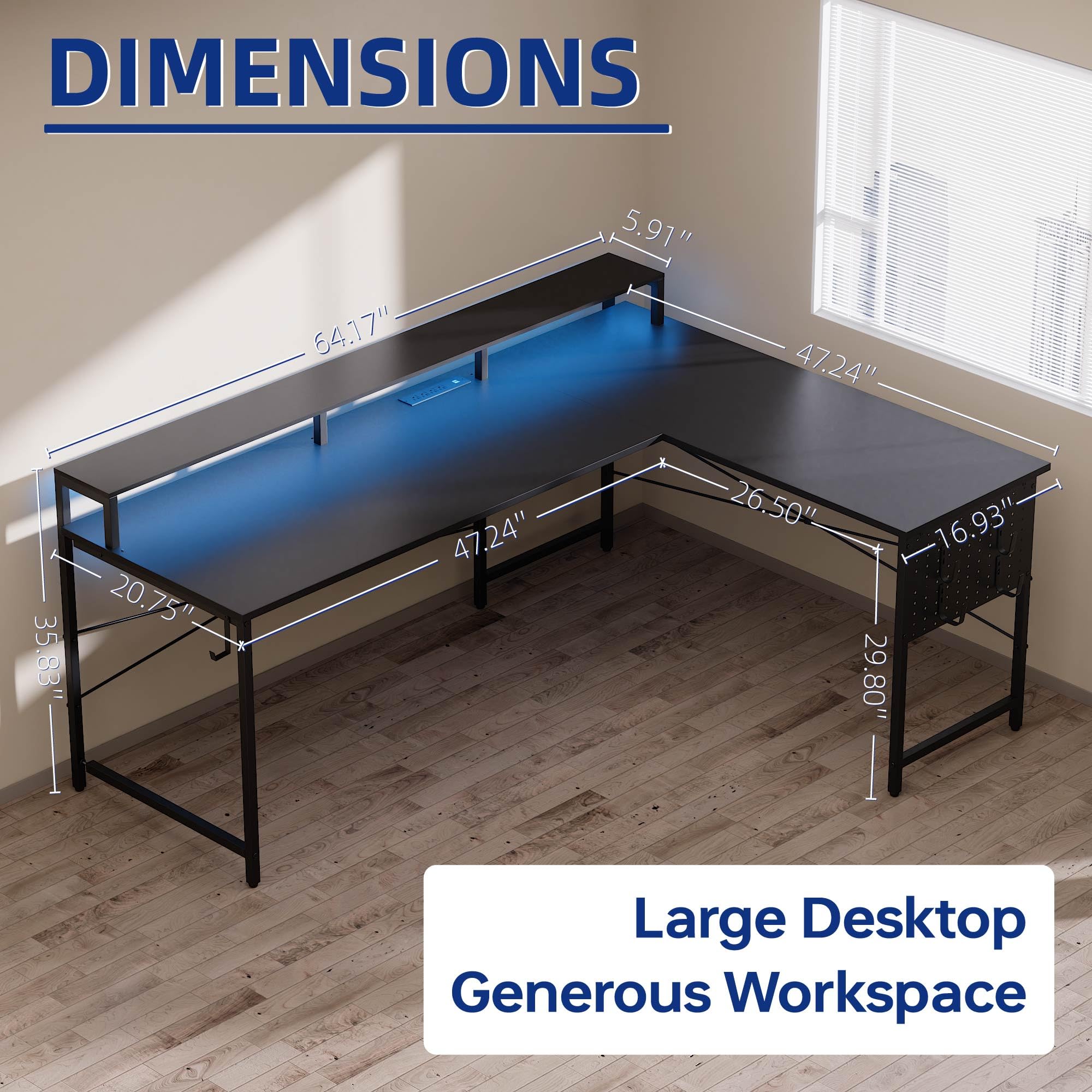
Image: Overview of the Pamray S10 L-shaped gaming desk with key dimensions labeled. This image helps in identifying the overall structure and size of the desk components.
4. Assembly Instructions
Assembly of the Pamray S10 desk requires careful attention to detail. All necessary installation tools are included in the accessory bag. For a visual guide, comprehensive installation videos are available from the seller. You can typically find these by scanning the transparency label on the packaging or visiting the product page online.
Key Assembly Tips:
- Identify all parts and hardware before starting.
- Follow the step-by-step instructions provided in the included manual.
- Ensure all screws and fasteners are tightened securely but do not overtighten.
- Pay attention to the orientation of parts, especially those with letter stickers, as indicated in the instructions.

Image: A fully assembled Pamray S10 L-shaped gaming desk in a gaming setup, showcasing its monitor stand, LED lighting, and overall layout. This image provides a reference for the completed assembly.
5. Operating Instructions
5.1. Power Outlets and USB Charging Ports
The desk is equipped with a built-in power strip for convenient device charging and power supply.
- 4 AC Outlets: Provides 125V/12A power for standard electronics.
- 2 USB Charging Ports: Delivers 5V/2A for charging phones, tablets, and other USB-powered devices.
- The power cord is 4.92 feet long.
- Rated Power: 1500W.

Image: A close-up view of the integrated power strip on the desk, showing the AC outlets and USB ports in use with devices charging. This illustrates the functionality of the built-in power features.
5.2. LED Lights
The integrated LED light strip offers customizable lighting options to enhance your workspace ambiance.
- Control: Remotely controlled via a dedicated app.
- Modes: Features 213 dynamic multicolor lighting modes.
- Colors: Over 10,000 color options available.
- Adjustments: Brightness and hues can be adjusted to suit your preference.
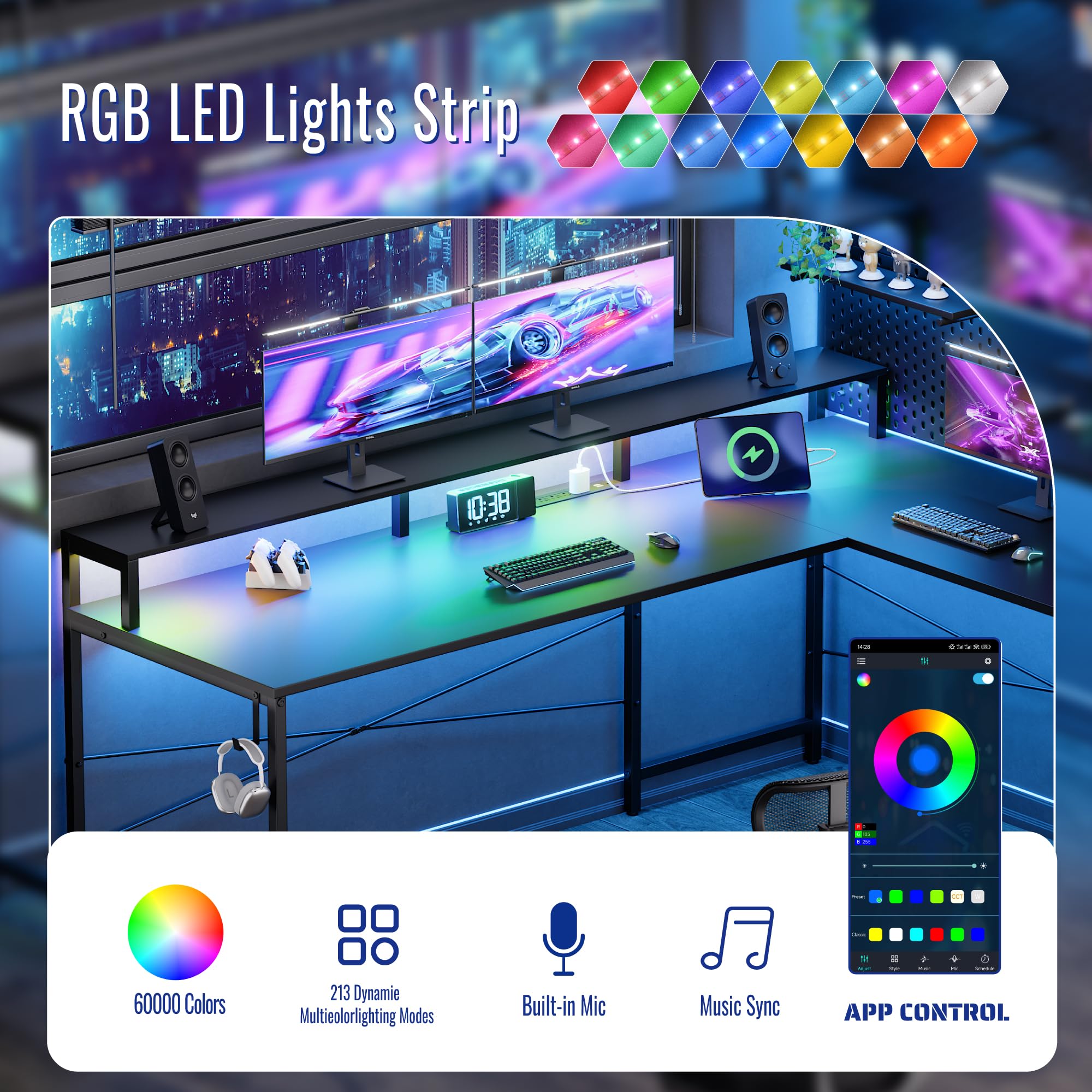
Image: The desk illuminated by its LED lights, with an overlay showing a smartphone app interface for controlling the lighting. This demonstrates the customizable LED features and their control method.
5.3. Pegboard and Hooks
The desk includes a pegboard and hooks for organizing gaming gear and accessories.
- Use the provided hooks to hang controllers, headphones, and other items.
- The pegboard helps keep your workspace tidy and essential items within easy reach.

Image: A close-up of the desk's pegboard section, showing gaming controllers and headphones neatly hung on the included hooks. This highlights the organizational capabilities of the pegboard.
6. Maintenance
To ensure the longevity and appearance of your Pamray S10 desk, follow these maintenance guidelines:
- Cleaning: Wipe the desk surface with a soft, damp cloth. Avoid abrasive cleaners or harsh chemicals that could damage the finish.
- Spills: Promptly clean up any spills to prevent staining or damage to the tabletop. The tabletop is designed to be water-resistant.
- Fasteners: Periodically check all screws and connections to ensure they remain tight. Retighten if necessary.
- Weight Distribution: Distribute weight evenly across the desk surface to prevent stress on any single point.

Image: A close-up of the desk surface with water droplets, demonstrating its water-resistant properties. This highlights the ease of cleaning and spill management.
7. Troubleshooting
This section addresses common issues you might encounter with your Pamray S10 desk.
- Desk Wobbles: Ensure all screws are securely tightened. Check that the desk is on a level surface. The adjustable feet can be used to stabilize the desk on uneven floors.
- LED Lights Not Working: Verify that the power adapter for the LED strip is properly connected to a working outlet. Check the app connection and settings.
- Power Outlets Not Functioning: Confirm the desk's main power cord is plugged into a live wall outlet. Test the outlet with another device.
- Missing Parts: If you discover missing parts during assembly, refer to the package contents list and contact customer support for assistance.

Image: A close-up view of the desk's adjustable feet, illustrating how they can be used to level the desk on uneven surfaces. This is a useful feature for addressing wobbling issues.
8. Specifications
| Feature | Detail |
|---|---|
| Brand | Pamray |
| Model Number | S10black64 |
| Product Dimensions (D x W x H) | 20.75"D x 64.17"W x 29.8"H |
| Color | Black |
| Style | Modern |
| Base Material | Metal |
| Top Material Type | Tabletop made of FSC-Certified Wood |
| Finish Type | Powder Coated |
| Maximum Weight Recommendation | 150 Pounds |
| Power Outlets | 4 AC Outlets (125V/12A), 2 USB Ports (5V/2A) |
| LED Lights | 213 modes, 10,000+ colors, app controlled |
| Special Features | L-shaped design, Monitor Stand, Pegboard, LED Lights, Power Outlets |
9. Warranty and Support
The Pamray S10 desk comes with a Limited Warranty. For specific warranty details, please refer to the documentation included with your product or contact Pamray customer support.
For further assistance, troubleshooting, or to inquire about replacement parts, please visit the official Pamray website or contact their customer service department. Contact information can typically be found on the product packaging or the brand's online store.
Documents and downloads
Ask a question about this manual
Ask about setup, troubleshooting, compatibility, parts, safety, or missing instructions. Manuals+ will review the question and use this page’s manual context to help answer it.