
1. Product Overview
The ZK-SMC04 is a versatile DC 10-30V 6.6A Stepper Motor Driver Controller Integrated Board designed for precise control of 42, 57, and 86 series stepper motors. This integrated unit combines driving and control functionalities, offering forward/reverse operation, pulse speed adjustment, and angle control. It supports PLC serial communication for advanced applications.
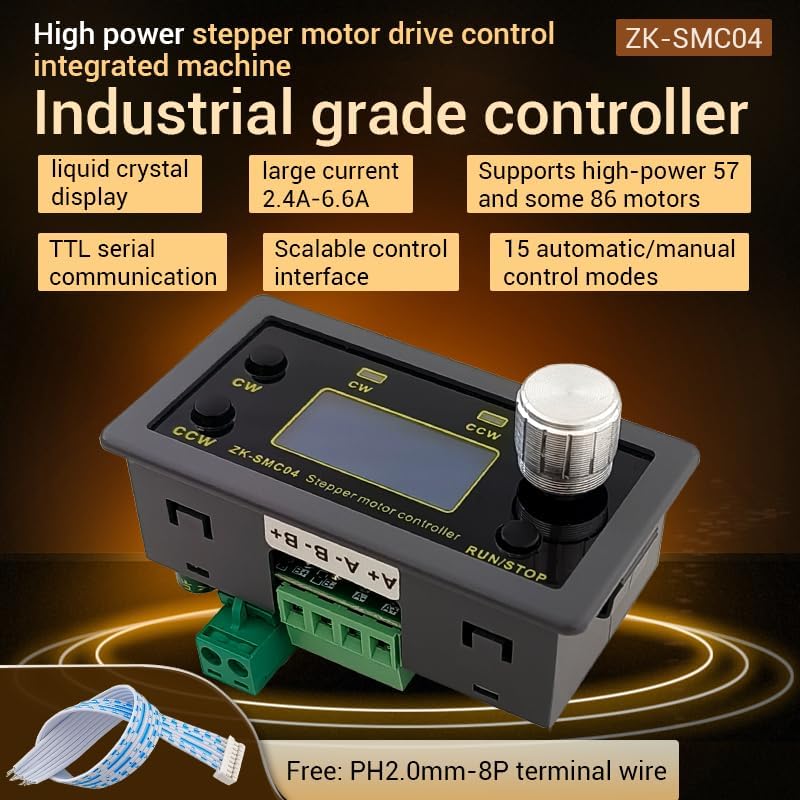
Figure 1.1: ZK-SMC04 Stepper Motor Controller highlighting features such as liquid crystal display, large current capability (2.4A-6.6A), support for high-power 57 and 86 motors, TTL serial communication, scalable control interface, and 15 automatic/manual control modes.
Key features include:
- Wide Power Supply Range: DC 10-30V universal.
- High Driving Capability: Peak 6.6A.
- High Pulse Frequency: Up to 200KHZ.
- Motor Compatibility: Adaptable for 42, 57, and 86 stepper motors.
- Control Modes: 15 automatic/manual control modes.
- Communication: TTL serial port for remote communication control.
- Compact Design: Product size 79x43x41mm, recommended hole size 75x39mm for mounting.
2. Specifications

Figure 2.1: Detailed specifications of the ZK-SMC04 Stepper Motor Driver Controller.
| Parameter | Value |
|---|---|
| Product Model | ZK-SMC04 |
| Product Name | Drive Control Integrated Machine |
| Supply Voltage | DC 10-30V (>3A recommended) |
| Output Current | 2.4A - 6.6A (Peak) |
| Adaptable Motors | 42, 57, 86 Stepper Motors |
| Pulse Frequency | Up to 200KHZ |
| Control Mode Selection | 15 options (customizable) |
| Operating Environment | -10 ~ 60 °C (non-condensing) |
| Shell Size | 79x43x41mm |
| Opening Size | 75x39mm |
| Item Weight | 3.52 ounces |
3. Setup and Installation
3.1 Wiring Diagram
Proper wiring is essential for the correct operation of the ZK-SMC04. Refer to the diagrams below for power, motor, and control signal connections.

Figure 3.1: Basic product wiring diagram. Connect the DC power supply to the "Power supply +" and "Power supply -" terminals. Connect the stepper motor phases to A+, A-, B+, B- terminals.

Figure 3.2: Expansion interface and serial port output. The 8-pin expansion interface provides connections for external triggers (start/stop, switch direction), limit switches, and output signals. The serial port allows for TTL communication.

Figure 3.3: Example connection for signal, limit switches, and output. This diagram illustrates how to connect NPN normally open proximity switches for limit detection and push buttons for start/stop and direction change functions.
3.2 Driver Settings (DIP Switches)
The ZK-SMC04 features DIP switches on the board for configuring output current and microstep resolution. Ensure the power is off before adjusting these switches.

Figure 3.4: Driver settings via DIP switches. This image details how to set the output peak current, microstep resolution, chopping mode (Smooth mode SpreadCycle or Silent Mode StealthChop), and holding current (1/2 Run or iRun).
Current Setting:
| Output Peak Current | Output Average Current | SW1 | SW2 | SW3 |
|---|---|---|---|---|
| 3.3A | 2.4A | off | off | off |
| 3.7A | 2.7A | on | off | off |
| 4.1A | 3.1A | off | on | off |
| 4.5A | 3.4A | on | on | off |
| 5.0A | 3.6A | off | off | on |
| 5.4A | 3.8A | on | off | on |
| 5.8A | 4.1A | off | on | on |
| 6.6A | 4.7A | on | on | on |
Microstep Resolution Setting:
| SW4 | SW5 | Microstep Settings |
|---|---|---|
| off | off | 8 |
| on | off | 16 |
| off | on | 32 |
| on | on | 64 |
Chopping Mode (SW6):
- off: Smooth mode SpreadCycle (Used at high speeds)
- on: Silent Mode StealthChop (Recommended at low speed, operates silently when the motor is at low speed or stopped)
Maintain Current (SW7):
- off: iRun (running current)
- on: 1/2 iRun (reduces heat generation)
4. Operating Instructions
The ZK-SMC04 features an intuitive interface with a rotary encoder and buttons for easy operation and parameter adjustment.
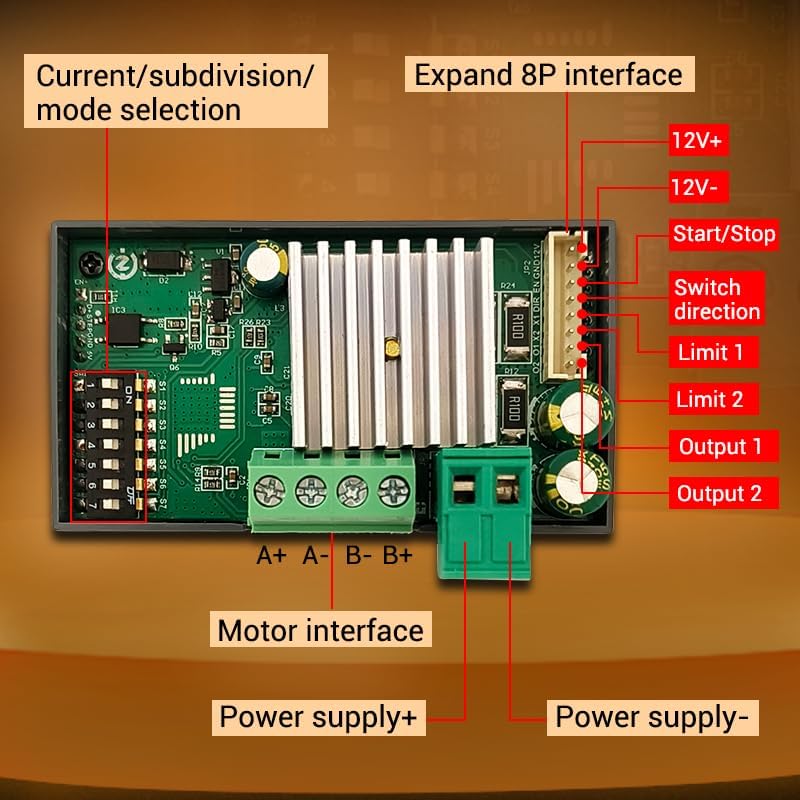
Figure 4.1: Front panel controls. The panel includes buttons for CW (Clockwise) and CCW (Counter-Clockwise) rotation, corresponding indicators, an encoder setting knob for adjustments, and a RUN/STOP button.
4.1 Basic Operation
- Start/Stop: Press the RUN/STOP button to start or stop the motor.
- Direction Control:
- Press CW button for forward rotation.
- Press CCW button for reverse rotation.
- Speed/Angle Adjustment: Rotate the encoder setting knob to adjust parameters such as speed or angle.
4.2 Menu Navigation and Parameter Settings
The ZK-SMC04 allows for detailed configuration through its menu system. Follow these steps to navigate and adjust parameters:

Figure 4.2: Menu navigation and parameter adjustment. This diagram shows how to stop running and exit, enter menu settings, tune parameters, and exit parameter settings using the rotary encoder and buttons.
- Stop Running and Exit: On the running interface, adjust the speed using the rotary encoder. Press the CW button for forward rotation, CCW button for reverse. Long press the RUN/STOP button to stop running and exit.
- Enter Menu Settings: From the running interface, long press the encoder to enter the menu settings interface.
- Navigate Menu: In the menu settings interface, rotate the encoder to change the parameter codes from F-01 to F-14. Long press the encoder to save the parameters and exit to enter the running interface.
- Tune Parameters: In the menu settings interface, short press the encoder to enter the F-XX corresponding menu parameter setting state. The parameters will flash. Short press the shift button to rotate the encoder and adjust the parameters. Short press the RUN/STOP button to exit parameter settings and return to the main menu number adjustment interface.
4.3 Menu Functions List
The following table provides a detailed description of each menu function (F-01 to F-14) and their adjustable ranges and default values.

Figure 4.3: Comprehensive list of menu functions and their corresponding actions and settings.
| Number | Function | Adjustable Range | Default Value |
|---|---|---|---|
| F-01 | Selection of action flow mode (Table introduction below) | 1 - 15 | 3 |
| F-02 | Number of positive rotation pulses/unit (High three bits by rotary encoder, low four bits by display) | 1 - 999999 | 1600 |
| F-03 | Forward rotation speed unit: revolutions per minute | 0.1 - 999 | 10 |
| F-04 | Number of reverse pulses/unit (High three bits by rotary encoder, low four bits by display) | 1 - 999999 | 1600 |
| F-05 | Reverse speed unit: revolutions per minute | 0.1 - 999 | 10 |
| F-06 | Number of cycles of work (where 0 = countless times) | 0 - 9999 or countless | 1 |
| F-07 | Forward time delay unit: seconds (accuracy ±0.2 seconds) | 0.0 - 999.9 | 0.0 |
| F-08 | Reverse time delay unit: seconds (accuracy ±0.2 seconds) | 0.0 - 999.9 | 0.0 |
| F-09 | Number of pulses per revolution (1-9999, x10) Unit: 10 (e.g., for 1.8° stepper motor, 8 subdivision = 160, 16 subdivision = 320, 32 subdivision = 640, 64 subdivision = 1280) | 1 - 9999 | 160 |
| F-10 | Main interface display content (Up: motor coil speed, Down: revolutions per minute) | 0 - 1 | 00 |
| F-11 | The action when pressing the pause button (0: motor slows down and stops slowly, 1: motor immediately stops) | 0 - 1 | 0 |
| F-12 | Acceleration and deceleration levels (1-100, 1 being the slowest and 100 being the fastest) | 1 - 100 | 20 |
| F-13 | Self-locking switch | 0 - 1 | 0 |
| F-14 | Mail address | 1 - 255 | 1 |
5. Maintenance
To ensure the longevity and optimal performance of your ZK-SMC04 Stepper Motor Driver Controller, follow these general maintenance guidelines:
- Keep Clean: Regularly clean the device with a soft, dry cloth to prevent dust accumulation, especially around ventilation openings and connectors.
- Environmental Conditions: Operate the controller within the specified temperature and humidity ranges (-10 ~ 60 °C, non-condensing) to prevent damage.
- Secure Connections: Periodically check all wiring connections to ensure they are secure and free from corrosion. Loose connections can lead to intermittent operation or damage.
- Avoid Overload: Ensure the connected motor and power supply are within the specified limits of the ZK-SMC04 to prevent overheating and damage to the driver.
6. Troubleshooting
This section provides solutions to common issues you might encounter with the ZK-SMC04 Stepper Motor Driver Controller.

Figure 6.1: Troubleshooting guide for common operational problems.
| Phenomenon | Possible Issues | Solution Measures |
|---|---|---|
| The screen doesn't light up | The motor shaft is powerless | Check the power supply circuit to see if it is connected in reverse or supplying power normally. |
| Driver chip protection | Power on again. | |
| The motor does not rotate | The pulse signal is weak | It is recommended to increase the voltage or choose a larger current. |
| The motor does not rotate and keeps vibrating | Check the motor wiring for any issues. | |
| Motor rotation error | Wrong connection of motor wire | Swap two wires of the same phase for any motor (e.g., A+ and A- exchange positions). |
| Incorrect position | Signal interference | Remove interference. |
| The motor wire has a broken circuit | Check and connect correctly. | |
| Subdivision error | Set up correct segmentation. | |
| Motor stalling vibration | The current is too small | Increase the current. |
| Turn on the mute mode, which is only suitable for low-speed states | Turn off silent mode. | |
| Short acceleration time | Extend acceleration time. | |
| Low voltage or low current | Appropriately increase the voltage or current. |
7. Warranty and Support
For warranty information, technical support, or any inquiries regarding the ZK-SMC04 Stepper Motor Driver Controller, please contact GODIYMODULES directly through their official channels or the retailer from whom the product was purchased.
Please refer to the original purchase documentation for specific warranty terms and conditions.
