
1. Introduction
This manual provides essential information for the safe and efficient use of your DOOGEE Fire 7 (2025) Rugged Smartphone. Please read it thoroughly before operating the device.
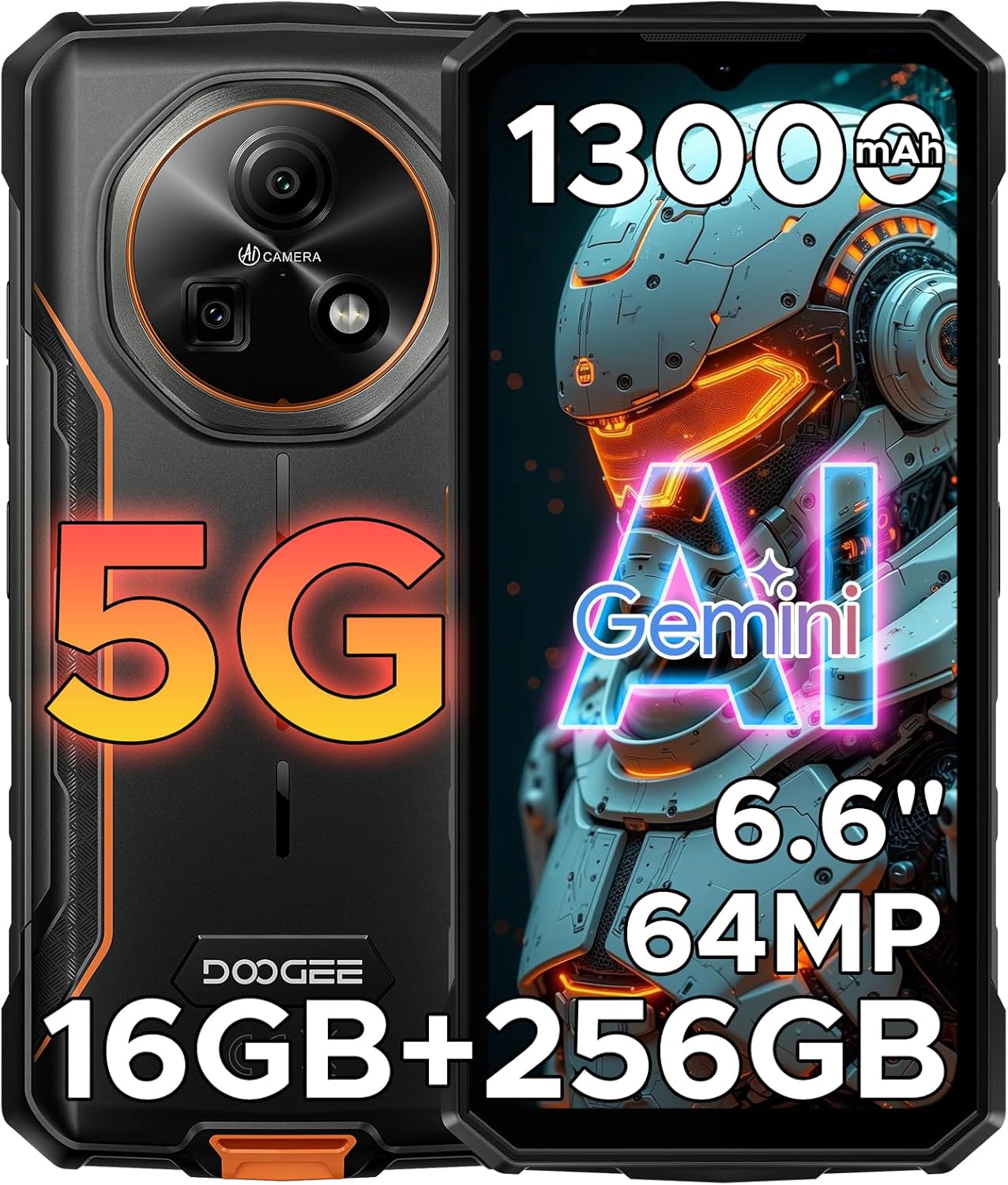
Image 1.1: Front and back view of the DOOGEE Fire 7 (2025) Rugged Smartphone, highlighting its robust design and key features like the 13000mAh battery, 6.6-inch display, 64MP camera, and 5G capability.

Image 1.2: Overview of the DOOGEE Fire 7 (5G) highlighting its 13000mAh large battery, 256GB large memory, 64MP HD main camera, and Dimensity 6300 Octa-Core 2.4GHz 6nm processor.
2. Package Contents
Verify that all items are present in the product packaging:
- 1 x Fire 7 Rugged Phone
- 1 x Charging Cable
- 1 x Charger
- 1 x Pre-applied Protective Film
- 1 x Package Box
- 1 x User Manual (this document)
- 1 x Service Card

Image 2.1: Contents of the DOOGEE Fire 7 retail package, including the phone, charger, USB cable, and documentation.
3. Device Overview
3.1 Physical Characteristics
The DOOGEE Fire 7 is designed for durability, measuring approximately 6.94 x 3.24 x 0.73 inches and weighing 0.85 pounds. It features a robust casing to withstand challenging environments.
3.2 Display
The device is equipped with a 6.6-inch HD+ IPS waterdrop display, offering a resolution of 720 x 1560 pixels and a 90Hz refresh rate for smooth visuals. It supports 16.7 million screen colors and has a typical brightness of 400 nits.

Image 3.1: Details of the 6.6-inch HD+ 90Hz IPS display, including 400 nits brightness, 16.7M screen color, HD+ resolution, 85% screen-to-body ratio, and Dark Mode support.
3.3 Camera System
The DOOGEE Fire 7 includes a 64MP AI main camera, a 2MP macro lens, and a 16MP front camera for photography and video calls.

Image 3.2: Diagram showing the camera setup of the DOOGEE Fire 7, featuring a 16MP front camera, a 64MP AI main camera, and a 2MP ultra macro camera.
3.4 Ports and Buttons
- USB Type-C Port: For charging and data transfer.
- Power Button: Located on the side, often integrated with the fingerprint sensor.
- Volume Buttons: For adjusting audio levels.
- Triple Card Slot: Supports two SIM cards (SIM1+SIM2) and one TF (microSD) card for expandable storage.

Image 3.3: Illustration of additional features such as the accurate navigation system, side fingerprint unlock, effortless NFC connectivity, and the triple card slot for SIM1, SIM2, and TF card.
4. Setup
4.1 SIM Card and TF Card Installation
- Locate the card slot on the side of the phone.
- Use the provided SIM ejector tool to open the card tray.
- Carefully place your Nano-SIM cards (up to two) and/or a TF (microSD) card into the designated slots on the tray. Ensure correct orientation.
- Gently push the tray back into the phone until it is flush with the device body.
4.2 Initial Power On
- Press and hold the Power button until the DOOGEE logo appears.
- Follow the on-screen prompts to complete the initial setup, including language selection, Wi-Fi connection, Google account login, and security settings.
4.3 Charging the Battery
- Connect the USB Type-C cable to the phone's charging port.
- Connect the other end of the cable to the provided 18W charger.
- Plug the charger into a power outlet. The charging indicator will appear on the screen.
5. Operating Instructions
5.1 Android 15 Operating System
The DOOGEE Fire 7 runs on Android 15, offering enhanced performance, privacy features, and user interactions. Key functions include:
- App Cloning: Duplicate applications for multiple accounts.
- App Lock: Secure individual applications with a password or biometric authentication.
- Mobile Anti-theft Alarm: Features to help locate or secure your device if lost or stolen.
- Children's Space: A dedicated mode for child-friendly content and usage limits.
- Fingerprint Extension Function: Advanced fingerprint sensor capabilities.
- Mobile Manager: Tools for optimizing device performance and managing resources.
- Game Space: A dedicated mode to enhance gaming performance and minimize distractions.

Image 5.1: Visual representation of various Android 15 OS functions available on the DOOGEE Fire 7, including App Cloning, App Lock, Mobile Anti-theft Alarm, Children's Space, Fingerprint Extension Function, Mobile Manager, and Game Space.
5.2 AI Features (Gemini AI)
The device integrates the Gemini AI system, which assists with various tasks:
- Content Creation: AI-powered assistance for generating text or ideas.
- Code Development: Support for coding tasks.
- Smart Assistant: General AI assistance for daily queries.
- Image Analysis: AI capabilities for understanding and processing images.
- Language Learning: Tools to aid in language acquisition.

Image 5.2: Overview of the built-in Gemini AI features, demonstrating its applications in content creation, code development, smart assistance, image analysis, and language learning.
5.3 Camera Operation
To use the camera:
- Open the Camera application.
- Select between the 64MP main camera, 2MP macro lens, or 16MP front camera.
- Utilize features like Panoramic, Night Shot, Pro Mode, Beauty Mode, AI Recognition, and Document Correction for various photography scenarios.
5.4 Connectivity
The device supports 5G NR (N1/N3/N7/N8/N28/N38/N41/N77/N78), 4G, 3G, and 2G networks. It also includes 2.4G/5G dual-band Wi-Fi, Bluetooth, and NFC for wireless connections.
5.5 Security Features
- Fingerprint Unlock: Use the side-mounted fingerprint sensor to unlock your device.
- Face Unlock: Use the front camera for facial recognition to unlock the device.
6. Battery Management
The DOOGEE Fire 7 is equipped with a 13000mAh battery, providing extended usage times. It supports 18W fast charging and 5W OTG reverse charging.
6.1 Charging
Use the provided 18W charger and USB Type-C cable for optimal charging speed. Avoid using unapproved chargers or cables.
6.2 OTG Reverse Charging
The device can act as a power bank to charge other small devices (e.g., smartwatches, Bluetooth earbuds) using an OTG cable (sold separately).

Image 6.1: Details of the 13000mAh large battery, including 18W fast charging and 5W reverse charging capabilities, along with estimated usage times for music, video, calling, web browsing, and continuous video recording.
7. Storage Management
The DOOGEE Fire 7 comes with 256GB of internal storage (ROM) and 16GB of RAM (4GB physical + up to 12GB extended). Storage can be expanded up to 2TB using a microSD card.
7.1 Expanding Storage
Insert a compatible microSD card into the TF card slot as described in Section 4.1. The device will prompt you to format the card for use.

Image 7.1: Illustration of the DOOGEE Fire 7's memory configuration, showing up to 16GB RAM (4GB basic + 12GB virtual), 256GB ROM, and support for up to 2TB expandable memory.
8. Durability Features
The DOOGEE Fire 7 is built to withstand harsh conditions, certified with IP68, IP69K, and MIL-STD-810H standards.
- IP68: Dust and water resistant, capable of submersion in up to 1.5 meters of water for 30 minutes.
- IP69K: Resistant to high-pressure, high-temperature water jets.
- MIL-STD-810H: Military-grade durability against drops, shocks, and extreme temperatures.

Image 8.1: Visual representation of the DOOGEE Fire 7's ruggedness, highlighting its IP68, IP69K, and MIL-STD-810H certifications, demonstrating resistance to drops, water immersion, and dust.
9. Maintenance
- Cleaning: Use a soft, damp cloth to clean the device. Avoid harsh chemicals.
- Software Updates: Regularly check for and install system updates to ensure optimal performance and security.
- Storage Management: Periodically clear unnecessary files and applications to maintain device speed.
- Battery Care: Avoid extreme temperatures and prolonged exposure to direct sunlight to preserve battery health.
10. Troubleshooting
10.1 Common Issues and Solutions
| Issue | Possible Solution |
|---|---|
| Device not powering on | Ensure the battery is charged. Press and hold the power button for 10-15 seconds to force a restart. |
| Apps crashing or freezing | Clear app cache/data, update the app, or uninstall and reinstall. Check for system updates. |
| Poor network connectivity | Check SIM card installation. Restart the device. Verify network settings and contact your carrier. |
| Battery draining quickly | Reduce screen brightness, close background apps, disable unnecessary features (GPS, Bluetooth, Wi-Fi when not in use). |
| Fingerprint sensor not working | Ensure your finger is clean and dry. Re-register your fingerprint. |
10.2 Factory Reset
If issues persist, a factory reset may be necessary. This will erase all data on your phone. Back up important data before proceeding.
- Go to Settings > System > Reset options.
- Select Erase all data (factory reset).
- Confirm your decision.
11. Specifications
| Feature | Detail |
|---|---|
| Model | Fire 7 |
| Operating System | Android 15 |
| Processor | MediaTek Dimensity 6300 Octa-Core (2.4 GHz) |
| RAM | 16GB (4GB physical + up to 12GB extended) |
| Internal Storage (ROM) | 256GB |
| Expandable Storage | Up to 2TB via TF (microSD) card |
| Display | 6.6-inch HD+ IPS Waterdrop Display, 90Hz Refresh Rate, 720 x 1560 Resolution |
| Main Camera | 64MP AI Main Camera + 2MP Macro Lens |
| Front Camera | 16MP |
| Battery Capacity | 13000mAh |
| Charging | 18W Fast Charging, 5W OTG Reverse Charging |
| Network Connectivity | 5G NR (N1/N3/N7/N8/N28/N38/N41/N77/N78), 4G, 3G, 2G |
| Wireless Connectivity | Wi-Fi (2.4G/5G dual-band), Bluetooth, NFC |
| Navigation | GPS, Glonass, Galileo, Beidou |
| Durability | IP68, IP69K, MIL-STD-810H certified |
| Dimensions | 6.94 x 3.24 x 0.73 inches |
| Weight | 0.85 pounds (13.6 ounces) |
| SIM Card Slot | Triple Slot (SIM1 + SIM2 + TF Card) |

Image 11.1: Comparison table detailing specifications across the DOOGEE Fire Series, including Fire 7, Fire 7 Pro, Fire 7 Ultra, and Fire 7 Max, showing differences in RAM, ROM, cameras, battery, and other features.
12. Warranty and Support
12.1 Warranty Information
The DOOGEE Fire 7 comes with a 2-year warranty service. Please refer to the included Service Card for detailed terms and conditions.
12.2 Technical Support
Lifetime technical support is available for your DOOGEE Fire 7. If you encounter any issues or require assistance, please contact DOOGEE customer service. Contact details can be found on the Service Card or the official DOOGEE website.


