
1. Important Safety Instructions
Please read all instructions carefully before using this appliance and retain for future reference. Failure to follow these instructions may result in electric shock, fire, or serious personal injury.
- Always ensure the fan is placed on a stable, flat surface to prevent tipping.
- Do not operate the fan with a damaged cord or plug. If the cord or plug is damaged, contact customer service for assistance.
- Keep fingers and other objects away from the fan grilles during operation. The fan features pinch-proof grilles for safety, but caution is still advised.
- Unplug the fan from the power outlet before cleaning or performing any maintenance.
- Do not use the fan in wet or damp locations, such as bathrooms or laundry areas.
- This appliance is equipped with overload protection. If the fan automatically shuts off, unplug it, wait a few minutes, and then plug it back in.
- Ensure the voltage indicated on the fan matches your local power supply before connecting.
- This fan is designed for indoor use only.
2. Product Overview
The Sweetcrispy Tower Fan (Model TS35INGYZZ) is designed to provide efficient and quiet cooling for various indoor spaces. It features multiple speed settings, operating modes, and a convenient timer function.

Image: Sweetcrispy Tower Fan with its remote control, illustrating the sleek design and primary components.
Package Contents:
- Sweetcrispy Tower Fan Unit
- Remote Control
- User Manual
3. Setup and Assembly
Follow these steps to assemble and prepare your tower fan for first use.
- Unpack the Fan: Carefully remove all components from the packaging. Ensure all parts listed in the package contents are present.
- Assemble the Base: The fan base typically requires minor assembly. Align the two halves of the base (if applicable) and attach them to the bottom of the fan unit. Secure with the provided screws.
- Place the Fan: Position the fan on a firm, level surface. Ensure there is adequate space around the fan for optimal airflow and oscillation.
- Connect Power: Plug the power cord into a standard electrical outlet.
Video: This video demonstrates the assembly process, including how to tighten the screws for the fan base, and provides an overview of the fan's features and operation.
4. Operating Instructions
Your Sweetcrispy Tower Fan can be operated using the control panel on top of the unit or the included remote control.
Control Panel and Remote Control:
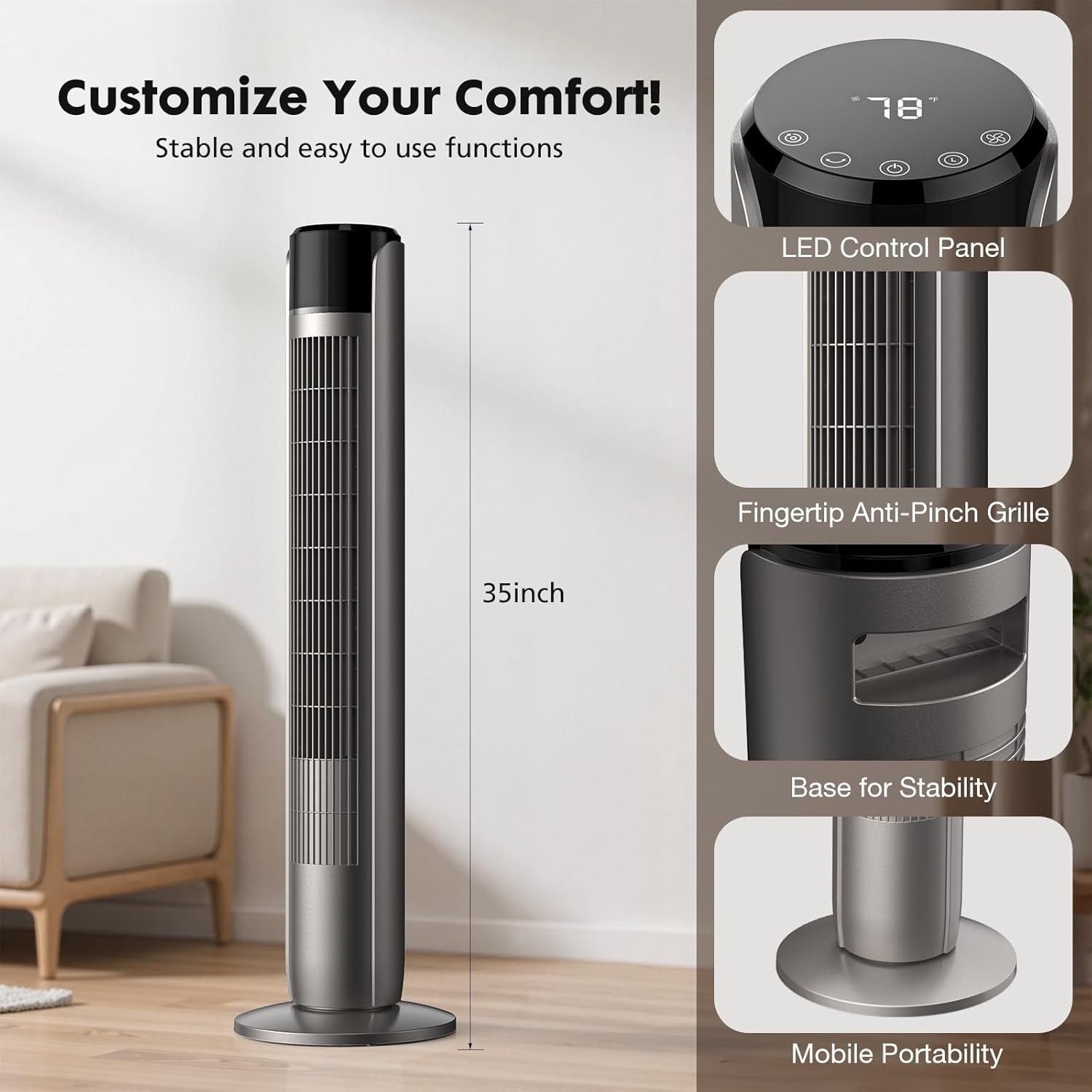
Image: Detailed view of the fan's LED control panel, showing buttons for Mode, Oscillation, Power, Timer, and Wind Speed.
- Power Button (U): Press to turn the fan ON or OFF.
- Wind Speed Button (F): Press to cycle through 5 speed settings (Level 1 to Level 5).
- Mode Button (O): Press to select one of the 4 operating modes: Normal, Natural, Auto, or Sleep.
- Oscillating Button (~): Press to activate or deactivate the 60-degree oscillation feature.
- Timer Button (L): Press to set the auto-off timer from 1 to 12 hours. Each press increases the timer by one hour.
Operating Modes:

Image: Visual representation of the four operating modes (Normal, Natural, Auto, Sleep) and five adjustable speed settings.
- Normal Mode: Provides a constant airflow at your selected speed.
- Natural Mode: Simulates a natural breeze by varying the fan speed intermittently.
- Auto Mode: Adjusts the fan speed automatically based on the ambient room temperature.
- Sleep Mode: Operates at a low, quiet speed (as low as 28 dB) and gradually decreases fan speed over time to ensure an undisturbed sleep environment. The display light may dim or turn off in this mode.

Image: Illustrates the fan operating in Sleep Mode, highlighting its 28dB low noise level and 1-12 hour timer function for a peaceful night's sleep.
Oscillation:

Image: Depicts the fan's 60-degree oscillation feature, showing how it distributes airflow across a wider area in a room.
Press the oscillation button to enable the fan to rotate horizontally, distributing air across a wider area. Press again to stop oscillation at the current position.
5. Maintenance and Cleaning
Regular cleaning helps maintain the fan's performance and extends its lifespan.
- Before Cleaning: Always unplug the fan from the power outlet before cleaning.
- Exterior Cleaning: Use a soft, damp cloth to wipe the exterior surfaces of the fan. Do not use abrasive cleaners or solvents, as these may damage the finish.
- Grille Cleaning: Use a vacuum cleaner with a brush attachment to gently remove dust and debris from the air intake and outlet grilles. Do not attempt to disassemble the fan for internal cleaning.
- Storage: If storing the fan for an extended period, clean it thoroughly, then place it back in its original packaging or cover it to protect from dust. Store in a cool, dry place.
6. Troubleshooting
If you encounter issues with your fan, refer to the following common problems and solutions.
| Problem | Possible Cause | Solution |
|---|---|---|
| Fan does not turn on. | No power supply; Power cord not securely plugged in; Overload protection activated. | Ensure the fan is plugged into a live outlet. Check the power cord connection. If overload protection activated, unplug, wait 5 minutes, then plug back in. |
| Weak or no airflow. | Air intake/outlet blocked; Fan speed set too low. | Clear any obstructions from the grilles. Increase the fan speed setting. |
| Fan makes unusual noise. | Fan not on a level surface; Debris inside the fan. | Place the fan on a flat, stable surface. Unplug the fan and gently check grilles for any visible debris. Do not attempt to open the fan. |
| Remote control not working. | Batteries are dead or incorrectly inserted; Obstruction between remote and fan. | Replace batteries with new ones, ensuring correct polarity. Remove any obstructions between the remote and the fan's sensor. |
If the problem persists after trying these solutions, please contact Sweetcrispy customer support.
7. Specifications
| Brand | Sweetcrispy |
| Model Name | Tower Fan for Bedroom |
| Model Number | TS35INGYZZ |
| Product Dimensions | 9.8"D x 9.8"W x 35"H |
| Power Source | AC |
| Wattage | 85 watts |
| Number of Speeds | 5 |
| Operating Modes | Normal, Natural, Auto, Sleep (4 Modes) |
| Max Speed | 1520 RPM |
| Noise Level | As low as 28 dB (Sleep Mode) |
| Timer | 1-12 hours |
| Oscillation Angle | 60 degrees |
| Special Features | Bladeless design, Pinch-proof grilles, Overload protection, Child lock switch |
| Control Method | Push Button / Remote Control |
| Indoor/Outdoor Usage | Indoor |
8. Warranty and Support
For warranty information and customer support, please refer to the warranty card included with your product or contact Sweetcrispy directly through their official website or the retailer where the product was purchased.
Please have your model number (TS35INGYZZ) and purchase date available when contacting support.
