
Introduction
Thank you for choosing the GP RECYKO B631 Universal Battery Charger. This manual provides essential information for the safe and efficient use of your charger. Please read these instructions carefully before operation and retain them for future reference.
Safety Instructions
- Use this charger only for rechargeable batteries of the specified types (NiMH, NiCd, Li-ion). Attempting to charge non-rechargeable batteries may lead to explosion, rupture, or leakage, causing personal injury and property damage.
- Do not expose the charger to rain or moisture. Use it in a dry environment only.
- Do not disassemble or modify the charger. Unauthorized modifications can result in electric shock, fire, or damage to the charger.
- Keep the charger away from direct sunlight, heat sources, and flammable materials.
- Ensure proper ventilation during charging. Do not cover the charger.
- Unplug the charger from the power outlet when not in use or before cleaning.
- Keep out of reach of children.
Package Contents
- GP RECYKO B631 Universal Battery Charger
- Power Adapter
- User Manual (this document)
Product Overview
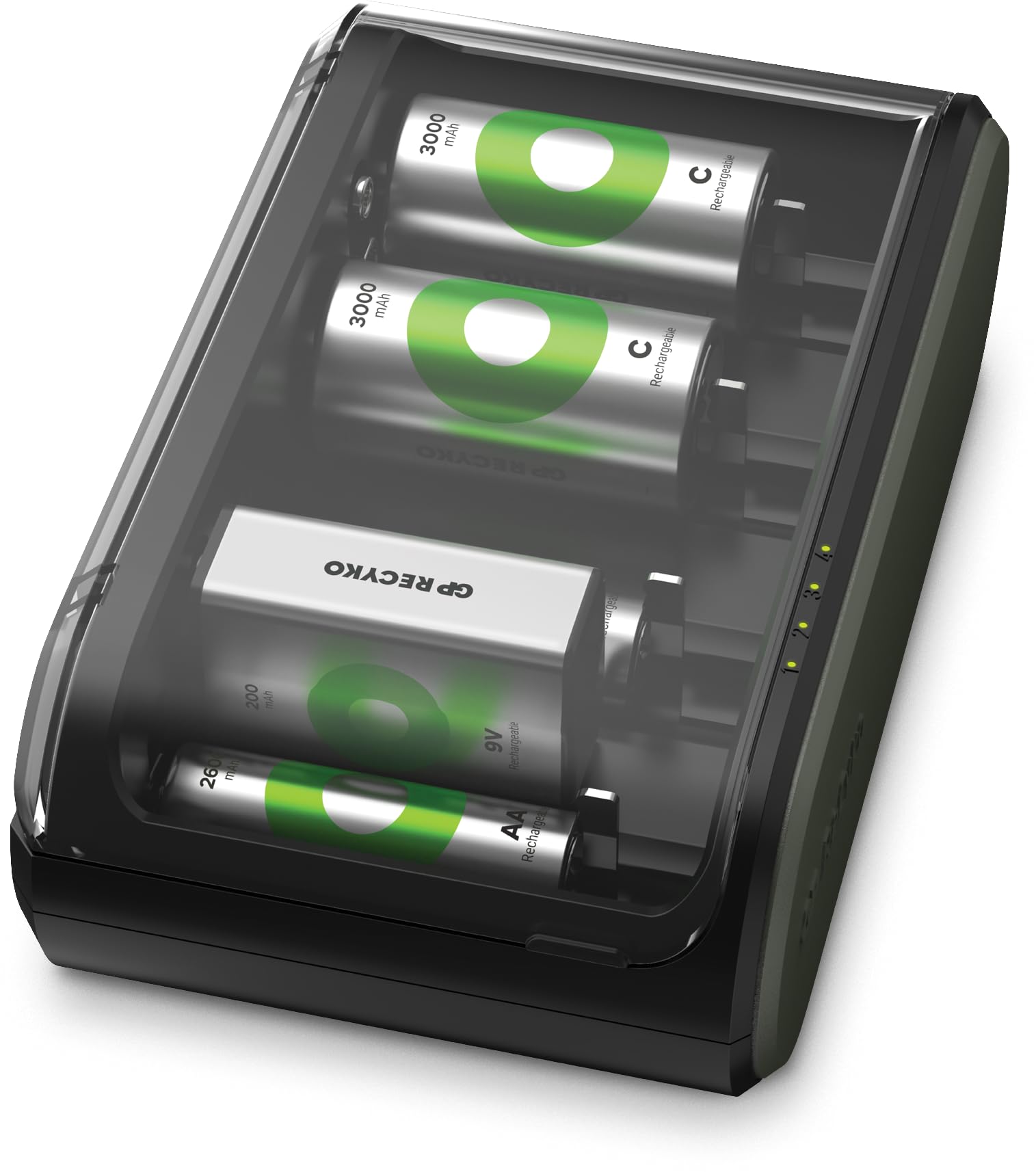
An image showing the GP RECYKO B631 Universal Battery Charger, typically black in color, with multiple charging slots and an indicator panel. This charger is designed to accommodate various battery sizes and types.
The GP RECYKO B631 is a versatile battery charger designed to charge multiple types and sizes of rechargeable batteries. It features individual charging channels and intelligent charging technology to optimize battery life and performance.
Setup
- Unpack the Charger: Carefully remove the charger and all accessories from the packaging.
- Connect Power: Plug the power adapter into the charger's input port, then plug the other end into a standard wall outlet. The charger may briefly illuminate its indicators upon connection.
- Insert Batteries: Insert rechargeable batteries into the charging slots. Ensure correct polarity (+ and -) as indicated on the charger and the batteries. The charger is designed to accommodate various battery sizes.
Operating Instructions
- Automatic Detection: Once batteries are correctly inserted, the charger will automatically detect the battery type and begin the charging process.
- Charging Indicators: Each charging slot typically has an LED indicator.
- Red/Flashing: Indicates charging in progress or an error.
- Green/Solid: Indicates charging is complete.
- No Light: Indicates no battery or incorrect insertion.
- Charging Time: Charging times vary depending on battery capacity and charge level. Refer to battery specifications for typical charging durations.
- Remove Batteries: Once charging is complete (indicated by green light), carefully remove the batteries from the charger.
Maintenance
- Cleaning: Disconnect the charger from power before cleaning. Use a soft, dry cloth to wipe the exterior. Do not use liquid cleaners or solvents.
- Storage: Store the charger in a cool, dry place away from direct sunlight and extreme temperatures when not in use.
- Inspection: Periodically inspect the charger and power adapter for any signs of damage. Do not use if damaged.
Troubleshooting
- Charger not powering on: Ensure the power adapter is securely connected to both the charger and a working wall outlet.
- Batteries not charging:
- Check that batteries are inserted with correct polarity.
- Ensure batteries are rechargeable and not damaged.
- Clean battery contacts on both the charger and batteries if dirty.
- Indicator light flashing or showing error: Remove and reinsert the battery. If the issue persists, the battery may be faulty or incompatible.
Specifications
| Brand | GP |
| Model | B631 |
| Color | Black |
| Product Dimensions (D x W x H) | 6.1" x 3.54" x 2.05" (15.5cm x 9cm x 5.2cm) |
| Item Weight | 475 Grams |
| Compatible Battery Types | NiMH, NiCd, Li-ion (common universal charger types) |
Warranty Information
GP products are manufactured to high quality standards. For specific warranty terms and conditions, please refer to the warranty card included with your purchase or visit the official GP Batteries website. Keep your proof of purchase for warranty claims.
Customer Support
For technical assistance, troubleshooting, or product inquiries, please contact GP Batteries customer support. Contact details can typically be found on the product packaging or the official GP Batteries website.


