
1. Important Safety Information
Always read and understand all safety warnings and instructions provided with the product before operation. Failure to follow these instructions may result in electric shock, fire, and/or serious injury.
- Wear appropriate personal protective equipment (PPE) including eye protection, long pants, and sturdy footwear.
- Keep children and bystanders away while operating the string trimmer.
- Do not operate the trimmer in wet conditions or in the presence of flammable liquids or gases.
- Ensure the battery is fully charged before use and removed when not in use or during maintenance.
- Inspect the trimmer for damage before each use. Do not use if damaged.
2. Product Overview
The ALDIPRO Cordless 20V 12-inch Electric String Trimmer (AD-ST-001.1) is a versatile 3-in-1 tool designed for trimming, edging, and light lawn mowing tasks. It features an automatic line feed system, a powerful motor, and a detachable, adjustable structure for user comfort and convenient storage.
Package Contents:
- 1 x Cordless String Trimmer
- 1 x Fast Charger (UL-certified)
- 1 x 2.0Ah Lithium-ion Battery
- 1 x User Manual
- 6 x Replacement Line
3. Setup and Assembly
3.1 Assembly Steps
The string trimmer features a detachable pole design for easy assembly and storage. Follow these steps to assemble the unit:
- Step 1: Connect the motor housing section to the first pole segment. Ensure it clicks securely into place.
- Step 2: Attach the second pole segment to the first, ensuring a secure connection.
- Step 3: Connect the handle section, which includes the battery housing, to the second pole segment. Verify all connections are firm before use.

Figure 3.1: Easy Assembly Steps
3.2 Battery Charging
The 2.0Ah Lithium-ion battery provides approximately 35 minutes of continuous runtime (no-load). Use the included UL-certified fast charger for optimal performance.
- Insert the battery into the fast charger.
- Plug the charger into a standard electrical outlet.
- The charger features visual indicators for charging status. A full charge typically takes 60 minutes.
- The charger includes overheat and overcharge protection for safety.
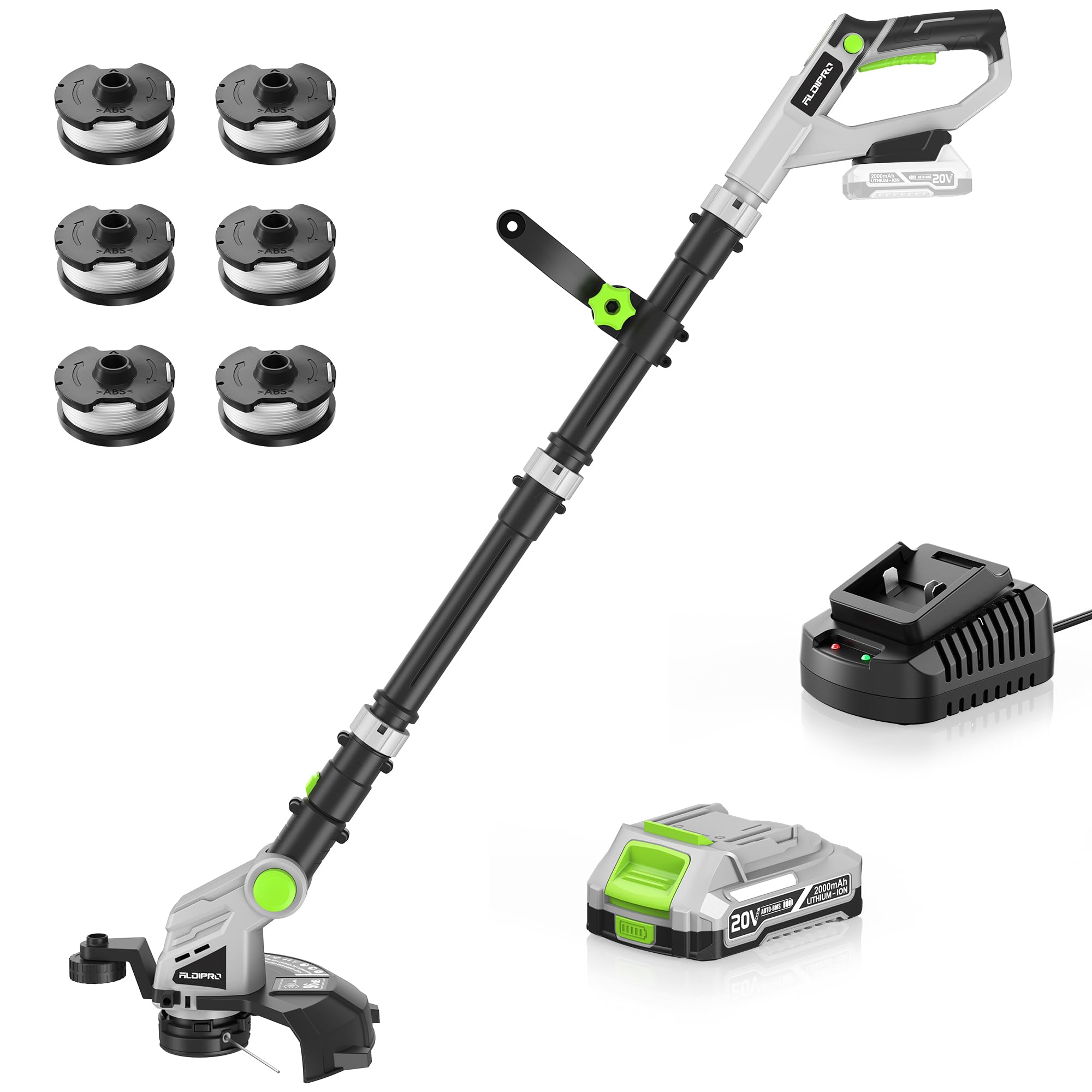
Figure 3.2: Battery and Fast Charger
4. Operating Instructions
4.1 Starting and Stopping
- To start the trimmer, ensure the battery is securely inserted, then press and hold the safety lock button while squeezing the trigger switch.
- To stop the trimmer, release the trigger switch.
4.2 3-in-1 Functionality (Trimmer, Edger, Mower)
This tool integrates three functions. Adjust the head and handle for optimal use in each mode:
- Trimming: Hold the trimmer at a comfortable angle, sweeping it side to side to cut grass and weeds.
- Edging: Rotate the trimmer head 180 degrees to position the line vertically. Use the guide wheel (if present) to maintain a consistent edge along sidewalks or driveways.
- Light Mowing: For small areas, adjust the head to a flatter angle to simulate a mower.

Figure 4.1: Flexible Application and Adjustments
4.3 Automatic Line Feed
The trimmer features an automatic line feeding system. Each time the machine is started, it automatically releases approximately 0.1-0.3 inches (2-3mm) of new line. This ensures continuous cutting without manual intervention. The recommended nylon wire diameter is 0.065 inches.

Figure 4.2: Auto Line Feed System
4.4 Adjustments
- Head Rotation: The trimmer head can be rotated 180 degrees for edging tasks.
- Head Angle: The head can be adjusted 60 degrees up and down to adapt to various terrains and cutting angles.
- Handle Rotation: The auxiliary handle can rotate 180 degrees for comfortable grip and control.
- Length Adjustment: The detachable pole allows for length adjustment to suit users of different heights.
5. Maintenance
Regular maintenance ensures the longevity and optimal performance of your ALDIPRO string trimmer.
5.1 Cleaning
- Always remove the battery before cleaning.
- Wipe the exterior of the trimmer with a damp cloth. Do not use harsh chemicals or abrasive cleaners.
- Clear any grass clippings or debris from the cutting head and guard.
5.2 Line Replacement
When the cutting line runs out, replace it with new 0.065-inch diameter nylon trimmer line. Refer to the specific instructions for spool replacement in the detailed manual.
5.3 Battery Care and Storage
- Store the battery in a cool, dry place away from direct sunlight and extreme temperatures.
- Do not store the battery in a discharged state for extended periods. Charge it periodically if not in use.
- Do not expose the battery to water or moisture.
6. Troubleshooting
This section addresses common issues you might encounter with your string trimmer.
| Problem | Possible Cause | Solution |
|---|---|---|
| Trimmer does not start | Battery not charged or improperly inserted; Safety lock not engaged; Trigger not pressed. | Ensure battery is fully charged and correctly inserted. Press safety lock button before squeezing trigger. |
| Line does not feed automatically | Line tangled or jammed; Spool empty; Line diameter incorrect. | Remove battery, inspect and clear any tangles. Replace spool if empty. Ensure correct 0.065-inch line is used. |
| Reduced cutting performance | Line too short; Battery low; Motor overloaded. | Start and stop the trimmer to activate auto-feed. Recharge battery. Avoid cutting excessively thick or wet vegetation. |
| Excessive vibration or noise | Damaged cutting line or head; Loose components. | Inspect cutting line and head for damage and replace if necessary. Check all connections for tightness. |
7. Specifications
| Feature | Specification |
|---|---|
| Brand | ALDIPRO |
| Model | AD-ST-001.1 |
| Power Source | Battery Powered (20V Lithium-ion) |
| Battery Capacity | 2.0Ah |
| Battery Average Life | 35 minutes (no load) |
| Charger Type | Fast Charger (UL-certified) |
| Charging Time | 60 minutes |
| Cutting Width | 12 inches |
| No-Load Speed | Up to 8500 RPM |
| Line Diameter | 0.065 inches (Nylon) |
| Product Dimensions (L x W) | 12"L x 12"W (Cutting head area) |
| Color | Gray & Green |
8. Warranty and Support
For warranty information or technical support, please refer to the documentation included with your product or contact ALDIPRO customer service. Keep your purchase receipt as proof of purchase for any warranty claims.