
1. Introduction
Thank you for choosing the Devoko Electric Height-Adjustable Standing Desk. This manual provides detailed instructions for the assembly, operation, and maintenance of your new desk. Please read this manual thoroughly before use to ensure proper function and safety. Keep this manual for future reference.
2. Safety Warnings
- Weight Limit: Do not overload the desk. The maximum load capacity is 70 kg. Exceeding this limit may cause damage to the desk or personal injury.
- Electrical Safety: Use the integrated USB-A charging port with caution to avoid electrical hazards. Ensure cables are properly managed to prevent tripping or damage.
- Children and Pets: Keep children and pets away from the desk during operation to prevent accidents.
- Clearance: Ensure there are no obstructions above or below the desk when adjusting its height.
- Power Source: Connect the desk only to a grounded power outlet.
- Maintenance: Do not attempt to disassemble or repair the motor or control system yourself. Contact customer support for assistance.
3. Package Contents
Please verify that all components are present before beginning assembly. If any parts are missing or damaged, contact Devoko customer support.
- Desktop sections (4 parts, 15mm high-quality particle board)
- Desk frame (2 steel beams, 2 T-shaped legs)
- Control panel with LED display and USB-A port
- Motor and power supply
- Fabric drawer (35x22x10.5 cm)
- Headphone hook
- Cable management tray
- Cable grommet
- Assembly hardware and tools
- User Manual
4. Setup and Assembly
The desktop is divided into 4 sections of 15mm high-quality particle board, which simplifies the assembly process. Follow the included graphical instructions for a smooth setup.
- Unpack Components: Carefully remove all parts from the packaging and lay them out on a clean, soft surface to prevent scratches.
- Assemble the Frame: Attach the two T-shaped legs to the steel beams. Ensure all screws are tightened securely. The frame features a robust double-beam construction (65x45 mm cold-rolled steel alloy) for enhanced stability.
- Attach Desktop Sections: Connect the four desktop sections together and then secure them to the assembled frame using the provided hardware.
- Install Control Panel: Mount the control panel to the underside of the desk in an easily accessible location.
- Connect Motor and Power: Connect the motor to the control panel and then plug the power supply into the control panel.
- Install Accessories: Attach the fabric drawer, headphone hook, cable management tray, and cable grommet as desired.


5. Operating Instructions
5.1 Control Panel Overview
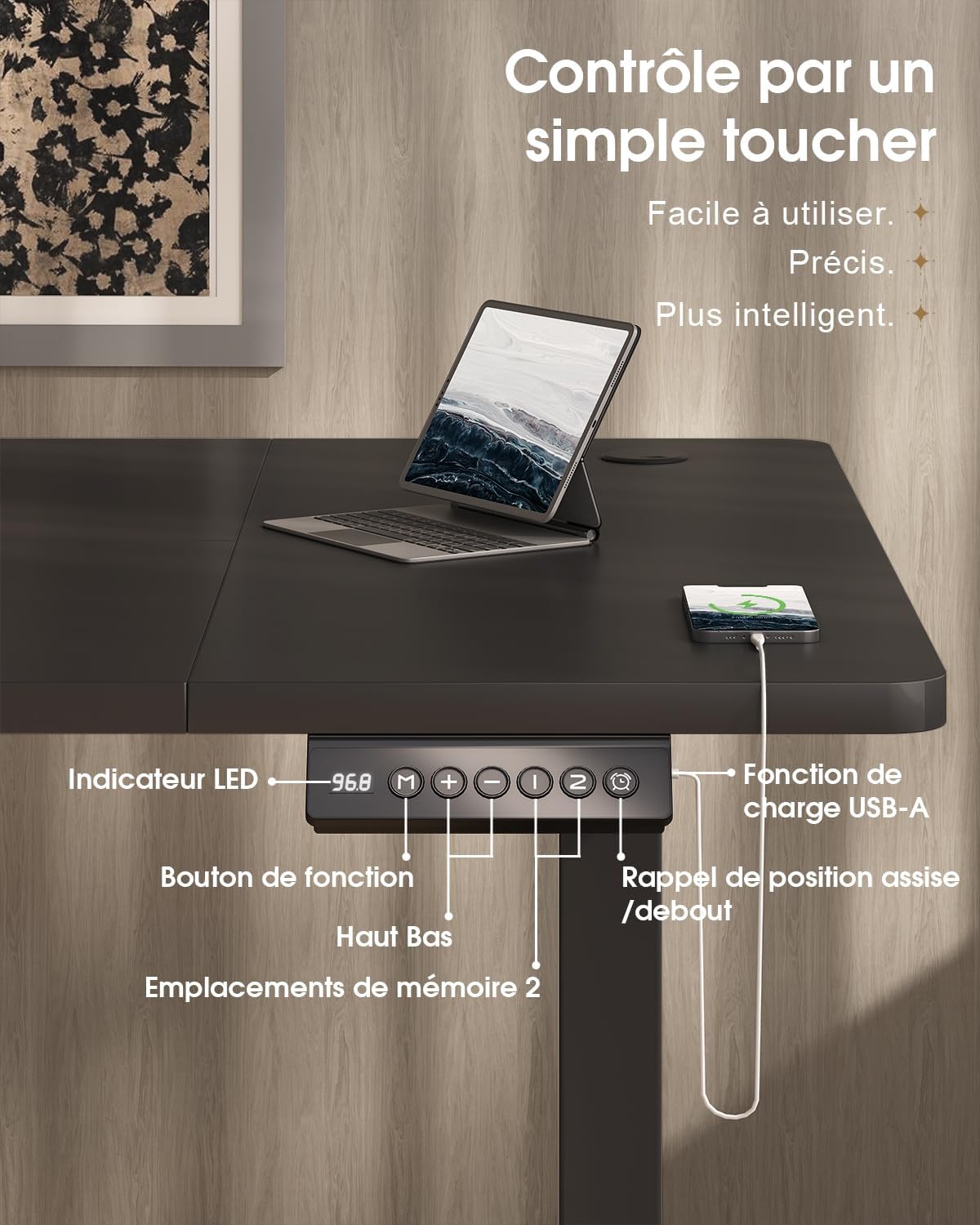
The desk features an intuitive control panel with an LED display for easy height adjustment and memory functions.

5.2 Height Adjustment
- Up/Down Buttons: Press and hold the 'Up' or 'Down' arrow buttons on the control panel to raise or lower the desk to your desired height. The LED display will show the current height.
- Height Range: The desk can be adjusted smoothly and quietly between 73 cm (sitting height) and 118 cm (standing height).
5.3 Memory Presets
The control panel allows you to save two preferred height settings for quick adjustments.
- Set a Memory Position: Adjust the desk to your desired height using the 'Up' or 'Down' buttons.
- Press the 'M' (Memory) button. The LED display will flash.
- Within 3 seconds, press either '1' or '2' to save the current height to that memory position. The LED display will confirm the setting.
- Recall a Memory Position: Simply press the '1' or '2' button to automatically move the desk to the saved height.
5.4 USB-A Charging Port
A convenient USB-A charging port is integrated into the control panel. Connect your compatible devices, such as smartphones or tablets, for charging. Ensure your device's charging cable is compatible with a USB-A port.
6. Features
The Devoko Electric Height-Adjustable Standing Desk is designed with several ergonomic and functional features to enhance your workspace.
- Electric Height Adjustment: Smooth and quiet (less than 50 dB) motor allows for effortless transitions between sitting and standing positions.
- Robust Construction: Features a double-beam frame made of 65x45 mm cold-rolled steel alloy, providing exceptional stability and a load capacity of up to 70 kg. All metal parts are powder-coated for durability.
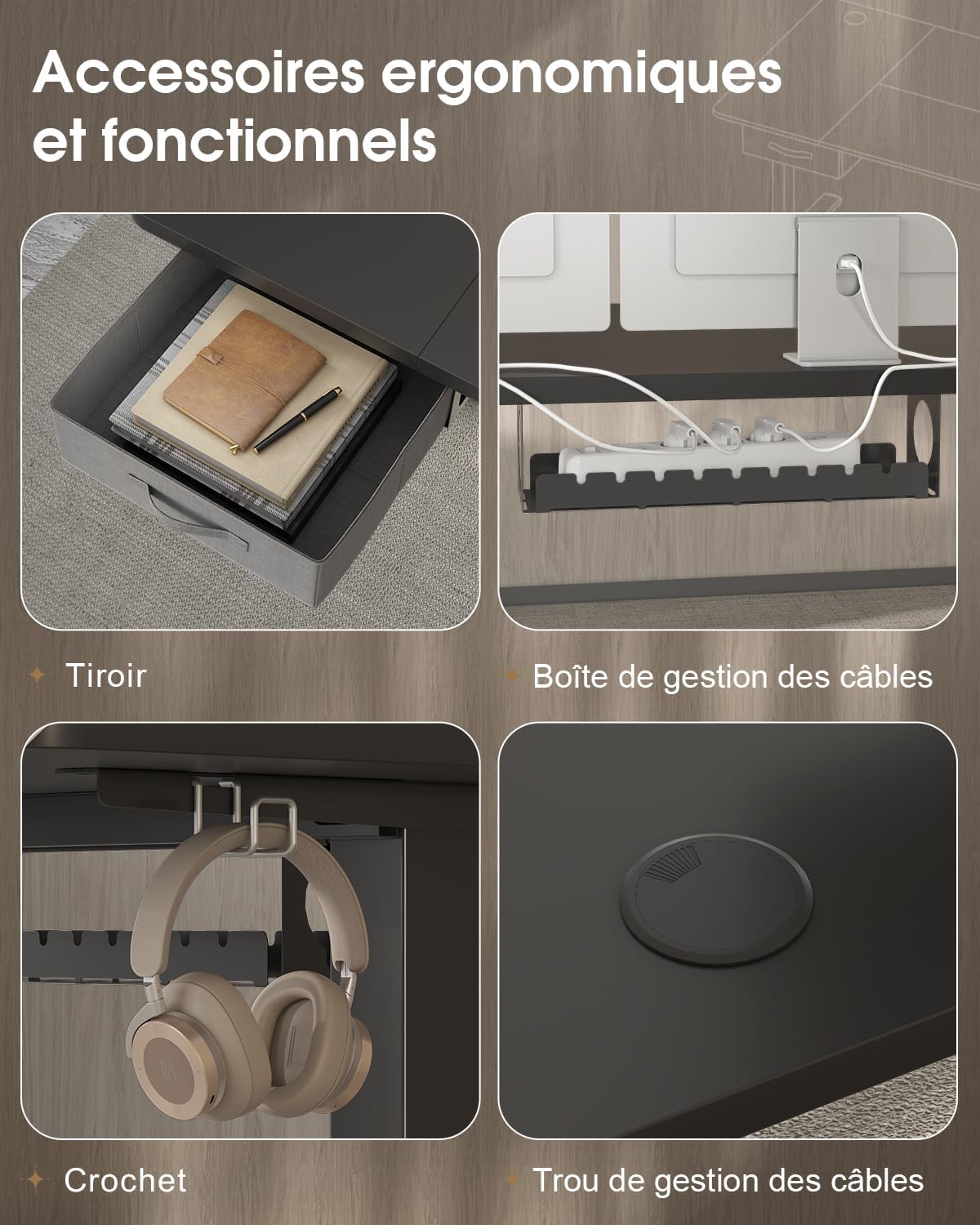
- Integrated Drawer: A fabric drawer (35x22x10.5 cm) is included for convenient storage of office supplies, helping to keep your desktop clutter-free.
- Headphone Hook: A side-mounted hook provides a dedicated spot for your headphones, keeping them within reach and off the desk surface.
- Cable Management System: Includes a cable management tray and a cable grommet to organize and conceal power cords and other cables, maintaining a tidy and safe workspace.
- USB-A Charging Port: Built-in port on the control panel for easy charging of your electronic devices.

7. Maintenance
Regular maintenance will help prolong the life and performance of your Devoko standing desk.
- Cleaning: Wipe the desk surface and frame with a soft, damp cloth. Avoid using harsh chemicals or abrasive cleaners that could damage the finish.
- Check Connections: Periodically check all screws and bolts to ensure they are tight. Retighten if necessary.
- Cable Management: Ensure cables are neatly organized and not pinched or strained, especially during height adjustments.
- Motor Care: Avoid spilling liquids on the motor or control panel. If the desk is not used for an extended period, unplug it from the power outlet.
8. Troubleshooting
If you encounter any issues with your desk, refer to the following common problems and solutions. If the problem persists, contact customer support.
| Problem | Possible Cause | Solution |
|---|---|---|
| Desk does not move or respond to controls. | Power cable disconnected; motor cable disconnected; overload. | Check if the power cable is securely plugged into the wall outlet and the desk. Ensure the motor cable is connected. Reduce the load on the desk if it exceeds 70 kg. |
| Desk moves unevenly or makes unusual noises. | Loose connections; uneven weight distribution. | Check and tighten all assembly screws. Redistribute weight evenly on the desktop. |
| LED display shows an error code. | System malfunction; sensor error. | Unplug the desk from the power outlet for 10 minutes, then plug it back in to reset the system. If the error persists, contact customer support. |
| USB-A charging port not working. | Cable issue; device incompatibility. | Try a different USB cable or device. Ensure the desk is powered on. |
9. Specifications
| Feature | Specification |
|---|---|
| Brand | Devoko |
| Model Number | 0790 |
| Color | Black |
| Desktop Material | Particle board |
| Frame Material | Steel alloy (65x45 mm cold-rolled steel) |
| Product Dimensions (L x W x H) | 180 cm x 80 cm x (73-118 cm) |
| Height Adjustment Range | 73 cm to 118 cm |
| Load Capacity | 70 kg |
| Noise Level | Less than 50 dB |
| Special Features | Electric height adjustment, Integrated USB-A port, Cable management, Ergonomic design, 2 Memory presets, Drawer, Headphone hook |
| Item Weight | 30.8 kg |
| Country of Origin | China |
10. Warranty and Support
For warranty information or technical support, please refer to the purchase documentation or contact Devoko customer service. Keep your proof of purchase for any warranty claims.
You can visit the official Devoko store for more information: Devoko Store


