
PUPKIDS Non
Contents
PUPKIDS GPS Wireless Dog Fence User Manual
Model: Non
1. Introduction
Thank you for choosing the PUPKIDS GPS Wireless Dog Fence. This system provides a safe and effective way to contain your dog within a defined outdoor area using advanced GPS and GNSS technology. It offers a customizable boundary, multiple warning modes, and is designed for medium to large dogs, ensuring their safety and your peace of mind.
2. Safety Information
- This product is designed for dogs over 6 months old.
- The GPS collar is intended for outdoor use only and requires an unobstructed view of the sky for accurate positioning. Avoid using indoors or in areas with heavy shelter (e.g., dense forests).
- Ensure the collar fits snugly but comfortably. It should not be too tight to cause discomfort or too loose to move freely on the dog's neck.
- Regularly check your dog's neck for any signs of irritation or pressure sores from the contact points. If irritation occurs, discontinue use and consult a veterinarian.
- Always supervise your dog during the initial training phase to ensure they understand the boundary and respond appropriately to the warnings.
- Do not use this system on aggressive dogs or dogs with health issues that could be exacerbated by stimulation.
3. Product Overview and Components
The PUPKIDS GPS Wireless Dog Fence system consists primarily of a GPS-enabled collar and various accessories to aid in setup and training.

Figure 3.1: The GPS Wireless Dog Fence collar in operation, showing its connection to a satellite for boundary definition and a dog within the defined area.

Figure 3.2: Contents of the product package, including the GPS Dog Collar Fence, contact points, silicone caps, test light, Type-C charging cable, boundary flags, user manual, and dog training guide.
Package Contents:
- GPS Dog Collar Fence
- Contact Points (various sizes)
- Silicone Protective Caps
- Test Light
- Type-C Charging Cable
- Boundary Flags
- User Manual
- Dog Training Guide
4. Setup Guide
Follow these steps to set up your PUPKIDS GPS Wireless Dog Fence system.
4.1 Initial Charging and Power On
- Before first use, fully charge the collar using the provided Type-C charging cable. A full charge takes approximately 2 hours and provides up to 24 hours of working time.
- Press and hold the power button on the collar to turn it on. The display will illuminate.

Figure 4.1: The collar features a 1000 mAh battery, charges in 2 hours, and provides 24 hours of working time.
4.2 Setting the Center Point
The center point is the reference location for your dog's safe zone. This must be set outdoors with a clear view of the sky.
- Turn on the device and allow it to search for satellite signals. Ensure the GPS signal strength is three bars or more.
- Move to the desired center point of your containment area.
- After the receiver successfully searches for a GPS signal, hold the SET button for 3 seconds. The TFT display will show the "Center Reset Interface".
- Press the UP/DOWN button to choose "YES" and then press the OK button on the display.
- When the GPS icon flashes with one beep and the distance number flashes the range setting for 1 second, it indicates that the center point setup has been completed.

Figure 4.2: Step-by-step visual guide for setting the center point of the wireless fence.
4.3 Setting the Safe Radius Distance
The radius defines the size of your dog's safe zone. It can be adjusted from 33 to 9999 yards.
- After completing the center point setting, press the SET button to go into the functional interface.
- Press the UP/DOWN button to choose the radius setting icon.
- Press the OK button to go into the safe radius distance interface.
- Press the UP/DOWN button to change the safe radius distance from 33 yards to 9999 yards.
- Hold the OK button for 3 seconds to save the setting and exit the safe radius distance interface.

Figure 4.3: Visual steps for adjusting the safe radius distance of the wireless fence.

Figure 4.4: Illustration of the customizable wireless fence range, from a minimum radius of 33 yards to a maximum of 9999 yards. Suitable for yards larger than 3/4 acre.
5. Operating Instructions
Once the center point and radius are set, the system is ready for operation. The collar will provide warnings as your dog approaches the boundary.
5.1 Understanding Warning Modes
The PUPKIDS wireless fence offers three warning modes to correct your dog's behavior:
- Beep + Vibrate: Provides an audible beep followed by a vibration. This mode is suitable for initial training or sensitive dogs.
- Beep + Vibrate + Static: Combines the beep and vibration with a static correction. The intensity of the static correction increases as the dog gets closer to the boundary.
- The system is designed to stop stimulation once the dog begins to return to the safe zone.
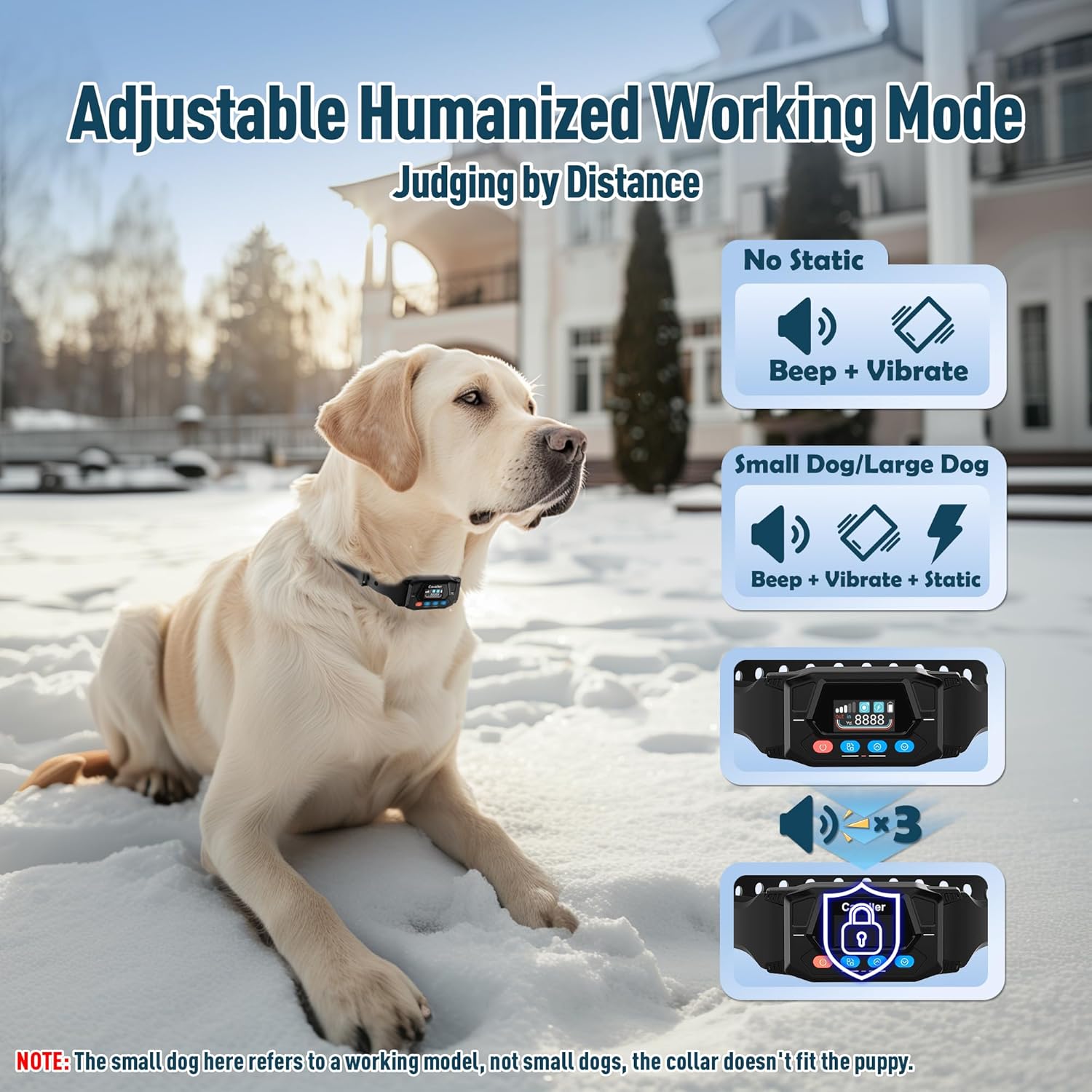
Figure 5.1: Overview of the adjustable working modes: Beep + Vibrate (No Static) and Beep + Vibrate + Static, suitable for different dog sizes and temperaments.
5.2 Choosing the Stimulation Mode
You can select the appropriate stimulation mode for your dog.
- Press the SET button to go into the functional interface.
- Press the UP/DOWN button to choose the mode setting icon.
- Press the OK button to set the mode.
- Press the UP/DOWN button to choose the desired mode setting icon.
- Hold the OK button for 3 seconds to save the setting and exit the mode setting interface.

Figure 5.2: Step-by-step guide for selecting the appropriate stimulation mode on the collar.
5.3 Collar Fit and Usage
The wireless collar is designed for dogs over 20 lbs with neck sizes of 12-25 inches. It is not ideal for small dogs.

Figure 5.3: The collar is adjustable for dogs weighing 20-140 lbs with neck sizes 12-25 inches, suitable for dogs over 6 months old. Not suitable for small dogs under 20 lbs.

Figure 5.4: The system is ideal for use in yards, at the beach, on farms, and during camping. It is not recommended for indoor use or for dogs under 20 lbs.
6. Maintenance
Proper maintenance ensures the longevity and effectiveness of your PUPKIDS GPS Wireless Dog Fence.
6.1 Waterproofing
The invisible fence collar is IPX7 waterproof, meaning it can withstand immersion in water up to 1 meter for 30 minutes. This makes it suitable for use in rainy conditions, during bathing, or while swimming.

Figure 6.1: The collar is IPX7 waterproof, making it safe for use in rain, during bathing, and while swimming.
6.2 Cleaning and Storage
- Clean the collar regularly with a damp cloth. Avoid harsh chemicals.
- Ensure the charging port cover is securely closed when not charging to maintain waterproofing.
- Store the collar in a cool, dry place when not in use.
6.3 Contact Points and Silicone Caps
The collar comes with different sizes of contact points and silicone protective caps for comfort and effectiveness.

Figure 6.2: The collar includes short prongs for thin-haired dogs, long prongs for thick-haired dogs, and silicone protective caps for enhanced comfort and double protection.
7. Troubleshooting
If you encounter issues with your PUPKIDS GPS Wireless Dog Fence, refer to the following common problems and solutions:
| Problem | Possible Cause | Solution |
|---|---|---|
| Collar not turning on. | Low battery or not charged. | Charge the collar fully using the provided Type-C cable. |
| Inaccurate boundary or no signal. | Poor GPS signal, indoor use, or heavy obstruction. | Ensure the collar is used outdoors with a clear view of the sky. Check GPS signal strength on the display (should be 3 bars or more). Re-set the center point if necessary. |
| Collar not providing warnings at boundary. | Incorrect mode setting, low battery, or dog not reaching warning zone. | Verify the stimulation mode is correctly set. Ensure the collar is charged. Confirm the dog is entering the warning zone (23-39ft from border). |
| Dog not responding to warnings. | Collar too loose, contact points not making contact, or dog needs more training. | Adjust collar fit to ensure contact points touch the dog's skin. Use longer contact points if your dog has thick fur. Refer to the Dog Training Guide for proper training techniques. |
8. Specifications
| Brand Name | PUPKIDS |
| Model Name | Non |
| Item Weight | 15.8 ounces |
| Item Package Dimensions | 7.52 x 7.2 x 2.13 inches |
| Batteries | 1 Lithium Polymer battery (included) |
| Battery Life | Up to 24 hours |
| Waterproof Rating | IPX7 |
| Adjustable Radius | 33 to 9999 yards |
| Suitable Dog Weight | 20-140 lbs |
| Neck Size Compatibility | 12-25 inches |
| Target Audience | Dogs over 6 months old |
9. Warranty and Support
PUPKIDS stands behind the quality of its products.
9.1 Warranty Information
This product comes with a 12-month warranty from the date of purchase. Please retain your proof of purchase for warranty claims.
9.2 Customer Support
For any questions, technical assistance, or warranty inquiries, please contact PUPKIDS customer support:
Email: support@pupkids.net
Support is available 24 hours a day, 7 days a week.

Figure 9.1: Contact information for PUPKIDS customer support.
Documents and downloads
Ask a question about this manual
Ask about setup, troubleshooting, compatibility, parts, safety, or missing instructions. Manuals+ will review the question and use this page’s manual context to help answer it.