
GODOX V480C
Contents
Godox V480 Touchscreen Camera Flash Speedlite User Manual
Model: V480C (GD-V480C-MIC)
Brand: GODOX
1. Introduction
The Godox V480 is a high-performance TTL camera flash speedlite designed for professional and enthusiast photographers. Featuring an intuitive touchscreen interface, robust wireless capabilities, and a flexible bounce head, the V480 offers precise lighting control and exceptional portability. This manual provides detailed instructions for the proper setup, operation, and maintenance of your V480 flash unit.
2. What's in the Box
Please check the contents of your package to ensure all items are present:
- Flash Body x1
- Lithium Battery x1
- USB-C Charging Cable x1
- Adapter x1
- Diffuser x1
- Mini Stand x1
- Storage Bag x1

Image: The Godox V480 flash unit along with its complete set of accessories, including the battery, charger, cables, diffuser, mini stand, and storage bag.
3. Setup
3.1 Battery Installation
- Locate the battery compartment on the side of the V480 flash unit.
- Slide the battery compartment cover open.
- Insert the provided 7.2V/2200mAh lithium battery, ensuring the contacts align correctly.
- Close the battery compartment cover until it clicks securely into place.
3.2 Mounting the Flash
- Ensure your camera is powered off.
- Slide the V480's hot shoe mount into your camera's hot shoe.
- Rotate the locking ring on the flash unit clockwise until it is securely fastened to the camera's hot shoe.
- To remove, rotate the locking ring counter-clockwise and slide the flash off.

Image: The Godox V480 flash unit securely mounted onto a DSLR camera's hot shoe, ready for operation.
4. Operating Instructions
4.1 Power On/Off and Touchscreen Interface
Press and hold the power button to turn the V480 on or off. The 2.0-inch color touchscreen provides an intuitive interface for all settings. You can tap, swipe, or use the tactile buttons for navigation and adjustments.

Image: A close-up view of the Godox V480's 2.0-inch color touchscreen, demonstrating its intuitive interface for quick adjustments.
4.2 Flash Modes
The V480 supports various flash modes for creative control:
- TTL (Through-The-Lens) Auto Flash: Automatically adjusts flash output for correct exposure.
- Manual (M) Mode: Allows precise control over flash power output (1/1 to 1/256).
- Multi (Stroboscopic) Mode: Fires a series of rapid flashes to capture multiple movements in one frame.
- High-Speed Sync (HSS): Synchronizes with shutter speeds up to 1/8000s, enabling wider apertures in bright conditions.
- Front/Rear-Curtain Sync: Controls when the flash fires relative to the shutter curtains for dynamic motion effects.

Image: Visual representation of the Godox V480's professional flash modes, including High-Speed Sync (HSS) up to 1/8000s, and front/rear curtain sync capabilities.
4.3 Flexible Bounce Head
The flash head can be tilted from -7° to 120° vertically and swiveled a full 330° horizontally. This flexibility allows you to bounce light off walls, ceilings, or reflectors for softer, more natural illumination.

Image: Diagram illustrating the flexible movement of the Godox V480's flash head, showing its vertical tilt from -7° to 120° and horizontal swivel of 330°.
4.4 10-Level LED Modeling Lamp
The built-in 2W LED modeling lamp offers ten adjustable brightness levels. This feature allows you to preview how your flash will shape shadows and highlights before taking the shot, aiding in precise light setup.

Image: A visual demonstrating the Godox V480's integrated 10-level LED modeling lamp, used for pre-visualizing light effects and shaping shadows.
4.5 Godox 2.4G X Wireless System
The V480 features a built-in Godox 2.4G X wireless system, allowing it to function as both a sender and receiver. It supports 32 channels and can control multiple flashes up to 100 meters away, eliminating the need for external triggers.

Image: Diagram illustrating the Godox 2.4G X wireless system, showing the V480's capability to act as both sender and receiver, controlling other Godox flashes across multiple channels and groups.
4.6 Smart Distance Readout
The V480's display provides a real-time effective flash range, helping you determine if your subject is within optimal reach for proper exposure. This is particularly useful for bounce applications or fast-paced shooting environments.

Image: The Godox V480's display showing the smart distance readout feature, which indicates the effective flash range in real-time.
5. Maintenance
5.1 Battery Charging
The V480 uses a 7.2V/2200mAh rechargeable lithium battery. To charge the battery:
- Connect the provided USB-C charging cable to the battery.
- Plug the other end of the cable into the included adapter or any compatible USB power source.
- A full charge provides approximately 650 full-power flashes and takes about 1.7 seconds for recycle time.
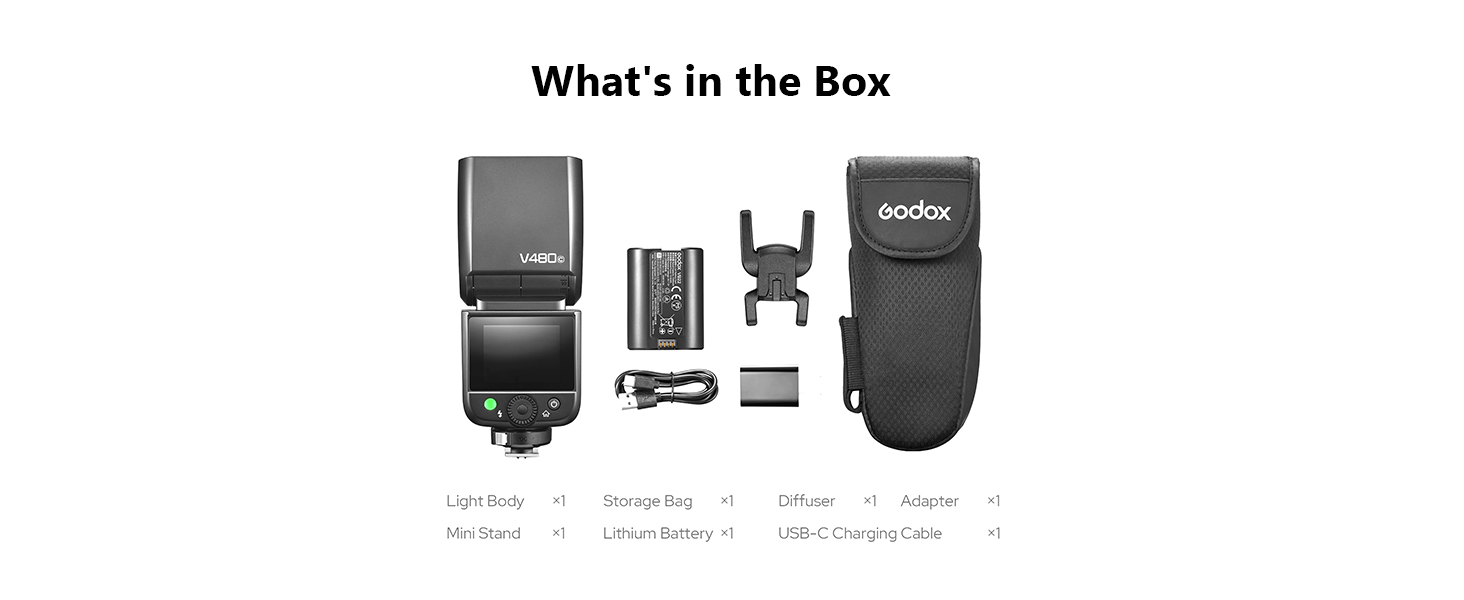
Image: The Godox V480's lithium battery being charged via its USB-C port, highlighting its capacity for 650 full-power flashes and quick recycle time.
5.2 Cleaning and Storage
- Use a soft, dry cloth to clean the flash unit. Avoid using solvents or abrasive cleaners.
- Keep the flash away from dust, moisture, and extreme temperatures.
- When not in use for extended periods, remove the battery and store the flash in its provided storage bag.
6. Troubleshooting
If you encounter issues with your Godox V480, please refer to the following common solutions:
- Flash Not Firing: Ensure the flash is securely mounted on the camera's hot shoe. Check battery level and ensure the flash is powered on. Verify flash mode settings are appropriate for your camera.
- Incorrect Exposure: Adjust Flash Exposure Compensation (FEC) or switch to Manual mode to fine-tune power output. Check camera's ISO, aperture, and shutter speed settings.
- Wireless Communication Issues: Ensure both the V480 and any receiving units are set to the same channel and ID. Check for obstructions between units.
- Touchscreen Unresponsive: Power off the unit and restart. Ensure the screen is clean and dry.
For persistent issues, please contact Godox customer support or refer to the official Godox website for further assistance.
7. Specifications
| Feature | Description |
|---|---|
| Model Number | GD-V480C-MIC |
| Guide Number | Approx. GN50 (ISO 100, in meters) |
| Flash Coverage | Auto zoom (24-105mm), Manual zoom |
| Flash Head Angle | Horizontal: 0-330°, Vertical: -7-120° |
| Flash Duration | 1/300s - 1/20000s |
| Exposure Control | TTL auto flash, Manual flash |
| Flash Exposure Compensation (FEC) | ±3 stops in 1/3 increment |
| Sync Mode | High-speed sync (up to 1/8000s), First-curtain sync, Second-curtain sync |
| Multi Flash | Provided (up to 100 times, 100Hz) |
| Wireless Flash (2.4G Transmission) | Sender/Receiver functionality |
| Wireless Channels | 32 (01-32) |
| Wireless ID | OFF/01-99 |
| Transmission Range | Approx. 100m |
| LED Modeling Lamp Power | 2W (10 brightness levels) |
| Color Temperature | 5300K ± 300K |
| Power Supply | 7.2V/2200mAh Lithium Battery |
| Recycle Time | Approx. 1.7 seconds |
| Number of Flashes | Approx. 650 (full power) |
| Dimensions (W x H x D) | 6.54" x 2.8" x 1.93" |
| Net Weight (without battery) | Approx. 282g |
| Net Weight (with battery) | Approx. 361g |

Image: A detailed table outlining the technical specifications of the Godox V480 flash, including guide number, flash modes, wireless capabilities, and physical dimensions.
8. Warranty and Support
For warranty information and customer support, please refer to the official Godox website or contact your local distributor. Keep your purchase receipt as proof of purchase for warranty claims.
Official Godox Website: www.godox.com
Ask a question about this manual
Ask about setup, troubleshooting, compatibility, parts, safety, or missing instructions. Manuals+ will review the question and use this page’s manual context to help answer it.