
Fafeicy ZN-MT32
Fafeicy 18-in-1 Air Quality Meter User Manual
Model: ZN-MT32
Introduction
Thank you for choosing the Fafeicy 18-in-1 Air Quality Meter, Model ZN-MT32. This device is designed to provide comprehensive and accurate real-time monitoring of various indoor air quality parameters, including Carbon Dioxide (CO2), Formaldehyde (HCHO), Total Volatile Organic Compounds (TVOC), and Particulate Matter (PM2.5, PM1.0, PM0.3, PM5.0, PM10). It also measures temperature and humidity, offering a complete overview of your indoor environment. This manual will guide you through the setup, operation, and maintenance of your air quality meter to ensure optimal performance and longevity.
Product Overview
Key Features
- Highly Sensitive Sensors: Equipped with advanced PM2.5 infrared and semiconductor sensors for accurate detection of multiple air pollutants.
- Comprehensive Measurement: Monitors CO2, HCHO, TVOC, PM0.3, PM1.0, PM2.5, PM5.0, PM10, temperature, and humidity.
- HD Display: Features a 2.8-inch high-definition LCD screen with backlight, displaying 13 data points in real-time with color-coded indicators for easy interpretation.
- Data Recording & Analysis: Capable of recording particulate matter ratios and displaying historical data curves for PM2.5, HCHO, TVOC, and CO2. Data can be stored for up to one year and exported as TXT files.
- Long Battery Life: Built-in 2000mAh rechargeable lithium-ion battery provides up to 7 hours of continuous operation.
- Convenient Charging: USB Type-C charging port for easy power replenishment.
Package Contents
- 1 x Fafeicy Air Quality Meter (Model ZN-MT32)
- 1 x USB Type-C Cable
- 1 x User Manual
Device Layout

Figure 1: Front and Back View of the Air Quality Meter. The front features a large display showing real-time readings for temperature, humidity, AQI, PM2.5, PM1.0, PM5.0, PM0.3, PM10, CO2, CO, HCHO, C6H6, and TVOC. The back panel includes a ventilation grille and two keyhole slots for wall mounting.

Figure 2: Sensing System and Display Breakdown. This image highlights the 18 items of test data displayed on the screen, including temperature, humidity, various PM levels, CO2, CO, HCHO, C6H6 (Benzene), and TVOC. It visually indicates the sensor detection areas for each parameter. The side of the device shows the USB Type-C charging port and a power button.
Setup
- Unpacking: Carefully remove the air quality meter and all accessories from the packaging.
- Initial Charge: Before first use, fully charge the device using the provided USB Type-C cable. Connect the cable to the meter's Type-C port and the other end to a DC5V 1A USB power adapter (not included) or a computer USB port. The charging indicator will show the charging status.
- Power On: Press and hold the power button located on the side of the device for a few seconds until the LCD screen illuminates.
- Placement: Place the meter in an area where you wish to monitor air quality. Ensure it is not placed directly next to air vents, windows, or sources of significant pollution (e.g., cooking fumes, chemical storage) for accurate readings. Allow the device to stabilize for a few minutes after powering on.
Operating Instructions
Real-time Monitoring
Upon powering on, the device will automatically begin real-time monitoring and display various air quality parameters on its 2.8-inch HD screen. The display provides a comprehensive overview of your indoor air quality at a glance.
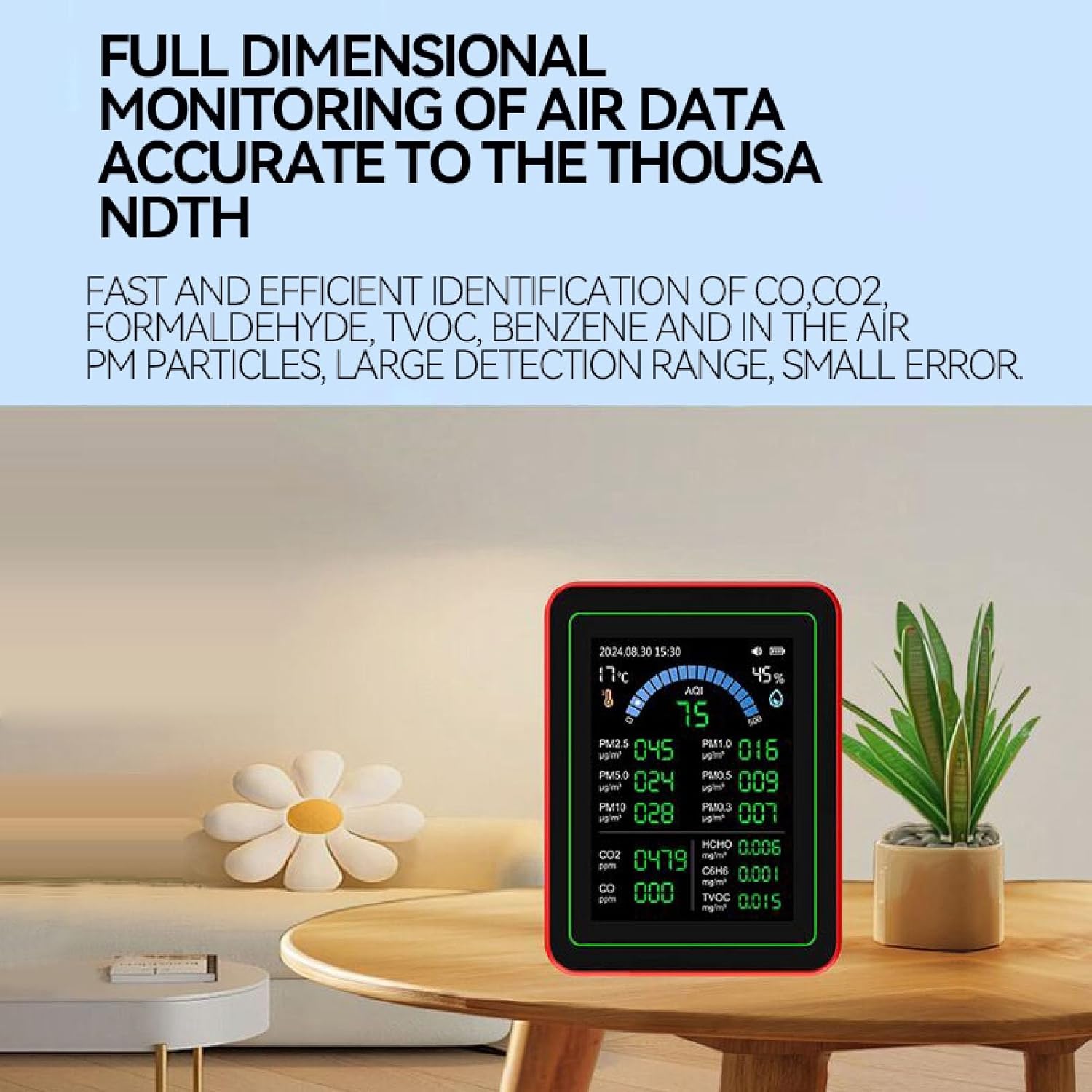
Figure 3: Real-time Air Quality Monitoring. The device's screen shows current temperature, humidity, AQI, and detailed readings for various particulate matter (PM2.5, PM1.0, PM5.0, PM0.3, PM10), CO2, CO, HCHO, C6H6, and TVOC.
- Temperature & Humidity: Displayed at the top left and right corners respectively.
- AQI (Air Quality Index): A composite index providing an overall assessment of air quality, often color-coded for quick understanding.
- Particulate Matter (PM): Readings for PM2.5, PM1.0, PM5.0, PM0.3, and PM10 are shown in µg/m³.
- Gases: CO2 (ppm), CO (ppm), HCHO (mg/m³), C6H6 (mg/m³), and TVOC (mg/m³) concentrations are displayed.
- Color-Coded Display: The display uses different colors to indicate the air quality status for various parameters, making it easy to interpret the current environmental conditions.
Data Recording and Analysis
The meter features advanced data recording capabilities, allowing you to track air quality trends over time.
- Particulate Ratio Recording: The device can record the ratio of PM0.3, 0.5, 1.0, and 2.5 particles before and after a 1-minute interval, useful for observing immediate changes.
- Historical Data Curves: View data curves for PM2.5, HCHO, TVOC, and CO2 to understand concentration trends over 24 hours.
- Data Storage: The device can store data records for up to one year.
- Data Export: Connect the device to a computer via the USB Type-C cable to export stored records as TXT files for further analysis.

Figure 4: Historical Data and Curve Recording. This image illustrates the device's ability to display 24-hour historical data curves for key indicators like HCHO, TVOC, PM2.5, and CO2, enabling users to track concentration trends.

Figure 5: Data Storage and Export. The image shows the air quality meter connected to a computer, demonstrating the capability to export recorded data as a TXT file for long-term storage and analysis. Data is recorded every 5 seconds and can be saved for 365 days.
Charging and Battery Life
The device is powered by a built-in 2000mAh rechargeable lithium-ion battery.
- Battery Capacity: 2000mAh.
- Continuous Operation: Up to 7 hours on a full charge.
- Charging Time: Approximately 2-3 hours for a full charge.
- Standby Time: 12-15 hours with screen off.
- Charging Port: USB Type-C.
- Power Saving: The device has a power-saving function that can turn off the screen to conserve battery.
Specifications
| Parameter | Value |
|---|---|
| Item Type | Air Quality Meter |
| Model | ZN-MT32 |
| Temperature Range | 0-70℃ |
| Display | LCD screen and backlight (2.8-inch HD) |
| Operating Voltage | DC5V 1A (TYPE C USB) |
| Operating Current | 180mA |
| Sensors | PM2.5 infrared sensor, Semiconductor sensor |
| Battery | 1 x 3.7V rechargeable Li-ion battery 2000mAh |
| Dimensions (L x W x H) | Approx. 90 x 70 x 35mm / 3.54 x 2.76 x 1.38in |
| Material | ABS |
| Color | Black |
| Weight | Approx. 9.9 ounces (280g) |
Maintenance
- Cleaning: Use a soft, dry cloth to clean the exterior of the device. Do not use abrasive cleaners or solvents.
- Storage: When not in use for extended periods, store the device in a cool, dry place away from direct sunlight and extreme temperatures.
- Battery Care: To prolong battery life, avoid fully discharging the battery frequently. Charge the device regularly, even if not in constant use.
- Sensor Care: Do not obstruct the sensor vents. Keep the device away from dust, lint, and other airborne particles that could interfere with sensor accuracy.
Troubleshooting
| Problem | Possible Cause | Solution |
|---|---|---|
| Device does not power on. | Low battery or no charge. | Connect the device to a power source using the USB Type-C cable and allow it to charge for at least 30 minutes before attempting to power on again. |
| Inaccurate readings. | Sensor obstruction or interference. Device not calibrated. | Ensure sensor vents are clear. Avoid placing the device near strong air currents, direct sunlight, or sources of high concentration pollutants. Allow the device to stabilize in a clean environment for 5-10 minutes after powering on. If issues persist, contact customer support. |
| Screen is dim or blank. | Power saving mode or low battery. | Press any button to wake the screen. If the screen remains dim or blank, charge the device. |
| Cannot export data. | Incorrect cable connection or software issue. | Ensure the USB Type-C cable is securely connected to both the device and the computer. Try a different USB port or cable. Refer to the device's on-screen instructions or a dedicated software guide (if applicable) for data export procedures. |
Warranty and Support
For warranty information and technical support, please refer to the documentation provided with your purchase or contact Fafeicy customer service. Keep your purchase receipt as proof of purchase for warranty claims.
Manufacturer: Fafeicy
Model Number: ZN-MT32 (Fafeicy7h5ou9y0z3)
For the latest support information and FAQs, please visit the official Fafeicy website or contact their customer support channels.
Related Documents - ZN-MT32
 |
Tuya Smart Air Quality Monitors: Multi-functional CO2, PM2.5, TVOC Detectors Explore Tuya's range of smart air quality monitors, including 18-in-1, 15-in-1, 10-in-1, and 5-in-1 models. Features include CO2, PM2.5, TVOC, HCHO detection, Wi-Fi connectivity, and real-time monitoring. |
 |
Gaqqee ZN-MT29 15-in-1 Air Quality Detector User Manual Comprehensive user manual and product overview for the Gaqqee ZN-MT29 15-in-1 Air Quality Detector. Features, technical specifications, and app integration instructions. |
 |
Tuya WiFi Air Quality Monitor User Manual & Product Guide Comprehensive user guide and product specifications for the Tuya WiFi Air Quality Monitor (Models ZN-MT11, MT11W, ZN-MT13W). Learn about features, operation, and smart app integration. |
 |
14-in-1 Air Quality Detector (Model 2CO9T) User Manual User manual for the 14-in-1 Air Quality Detector (Model 2CO9T). Includes setup instructions, Tuya Smart App integration, parameter specifications, and troubleshooting. |
 |
MT32 18-in-1 Indoor Real-Time Air Detector User Manual User manual for the MT32 18-in-1 indoor air quality monitor, providing safety warnings, precautions, and after-sales service guidelines. |
 |
MT11 5-in-1 LCD Digital Air Quality Detector: Monitor CO2, HCHO, TVOC, Temp & Humidity Discover the MT11 5-in-1 LCD Digital Air Quality Detector. This device offers real-time monitoring of CO2, HCHO, TVOC, temperature, and humidity on a 2.8-inch color display. Features include long battery life, Type-C charging, and versatile application for homes, offices, and more. Learn about its specifications, features, and benefits for healthy breathing. |
Ask a question about this manual
Ask about setup, troubleshooting, compatibility, parts, safety, or missing instructions. Manuals+ will review the question and use this page’s manual context to help answer it.