
1. Introduction
This manual provides essential information for setting up, operating, and maintaining your Vu 65VIBE-DV Vibe Series 4K QLED Smart Google TV. Please read these instructions carefully before use to ensure proper functionality and safety. Keep this manual for future reference.
2. What's in the Box
Verify that all components are present in the packaging:
- TV Unit (1 U)
- Remote Control (1 U)
- Power Cord (1 U)
- Welcome Kit Guide (1 U)
- Table Mount Stand (1 U)
- AAA Batteries (2 U)
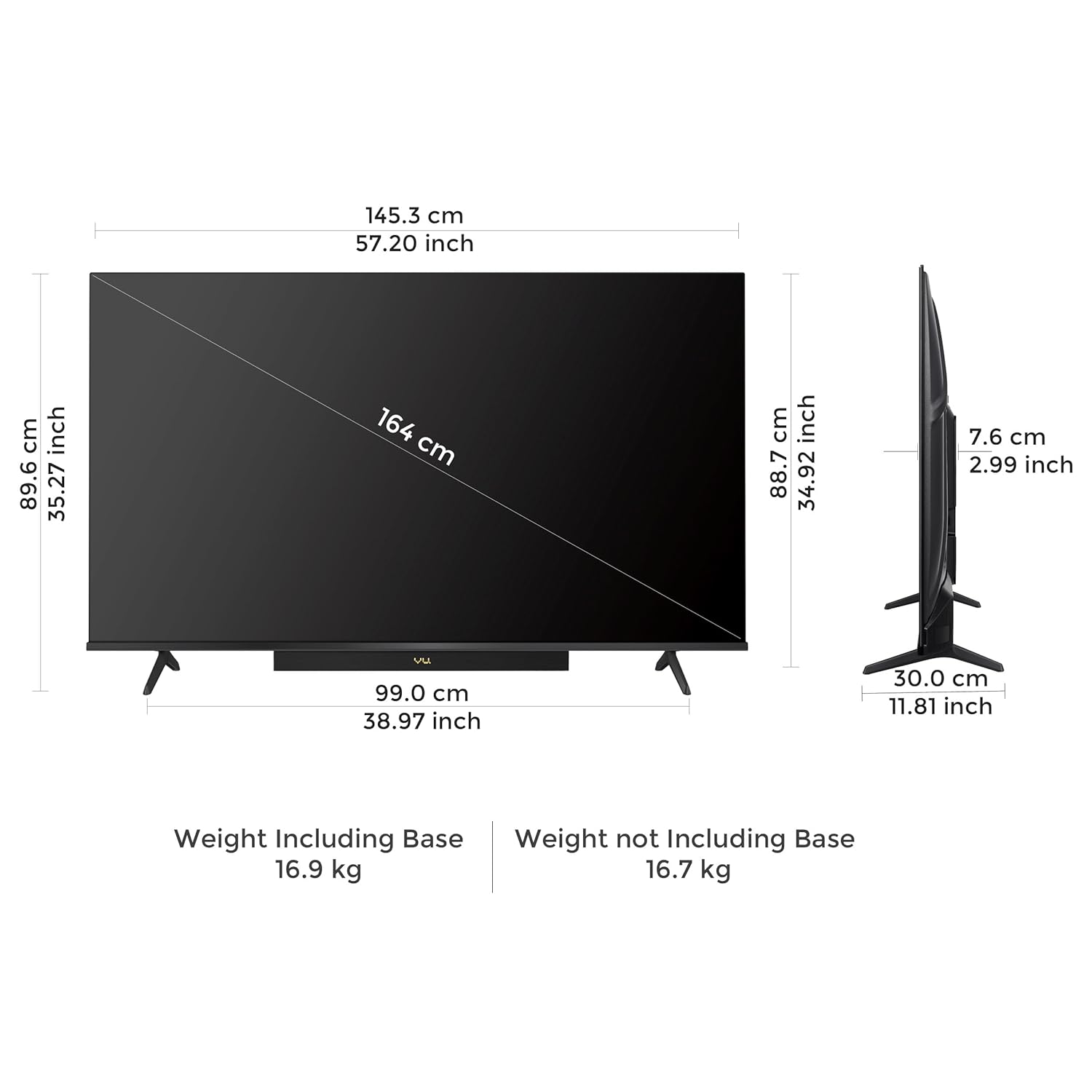
Image: Contents of the Vu Vibe Series TV packaging, including the TV unit, remote, power cord, welcome kit, table mount stand, and batteries.
3. Setup
3.1. Mounting Options
Your Vu TV can be set up using the included table mount stand or a compatible wall mount bracket (sold separately). The table mount stand is provided free of cost during installation by the service team. Wall mount installation may incur additional charges.
Table Mount Installation
Attach the provided table mount stand to the base of the TV unit using the designated screws. Ensure the stand is securely fastened before placing the TV on a stable, flat surface.

Image: The Vu 65VIBE-DV TV securely placed on its table mount stand.
Wall Mount Installation
If opting for wall mounting, use a VESA-compatible wall mount bracket suitable for a 65-inch television. Follow the instructions provided with your wall mount bracket and ensure professional installation for safety.

Image: The Vu 65VIBE-DV TV mounted on a wall, showcasing its sleek design.
3.2. Initial Power On
- Connect the power cord to the TV and then to a power outlet.
- Press the power button on the remote control or the TV unit.
- Follow the on-screen instructions to complete the initial setup, including network connection and Google account login.
4. Key Features
4.1. Display Technology
- 4K QLED Display: Offers a resolution of 3840x2160 pixels for detailed and vibrant visuals.
- Dolby Vision, HDR10 & HLG: Supports multiple HDR formats for enhanced contrast and color accuracy.
- A+ Grade Panel: Ensures high-quality display performance.
- 400 Nits Brightness: Provides clear visibility even in well-lit environments.
- Dynamic Backlight Control & Active Contrast: Optimizes brightness and contrast in real-time.
- MEMC (Motion Estimation, Motion Compensation): Reduces motion blur for smoother fast-paced scenes.
- AI Picture Smart Scene & Upscale: Intelligently enhances picture quality and upscales lower resolution content to near 4K.

Image: Visual representation of the TV's display and smart features.
4.2. Audio System
- Integrated Soundbar: Features an 88-Watt sound output for powerful audio.
- Dolby Atmos: Delivers immersive, multi-dimensional sound.
- Dialogue Clarity & Deep Bass: Enhances vocal understanding and provides rich low-frequency sounds.
- Audio Only Mode: Allows listening to audio with the screen off.
- Auto Volume Control: Maintains consistent volume levels across different content.

Image: The TV's integrated soundbar and its audio capabilities.
4.3. Smart TV Features
- Google TV OS: Provides a personalized content discovery experience.
- Google App Search & Voice Assistant: Easily find content and control the TV using voice commands.
- A.I. Processor: Enhances performance and smart functionalities.
- 16GB ROM / 2GB RAM: Offers ample storage for apps and smooth operation.
- Pre-installed Apps: Access popular streaming services like Netflix, YouTube, Prime Video, and more.

Image: The Google TV interface displaying various streaming application logos.
4.4. Connectivity
- 3 HDMI Ports: Includes HDMI 2.1 for gaming consoles and eARC/ARC support.
- 2 USB Ports: For connecting hard drives and other USB devices.
- 2.4/5GHz WiFi: Dual-band Wi-Fi for stable internet connection.
- 2-way Bluetooth 5.3: Connect wireless headphones, speakers, or other Bluetooth devices.
- Airplay & Google Chromecast: Seamlessly cast content from compatible devices.

Image: A detailed view of the various input and output ports on the back of the TV.
5. Operating Instructions
5.1. Remote Control
The ActiVoice remote control features dedicated hotkeys for popular streaming services (Netflix, YouTube), picture and sound settings, and specific modes like Cricket and Cinema. Use the built-in Voice Assistant for hands-free control and search.

Image: The Vu ActiVoice remote control, highlighting its various buttons and voice assistant feature.
5.2. Picture and Sound Modes
Utilize the various picture and sound modes to optimize your viewing experience:
- Cricket Mode: Enhances sports viewing with optimized picture and sound settings.
- Cinema Mode: Provides a cinematic experience with adjusted color, contrast, and audio.
- Filmmaker Mode: Displays content as intended by the creators, preserving original aspect ratios, colors, and frame rates.
6. Maintenance
To ensure the longevity and optimal performance of your TV, follow these maintenance guidelines:
- Cleaning the Screen: Gently wipe the screen with a soft, dry microfiber cloth. For stubborn marks, lightly dampen the cloth with water or a screen-specific cleaning solution. Avoid harsh chemicals.
- Cleaning the Body: Use a soft, dry cloth to clean the TV's frame and back panel.
- Ventilation: Ensure adequate airflow around the TV by keeping vents clear of obstructions.
- Power Off: Always turn off and unplug the TV during electrical storms or when not in use for extended periods.
7. Troubleshooting
If you encounter issues with your TV, refer to the following common solutions:
- No Power: Check if the power cord is securely connected to both the TV and the power outlet. Ensure the outlet is functioning.
- No Picture/Sound: Verify that the correct input source is selected. Check all cable connections (HDMI, AV).
- Remote Not Working: Replace the AAA batteries in the remote control. Ensure there are no obstructions between the remote and the TV's IR sensor.
- Network Connection Issues: Restart your Wi-Fi router. Reconnect the TV to the Wi-Fi network via the settings menu.
- Slow Performance: Close unused applications. Clear cache from the TV's settings. Consider a factory reset if issues persist (note: this will erase all personal data and settings).
For further assistance, please contact Vu customer support.
8. Specifications
| Feature | Specification |
|---|---|
| Brand | Vu |
| Model | 65VIBE-DV |
| Screen Size | 65 Inches |
| Display Technology | QLED |
| Resolution | 3840x2160 Pixels (4K) |
| Refresh Rate | 60 Hz |
| Viewing Angle | 178 Degrees |
| Brightness | 400 Nits Peaking Brightness |
| HDR Support | Dolby Vision, HDR10 & HLG |
| Audio Output Power | 88 Watts |
| Audio Technology | Dolby Atmos, Dolby Digital Plus |
| Operating System | Google TV |
| Processor | 1.5GHz VuOn™ Processor |
| RAM | 2 GB |
| Storage (ROM) | 16 GB |
| HDMI Ports | 3 (HDMI 2.1, eARC/ARC) |
| USB Ports | 2 |
| Wireless Connectivity | 2.4/5GHz Dual Band Wi-Fi, 2-way Bluetooth 5.3 |
| Casting | Apple Airplay, Google Chromecast |
| Product Dimensions (LxWxH) | 145.3 x 30 x 89.6 cm (with stand) |
| Item Weight | 16.9 kg (with stand) |
9. Warranty and Support
Your Vu 65VIBE-DV TV comes with a 1-year manufacturer warranty from the date of purchase on the television set and a 6-month warranty on the remote control. Warranty claims can be processed using your Amazon e-invoice.
For customer support, installation requests, or further inquiries, you can contact Vu Technologies Pvt. Ltd. at:
- Contact Number: +91 022-45417000
- WhatsApp: +91 9867740000
- Email: support@vutvs.com
The user guide and manual are also available on the brand’s official website under the repair & customer support section.
10. Product Overview Video
Watch this official product video for a visual overview of the Vu Vibe Series 4K QLED Smart Google TV's features and capabilities.
Video: An official overview of the Vu Vibe Series 4K QLED Smart Google TV, detailing its display, sound, smart features, and connectivity options.