
1. Introduction and Safety Information
This manual provides important instructions for the installation, operation, and maintenance of your Feelfunn 8000 BTU Portable Air Conditioner. Please read this manual thoroughly before using the appliance and keep it for future reference.
Important Safety Instructions
- Always connect the unit to a grounded power outlet.
- Do not operate the unit with a damaged power cord or plug.
- Ensure the unit is placed on a flat, stable surface to prevent tipping.
- Maintain at least 20 inches (50 cm) of clear space around the unit for proper airflow.
- Do not block air outlets or inlets.
- Do not insert objects into the air vents.
- Unplug the unit before cleaning or servicing.
- Keep children away from the appliance.
- Do not use the unit in wet environments or near water.
2. Package Contents
Verify that all items are present in the package. If any parts are missing or damaged, contact customer support.
- Portable AC Unit
- Window Installation Kits
- Remote Control
- Instruction Manual

Image: Feelfunn Portable AC unit with remote control and smartphone app interface.
Video: Unboxing and initial overview of the Feelfunn Portable Air Conditioner and its components.
3. Product Features
The Feelfunn 8000 BTU Portable Air Conditioner offers versatile climate control for your space.
- 8000 BTU Cooling Capacity: Effectively cools areas up to 350 sq. ft.
- 3-in-1 Functionality: Operates as an Air Conditioner, Fan, and Dehumidifier.
- Dehumidifier: Removes up to 45 pints of moisture per day.
- Temperature Range: Adjustable from 60°F to 86°F.
- Low Noise Operation: Operates at less than 48dB, suitable for quiet environments.
- Sleep Mode: Automatically adjusts temperature for energy saving and quiet operation.
- 24-Hour Timer: Program the unit to turn on or off automatically.
- Remote Control & LED Display: Convenient control and clear status indication.
- Full-Water Alert: Notifies you when the water tank needs emptying.
- Portability: Equipped with 360° casters and hidden handles for easy movement.
- Washable Filter: Reusable filter for easy maintenance.

Image: Diagram illustrating the 5-in-1 versatility of the portable AC unit, including cooling, fan, dehumidifier, sleep mode, and 24-hour timer.

Image: Portable AC unit in a bedroom, emphasizing quiet operation (48dB) and the 24-hour auto-off timer for uninterrupted sleep.
Video: Detailed explanation of the portable air conditioner's features and included attachments.
4. Setup and Installation
Follow these steps to properly set up your portable air conditioner.
Window Kit Installation
- Attach the hose connector to one end of the exhaust hose by rotating it.
- Connect the window kit adapter to the other end of the exhaust hose by rotating it.
- Adjust the slide plate of the window kit to fit the length of your window (20-49 inches) and secure with screws.
- Attach the hose connector to the air exhaust outlet on the back of the unit.
- Insert the window kit adapter into the prepared window kit.
- Ensure all connections are secure and the exhaust hose is extended without kinks.
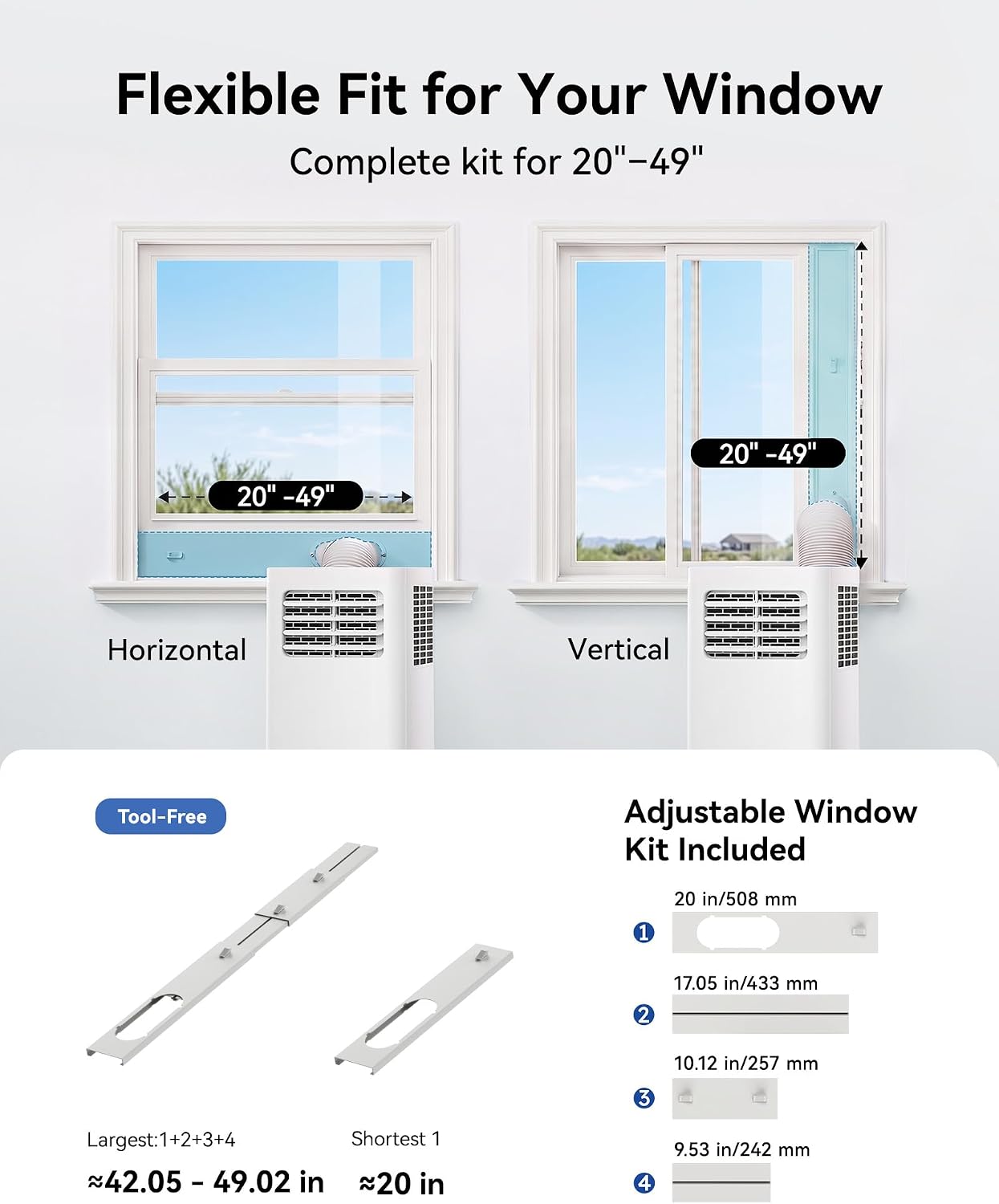
Image: Illustration of flexible window kit installation for both horizontal and vertical windows, with dimensions.

Image: Visual step-by-step instructions for assembling and installing the window kit components.
Video: Detailed unboxing and setup process for the portable air conditioner, including window kit assembly.
5. Operating Instructions
Your Feelfunn portable AC can be controlled via the top LED display panel or the included remote control.
Control Panel and Remote
- Power Button: Turns the unit on or off.
- Mode Button: Cycles through Cool, Fan, and Dehumidifier modes.
- Temperature Adjustment (Up/Down Arrows): Sets the desired temperature (60°F-86°F).
- Speed Button: Adjusts fan speed (Low/High).
- Timer Button: Sets the 24-hour auto-on/off timer.
- Sleep Mode: Activates quiet operation and energy-saving temperature adjustments.
- Full Indicator: Illuminates when the water tank is full and needs draining.

Image: Portable AC unit displaying its top touch control panel and the remote control for convenient operation.
Video: Explanation of the portable air conditioner's interface and controls.
6. Maintenance
Regular maintenance ensures optimal performance and longevity of your unit.
Cleaning the Air Filter
The unit features a removable and washable air filter. Clean the filter every two weeks or more frequently depending on usage and air quality.
- Unplug the air conditioner from the power outlet.
- Remove the back panel to access the filter.
- Gently slide out the filter.
- Wash the filter under running water (warm, not hot) with a mild detergent.
- Rinse thoroughly and allow the filter to air dry completely before reinserting.
- Reinstall the dry filter and secure the back panel.
Draining Accumulated Water
The unit will accumulate water during dehumidifying and cooling operations. When the 'Full' indicator lights up, the unit will stop operating until drained.
- Place a shallow pan or bucket under the drainage outlet at the bottom rear of the unit.
- Remove the drain plug.
- Allow all accumulated water to drain completely.
- Replace the drain plug securely.

Image: Close-up view of the portable AC unit highlighting its adjustable airflow, washable filter, and dual drainage options.
7. Troubleshooting
Refer to this section for common issues and their solutions.
| Problem | Possible Cause | Solution |
|---|---|---|
| Unit does not turn on | No power supply; Power cord not plugged in; Circuit breaker tripped; Water tank full. | Check power connection; Plug in securely; Reset circuit breaker; Drain water tank. |
| Unit not cooling effectively | Window kit not properly installed; Room too large; Air filter dirty; Doors/windows open; Temperature setting too high. | Ensure window kit is sealed; Use in recommended room size (up to 350 sq. ft.); Clean air filter; Close all doors/windows; Lower temperature setting. |
| Loud noise during operation | Unit not on a level surface; Obstruction in fan; Loose parts. | Place on a flat, stable surface; Check for and remove obstructions; Contact customer support if noise persists. |
| Water leakage | Drain plug loose or missing; Unit tilted; Drainage hose blocked. | Secure drain plug; Ensure unit is level; Check drainage hose for blockages. |
If the problem persists after attempting these solutions, please contact Feelfunn customer support.
8. Specifications
| Feature | Specification |
|---|---|
| Brand | Feelfunn |
| Model Name | PAC003-8K |
| Cooling Power | 8000 BTU (ASHRAE) / 5000 BTU (SACC) |
| Coverage Area | Up to 350 sq. ft. |
| Product Dimensions | 11.4"D x 12"W x 26.7"H |
| Item Weight | 41.6 pounds |
| Voltage | 115 volts |
| Noise Level | 48 dB |
| Seasonal Energy Efficiency Ratio (CEER) | 6.1 |
| Refrigerant | R-32 |
| Dehumidification Capacity | Up to 45 pints/day |
| Window Opening Compatibility | 20-49 inches wide (vertical/horizontal) |
9. Warranty and Customer Support
Your Feelfunn Portable Air Conditioner is backed by a 1-year manufacturer's warranty. This warranty covers defects in materials and workmanship under normal use.
For warranty claims, technical assistance, or any questions regarding your product, please contact Feelfunn customer support. Have your model number (PAC003-8K) and purchase information ready when contacting support.
Contact information can typically be found on the official Feelfunn website or through your purchase platform.
