
ComMarker Titan1 Mopa
ComMarker Titan1 200W JPT Mopa Fiber Laser Engraving Machine User Manual
Model: Titan1 Mopa
1. Introduction
This manual provides essential information for the safe and efficient operation of your ComMarker Titan1 200W JPT Mopa Fiber Laser Engraving Machine. Please read this manual thoroughly before operating the machine to ensure proper usage, optimal performance, and to prevent injury or damage.
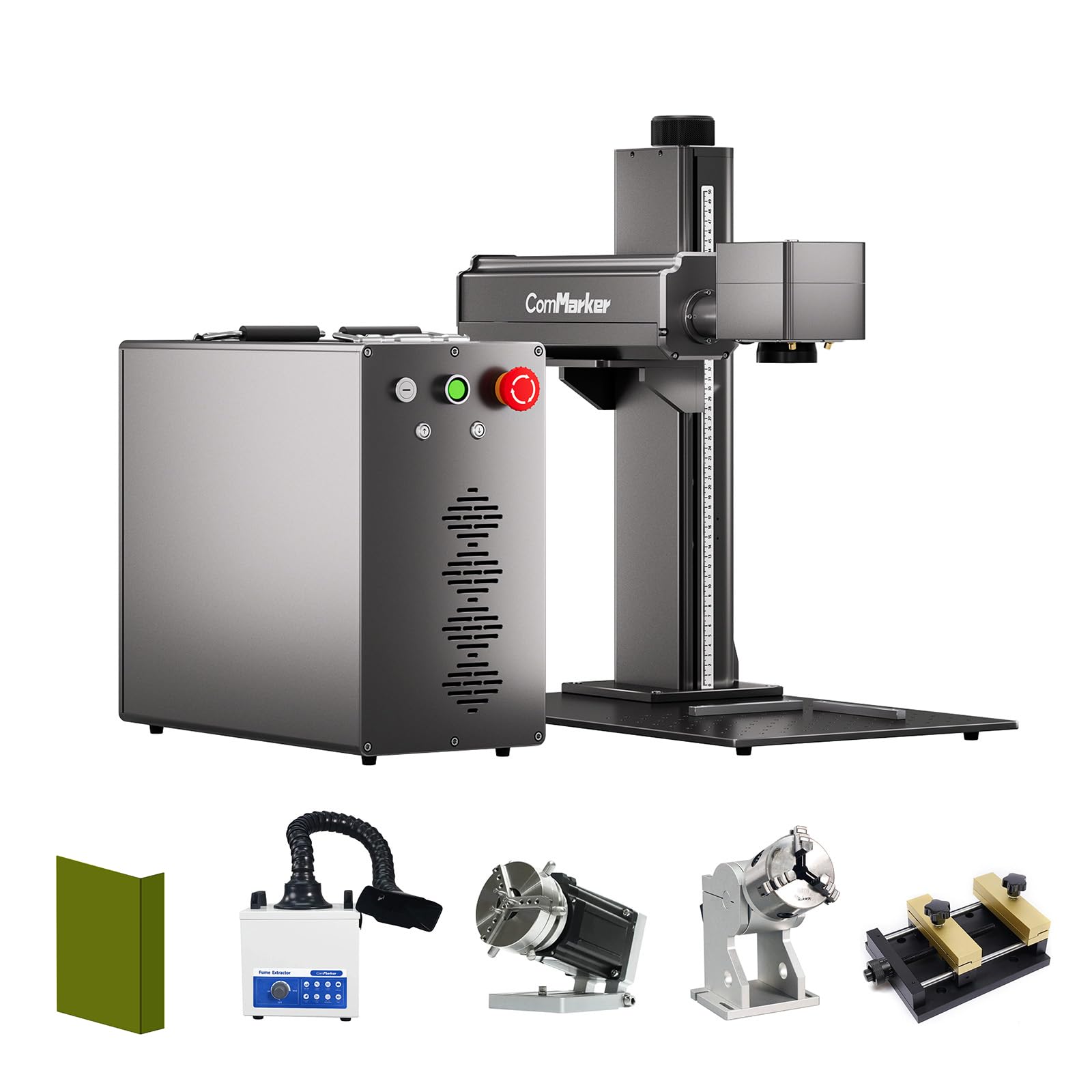
Image 1.1: The ComMarker Titan1 200W JPT Mopa Fiber Laser Engraving Machine.
2. Safety Information
The ComMarker Titan1 is a Class 1 Laser Product (IEC 60825-1 Report Number: 2501Q25848E-SFA1, FDA Accession No.: 2521455-000). While designed for safety, proper precautions are crucial.
- Eye Protection: Always wear appropriate laser safety goggles when operating the machine. The laser beam can cause severe eye damage.
- Ventilation: Ensure adequate ventilation in the work area to dissipate fumes and particles generated during engraving. Consider using a fume extractor.
- Material Compatibility: Only engrave materials specified as safe for fiber lasers. Engraving certain plastics or materials can produce toxic fumes.
- Emergency Stop: Familiarize yourself with the location and operation of the emergency stop button.
- Supervision: Never leave the machine unattended during operation.
- Power Disconnection: Disconnect power before performing any maintenance or adjustments.

Image 2.1: Example of a fume extractor, recommended for use with the laser engraver.
3. Package Contents
Verify that all items listed below are included in your package. If any items are missing or damaged, please contact ComMarker support.
- ComMarker Titan1 Laser Engraver Body
- Power Adaptor
- Data Cable
- Foot Switch
- Safety Goggles
- Allen Wrench Set
- USB Drive (with software and drivers)
- Ruler
- Ground Wire
- Placing Helpers
- Sample Materials (Rings, Metal Pendants, Pendants)

Image 3.1: Contents typically included with the ComMarker Titan1 laser engraving machine.
4. Product Overview and Features
The ComMarker Titan1 is a high-performance 200W JPT Mopa fiber laser engraving machine designed for precision marking and engraving on various materials.
Key Features:
- High Power & Speed: Equipped with a 200W JPT laser source, achieving engraving speeds up to 15,000mm/s.
- Precision Engraving: Offers 8K HD accuracy with a laser precision of up to 0.01mm.
- Color Marking: Capable of color marking on stainless steel.
- Motorized Elevation & Focusing: Features motorized elevation and both manual and electric focusing options for ease of use.
- Large Engraving Area: Maximum engraving area of 300mm x 300mm.
- Software Compatibility: Supports Lightburn and EzCad2 software.
- Wide Material Compatibility: Suitable for engraving stainless steel, aluminum, gold, silver, alloys, most painted products, and non-transparent plastics.
- Durability: Designed for longevity with an estimated lifespan of 100,000 hours.
Product Dimensions:
Image 4.1: Overall dimensions of the ComMarker Titan1 machine.
The machine measures approximately 22 x 25.8 x 21.5 inches (55.88 x 65.53 x 54.61 cm). Refer to Image 4.1 for detailed component dimensions.
Engraving Area:

Image 4.2: The 300mm x 300mm maximum engraving area.
The maximum working area for engraving is 300mm x 300mm, providing ample space for various projects.
5. Setup
5.1 Unpacking and Placement
- Carefully remove all components from the packaging.
- Place the machine on a stable, level surface in a well-ventilated area.
- Ensure there is sufficient space around the machine for operation and maintenance.
5.2 Electrical Connections
- Connect the power adaptor to the machine and then to a grounded 110V power outlet.
- Connect the ground wire to the designated grounding point on the machine and to a reliable ground source.
- Connect the data cable from the machine to your computer.
5.3 Software Installation
- Insert the provided USB drive into your computer.
- Install the necessary drivers and software (Lightburn or EzCad2) from the USB drive. Follow the on-screen instructions.
- Ensure your operating system (Windows 7/8/10/11 or MAC for Lightburn) meets the software requirements.
6. Operating Instructions
6.1 Powering On and Software Launch
- Ensure all connections are secure and power on the machine.
- Launch Lightburn or EzCad2 software on your computer.
6.2 Material Placement and Focusing
- Place the material to be engraved on the work platform.
- Adjust the motorized elevation to bring the laser head to the approximate working height.
- Use either manual or electric focusing to achieve the sharpest laser spot on the material surface. Refer to Image 6.1 for focusing controls.

Image 6.1: Manual and electric focusing controls.
6.3 Creating and Starting an Engraving Job
- Import or create your design in the software. Supported formats include BMP, GIF, JPG, JPEG, DXF, DST, AI, etc.
- Set engraving parameters such as power, speed, frequency, and passes according to your material and desired effect.
- Preview the engraving path to ensure correct placement.
- Initiate the engraving process. Always wear safety goggles during operation.

Image 6.2: Laser in operation, engraving text onto a metal surface.
6.4 Advanced Engraving Techniques
- Color Marking: Experiment with different parameters on stainless steel to achieve various color effects.
- 3D Engraving: Utilize the machine's capabilities for deep and textured engravings.
- Cutting: The machine has super cutting ability for thin metals and other compatible materials.

Image 6.3: Examples of 3D engraving and cutting results.
7. Maintenance
Regular maintenance ensures the longevity and optimal performance of your ComMarker Titan1. Always disconnect power before performing maintenance.
- Lens Cleaning: Periodically inspect and clean the laser lens using a lint-free cloth and lens cleaning solution. Dust and debris can affect laser performance.
- General Cleaning: Keep the work platform and machine exterior clean from dust and engraving residue.
- Cable Inspection: Regularly check all power and data cables for any signs of wear or damage.
- Fume Management: Ensure your fume extraction system (if used) is clean and functioning effectively.
8. Troubleshooting
This section addresses common issues you might encounter. For problems not listed here, please contact ComMarker support.
| Problem | Possible Cause | Solution |
|---|---|---|
| Machine does not power on. | Power cable disconnected, faulty outlet, emergency stop engaged. | Check power connections, try a different outlet, disengage emergency stop button. |
| Laser is weak or not engraving. | Incorrect focus, dirty lens, incorrect power settings, material incompatibility. | Re-focus the laser, clean the lens, adjust power settings in software, verify material is suitable for fiber laser. |
| Software not connecting to machine. | Data cable issue, driver not installed, incorrect port selected. | Check data cable connection, reinstall drivers, select correct COM port in software. |
| Engraving quality is poor or inconsistent. | Incorrect focus, unstable material, incorrect speed/power settings, dirty lens. | Ensure proper focus, secure material, adjust engraving parameters, clean lens. |
9. Specifications
| Feature | Detail |
|---|---|
| Manufacturer | ComMarker |
| Model Number | Titan1 Mopa |
| Laser Source | JPT Mopa Fiber Laser |
| Laser Power | 200W |
| Laser Wavelength | 1064nm |
| Engraving Speed | Up to 15,000mm/s |
| Engraving Accuracy | 8K HD, 0.01mm precision |
| Maximum Engraving Area | 300mm x 300mm |
| Focusing | Motorized Elevation, Manual & Electric Focusing |
| Supported Software | Lightburn, EzCad2 |
| System Compatibility | Windows 7/8/10/11, MAC (Lightburn) |
| Supported Graphic Formats | BMP, GIF, JPG, JPEG, DXF, DST, AI, etc. |
| Product Dimensions | 22 x 25.8 x 21.5 inches (approx.) |
| Power Source | AC/DC 110V |
| Material | Alloy Steel, Aluminum, Metal |
| Laser Class | CLASS 1 LASER PRODUCT (IEC 60825-1) |
| Estimated Lifespan | 100,000 hours |
10. Warranty and Support
For warranty information, technical support, or any inquiries regarding your ComMarker Titan1 laser engraving machine, please contact ComMarker customer service. Refer to the official ComMarker website or your purchase documentation for contact details.
You can also visit the ComMarker Store on Amazon for additional product information and support resources.
Related documentsTitan1 Mopa


Ask a question about this manual
Ask about setup, troubleshooting, compatibility, parts, safety, or missing instructions. Manuals+ will review the question and use this page’s manual context to help answer it.