
1. Introduction
This manual provides detailed instructions for the installation, operation, and maintenance of your VECHTEL 5G WiFi Android 15 Car Stereo. Please read this manual thoroughly before using the product to ensure proper functionality and safety. This unit is designed specifically for Honda Fit models manufactured between 2008 and 2013.
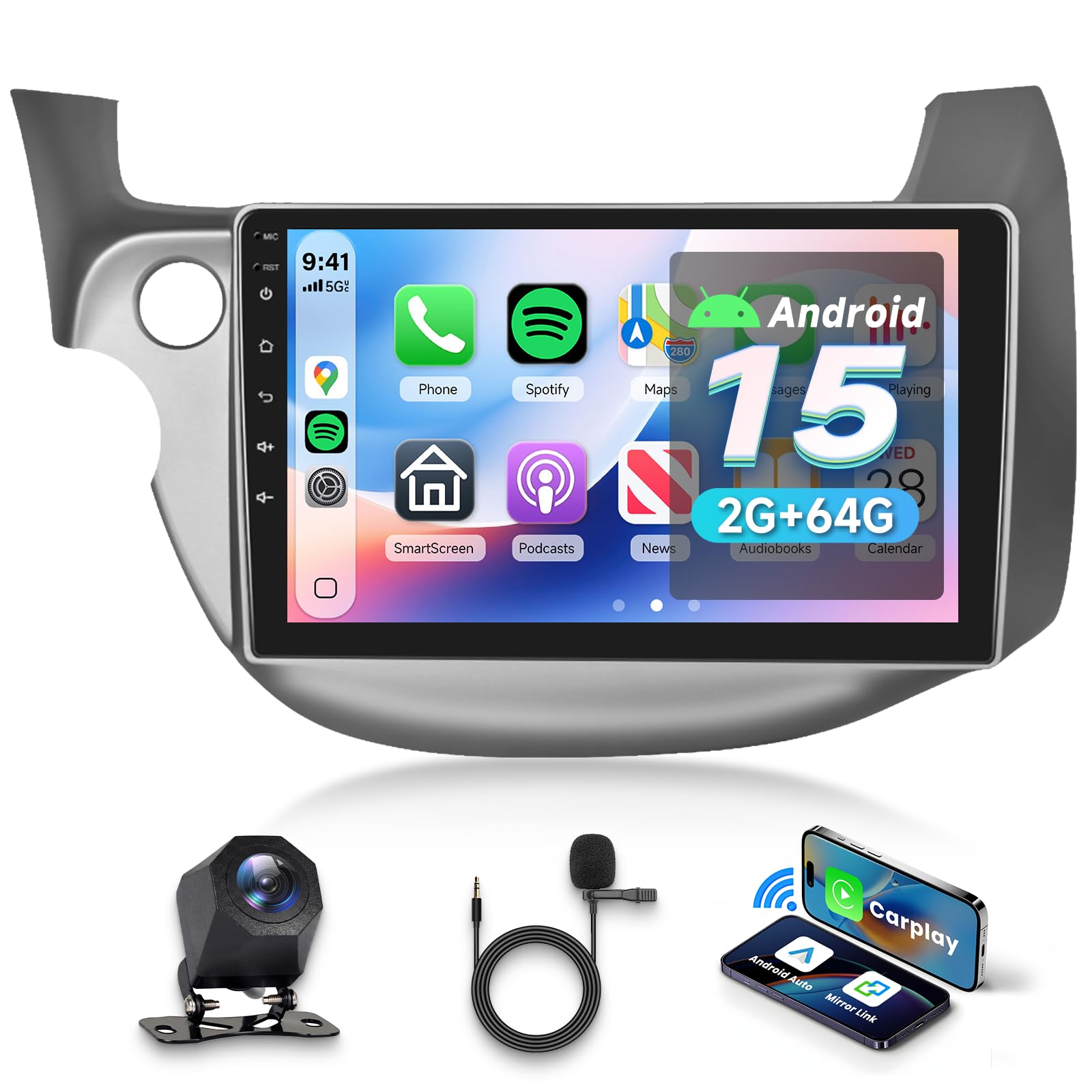
Image: VECHTEL Android 15 Car Stereo seamlessly integrated into a Honda Fit dashboard, showing the before and after installation view.
2. Package Contents
Verify that all items listed below are included in your package:
- Car Radio Unit
- Backup Camera
- Power Cable
- Installation Tool
- USB Cable
- Rear Camera Input Cable
- GPS Antenna
- RCA Cable

Image: A visual representation of all components included in the VECHTEL car stereo package, including the main unit, cables, and accessories.
3. Setup and Installation
Proper installation is crucial for optimal performance. It is recommended to have this unit installed by a professional. Ensure the vehicle's power is disconnected before beginning installation.
3.1 Wiring Diagram
Refer to the wiring diagram for correct connections. Each cable is designed for a specific port.

Image: A comprehensive diagram illustrating the rear panel connections and wiring harness for the VECHTEL car stereo, showing ports for power, USB, camera, GPS, and RCA cables.
3.2 Video Guide: Car Radio Rear Panel Wiring
Video: A step-by-step guide demonstrating how to connect the various cables to the rear panel of the car radio, including power, USB, and other essential wiring.
4. Operating Instructions
4.1 Wireless CarPlay and Android Auto
Connect your smartphone wirelessly to access navigation, music, calls, and more directly on the car stereo's display. Voice control enhances safety and convenience.

Image: Illustration showing both wireless (Bluetooth) and wired (USB) connection methods for CarPlay and Android Auto, with a smartphone mirroring its interface to the car stereo.
4.2 Video Guide: Wireless CarPlay and Android Auto Connection
Video: A detailed tutorial on how to establish a wireless connection for both CarPlay and Android Auto with the car stereo, including troubleshooting steps for manual WiFi connection.
4.3 5G WiFi and GPS Navigation
The unit supports 5G WiFi for fast internet access and features built-in GPS navigation with support for both online and offline maps. Download your favorite apps from the Play Store.

Image: A visual representation of the car stereo's 5G WiFi capability, showing seamless streaming and app downloads.

Image: The car stereo displaying GPS navigation with both online and offline map options, guiding a vehicle on a route.
4.4 Bluetooth and FM Radio
Enjoy hands-free calling and wireless music streaming via Bluetooth. The FM radio offers 18 preset stations for your listening pleasure.

Image: The car stereo's Bluetooth interface, showing options for hands-free calling and music playback.

Image: The car stereo displaying the FM radio interface with station presets and a separate screen for audio equalizer (EQ) adjustments.
4.5 Rear Camera Input and Steering Wheel Controls (SWC)
The unit supports rear camera input for enhanced visibility during parking and reversing. Steering wheel controls allow for safe and convenient operation of music and calls.

Image: The car stereo displaying a clear AHD backup camera feed with parking guidelines, alongside an interface demonstrating steering wheel control functionality.
4.6 Mirror Link and Split Screen
Mirror Link allows you to display your smartphone screen (iOS and Android) wirelessly on the car stereo. The split-screen feature enables simultaneous display of two applications, such as navigation and music.

Image: The car stereo demonstrating Mirror Link, wirelessly displaying a smartphone screen, compatible with both iOS and Android devices.

Image: The car stereo's display showing the split-screen feature, running two applications side-by-side, such as music playback and a web browser.
4.7 Multiple UI Themes
Customize your user experience with various user interface themes available on the device.

Image: A collage of different user interface themes available on the car stereo, showcasing various layouts and color schemes.
4.8 Video Guide: Radio Features Overview
Video: A brief demonstration of the key features and functionalities of the car radio, including navigation, media playback, and settings.
5. Troubleshooting
- No Power: Check all power cable connections. Ensure the vehicle's ignition is on. Verify the fuse.
- No Sound: Check speaker connections. Ensure volume is not muted or set to zero. Verify EQ settings.
- Bluetooth/CarPlay/Android Auto Disconnection: Ensure your phone's Bluetooth and Wi-Fi are enabled. Restart both the car stereo and your phone. Delete previous pairings and re-pair.
- GPS Signal Issues: Ensure the GPS antenna is correctly installed and has a clear view of the sky.
- Touchscreen Unresponsive: Restart the unit. If the issue persists, contact customer support.
- Rear Camera Not Displaying: Check the camera input cable connection. Ensure the camera is powered correctly and the reverse gear is engaged.
6. Specifications
| Feature | Specification |
|---|---|
| Brand | VECHTEL |
| Vehicle Service Type | Honda Fit 2008-2013 |
| Screen Size | 10.1 Inches |
| Operating System | Android 15 |
| Memory Storage Capacity | 64 GB |
| RAM | 2 GB |
| Connectivity Technology | Bluetooth, USB, Wi-Fi (5G) |
| Special Features | Wireless CarPlay/Android Auto, GPS, Touchscreen, Rear Camera Input, SWC |
| Display Type | LCD |
| Touch Screen Type | Capacitive |
| Map Type | Worldwide (Online/Offline) |
7. Warranty and Support
This product comes with a 2-year warranty from the manufacturer, VECHTEL. For technical support, troubleshooting assistance, or warranty claims, please contact VECHTEL directly through their official channels. You can typically find seller contact information on the product's purchase page or by visiting the VECHTEL Store on Amazon.

Image: A visual guide on how to locate and contact VECHTEL technical support via the Amazon platform.
