
1. Introduction
Thank you for choosing the EOS ECI04EP3 4-Burner Induction Cooktop. This appliance is designed to provide efficient, safe, and modern cooking experience. Please read this manual thoroughly before installation and operation to ensure proper use and maintenance. Keep this manual for future reference.
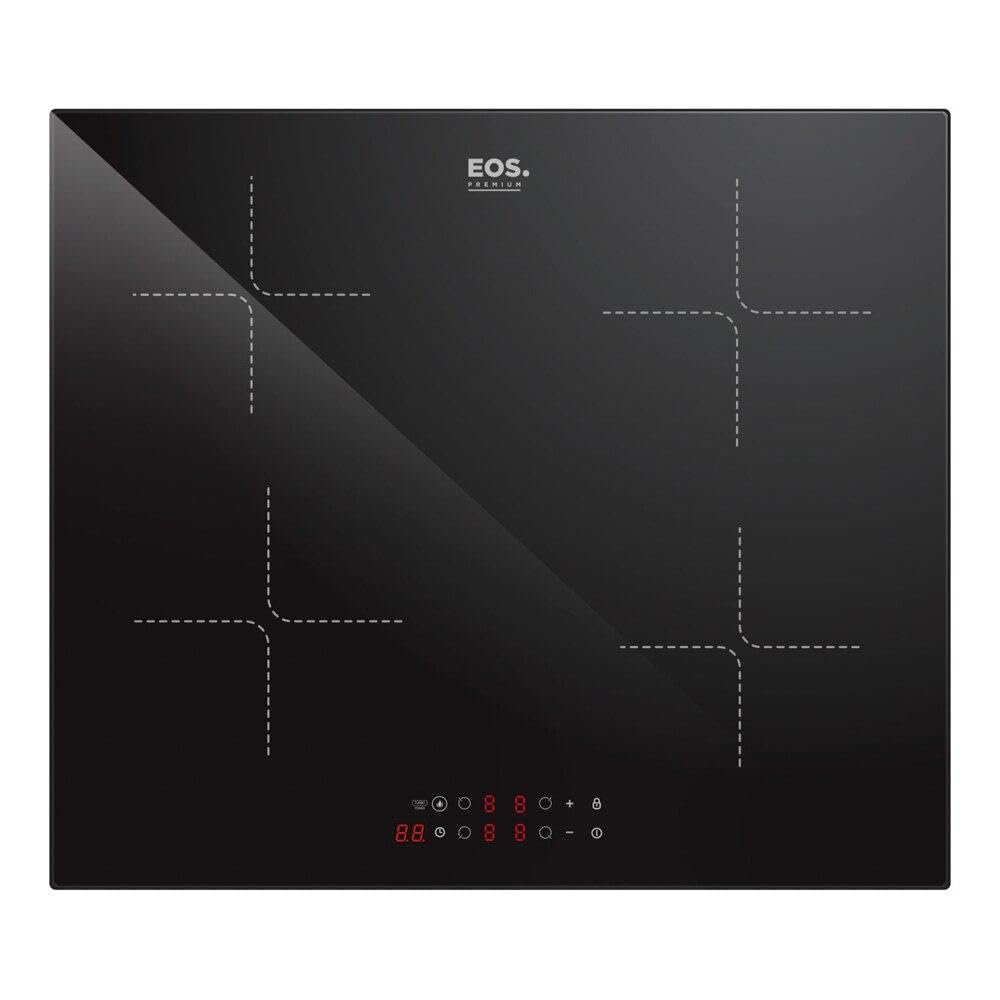
Figure 1.1: EOS ECI04EP3 4-Burner Induction Cooktop.
2. Safety Information
Your safety and the safety of others are paramount. Always follow basic safety precautions when using electrical appliances.
- Electrical Safety: Ensure the cooktop is connected to a properly grounded 220V electrical supply. Do not use extension cords or adapters.
- Compatible Cookware: Only use induction-compatible cookware. The cooktop will not heat without a suitable pan detected.
- Overheating Protection: The cooktop is equipped with protection against overheating. If an unsafe temperature is detected, the unit will automatically shut down.
- Residual Heat Indicator: After use, the cooking zones may remain hot. A residual heat indicator will alert you to hot surfaces, preventing burns.
- Safety Lock (Child Lock): Activate the safety lock to prevent accidental operation, especially important in households with children.
- Placement: Install the cooktop in a well-ventilated area, away from flammable materials.
- Cleaning: Disconnect power before cleaning. Allow the cooktop to cool completely.

Figure 2.1: The cooktop features pan detection for enhanced safety, only heating when a compatible pan is present.
3. Product Overview
3.1 Key Features
- 4 Induction Cooking Zones: Provides ample space for multiple dishes.
- 7200W Total Power: Ensures rapid and efficient heating across all zones.
- Touch Panel Control: Modern and intuitive interface for easy operation.
- 9 Power Levels + Turbo Function: Offers precise temperature control for various cooking needs.
- 99-Minute Timer: Allows programming cooking times for each zone.
- Pan Sensor: Automatically detects compatible cookware, preventing energy waste.
- Pause Function: Temporarily stops and resumes cooking with a single touch.
- Safety Lock (Child Lock): Prevents unintended changes to settings.
- Ceramic Glass Surface: Durable, easy to clean, and resistant to water.
3.2 Components
The EOS ECI04EP3 cooktop consists of a ceramic glass surface with four marked cooking zones and an integrated touch control panel.

Figure 3.1: The cooktop's sleek design integrates seamlessly into modern kitchens.
4. Setup and Installation
Installation should be performed by a qualified technician to ensure electrical safety and proper fit.
4.1 Unpacking
Carefully remove the cooktop from its packaging. Inspect for any damage during transit. Retain packaging materials for potential future transport or service.
4.2 Electrical Requirements
- Voltage: 220 Volts.
- Power: 7200 Watts.
- Ensure the electrical circuit can support the cooktop's power requirements.
- A dedicated circuit with appropriate circuit breaker is recommended.
4.3 Cutout Dimensions
The cooktop is designed for independent installation. Ensure the countertop cutout dimensions match the specifications below for a secure fit.

Figure 4.1: Installation dimensions for the cooktop cutout.
| Dimension | Description | Value (cm) |
|---|---|---|
| L | Cooktop Length | 59 |
| W | Cooktop Width | 52 |
| H | Cooktop Height | 6.2 |
| D | Depth (under counter) | 5.8 |
| A | Cutout Length | 56 |
| B | Cutout Width | 49 |
| X | Minimum Clearance | 5 (min) |
5. Operating Instructions
The cooktop features an intuitive touch control panel. Ensure your hands are clean and dry for optimal responsiveness.
5.1 Powering On/Off
- To Turn On: Touch the main power button (O) once. The display will light up.
- To Turn Off: Touch and hold the main power button (O) for a few seconds until the display turns off.
5.2 Selecting a Cooking Zone and Adjusting Power
- Place an induction-compatible pan on the desired cooking zone.
- Touch the corresponding zone selection button.
- Use the '+' and '-' buttons to adjust the power level from 1 to 9.
- Turbo Function: For rapid heating, select a zone and then touch the 'Turbo' button (often represented by a 'P' or a boost icon). This provides maximum power for a short period.

Figure 5.1: The cooktop offers Turbo Power for ultra-fast heating and up to 9 power levels for precise control.
5.3 Using the Timer Function
- While a cooking zone is active, touch the 'Timer' button.
- Use the '+' and '-' buttons to set the desired cooking time (up to 99 minutes).
- The timer will count down, and the cooking zone will automatically turn off when the time expires.

Figure 5.2: The timer function allows you to program cooking duration, providing convenience and peace of mind.
5.4 Pause Function
- To temporarily pause all active cooking zones, touch the 'Pause' button.
- To resume cooking with the previous settings, touch the 'Pause' button again.
5.5 Safety Lock (Child Lock)
- To activate the safety lock, ensure the cooktop is off or in standby mode. Touch and hold the 'Lock' button (often indicated by a key icon) for a few seconds.
- To deactivate, touch and hold the 'Lock' button again until the indicator light turns off.

Figure 5.3: The digital touch display provides clear feedback and easy control over all functions.
6. Maintenance and Cleaning
Regular cleaning and maintenance will prolong the life of your cooktop and ensure optimal performance.
- Daily Cleaning: After each use, allow the cooktop to cool. Wipe the ceramic glass surface with a damp cloth and mild detergent. Dry thoroughly with a clean cloth.
- Stubborn Stains: For burnt-on food or stubborn stains, use a ceramic hob scraper or a specialized ceramic cooktop cleaner. Follow the product instructions carefully.
- Avoid Abrasives: Do not use abrasive sponges, scouring pads, or harsh chemical cleaners, as these can scratch or damage the glass surface.
- Spills: Clean up spills immediately, especially sugary liquids, to prevent them from burning onto the surface and causing permanent damage.
- Inspection: Periodically check the cooktop for any signs of damage or wear. If any issues are found, contact customer support.
7. Troubleshooting
If you encounter issues with your cooktop, refer to the following common problems and solutions before contacting customer support.
| Problem | Possible Cause | Solution |
|---|---|---|
| Cooktop does not turn on. | No power supply; Safety lock activated. | Check power connection and circuit breaker. Deactivate safety lock. |
| Cooking zone not heating. | Non-compatible pan; Pan not centered; No pan detected. | Use induction-compatible cookware. Center the pan on the zone. Ensure a pan is present. |
| Cooktop makes a humming noise. | Normal operation of induction technology. | This is normal. Some cookware may produce more noise than others. |
| Error code displayed. | Specific internal fault or condition. | Refer to the full product manual for specific error codes or contact customer support. |
| Touch controls are unresponsive. | Wet surface; Finger not fully covering sensor. | Ensure the control panel is dry and clean. Use the flat part of your finger. |
If the problem persists after attempting these solutions, please contact EOS customer support.
8. Specifications
| Feature | Detail |
|---|---|
| Brand | EOS |
| Model Number | ECI04EP3 |
| Heating Elements | 4 Induction Zones |
| Color | Black |
| Power Source | Wired Electric |
| Voltage | 220 Volts |
| Power | 7200 Watts |
| Control Type | Touch Panel |
| Installation Type | Independent |
| Cooktop Material | Ceramic Glass |
| Item Dimensions (L x W x H) | 59 cm x 52 cm x 6.2 cm |
| Item Weight | 8.6 Kilograms |
| Special Features | Touch Panel, Safety Lock, 9 Power Levels + Turbo, 99-Minute Timer, Pan Sensor, Pause Function |
9. Warranty and Support
9.1 Warranty Information
This EOS ECI04EP3 Induction Cooktop comes with a 12-month warranty from the date of purchase. The warranty covers manufacturing defects and malfunctions under normal use. Please retain your proof of purchase for warranty claims.
The warranty does not cover:
- Damage caused by improper installation or use not in accordance with this manual.
- Damage from accidents, misuse, abuse, or unauthorized modifications.
- Normal wear and tear.
9.2 Customer Support
For technical assistance, warranty claims, or any questions regarding your EOS ECI04EP3 Induction Cooktop, please contact EOS customer support. Refer to the contact information provided with your product packaging or visit the official EOS website for the most up-to-date support details.
When contacting support, please have your product model number (ECI04EP3) and proof of purchase readily available.