
1. Introduction
This manual provides detailed instructions for the safe installation, operation, and maintenance of your Topaz RDL6-12W-CS LED Slim Fit Recessed Downlight. Please read this manual thoroughly before installation and retain it for future reference. This product is designed for both residential and commercial indoor applications, including wet locations.
2. Safety Information
WARNING: Risk of fire or electric shock. Installation requires knowledge of luminaires electrical systems. If not qualified, do not attempt installation. Contact a qualified electrician.
- Disconnect power at the fuse or circuit breaker before installation or servicing.
- Ensure all electrical connections are made in accordance with local codes and ordinances, as well as the National Electric Code (NEC).
- Do not make or alter any open holes in an enclosure of wiring or electrical components during kit installation.
- To prevent wiring damage or abrasion, do not expose wiring to edges of sheet metal or other sharp objects.
- This fixture is intended for use with a 120V AC, 60Hz circuit.
- Suitable for wet locations.
- Airtight certified per ASTM-E283.
3. Package Contents
Verify that all components are present before beginning installation:
- 1x LED Slim Fit Recessed Downlight (Model: RDL6-12W-CS)
- 1x Remote J-box
4. Specifications
| Feature | Specification |
|---|---|
| Model Name | LED Slim Fit Recessed Downlight |
| Part Number | RDL6-12W-CS |
| Brand | Topaz |
| Wattage | 12 Watts |
| Brightness | 1000 Lumens |
| Voltage | 120 Volts |
| CCT Selectable | 5 CCT (2700K to 5000K) |
| Dimmable | Yes, down to 5% |
| Material | Aluminum |
| Color | White |
| Product Dimensions | 7.09"L x 7.09"W x 0.73"H |
| Item Weight | 1.35 pounds |
| Indoor/Outdoor Usage | Indoor (Suitable for wet locations) |
| Certifications | Airtight certified per ASTM-E283 |
5. Installation Instructions
Before starting, ensure power is turned off at the circuit breaker.
Prepare the Opening: Cut a 6-inch diameter hole in the ceiling at the desired location. Ensure there are no obstructions such as joists or wiring within the ceiling space.

Image: The Topaz RDL6-12W-CS LED Slim Fit Recessed Downlight, showing the circular light fixture and the separate remote junction box connected by a cable. The junction box has wiring instructions and certifications visible.
Connect the Remote J-box: Open the remote junction box cover. Connect the supply wires (black to black, white to white, ground to ground) from your electrical circuit to the wires inside the J-box using appropriate wire connectors. Secure the J-box cover.
Select Color Temperature (CCT): Before inserting the fixture into the ceiling, locate the CCT selectable switch on the remote J-box. Choose your desired color temperature (2700K, 3000K, 3500K, 4000K, or 5000K) by sliding the switch. This setting can be changed later if needed.
Position the J-box: Place the remote J-box into the ceiling opening, ensuring it rests securely above the ceiling tile or drywall.
Install the Downlight: Connect the cable from the downlight to the remote J-box. Push the spring clips on the sides of the downlight upwards and insert the fixture into the ceiling hole. Release the clips to secure the downlight flush against the ceiling.
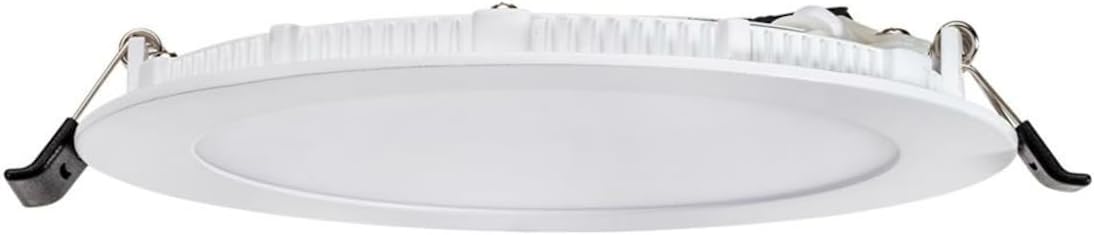
Image: A side profile view of the Topaz RDL6-12W-CS LED Slim Fit Recessed Downlight, highlighting the two spring-loaded clips on either side used for securing the fixture into the ceiling opening.
Restore Power: Turn the power back on at the circuit breaker. Test the light fixture.
6. Operation
6.1 Power On/Off
The downlight operates like any standard light fixture. Use your wall switch to turn the light on or off.
6.2 CCT (Color Correlated Temperature) Selection
The RDL6-12W-CS features 5 CCT selectable options. As mentioned in the installation section, the desired color temperature is selected via a switch on the remote J-box. To change the CCT after installation, you will need to access the J-box (typically by carefully pulling the downlight out of the ceiling to reach the J-box if it's placed nearby, or accessing it from above if possible) and adjust the switch to one of the following settings:
- 2700K (Warm White)
- 3000K (Soft White)
- 3500K (Neutral White)
- 4000K (Cool White)
- 5000K (Daylight)
6.3 Dimming Functionality
This downlight is dimmable down to 5% when used with compatible LED dimmers. For optimal performance, ensure your dimmer switch is designed for LED lighting. Refer to your dimmer's instructions for proper installation and operation.
7. Maintenance
The Topaz RDL6-12W-CS LED Slim Fit Recessed Downlight requires minimal maintenance.
- Cleaning: Ensure power is off before cleaning. Wipe the fixture with a soft, dry, or slightly damp cloth. Do not use harsh chemicals or abrasive cleaners, as these may damage the finish or electrical components.
- No User-Serviceable Parts: There are no user-serviceable parts inside this fixture. Do not attempt to open or repair the unit.
8. Troubleshooting
| Problem | Possible Cause | Solution |
|---|---|---|
| Light does not turn on. | No power to the fixture. Loose wiring connection. Faulty switch or circuit breaker. | Check if the circuit breaker is tripped. Ensure wall switch is on. Verify all wiring connections are secure. Consult a qualified electrician if the issue persists. |
| Light flickers or dims inconsistently. | Incompatible dimmer switch. Loose wiring connection. | Ensure you are using an LED-compatible dimmer. Check wiring connections. If flickering persists, try a different dimmer or consult an electrician. |
| Incorrect CCT (Color Temperature). | CCT switch on J-box set incorrectly. | Access the remote J-box and adjust the CCT selectable switch to the desired setting. |
9. Warranty and Support
This Topaz RDL6-12W-CS LED Slim Fit Recessed Downlight comes with a 5-year warranty from the date of purchase, covering defects in materials and workmanship under normal use. For warranty claims or technical support, please contact Topaz customer service directly. Keep your proof of purchase for warranty validation.
For further assistance, please visit the official Topaz website or contact their customer support.
