
Introduction
The Ajazz K870T Pro is a compact TKL (Tenkeyless) mechanical gaming keyboard designed for high performance and versatility. It features multiple connectivity options, vibrant RGB backlighting, and convenient media controls. This manual provides detailed instructions for setting up, operating, maintaining, and troubleshooting your keyboard, ensuring a full and enjoyable mechanical keyboard experience.
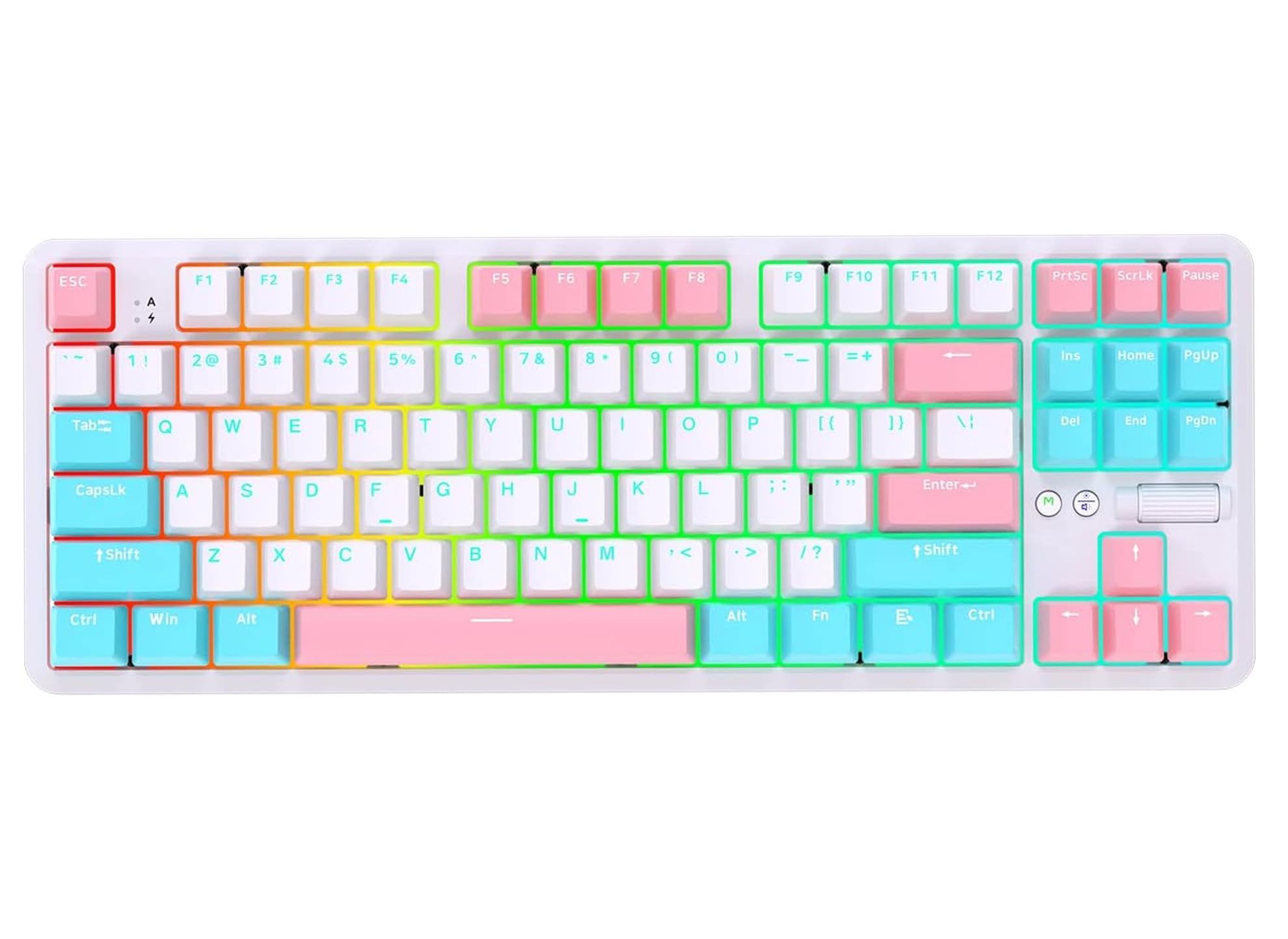
Image: Ajazz K870T Pro Wireless Mechanical Gaming Keyboard, showcasing its compact design and colorful keycaps.
Setup
Package Contents
Your Ajazz K870T Pro keyboard package typically includes:
- Ajazz K870T Pro Mechanical Keyboard
- USB-C Cable
- 2.4GHz USB Receiver
- Keycap Puller
- Switch Puller
- Additional Switches (if included with your specific model)
- User Manual (this document)

Image: The Ajazz K870T Pro keyboard shown with its included accessories, such as the USB-C cable, 2.4GHz receiver, keycap puller, switch puller, and extra switches.
Connecting Your Keyboard
The K870T Pro supports three versatile connection modes: USB-C wired, Bluetooth 5.0, and 2.4GHz wireless. This offers the freedom to switch between wired and wireless connections based on your needs.
USB-C Wired Connection
For a fast and stable connection, plug the provided USB-C cable into the keyboard's USB-C port and the other end into an available USB port on your computer. The keyboard will be automatically recognized and ready for immediate use.
Bluetooth 5.0 Wireless Connection
- Toggle the switch on the keyboard to Bluetooth mode.
- Press Fn + Q, Fn + W, or Fn + E to select one of the three available Bluetooth channels. The corresponding key (Q, W, or E) will flash slowly, indicating that the keyboard is in pairing mode.
- On your device (computer, tablet, or phone), search for Bluetooth devices and select "AJAZZ K870T Pro" to establish the connection.
- Once successfully connected, the selected key will stop flashing and remain steadily lit.
2.4GHz Wireless Connection
- Toggle the switch on the keyboard to 2.4GHz mode.
- Insert the 2.4GHz USB receiver into an available USB port on your computer.
- Press Fn + R. The R key will flash slowly, indicating that the keyboard is in pairing mode.
- The keyboard should automatically connect to the receiver. Once connected, the R key will stop flashing and remain steadily lit. This mode offers low-latency performance.

Image: Visual representation of the Ajazz K870T Pro's triple connectivity options: 2.4G wireless, Bluetooth, and USB-C wired, along with a Red Switch.
Operating Instructions
Mode Switching (M Button)
The 'M' button on the keyboard allows you to easily switch between wired, Bluetooth, and 2.4G modes. The LED indicator will show the current mode:
- Wired Mode: The red light is continuously on.
- Bluetooth Mode: The blue light flashes slowly during pairing, then stays on once connected.
- 2.4G Mode: The green light flashes slowly during pairing, then stays on once connected.

Image: Detailed view of the 'M' button for mode switching, the middle button for light effects, and the rotary knob for volume/brightness control on the Ajazz K870T Pro keyboard.
RGB Lighting Control
The K870T Pro features 18 different RGB lighting effects, allowing you to customize your keyboard's appearance. Light brightness and animation speed can be freely adjusted. You can also design and save your own lighting layouts.
- Change Lighting Effect: Use the dedicated lighting control keys or specific Fn key combinations (refer to the keyboard's function layer for detailed commands).
- Adjust Brightness: Rotate the rotary knob when the lighting is active.
- Adjust Animation Speed: Use specific Fn key combinations.
Media and Volume Control (Rotary Knob)
The rotary knob located on the upper right side of the keyboard provides quick and convenient control over media and lighting:
- Volume Control: Rotate the knob when the lighting is off to adjust the system volume. Press the knob to mute or unmute audio.
- Lighting Control: Rotate the knob when the lighting is on to adjust the brightness of the backlight.
N-Key Rollover (NKRO)
The keyboard supports N-Key Rollover, ensuring that every keypress is registered accurately, even when multiple keys are pressed simultaneously. This feature is particularly beneficial for gaming, preventing missed commands and ensuring precise input.
Hot-Swap Feature
The Ajazz K870T Pro is a hot-swappable keyboard, allowing you to change mechanical switches without the need for soldering. This enables easy customization of your typing experience and allows for quick replacement of faulty switches.
To replace switches:
- Use the included keycap puller to carefully remove the keycap from the desired switch.
- Use the included switch puller to gently grip and pull the switch straight out of the PCB.
- Align the pins of the new switch with the holes on the PCB and press firmly until it clicks into place. Ensure the pins are not bent during insertion.
- Replace the keycap.

Image: Illustration highlighting the hot-swap feature of the Ajazz K870T Pro and its compatibility with Android, iOS, and Windows operating systems.
Maintenance
Cleaning
To maintain your keyboard's performance and appearance, regular cleaning is recommended:
- Keycaps: Use the keycap puller to remove keycaps and clean them with a mild soap solution and a soft brush. Ensure they are completely dry before reattaching.
- Keyboard Body: Wipe the keyboard surface with a soft, slightly damp cloth. Avoid using harsh chemicals or abrasive materials.
- Switches: If switches feel sluggish or accumulate dust, you can remove them (utilizing the hot-swap feature) and gently clean any debris.
Battery Management
The keyboard is equipped with a 2000mAh high-capacity lithium battery for long-lasting, uninterrupted performance. To prolong battery life and ensure optimal usage:
- Charge the keyboard fully before its first use.
- Avoid completely draining the battery frequently.
- If you are not using the keyboard for an extended period, turn it off to conserve power.
- Approximate usage times: 8 hours with backlight on, 100 hours with backlight off. Charging time: Approximately 5 hours. Standby time: Approximately 200 hours.

Image: Information on the Ajazz K870T Pro's 2000mAh battery, highlighting long-lasting power and uninterrupted performance, with usage statistics.
Troubleshooting
Keyboard Not Responding
- Ensure the keyboard is sufficiently charged or connected via the USB-C cable.
- Verify that the selected connection mode (wired, Bluetooth, or 2.4GHz) matches your device's connection.
- For wireless connections, ensure the USB receiver is properly inserted or that Bluetooth is correctly paired.
- Try restarting your computer or the connected device.
Keys Not Registering
- Check if any keycaps or switches are loose. Gently re-seat them if necessary.
- If a specific switch is faulty, consider replacing it using the hot-swap feature.
- Ensure N-Key Rollover (NKRO) is functioning correctly (it is usually active by default).
RGB Lighting Not Working
- Ensure the lighting is turned on via the keyboard controls.
- Check the brightness settings using the rotary knob.
- If a specific LED is not working, it might indicate a hardware issue.
Connectivity Issues
- Bluetooth: Ensure your device's Bluetooth is enabled and the keyboard is in pairing mode. Try unpairing and then re-pairing the keyboard.
- 2.4GHz: Ensure the USB receiver is securely plugged into a functioning USB port. Try a different USB port if issues persist.
- Wired: Try using a different USB-C cable or a different USB port on your computer.
Specifications
| Feature | Detail |
|---|---|
| Brand | AJAZZ |
| Model | K870T Pro |
| Connectivity | USB-C, Bluetooth 5.0, 2.4GHz |
| Compatible Devices | Desktop PC, Laptop |
| Keyboard Description | Mechanical |
| Recommended Use | Gaming |
| Special Features | Hot Swap, RGB Lighting, N-Key Rollover, Rotary Knob |
| Switch Type | Mechanical (Red Switch for this variant) |
| Keyboard Layout | QWERTY |
| Operating System Compatibility | Windows, Mac, Android, iOS |
| Color | White (Red Switch variant) |
| Battery Capacity | 2000 mAh |
| Product Dimensions | 362 x 134 x 34.5 mm |
| Product Weight | 880g |
| Cable Length | 1.6m |
| Matrix | Wired mode full key anti-ghosting |

Image: A table detailing the product specifications and dimensions of the Ajazz K870T Pro keyboard.
Warranty and Support
The Ajazz K870T Pro keyboard comes with a 1-year warranty. Please refer to the warranty information provided in your product package for specific details on coverage and terms. For technical support, troubleshooting assistance, or any further inquiries regarding your product, please contact Ajazz customer service through their official website or the retailer from whom you purchased the product.
- Warranty Duration: 1 Year
- Manufacturer: Ajazz