LILYGO T-Deck Plus
User Manual
Introduction
The LILYGO T-Deck Plus is a versatile development board designed for advanced communication and embedded projects. It integrates an ESP32-S3 microcontroller, a 915Mhz LoRa module with SX1262 transceiver, Ulbox GPS, and a 2.8-inch IPS display, all housed within a compact form factor featuring a QWERTY keyboard. This manual provides essential information for setting up, operating, maintaining, and troubleshooting your T-Deck Plus device.
Key Features
- Antenna: Equipped with an external antenna for enhanced signal reception and transmission.
- MCU: Powered by an ESP32-S3FN16R8 Dual-core LX7 microprocessor, offering robust processing capabilities.
- Display: Features a vibrant 2.8-inch ST7789 SPI Interface IPS LCD with a resolution of 320 x 240 pixels, providing a full viewing angle.
- LoRa Transceiver: Integrates the SX1262 LoRa module with a transmit power of +22dBm, supporting 433/868/915Mhz frequency options.
- Onboard Functions: Includes built-in GPS for location services, a TF Card slot for expandable storage, and integrated Microphone and Speaker for audio functionalities.
- Connectivity: Supports 2.4 GHz Wi-Fi and Bluetooth 5 (LE) for versatile wireless communication.
- Development: Compatible with popular development environments such as Arduino, PlatformIO-IDE, and Micropython.
- Memory: Features 16MB PSRAM and 8MB Flash memory for application and data storage.
Package Contents
Please verify that all items listed below are included in your package:
- LILYGO T-Deck Plus Device
- External Antenna
- User Manual (this document)

Figure 1: LILYGO T-Deck Plus as packaged in its protective case.
Product Overview
Familiarize yourself with the physical components and layout of your LILYGO T-Deck Plus.

Figure 2: Front view of the LILYGO T-Deck Plus, showing the display, keyboard, and attached antenna.

Figure 3: Angled view of the device, highlighting its profile and antenna connection point.
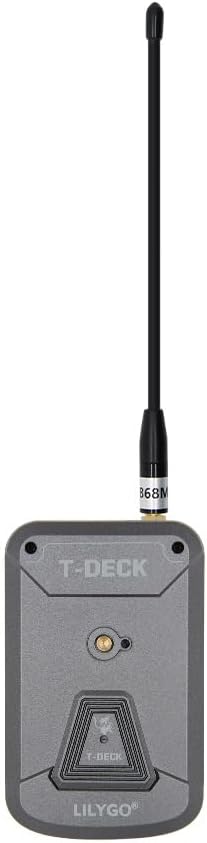
Figure 4: Rear view of the LILYGO T-Deck Plus, showing the antenna port and mounting features.

Figure 5: Physical dimensions of the LILYGO T-Deck Plus (Length: 115mm, Width: 72mm, Height: 20mm).
Component Identification:
- Display: The primary visual interface for interacting with the device.
- Keyboard: A full QWERTY keyboard for text input and command execution.
- Trackball: Provides precise cursor control and navigation through menus.
- Antenna Port: SMA connector for attaching the external LoRa antenna.
- USB-C Port: Used for charging the device and for data communication with a computer.
- TF Card Slot: Allows for the insertion of a microSD card for additional storage.
- Microphone & Speaker: Integrated components for audio input and output.
- GPS Module: Internal module for acquiring global positioning data.

Figure 6: Detailed pinmap and component layout of the LILYGO T-Deck Plus.
Setup
Follow these steps to prepare your LILYGO T-Deck Plus for first use:
- Attach Antenna: Carefully screw the provided external antenna into the SMA connector on the device. It is crucial to attach the antenna before powering on the device to prevent potential damage to the LoRa module.
- Power On: Connect the device to a power source using a standard USB-C cable. The device should power on automatically.
- Initial Firmware: The device comes with pre-installed LILYGO firmware. For specific applications or advanced functionalities (e.g., Meshtastic), you may need to flash custom firmware. Detailed instructions and firmware files are available on the official GitHub repository: github.com/Xinyuan-LilyGO/T-Deck.
- Insert TF Card (Optional): If you plan to use expandable storage for maps or other data, gently insert a TF (microSD) card into the designated slot. A 32GB SD card is recommended for optimal performance with map storage.
Operation
Basic Navigation:
- Use the QWERTY keyboard for entering text, commands, and navigating through menus.
- The trackball provides precise control for selecting items, scrolling, and interacting with the user interface.
- The 2.8-inch display serves as the primary output for all device information and application interfaces.
Key Functionalities:
- LoRa Communication: The SX1262 transceiver enables long-range, low-power wireless communication. Its specific use will depend on the installed firmware, such as for mesh networking with Meshtastic.
- GPS: The integrated Ulbox GPS module provides accurate location data. Initial GPS signal acquisition may take a few minutes, especially when first used or in challenging environments.
- TF Card: Utilize the TF card slot for storing various data, including maps, logs, or custom application files.
- Audio: The microphone and speaker allow for audio input and output, depending on the capabilities of the running firmware.
- Wi-Fi & Bluetooth: Leverage Wi-Fi for network connectivity and Bluetooth for pairing with other devices or for configuration via a smartphone.
For detailed operational instructions specific to your installed firmware and applications, please consult the comprehensive documentation available on the LILYGO T-Deck GitHub repository.
Maintenance
Proper care and maintenance will ensure the longevity and optimal performance of your LILYGO T-Deck Plus:
- Cleaning: Use a soft, dry, lint-free cloth to clean the device's exterior. Avoid using abrasive cleaners, solvents, or harsh chemicals, as these can damage the casing or screen.
- Storage: When not in use, store the device in a cool, dry place, away from direct sunlight, extreme temperatures, and high humidity.
- Battery Care: The device contains a rechargeable battery. While the built-in battery meter may not be entirely accurate, regular charging is recommended to maintain battery health. Future firmware versions are expected to optimize the battery percentage display.
- Firmware Updates: Periodically check the official LILYGO GitHub repository for the latest firmware updates. Updating your device can provide performance improvements, bug fixes, and new features.
Troubleshooting
This section addresses common issues you might encounter with your LILYGO T-Deck Plus:
- Inaccurate Battery Percentage Display:
- This is a known characteristic of the device due to the absence of a dedicated built-in battery meter. It is not indicative of a product defect. LILYGO is working on firmware optimizations to improve the accuracy of the displayed percentage in future releases.
- Device Not Powering On:
- Ensure the device is properly connected to a reliable power source using the USB-C cable. Verify that the cable and power adapter are not damaged. Allow the battery to charge for a short period (e.g., 15-30 minutes) before attempting to power on again.
- No LoRa Communication:
- Confirm that the external antenna is securely attached to the SMA connector. Ensure that the correct firmware for LoRa communication is installed and properly configured according to the application's requirements.
- GPS Not Acquiring Signal:
- For optimal GPS performance, ensure the device has a clear, unobstructed view of the sky. GPS signal acquisition can take several minutes, especially during the first use or after a long period of inactivity. Indoor use may significantly hinder signal reception.
Specifications
| Feature | Detail |
|---|---|
| Product Dimensions | 4.53 x 2.83 x 0.79 inches (115 x 72 x 20 mm) |
| Manufacturer | LILYGO |
| Item Model Number | LILYGO Firmware |
| Antenna Type | External LORA, GPS |
| MCU | ESP32-S3FN16R8 Dual-core LX7 microprocessor |
| Wireless Connectivity | 2.4 GHz Wi-Fi & Bluetooth 5 (LE) |
| Flash Memory | 16MB PSRAM, 8MB Flash |
| Display | 2.8-inch ST7789 SPI Interface IPS LCD (320 x 240 resolution) |
| LoRa Transceiver | SX1262 (+22dBm transmit power, 433/868/915Mhz) |
| Onboard Peripherals | GPS, TF Card, Microphone, Speaker |
| UPC | 717382831091 |
Warranty and Support
For product support, technical inquiries, or detailed warranty information, please contact LILYGO directly through their official channels. You may also refer to the specific terms and conditions provided by your retailer at the time of purchase.
Official GitHub Repository: github.com/Xinyuan-LilyGO/T-Deck
For general inquiries or suggestions regarding the product, please feel free to reach out to LILYGO customer service as indicated in the product documentation or on their official website.


