
Retevis H777D
Retevis H777D 2 Way Radio with LCD Display Instruction Manual
Model: H777D
1. Introduction
This manual provides detailed instructions for the operation and maintenance of your Retevis H777D 2 Way Radio. Please read this manual thoroughly before using the device to ensure proper function and safety. The Retevis H777D is a handheld, rechargeable two-way radio featuring an LCD display, NOAA weather alerts, USB-C charging, and VOX functionality, designed for reliable communication in various environments.

Figure 1: Retevis H777D 2 Way Radios
2. Package Contents
Verify that all items are present in your package:
- H777D walkie talkie (x2)
- 1200mAh Battery (x2)
- Data Cable & Charger Cable (x2)
- Charge Base (x2)
- Belt Clip & Strap (x2)
- User Manual (x1)

Figure 2: Included Package Contents
3. Product Overview
The Retevis H777D features an intuitive design with an LCD screen for real-time information and easily accessible controls.

Figure 3: H777D Walkie Talkie Components
Key Features:
- LCD Display: Provides real-time information on signal, volume, channel, and battery status.
- New Button Design: Features dedicated Up, Menu, and Down buttons for easy navigation.
- Flexible Charging: Supports both Type-C and base charging.
- Extended Battery Performance: 1200mAh battery offers 11 hours of continuous use and 87 hours of standby.
- NOAA Weather Alert: Stay informed with weather updates.
- VOX Function: Hands-free operation.
- Emergency Alarm: For alerting others in critical situations.
- Channel Lock: Prevents accidental channel changes.
- LED Torch: Built-in flashlight for illumination.
4. Setup
4.1 Battery Installation
- Ensure the radio is powered off.
- Locate the battery compartment on the back of the radio.
- Align the 1200mAh battery with the contacts and gently push it into the compartment until it clicks into place.
- Close the battery cover securely.
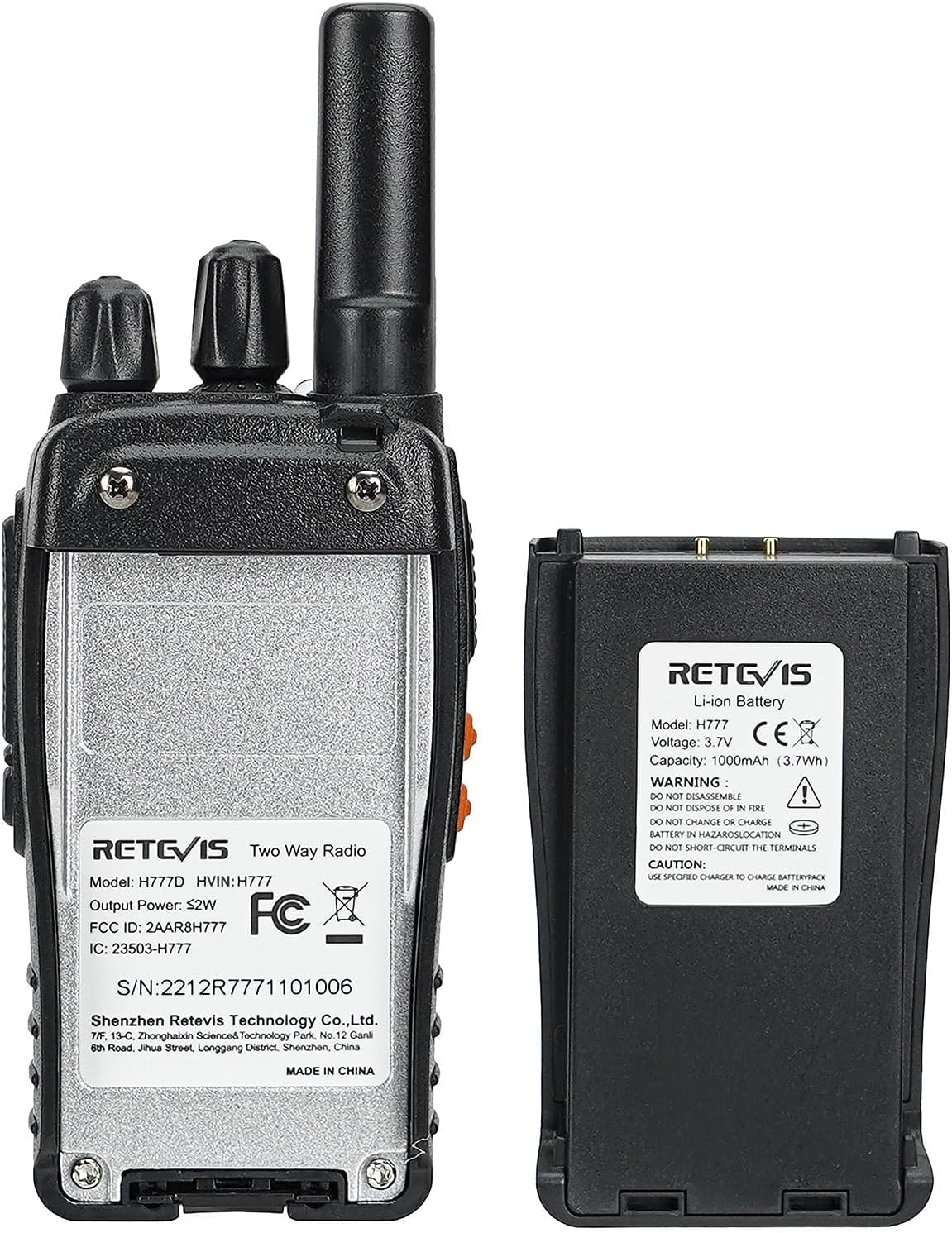
Figure 4: Battery Installation
4.2 Charging the Battery
The H777D offers two charging methods:
- USB-C Charging: Connect the provided Type-C cable directly to the radio's USB-C port and to a power source.
- Base Charging: Place the radio into the charging base. Ensure the contacts on the radio align with the contacts on the base. Connect the charging base to a power source using the provided cable and adapter.
The LED indicator on the radio or charging base will show the charging status. A full charge typically takes several hours. The 1200mAh battery provides approximately 11 hours of continuous use and 87 hours of standby time.

Figure 5: Charging Methods (USB-C and Base)

Figure 6: Battery Life Overview
5. Operating Instructions
5.1 Power On/Off and Volume Control
- To power on the radio, rotate the Power/Volume knob clockwise until you hear a click.
- Continue rotating the knob to adjust the volume.
- To power off, rotate the knob counter-clockwise until it clicks.
5.2 Channel Selection
Rotate the Channel Switch knob to select your desired channel (1-16). The LCD display will show the current channel number and frequency.

Figure 7: LCD Screen Display
5.3 Transmitting and Receiving
- To transmit, press and hold the PTT (Push-To-Talk) button on the side of the radio. Speak clearly into the microphone.
- Release the PTT button to receive.
- The Roger Beep feature ensures a distinct start and end marker for each transmission.
5.4 Menu Navigation and Buttons
Use the Up, Menu, and Down buttons located below the LCD screen to navigate through settings and options.

Figure 8: Upgraded Button Design
5.5 VOX Function (Hands-Free Operation)
The VOX (Voice Operated Exchange) function allows for hands-free transmission. When activated, the radio will transmit automatically when it detects your voice. Refer to the menu settings to enable and adjust VOX sensitivity.

Figure 9: Hands-Free Communication with VOX
5.6 NOAA Weather Alerts
The H777D can receive NOAA weather alerts. Access the NOAA channels through the menu or by a special tone from a NOAA broadcast station. This feature helps you stay informed about weather conditions.

Figure 10: NOAA Weather Alert Feature
5.7 One-Key Pairing
To quickly pair multiple H777D walkie-talkies:
- Tune all radios to Channel 1.
- Hold down the Up button while powering on the radios. This allows for quick replication of settings.

Figure 11: One-Key Pairing
5.8 Channel Lock
To prevent accidental changes to your selected channel, use the channel lock feature. Short press Side Key 1 to toggle the channel lock on or off.

Figure 12: Channel Lock Feature
5.9 Emergency Alarm
In an emergency, activate the alarm function to alert others. Refer to the radio's menu or dedicated button (if programmed) for this feature.

Figure 13: Emergency Alarm
5.10 LED Torch (Flashlight)
The H777D includes a built-in LED torch for illumination in low-light conditions. This can be activated via a dedicated button or through the menu.

Figure 14: LED Torch in Use
6. Maintenance
6.1 Cleaning
Wipe the radio's surface with a soft, damp cloth. Do not use harsh chemicals or abrasive cleaners. Ensure the USB-C port and charging contacts are free of dust and debris.
6.2 Battery Care
To prolong battery life, avoid fully discharging the battery frequently. Store the radio and battery in a cool, dry place when not in use for extended periods.
7. Troubleshooting
| Problem | Possible Cause | Solution |
|---|---|---|
| Radio does not power on | Battery is low or not installed correctly. | Charge the battery or re-install it correctly. |
| Cannot transmit or receive | Incorrect channel selected; out of range; PTT button not pressed/released correctly. | Ensure both radios are on the same channel. Move closer to the other radio. Press and hold PTT to transmit, release to receive. |
| Poor audio quality or weak signal | Obstructions (buildings, terrain); low battery; interference. | Move to an open area. Ensure battery is charged. Check for sources of interference. |
| Battery not charging | Charger cable or base not connected properly; faulty charger/battery. | Check all connections. Try a different charging method (USB-C or base). Contact support if issue persists. |
| Accidental button presses | Channel lock is not enabled. | Activate the channel lock feature by short pressing Side Key 1. |
8. Specifications
- Model: H777D
- Item Weight: 1.3 pounds
- Package Dimensions: 10.63 x 8.43 x 2.09 inches
- Batteries: 2 Nonstandard Battery batteries required (included)
- Battery Capacity: 1200mAh
- Battery Life: 11 Hours (usage), 87 Hours (standby)
- Number of Channels: 16
- Frequency Range: FRS
- Special Features: Emergency Alarm, Long Range, Weather Alert (NOAA)
- Water Resistance Level: Not Water Resistant
- Compatible Devices: H777D walkie talkies
- Manufacturer: Retevis
9. Warranty and Support
Retevis provides a 2-year warranty for the radio body and a 1-year warranty for accessories. A 30-day no-reason return policy is also offered. For service beyond the warranty period, maintenance services are available, with corresponding costs to be afforded by the buyer.
For any inquiries or support, please contact Retevis customer service through Amazon. Responses are typically provided within 12 hours.
Related documentsH777D


Ask a question about this manual
Ask about setup, troubleshooting, compatibility, parts, safety, or missing instructions. Manuals+ will review the question and use this page’s manual context to help answer it.