
1. Introduction
Thank you for choosing the Basike 30000mAh Power Bank, model Ba-POW176. This portable charger is designed to provide reliable and fast power to your devices, ensuring you stay connected on the go. With its high capacity, multiple output options, and intelligent protection features, it is an ideal companion for daily use, travel, and emergencies. Please read this manual carefully to ensure proper use and maintenance of your device.
The Ba-POW176 offers:
- 30000mAh Super Capacity: Recharge smartphones up to 7 times, Android devices 6 times, or laptops 2 times.
- 22.5W Universal Fast Charging: Supports PD3.0/QC4.0/SCP/FCP/AFC and more than 10 protocols for rapid charging.
- 5 Simultaneous Outputs + Integrated Cables: Connect up to 5 devices with 2 USB-A (QC3.0), 1 Type-C (PD bidirectional 22.5W), 1 Micro-USB, and an integrated cable for compatible devices.
- Advanced 6-in-1 Safety: Protection against overvoltage, short-circuit, overheating, and more. CE/FCC/RoHS certified.
- Intelligent Digital Display: 188 LED screen shows remaining charge percentage and fast mode status.
2. Setup
2.1 Package Contents
Before using your Basike Power Bank, please ensure all items are present in the package:
- Basike 30000mAh Power Bank (Ba-POW176)
- USB Charging Cable (Type-C)
- User Manual
2.2 Initial Charging of the Power Bank
For optimal performance, fully charge your power bank before first use.
- Connect the provided USB Type-C cable to the Type-C input port on the power bank.
- Connect the other end of the cable to a compatible USB wall adapter (not included) or a computer's USB port.
- The digital LED display will show the charging progress. When it reaches 100%, the power bank is fully charged.
The power bank supports bidirectional Type-C input, allowing it to be fully recharged in approximately 4 hours (using a 9V/2.2A adapter).

Image: The Basike Power Bank connected to a smartphone and wireless earbuds, demonstrating its charging capabilities. The power bank's digital display shows "100%".
3. Operating Instructions
3.1 Charging Your Devices
The Basike Power Bank offers multiple output ports and integrated cables for versatile charging.
- Using USB-A Ports: Connect your device's USB charging cable to one of the two USB-A output ports (USB-A1 or USB-A2) on the power bank.
- Using Type-C Port: Connect your device's Type-C charging cable to the Type-C output port on the power bank. This port also supports fast charging.
- Using Integrated Cables: The power bank features integrated Type-C and Lightning cables. Simply pull out the appropriate cable and connect it to your device.
- Using Micro-USB Port: Connect your device's Micro-USB charging cable to the Micro-USB output port.
The power bank will automatically detect the connected device and begin charging. The digital display will show the remaining battery percentage.

Image: The Basike Power Bank showcasing its integrated Type-C and Lightning cables, ready for use with various devices.
3.2 Priority Mode
The power bank supports "Priority Mode," allowing you to charge your devices while the power bank itself is being recharged, without loss of performance.
3.3 Auto-Shutdown Feature
To conserve energy, the power bank will automatically deactivate its outputs after 32 seconds of inactivity (no device connected or device fully charged).
4. Maintenance
To ensure the longevity and optimal performance of your Basike Power Bank, follow these maintenance guidelines:
- Cleaning: Use a soft, dry cloth to clean the exterior of the power bank. Do not use liquid cleaners or abrasive materials.
- Storage: Store the power bank in a cool, dry place away from direct sunlight, extreme temperatures, and humidity.
- Battery Health: For best battery health, avoid fully discharging the power bank frequently. Recharge it when the battery level is low. If storing for extended periods, charge it to about 50-70% every 3-6 months.
- Avoid Drops: Protect the device from physical shocks and drops, which can damage internal components.
5. Troubleshooting
If you encounter issues with your Basike Power Bank, refer to the following common problems and solutions:
5.1 Power Bank Not Charging
- Check Cable: Ensure the charging cable is securely connected to both the power bank's input port and the power source. Try a different cable.
- Check Power Source: Verify that the wall adapter or USB port you are using is functional. Try a different power source.
- Adapter Compatibility: Ensure your wall adapter provides sufficient power (e.g., 9V/2.2A for fast charging).
5.2 Device Not Charging from Power Bank
- Check Power Bank Charge: Ensure the power bank has sufficient charge (check the LED display).
- Check Cables: Ensure the charging cable connecting your device to the power bank is securely connected and not damaged. Try a different cable.
- Check Ports: Try a different output port on the power bank.
- Device Compatibility: While highly compatible, ensure your device is not drawing excessive power or has specific charging requirements not met by the power bank.
5.3 Fault Indicators / Overheating
The power bank features fault indicators that may flash alerts for overcharge or overheating.
- If the power bank feels excessively hot, disconnect all devices and the power source immediately. Allow it to cool down in a well-ventilated area.
- If fault indicators persist, discontinue use and contact customer support.
6. Specifications
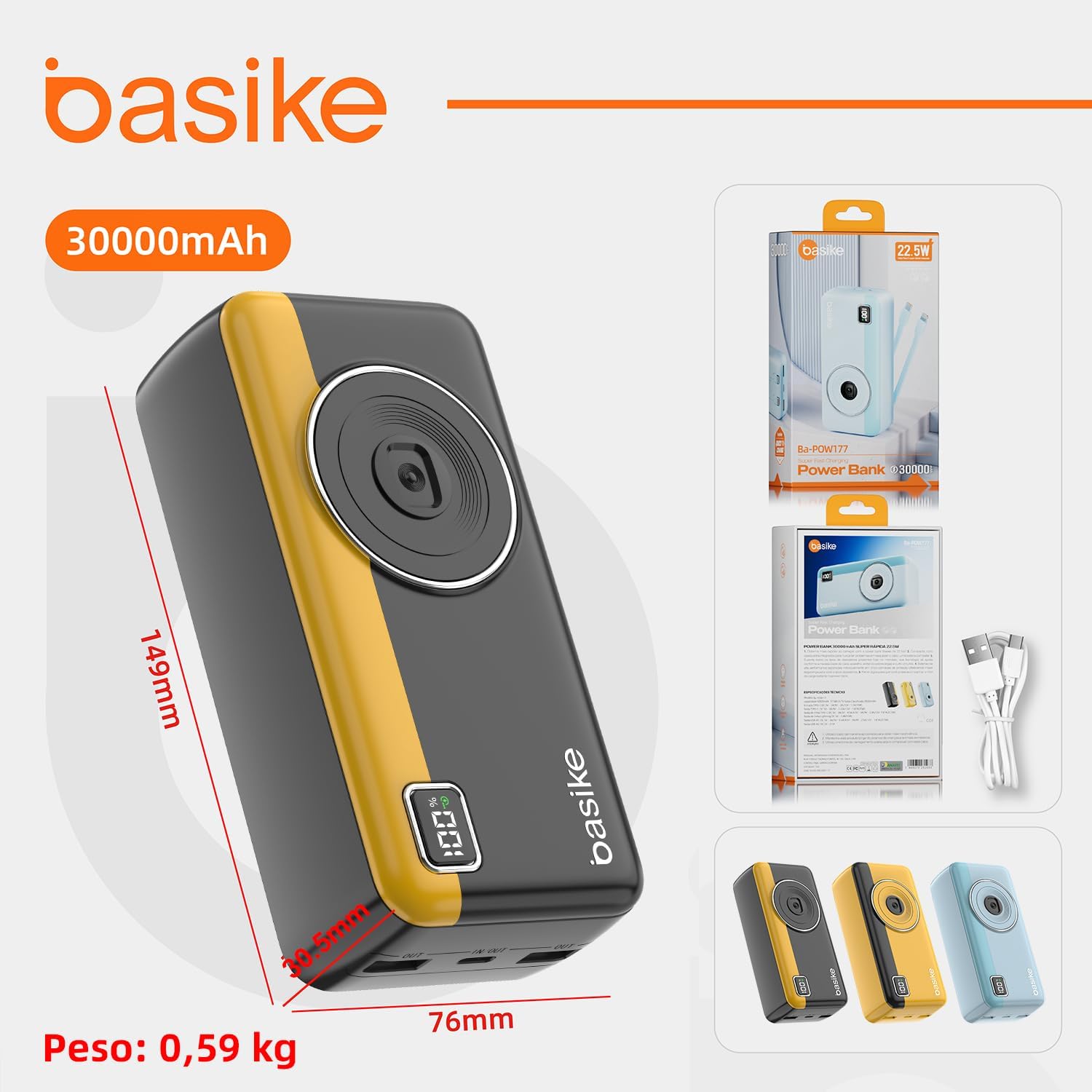
Image: The Basike Power Bank displaying its physical dimensions (149mm height, 76mm width, 28.5mm thickness) and weight (0.59 kg), alongside its retail packaging.
| Feature | Detail |
|---|---|
| Model Name | Ba-POW176 |
| Brand | Basike |
| Battery Capacity | 30000mAh |
| Battery Cell Composition | Lithium-ion |
| Inputs | Type-C (5-12V), Micro-USB |
| Outputs |
|
| Special Features | Fast Charging, Digital LED Display, Integrated Cables |
| Operating Temperature | 0°C ~ 45°C |
| Weight | 590g (0.59 kg) |
| Dimensions (L x W x H) | 14.9cm x 7.6cm x 2.85cm |
| Certifications | CE/FCC/RoHS, ANATEL: 09814-24-15167 |
| Compatible Devices | Android/iOS smartphones, tablets, laptops, earphones, gamepads |

Image: The Basike Power Bank demonstrating its universal compatibility with a range of electronic devices, including smartphones, tablets, laptops, earphones, and gamepads.
7. Warranty and Support
7.1 Warranty Information
The Basike Ba-POW176 Power Bank comes with a 1-year warranty against manufacturing defects from the date of purchase. This warranty covers defects in materials and workmanship under normal use. It does not cover damage caused by misuse, accidents, unauthorized modifications, or natural wear and tear.
Please retain your proof of purchase for warranty claims.
7.2 Customer Support
For technical assistance, warranty claims, or any questions regarding your Basike Power Bank, please contact Basike customer support.
You can visit the official Basike store on Amazon for more information and contact options: Basike Official Store.