
GODOX iT30Pro S for Sony (Black)
Godox iT30Pro-S Flash Instruction Manual
Model: iT30Pro S for Sony (Black)
1. Introduction
This manual provides detailed instructions for the safe and effective operation of your Godox iT30Pro-S Flash. Please read this manual thoroughly before use to ensure optimal performance and to prevent damage to the unit or personal injury. Keep this manual for future reference.
The Godox iT30Pro-S is a compact and portable flash unit designed for Sony cameras, offering advanced features such as a 2.8-inch full-color touchscreen, 2.4G X Wireless TTL system, 1/8000s High-Speed Sync (HSS), and a rapid 1.5-second recycle time. Its built-in battery supports up to 560 full-power flashes, making it suitable for extended shooting sessions.
2. Safety Information
- Do not disassemble or modify the flash unit. Unauthorized repairs can cause electric shock or malfunction.
- Keep this product dry. Do not handle with wet hands or immerse in water.
- Do not use the flash in the presence of flammable gases, chemicals, or other materials.
- The flash unit contains a built-in lithium-ion battery. Do not expose to excessive heat, direct sunlight, or fire.
- Keep out of reach of children.
- Avoid direct eye exposure to the flash, especially at close range, as it may cause visual impairment.
- Ensure the flash is securely mounted to the camera hot shoe before operation.
3. Package Contents
Verify that all items are present in your package:
- 1 x Flash Body
- 1 x USB-C Charging Cable
- 1 x Storage Bag

Image: The Godox iT30Pro-S flash unit, a USB-C charging cable, and a storage bag are included in the package.
4. Product Overview
The Godox iT30Pro-S is designed for intuitive control and versatile lighting. Key features include:
- 2.8" Full-Color Touchscreen: For easy navigation and setting adjustments.
- Built-in Diffuser: Provides soft, even lighting.
- Wireless X System: Supports both Master and Receiver modes for multi-flash setups.
- USB-C Charging: Convenient charging of the built-in lithium-ion battery.
- High-Speed Sync (HSS): Up to 1/8000s for freezing fast motion or balancing ambient light.

Image: The iT30Pro-S flash mounted on a camera, highlighting its compact size and the clear touchscreen display.
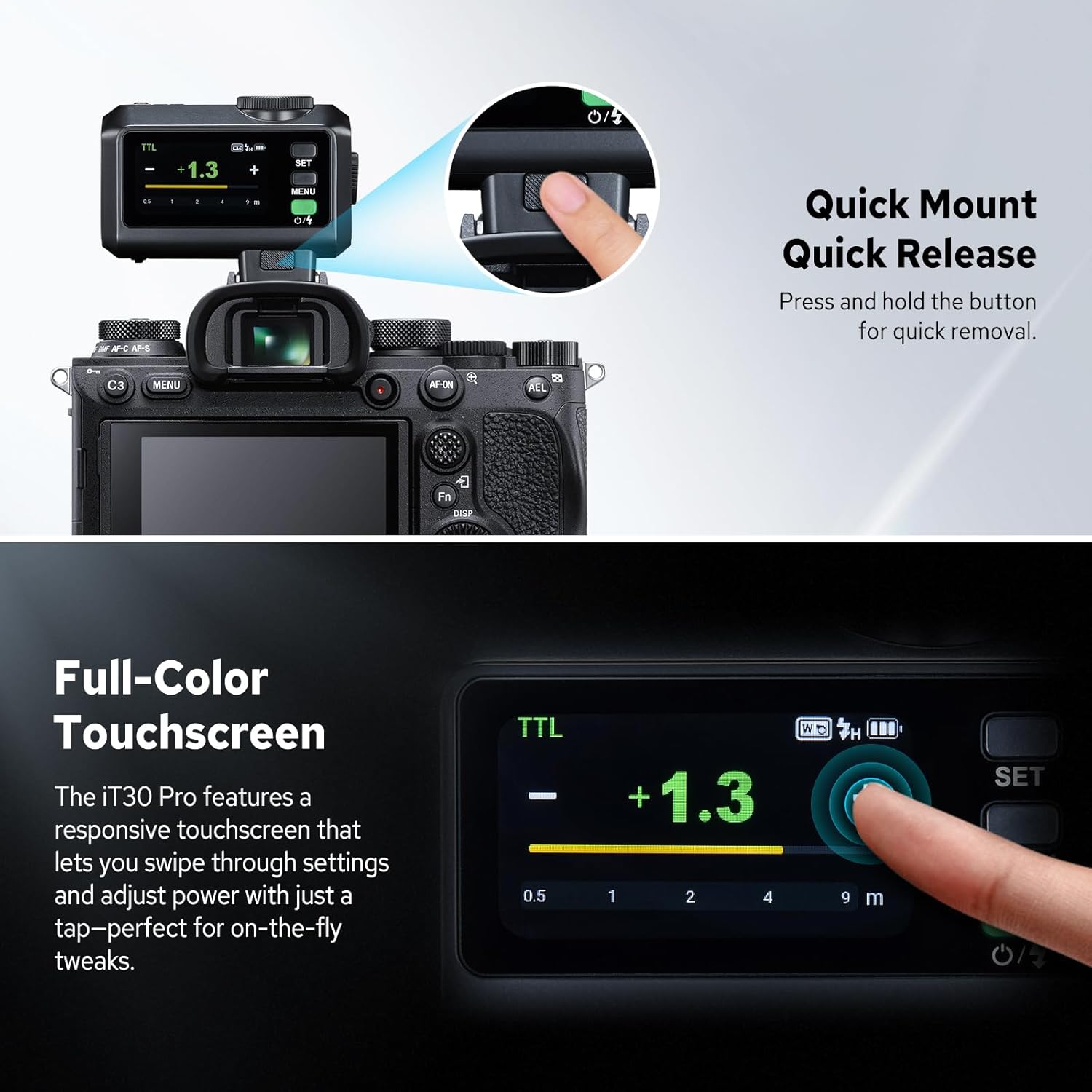
Image: A detailed view of the flash unit, illustrating the quick-release mechanism for easy mounting and dismounting, and the responsive full-color touchscreen for intuitive control.
5. Setup
5.1 Installing the Flash
- Hold the quick-release button on the flash unit.
- Slide the flash into the camera's hot shoe until it locks securely into place.
Video: This video demonstrates the installation process of the Godox iT30Pro-S flash onto a camera's hot shoe, showing how to securely attach the unit.
5.2 Powering On/Off
- Press and hold the power button.
- Swipe right or twist the dial on the touchscreen to unlock the unit.
- To power off, press and hold the power button again.
6. Operating Instructions
6.1 Touchscreen and Button Operation
- Touchscreen: Swipe down to open the function menu; swipe up to return to the main display. Tap icons to select options.
- MENU Button: Press to open/close the function menu.
- Dial: Rotate to scroll through options or fine-tune flash output.
- SET Button: Confirm selection.
- Power/Flash Button: Fire flash or turn unit on/off.
6.2 Flash Modes
The iT30Pro-S supports various flash modes:
- M Mode (Manual): Adjust flash power manually.
- Tap "+" or "-" icons for 0.3-stop increments.
- Slide the bar for rapid power changes.
- Turn the dial for fine-tune adjustments.
- The exposure distance indicator bar shows the effective flash range based on camera settings.
- TTL Mode (Through-The-Lens): Automatic exposure control.
- Swipe down from M mode to switch to TTL.
- Slide the bar to set flash exposure compensation.

Image: Demonstrates the TTL Auto Flash feature, which automatically adjusts flash output for accurate exposure in varying lighting conditions.
- Multi (Stroboscopic) Mode: Fires a series of rapid flashes.
- Swipe down from TTL mode to enter Multi mode.
- Slide the bar to set output power.
- Tap "Hz" to adjust flash count and frequency.

Image: Illustrates the capabilities of Global Shutter Flash Sync for high-speed photography and examples of Multi Flash Modes for creative effects.
6.3 Wireless Operation (2.4GHz X System)
The iT30Pro-S can function as both a master (sender) and receiver unit.
- Sender Mode (Master): Pair with other Godox 2.4GHz Wireless Flashes.
- Access Wireless settings from the function menu.
- Select "Wireless Sync" to pair with receiver units.
- Long-press the group icon to cycle through M (manual), TTL, or Off for each group.
- Use "+", "-", slider, or dial + SET to adjust power or compensation for the selected group.
- Receiver Mode (Slave): Syncs wirelessly with an X3 trigger unit or other Godox master units.
- Access Wireless settings from the function menu.
- Select "Wireless Sync" to pair with the master unit.
- Tap the group icon to open group settings and select your channel (A, B, C, D).
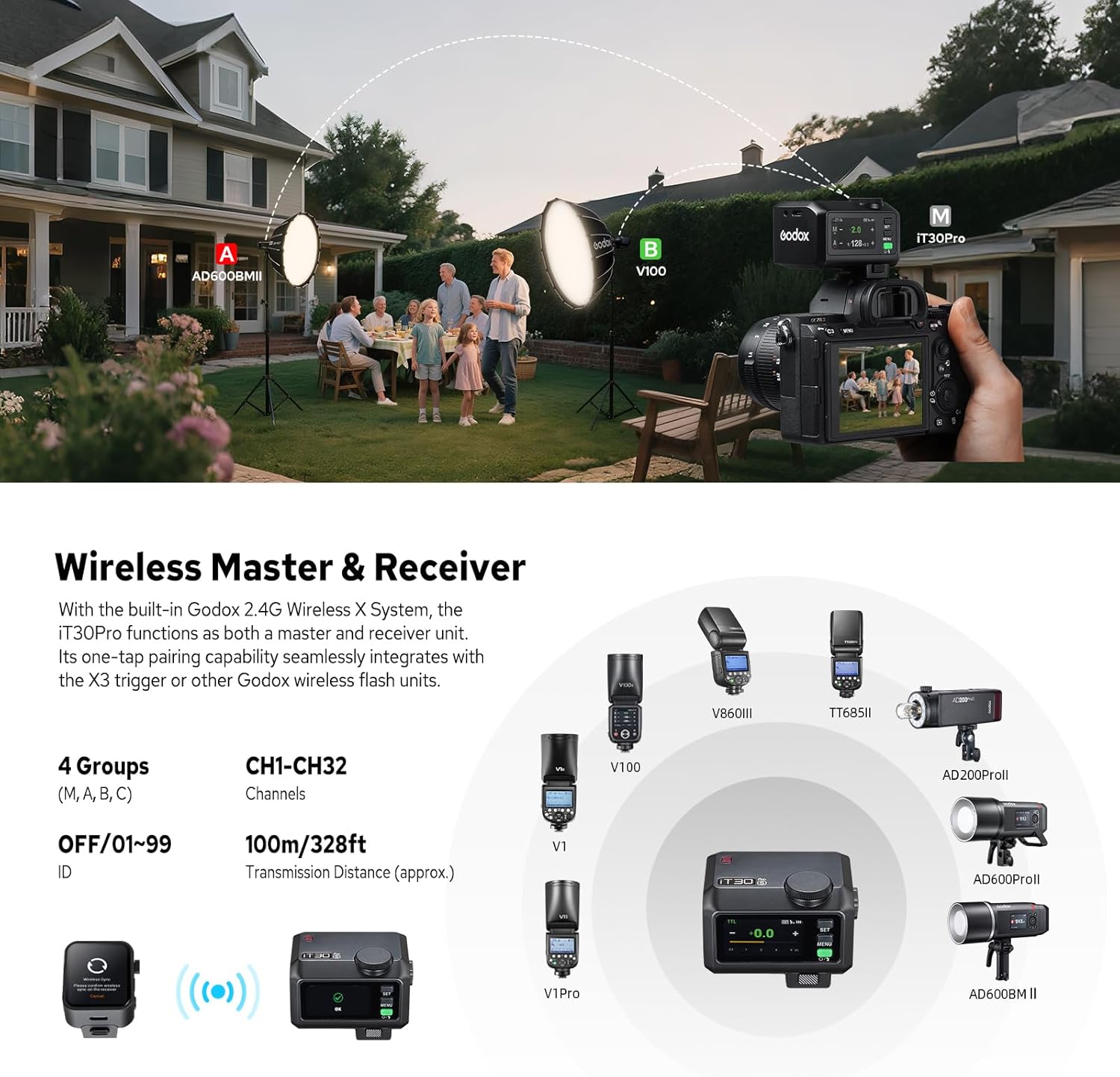
Image: Depicts a multi-light setup demonstrating the wireless master and receiver capabilities of the iT30Pro-S with other Godox flash units.
6.4 Optical Trigger
- S1 Mode: In M mode, fires in sync with the master's first flash.
- S2 Mode: In M mode, fires in sync with the master's second flash (useful for flashes with pre-flash).
6.5 Sync Modes
The iT30Pro-S supports:
- Front-Curtain Sync
- High-Speed Sync (HSS) - up to 1/8000s
- Rear-Curtain Sync
Image: Illustrates the capabilities of Global Shutter Flash Sync for high-speed photography and examples of Multi Flash Modes for creative effects.
6.6 Function Settings
Access these settings via the function menu (swipe down on the touchscreen):
- TCM (TTL→Manual): Converts the last TTL metering into a manual power setting.
- Standby: Adjust the standby time before the unit enters sleep mode.
- Auto Off: Set the time before the unit automatically powers off.
- Screen Brightness: Adjust the brightness of the touchscreen display.
- New Protocol: Only the Sony version supports the new protocol, enabling full electronic shutter (global shutter) compatibility when activated.
- Language: Select the display language (English, Chinese).
6.7 One-Touch Diffusion
The iT30Pro-S features a built-in diffuser for softer light.
- W: Pop up the wide-angle diffuser for broader, softer light.
- N: Retract the diffuser for a more focused beam.
Image: Shows the built-in diffuser in action, providing softer light for portraits compared to direct flash.
6.8 Sync Port Trigger
The flash unit includes a 2.5 mm port for wired trigger via a sync cable, offering an alternative to wireless triggering.
6.9 USB-C Charging
The iT30Pro-S has a built-in Li-ion battery that can be charged using the provided USB-C cable. It supports charging while in use.

Image: Highlights the compact size of the flash and its convenient USB-C charging capability, allowing for charging anytime, anywhere.
6.10 Screen Lock
To prevent accidental changes, long-press the touchscreen or the SET button for 2 seconds to lock/unlock the screen.
7. Maintenance
- Clean the flash unit regularly with a soft, dry cloth. Avoid using solvents or abrasive cleaners.
- Store the unit in a cool, dry place when not in use, preferably in the provided storage bag.
- If the unit will not be used for an extended period, charge the battery periodically to maintain its health.
- Avoid strong impacts or dropping the unit.
8. Troubleshooting
| Problem | Possible Cause | Solution |
|---|---|---|
| Flash does not fire. | Low battery; incorrect mode; unit not powered on; hot shoe connection issue. | Charge battery; check flash mode (M/TTL/Multi); power on unit; ensure secure hot shoe connection. |
| Flash output is inconsistent. | Incorrect TTL compensation; ambient light interference; wireless signal issues. | Adjust TTL compensation; check lighting conditions; verify wireless sync. |
| Cannot connect wirelessly. | Incorrect channel/ID; wireless function off; interference. | Ensure matching channel/ID; turn on wireless function; move closer to master/receiver. |
| Screen is unresponsive. | Screen locked; temporary software glitch. | Long-press to unlock; power cycle the unit. |
9. Specifications
| Feature | Detail |
|---|---|
| Model | iT30Pro S (for Sony) |
| Guide Number (1/1 step) | Approx. GN15 (ISO 100, in meters) |
| Flash Duration (t0.1) | 1/1000s~1/30000s |
| Exposure Control System | TTL / Auto Flash / Manual Flash |
| Flash Exposure Compensation | ±3 steps with 1/3 increment each step |
| Sync Mode | High-speed sync (up to 1/8000 seconds, or 1/80000 seconds with Sony cameras equipped with global shutter), first-curtain sync, and second-curtain sync |
| Multi Flash | Provided (up to 100 times, 100Hz) |
| Wireless Function | Sender, Receiver |
| Sender Groups | M, A, B, C |
| Receiver Groups | A, B, C, D |
| Transmission Range (approx.) | 100m/328ft |
| Channels | 32: 01-32 |
| ID | OFF/01-99 |
| Lithium Battery | 7.4V/900mAh |
| Recycle Time (1/1 step) | Approx. 1.5s |
| Number of Flashes (1/1 step) | Approx. 560 |
| Dimension | 65*46*47mm / 2.56*1.81*1.85in |
| Net Weight | Approx. 120g / 4.23oz |
10. Warranty and Support
This product is covered by a manufacturer's warranty. For detailed warranty terms and conditions, please refer to the warranty card included with your purchase or visit the official Godox website. For technical support, troubleshooting assistance, or service inquiries, please contact Godox customer service or your authorized dealer.
You can find more information and support at the GODOX Store.
Ask a question about this manual
Ask about setup, troubleshooting, compatibility, parts, safety, or missing instructions. Manuals+ will review the question and use this page’s manual context to help answer it.