
1. Product Overview
The DJI Osmo Nano is a compact and powerful camera designed for capturing high-quality video and photos. It features a 1/1.3-inch sensor, 4K/60fps video recording, and a 143° wide field of view. Its magnetic design allows for versatile mounting and quick mode switching.

Image: The DJI Osmo Nano camera, showing its compact form factor and rear display.
2. What's in the Box
The DJI Osmo Nano Standard Combo (64GB) includes the following components:
- Osmo Nano Camera (64GB) x 1
- Osmo Nano Multifunctional Vision Dock x 1
- Osmo Nano Magnetic Hat Clip x 1
- Osmo Nano Magnetic Lanyard x 1
- Osmo Nano Protective Case x 1
- USB-C to USB-C PD Cable (USB 3.1) x 1
- Osmo Nano Dual-Direction Magnetic Ball-Joint Adapter Mount x 1
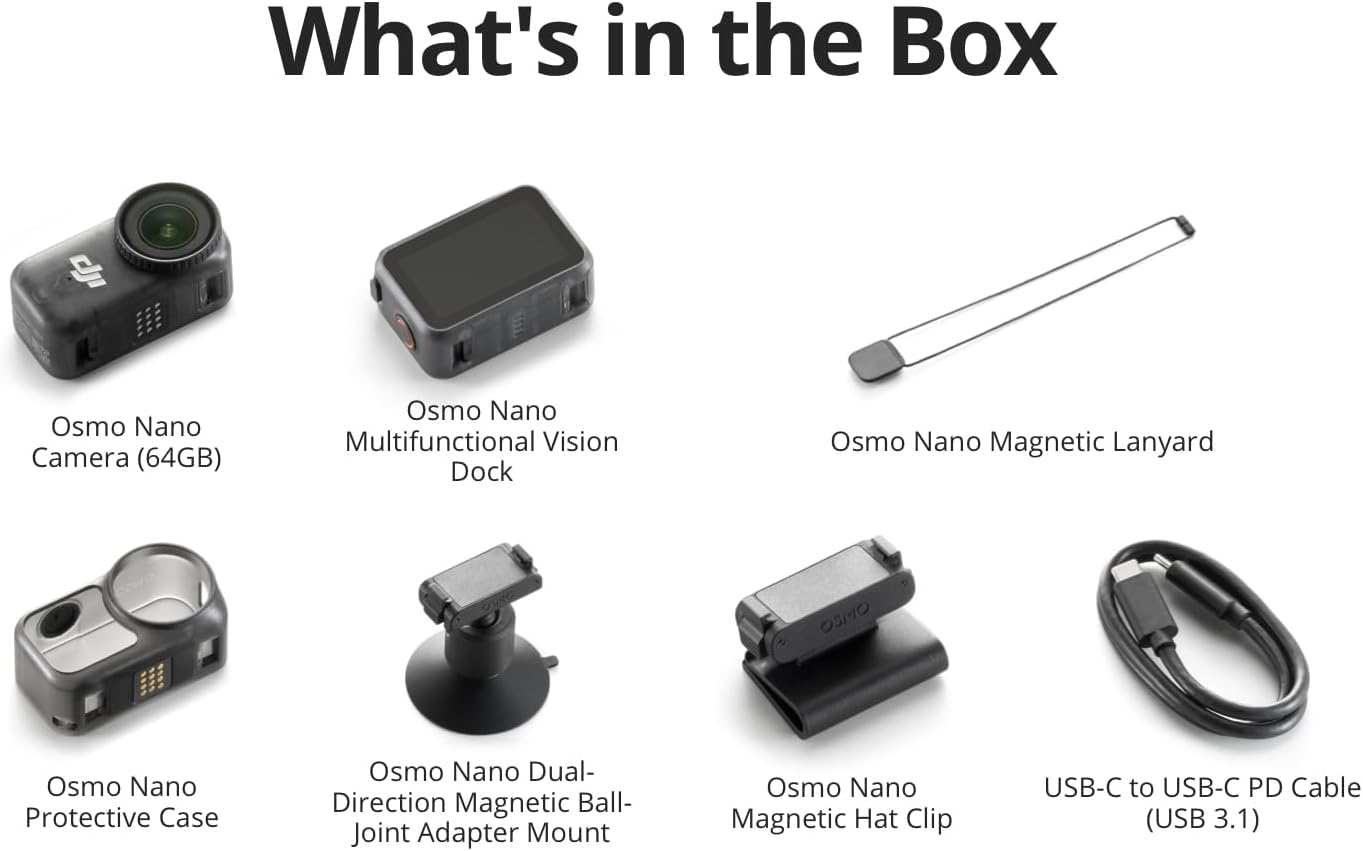
Image: All components included in the DJI Osmo Nano Standard Combo package.
3. Setup
3.1. Charging the Battery
The Osmo Nano camera requires 2 C batteries (included). To charge the device:
- Connect the USB-C to USB-C PD Cable (USB 3.1) to the camera or Vision Dock.
- Connect the other end of the cable to a USB-C charger that supports the standard PD 3.0 protocol with a maximum PD output power of 30 W or above.
- A 20-minute charge can bring the camera to 80% battery capacity.

Image: The Osmo Nano camera and Vision Dock connected for charging.
3.2. App Installation
For optimal product experience and to access all features, download the latest version of the DJI Mimo app. Due to platform compatibility issues, the DJI Mimo app has been removed from Google Play. Please visit the official DJI website to download the latest version.
The DJI Mimo app allows for live view, remote control, and instant content transfer.
3.3. Magnetic Mounting
The Osmo Nano features a magnetic design for quick and versatile mounting. Utilize the included Magnetic Hat Clip, Magnetic Lanyard, or Dual-Direction Magnetic Ball-Joint Adapter Mount to attach the camera to various surfaces or wear it for hands-free recording.

Image: Examples of magnetic mounting for the Osmo Nano, demonstrating its versatility.

Image: The Osmo Nano camera mounted on a hat for first-person perspective recording.
4. Operating Instructions
4.1. Basic Recording
The Osmo Nano captures video in 4K resolution at 60 frames per second (4K/60fps) with a 143° ultra-wide field of view (FOV). This allows for immersive and detailed footage.

Image: Example of 4K video clarity captured by the Osmo Nano.
4.2. Battery Life and Recording
The camera offers up to 200 minutes of recording time when used with the Vision Dock. The main camera alone can operate for up to 90 minutes. Actual operating time may vary based on settings, usage, and environmental factors.
4.3. Live View and Remote Control
Utilize the DJI Mimo app for live preview of your footage and remote control of the camera. The dual-sided magnetic design allows for easy switching between selfie and capturing other perspectives.

Image: The Osmo Nano displaying live view on its screen, demonstrating ease of use.
4.4. Audio Recording
The Osmo Nano supports direct connection to two microphones, delivering high-quality sound for your recordings without the need for an external receiver.

Image: Demonstrating the dual microphone support for enhanced audio capture.
4.5. Waterproofing
The camera is waterproof up to 10 meters without any additional housing. With the Vision Dock, it offers IPX4 splash resistance, protecting it from sweat, rain, and splashes.
4.6. Storage and Transfer
The Standard Combo includes 64GB of built-in storage. While direct recording to a microSD card is not supported, you can quickly export footage from the camera to a microSD card via the Vision Dock to free up camera storage space.
For swift content transfer, connect the camera to a device/PC via the USB 3.1 PD cable for speeds up to 600 MB/s. Wireless transfer to your smartphone via the DJI Mimo app can reach up to 80 MB/s.
4.7. Image Quality and Stabilization
The 1/1.3-inch sensor captures more light for crisp, vivid shots, even in low light. It supports 10-bit D-Log M color for vibrant, lifelike footage and greater flexibility in post-production. RockSteady 3.0 stabilization keeps your POV shots steady and clear during dynamic activities.


