
1. Introduction and Overview
The Godox iT30Pro-C is a compact and versatile touchscreen speedlite designed for Canon cameras. It features a built-in battery, 2.4G wireless X system, 1/8000s High-Speed Sync (HSS), and TTL auto-exposure for accurate and consistent lighting. Its intuitive 2.8-inch full-color touchscreen allows for easy navigation and control, making it suitable for both beginners and experienced photographers.
Key features include:
- 2.8" Full-Color Touchscreen: Intuitive control for settings and power adjustments.
- TTL Auto-Exposure: Real-time light metering for optimal flash output.
- Wireless Master & Receiver: Control up to three additional Godox flashes with the built-in 2.4GHz X system.
- Built-In Diffuser: Provides soft, even lighting without extra modifiers.
- Compact and Portable: Weighs only 120g, making it easy to carry.
- High-Speed Sync (HSS): Up to 1/8000s for versatile shooting conditions.
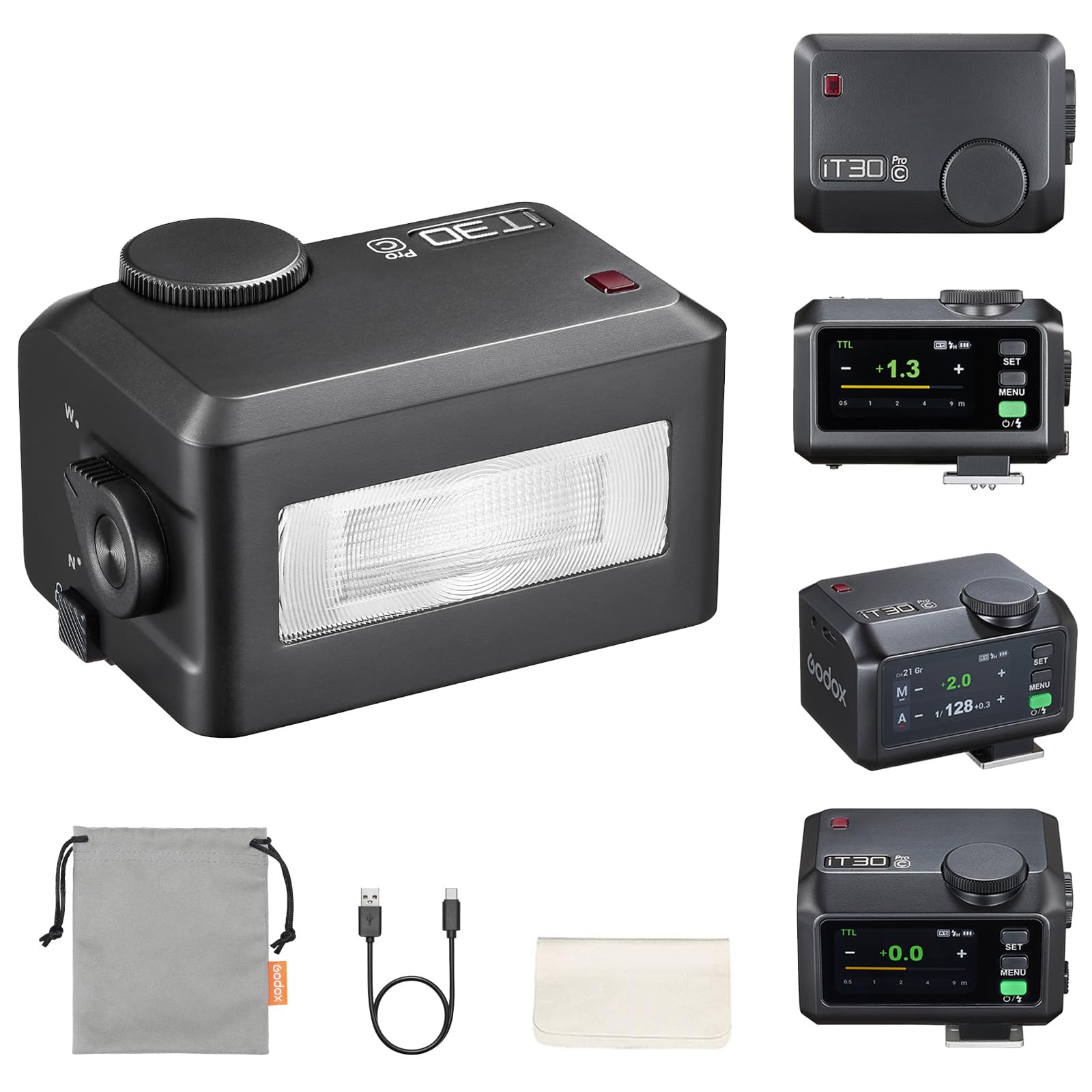
Figure 1.1: The Godox iT30Pro-C Flash mounted on a camera, highlighting its compact design and touchscreen display.
2. Setup
2.1. Installation
To install the iT30Pro-C flash onto your camera's hot shoe, hold the quick-release button and slide the flash into the hot shoe until it locks securely. Ensure the flash is firmly attached before operation.
Video 2.1: Demonstrates the installation process of the Godox iT30Pro-C flash onto a camera's hot shoe.

Figure 2.1: A user installing the Godox iT30Pro-C flash onto a camera, showing the secure attachment mechanism.
2.2. Power On/Off
To power on the device, press and hold the power button. Then, swipe right on the touchscreen or twist the dial to unlock the screen and begin operation. To power off, long-press the power button.
Video 2.2: Illustrates how to power on the Godox iT30Pro-C flash and unlock its touchscreen interface.
3. Operating the Flash
3.1. Touchscreen Operation
The 2.8-inch full-color touchscreen provides intuitive control. Swipe down to open the function menu and swipe up to return to the main display. Tap icons to select functions and slide bars to adjust values.
Video 3.1: Shows how to navigate the touchscreen interface of the Godox iT30Pro-C flash using swipe gestures.

Figure 3.1: The responsive touchscreen of the iT30Pro-C, allowing for quick adjustments and settings navigation.
3.2. Button Operation
The physical buttons and dial offer alternative control:
- MENU Button: Press to open/close the function menu.
- Dial: Rotate to scroll through options or fine-tune flash output.
- SET Button: Confirm selections.
- Power/Flash Button: Fire the flash or turn the unit on/off.
Video 3.2: Demonstrates the use of physical buttons and the dial for controlling the Godox iT30Pro-C flash.
3.3. Flash Modes
The iT30Pro-C supports various flash modes:
- M Mode (Manual): Manually set the flash power. Tap the "+" or "-" icons for 0.3-stop increments, slide the bar for rapid changes, or use the dial for fine-tuning.
- TTL Mode (Auto-Exposure): The flash automatically meters light. Slide the bar to set flash exposure compensation (FEC).
- Multi Mode (Stroboscopic): For creative continuous capture. Slide the bar to set output power and tap "Hz" to adjust flash count and frequency.

Figure 3.2: The E-TTL II Auto Flash system ensures accurate exposure by metering light in real-time.

Figure 3.3: Multi Flash mode allows for creative stroboscopic effects with adjustable flash count and frequency.
3.4. Exposure Distance Indicator
When adjusting camera settings, a bar on the display will indicate the effective flash range, helping you determine appropriate distances for your subjects.
Video 3.3: Explains the exposure distance indicator on the Godox iT30Pro-C, showing how it reflects effective flash range.
4. Wireless Operation
The iT30Pro-C features a built-in Godox 2.4GHz X system, allowing it to function as both a master (sender) and a receiver unit for flexible multi-light setups.
4.1. Sender Mode
In Sender Mode, the iT30Pro-C can control up to three additional Godox flashes. Long-press the group icon to cycle through M (manual), TTL, or Off for each group. Use the "+" / "-" buttons, slider, or dial + SET to adjust power or compensation for the selected group.
Video 4.1: Demonstrates how to use the Godox iT30Pro-C in Sender Mode to control other Godox flashes wirelessly.

Figure 4.1: The iT30Pro-C acting as a master unit, wirelessly controlling multiple Godox flashes for a complex lighting setup.
4.2. Receiver Mode
In Receiver Mode, the iT30Pro-C syncs wirelessly with an X3 trigger unit or another Godox master flash. Tap the group icon to open group settings and select your channel.
Video 4.2: Shows how to set up the Godox iT30Pro-C in Receiver Mode to be controlled by a master unit.
4.3. Wireless Settings
Channel and ID can be set manually or synced wirelessly from the master unit. Access these settings through the function menu.
Video 4.3: Guides through adjusting wireless channel and ID settings on the Godox iT30Pro-C.
5. Advanced Features
5.1. Optical Trigger (Photocell)
The iT30Pro-C supports optical triggering modes:
- S1: In M mode, the flash fires in sync with the master's first flash.
- S2: In M mode, the flash fires in sync with the master's second flash (ignoring the pre-flash).
Video 5.1: Explains and demonstrates the S1 and S2 optical trigger modes of the Godox iT30Pro-C.
5.2. TCM (TTL to Manual)
The TCM function converts the latest TTL metering into a manual power setting, allowing for precise manual adjustments based on an initial TTL reading.
Video 5.2: Shows how to use the TCM function on the Godox iT30Pro-C to convert TTL readings to manual power settings.
5.3. Built-in Diffuser
The iT30Pro-C features a quick-flip built-in diffuser. Pop up the wide-angle diffuser (W) for softer, wider light coverage, or retract it (N) for direct flash. This helps in achieving natural-looking light without external modifiers.

Figure 5.1: The built-in diffuser of the iT30Pro-C provides soft, flattering light, ideal for portraits and close-up shots.
5.4. High-Speed Sync (HSS)
The flash supports High-Speed Sync up to 1/8000s, allowing you to use wider apertures in bright conditions or freeze fast-moving subjects effectively.

Figure 5.2: High-Speed Sync (HSS) enables shooting at fast shutter speeds, preventing overexposure in bright light.
5.5. Global Shutter Flash Sync
The iT30Pro-C supports Global Shutter Flash Sync, enabling full electronic shutter compatibility when activated. Note: This feature's compatibility depends on the camera manufacturer's support for relevant camera models.

Figure 5.3: Global Shutter Flash Sync allows for extremely fast shutter speeds, capturing moments without motion blur.
6. Maintenance
6.1. USB-C Charging
The iT30Pro-C has a built-in Li-ion battery that can be charged using a USB-C cable. Connect the flash to a mobile power supply or a compatible USB-C charger. The battery indicator on the screen will show charging status.
Video 6.1: Demonstrates how to charge the Godox iT30Pro-C flash using its USB-C port.

Figure 6.1: The iT30Pro-C being charged via USB-C, indicating its portability and convenience.
6.2. Cleaning
Regularly clean the flash unit with a soft, dry cloth. Avoid using harsh chemicals or abrasive materials. For the hot shoe contacts, use a clean, dry cotton swab. Ensure the unit is powered off before cleaning.
7. Troubleshooting
7.1. Screen Lock
If the screen is locked, long-press the touchscreen or the SET button for 2 seconds to unlock it. This prevents accidental changes to settings during use.
Video 7.1: Shows how to unlock the screen of the Godox iT30Pro-C flash.
7.2. Auto Off / Standby
The flash features an Auto Off function and a Screen Standby mode to conserve battery. These settings can be adjusted in the function menu. To disable Auto Off, set the timer to 'OFF'. For Screen Standby, adjust the duration before the screen dims.
Video 7.2: Explains how to configure Auto Off and Screen Standby settings on the Godox iT30Pro-C.
7.3. General Issues
- Flash not firing: Check battery level, ensure flash is securely mounted, and verify flash mode and wireless settings.
- Inconsistent exposure: Review TTL exposure compensation, adjust manual power settings, or check for obstructions to the flash sensor.
- Lens shadow: Avoid using lenses longer than 8 cm (3.15 inches) with the iT30Pro-C, as they may cast a shadow in the photo due to the flash's compact size.
8. Specifications
| Feature | Detail |
|---|---|
| Product Dimensions | 2.56 x 1.81 x 1.81 inches |
| Item Weight | 7.4 ounces |
| Item Model Number | iT30Pro C |
| Batteries | 1 Lithium Ion battery required (built-in) |
| Compatible Mountings | Canon R5, R6, R6II, R7, R50, R8, R3, M5, M50, RP, R, 80D, 90D, 7D, 6D, 70D, 750D, 760D, 5DMarkIV, EOS 1DX, 6DMarkII, 77D, 800D, 5DMarkIII, 60D, 7D Mark II, 600D, 50D, 30D, 500D Digital X, M3, M6II, 1500D, 3000D, 200IID (Not compatible with Canon SL3) |
| Camera Flash | Hotshoe |
| Flash Sync Speed | 1/8000s |
| Guide Number (GN) | Approx. GN15 (ISO 100, in meters) |
| Flash Duration (t0.1) | 1/1000s - 1/30000s |
| Recycle Time | Approx. 1.5s |
| Number of Flashes (full power) | Approx. 560 |
| Wireless Transmission Range | Approx. 100m/328ft |
| Channels | 32 (01-32) |
| ID | OFF/01-99 |
9. What's in the Box
- 1 x Flash Body
- 1 x USB-C Charging Cable
- 1 x Storage Bag

Figure 9.1: The complete package contents of the Godox iT30Pro-C flash.
10. Warranty and Support
This product comes with a standard manufacturer's warranty. For detailed warranty information, please refer to the warranty card included in the packaging or visit the official GODOX website. For technical support, troubleshooting assistance, or service inquiries, please contact GODOX customer service through their official channels or the retailer where the product was purchased.