
1. Introduction
Thank you for choosing the TEKA HSB 6150 Multifunction Oven. This manual provides essential information for the safe installation, operation, and maintenance of your new appliance. Please read these instructions carefully before using the oven and keep them for future reference.
2. Safety Instructions
- Electrical Safety: Ensure the oven is correctly earthed and connected to a suitable power supply. Do not use adapters or extension cords.
- Hot Surfaces: The oven and its accessories become very hot during operation. Always use oven mitts when handling hot items. Keep children and pets away from the appliance.
- Cleaning: Disconnect the oven from the power supply before cleaning. Do not use abrasive cleaners or sharp metal scrapers.
- Ventilation: Ensure adequate ventilation around the appliance as specified in the installation instructions.
- Supervision: Never leave the oven unattended during operation, especially when cooking with oil or fat.
3. Product Overview
The TEKA HSB 6150 is a 60cm multifunction oven designed for optimal cooking performance and ease of use. It features a durable stainless steel finish and intuitive controls.

Figure 3.1: Control Panel. This image shows the oven's control panel, featuring three rotary knobs for function selection, temperature, and timer, alongside a digital display.

Figure 3.2: Oven Interior with Telescopic Guides. The oven interior is equipped with multiple rack positions and telescopic guides for easy and safe handling of trays and racks.
Components:
- Control Panel: Used to select cooking functions, set temperature, and manage the timer.
- Oven Cavity: The main cooking area.
- Telescopic Guides Plus Extension: Allows for smooth and safe extraction of trays and racks.
- Oven Door: Features a cool-touch exterior for safety.
- Interior Light: Illuminates the oven cavity for visibility during cooking.
4. Setup
4.1. Installation
Installation of the TEKA HSB 6150 oven should only be performed by a qualified technician in accordance with local regulations and the provided installation diagram. Ensure the appliance is securely fitted into the cabinet and properly connected to the electrical supply.

Figure 4.1: Installation Dimensions. This diagram illustrates the precise measurements required for proper integration of the oven into a kitchen cabinet.
4.2. First Use
- Remove all packaging materials and accessories from the oven cavity.
- Clean the interior of the oven with a damp cloth and mild detergent.
- Heat the empty oven at maximum temperature for approximately 30 minutes to burn off any manufacturing residues. Ensure the kitchen is well-ventilated during this process.
5. Operating Instructions
The HSB 6150 oven offers 6 versatile cooking functions to suit various culinary needs.
5.1. Selecting a Cooking Function
Turn the function selector knob to choose one of the 6 available cooking functions. The digital display will show relevant information.
5.2. Setting Temperature
Use the temperature control knob to set the desired cooking temperature. The oven will begin to preheat once the function and temperature are set.
5.3. Preheating
For best results, always preheat the oven to the desired temperature before placing food inside. The oven features a rapid preheating function for convenience.
5.4. Using Telescopic Guides
The telescopic guides allow you to pull out trays and racks smoothly and safely, reducing the risk of burns. Always ensure the tray is stable on the guides before pulling it out or pushing it back in.
Figure 5.1: Pizza Baking. This image illustrates the oven in use, baking a pizza on a stone, showcasing one of its cooking capabilities.
Figure 5.2: Roasted Vegetables. A tray of roasted vegetables inside the oven, highlighting its versatility for different types of dishes.
6. Maintenance
6.1. HydroClean ECO System
The HydroClean ECO system simplifies oven cleaning by using steam. To activate:
- Pour approximately 300 ml of water into the bottom of the oven cavity.
- Select the HydroClean ECO function.
- Allow the cycle to complete. The steam will loosen food residues.
- Once the oven has cooled, wipe the interior with a soft cloth to remove softened dirt.
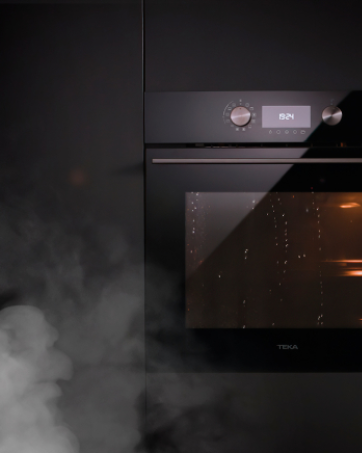
Figure 6.1: HydroClean ECO in Action. This image shows steam inside the oven cavity, indicating the HydroClean ECO function is active, helping to loosen food residues for easier cleaning.
6.2. General Cleaning
- Exterior: Clean the stainless steel exterior with a soft cloth and a non-abrasive stainless steel cleaner. Avoid harsh chemicals.
- Oven Door: Clean the glass door with a glass cleaner. For stubborn stains, consult the HydroClean ECO system.
- Accessories: Racks and trays can be washed by hand with warm soapy water or in a dishwasher.
7. Troubleshooting
| Problem | Possible Cause | Solution |
|---|---|---|
| Oven does not heat | No power supply; incorrect settings | Check power connection and circuit breaker. Verify function and temperature settings. |
| Uneven cooking | Incorrect rack position; overloaded oven | Use recommended rack positions. Avoid overcrowding the oven. |
| Smoke/odor during first use | Manufacturing residues burning off | This is normal. Ensure good ventilation. It will dissipate after initial use. |
| HydroClean ECO not effective | Insufficient water; heavy soiling | Ensure correct water quantity. For heavy soiling, a manual clean may be required first. |
If problems persist, please contact customer support.
8. Specifications
- Model: HSB 6150
- Type: Multifunction Electric Oven
- Dimensions (Product): 59.5 cm (depth) x 59.5 cm (width) x 59.5 cm (height)
- Installation Dimensions: 595mm x 595 mm x 537+22 mm (refer to Figure 4.1 for detailed diagram)
- Weight: 34 kg
- Energy Efficiency Class: A+
- Heating Method: Convection
- Wattage: 240 watts (Note: This value seems low for an oven, typically it's in kW. Please refer to the product label for exact power consumption.)
- Special Feature: HydroClean ECO cleaning system
- Color: Stainless Steel
- Manufacturer: Teka Industrial S.A.
9. Warranty and Support
Your TEKA HSB 6150 oven is covered by a manufacturer's warranty. For specific warranty terms and conditions, please refer to the warranty card included with your product or visit the official Teka website. For technical assistance, spare parts, or any inquiries, please contact Teka customer support.
Contact Information: Please refer to your regional Teka website or the documentation provided with your appliance for local service contact details.


