
MCHOSE Mix 87
MCHOSE Mix 87 Magnetic Switch Gaming Keyboard User Manual
Model: Mix 87
1. Introduction
Thank you for choosing the MCHOSE Mix 87 Magnetic Switch Gaming Keyboard. This manual provides detailed instructions for setting up, operating, and maintaining your keyboard to ensure optimal performance. The Mix 87 is designed for competitive gaming, featuring Hall Effect magnetic switches with rapid trigger technology and adjustable actuation.
2. Package Contents
Please verify that all items are present in your package:
- MCHOSE Mix 87 Gaming Keyboard
- USB-C Cable
- Keycap Puller
- Extra Switches (2 pieces)
- User Manual (this document)
3. Product Overview
The MCHOSE Mix 87 is a Tenkeyless (TKL) keyboard featuring 87 keys, Hall Effect magnetic switches, and a dedicated volume knob. Its design prioritizes speed, precision, and customization for an enhanced gaming experience.

Image 3.1: Top view of the MCHOSE Mix 87 Gaming Keyboard, showcasing its 87-key layout, dedicated function keys, and volume knob. The keyboard features RGB backlighting visible through the translucent keycaps.
Key Features:
- Hall Effect Magnetic Switches: Offers adjustable actuation points from 0.01mm to 3.4mm.
- Rapid Trigger (RT) Mode: Allows keys to react instantly upon release, enhancing responsiveness.
- 8000 Hz Polling Rate: Minimizes input latency for competitive gaming.
- RGB Backlighting: Customizable 16 million color options with various effects.
- Dedicated Volume Knob: For convenient audio control.
- Gasket Mount Structure: Provides a comfortable typing feel and acoustic profile.

Image 3.2: Close-up of the MCHOSE Mix 87 keyboard highlighting its magnetic switch technology. The image emphasizes the 0.001mm precision and 0.08ms event-level delay, crucial for high-performance gaming.
4. Setup
4.1 Connecting the Keyboard
- Locate the USB-C port on the back of your MCHOSE Mix 87 keyboard.
- Connect one end of the provided USB-C cable to the keyboard.
- Connect the other end of the USB-C cable to an available USB port on your computer.
- The keyboard will automatically be recognized by your operating system.
4.2 System Compatibility
The MCHOSE Mix 87 keyboard is compatible with the following operating systems:
- Windows
- macOS
- iOS
- Android
5. Operating Instructions
5.1 Basic Key Functions
The MCHOSE Mix 87 features a standard 87-key TKL layout. All keys function as labeled. Use the Fn key in combination with other keys for secondary functions, typically indicated by icons or alternative labels on the keycaps.
5.2 Volume Knob Operation
The dedicated knob located in the upper right corner of the keyboard controls audio output.
- Rotate Left: Decrease volume.
- Rotate Right: Increase volume.
- Press Down: Mute/Unmute audio.
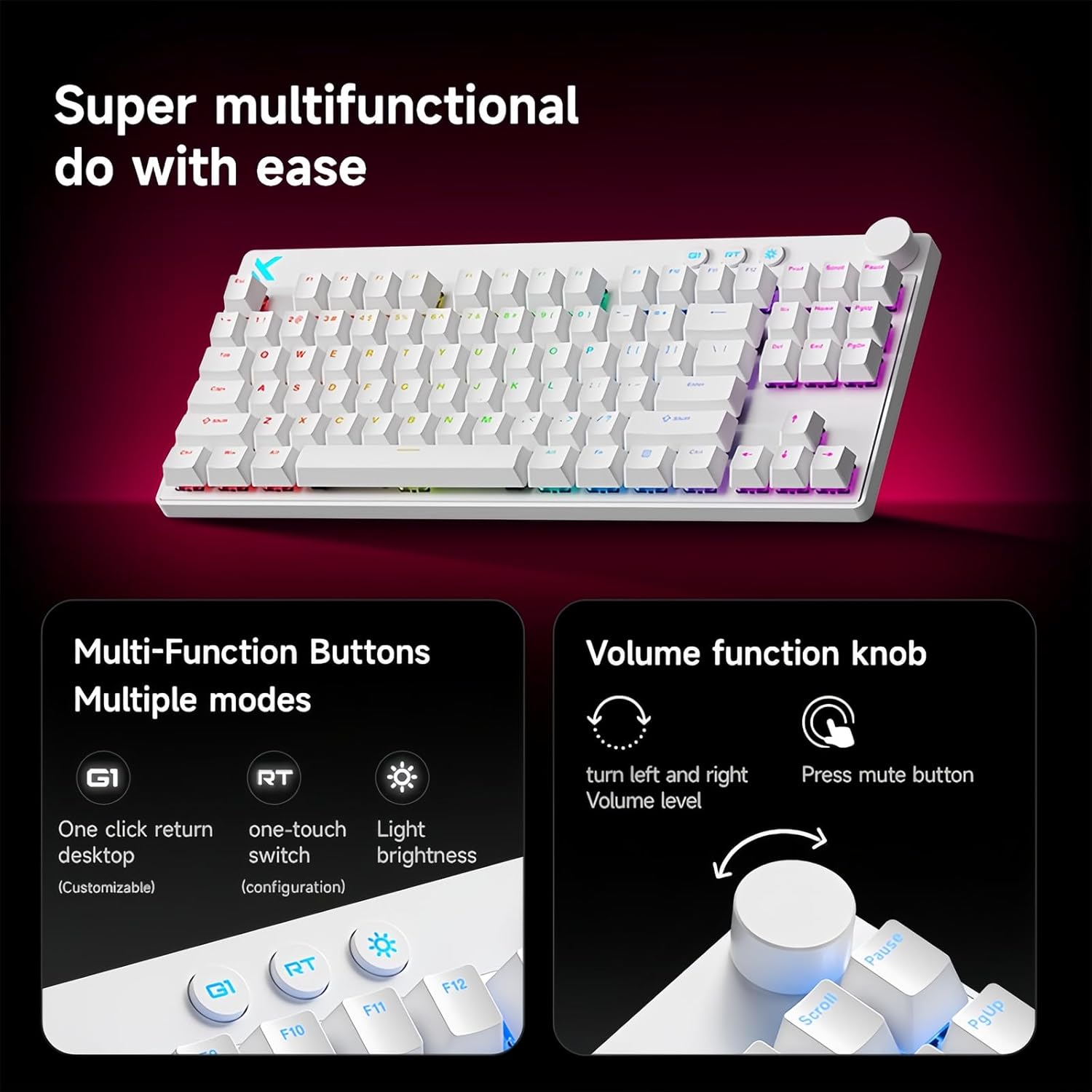
Image 5.1: Illustration of the multi-function buttons (G1, RT, Light) and the volume knob on the MCHOSE Mix 87 keyboard. The image details the functions of the knob for volume adjustment and muting, and the customizable nature of the G1 button.
5.3 Multi-Function Buttons
Above the numeric row, there are three dedicated buttons:
- G1 Button: Customizable function, typically set to return to desktop.
- RT Button: Toggles or adjusts Rapid Trigger mode.
- Light Button: Adjusts RGB lighting brightness or cycles through lighting modes.
5.4 Rapid Trigger (RT) Mode and Adjustable Actuation
The Mix 87 features Hall Effect magnetic switches that allow for precise control over actuation and de-actuation points.
- Adjustable Actuation: The trigger point can be set from 0.01mm to 3.4mm, allowing you to customize key sensitivity. This is configured via the web driver.
- Rapid Trigger (RT): This mode allows a key to register a new press as soon as it begins to move upwards, without needing to return to its reset point. This significantly reduces input delay for repeated key presses. The RT Smart Mode offers 1-15 adjustable levels for fine-tuning responsiveness.
- Advanced Functions: Supports SOCD (Simultaneous Opposite Cardinal Directions), DKS (Dynamic Keystrokes), MT (Macro Toggle), and TGL (Toggle) functions for advanced control.

Image 5.2: Visual representation of the MCHOSE Mix 87's performance capabilities, including 0.001mm precision, 256K ultra-high scanning rate, 0.08ms ultra-low latency, and 8K ultra-high polling rate. It also highlights the magnetic axis Algorithm 3.0, 15-level adjustable RT Smart mode, and ADC Direct Link for WASD keys.
5.5 RGB Backlighting
The keyboard features 16 million color RGB backlighting with various effects. Use the dedicated Light button or the software driver to customize lighting:
- Cycle through preset lighting effects.
- Adjust brightness levels.
- Customize individual key lighting.
- Enable music rhythm synchronization.
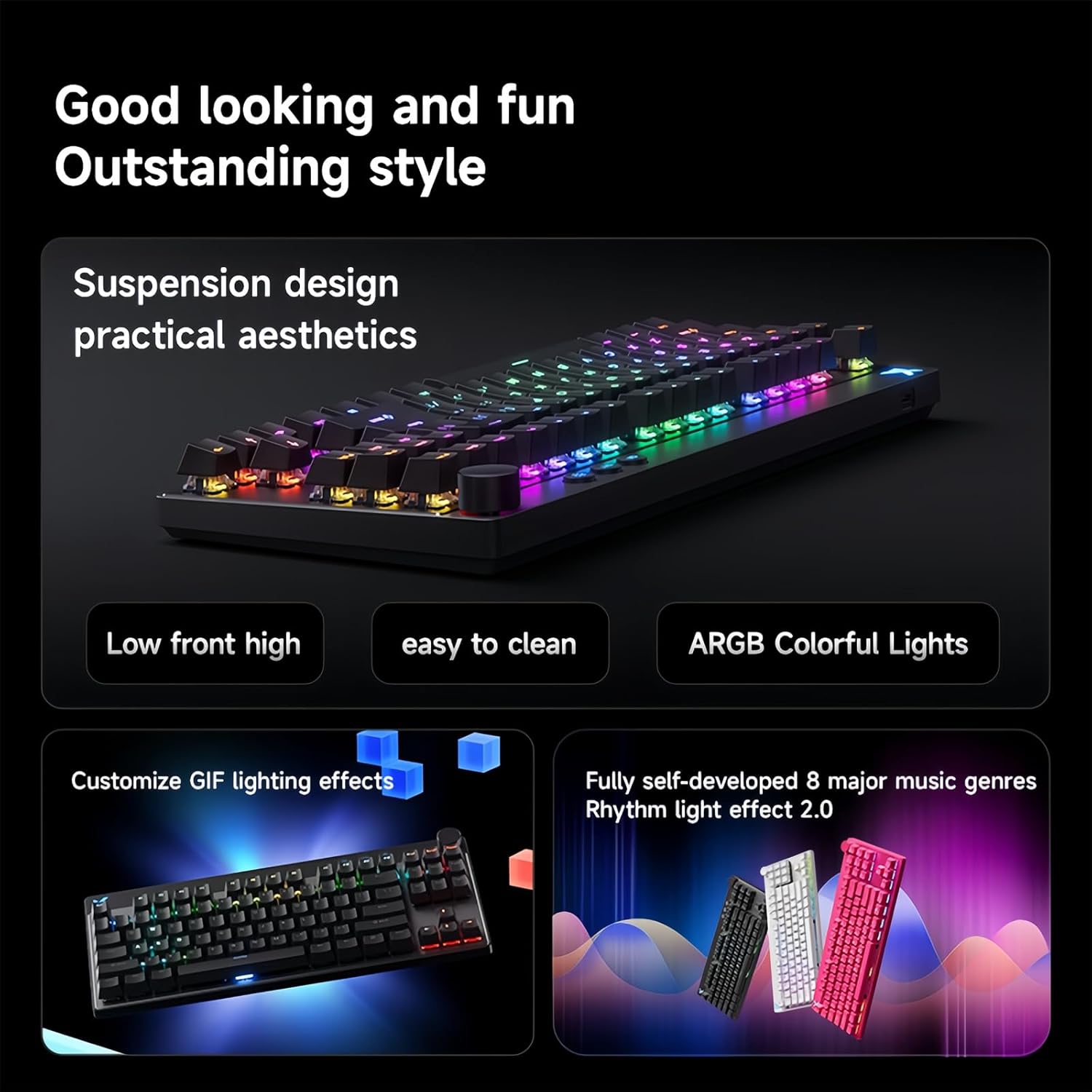
Image 5.3: The MCHOSE Mix 87 keyboard showcasing its suspension design and ARGB colorful lighting. The image highlights the aesthetic appeal and practical features like easy cleaning and customizable GIF lighting effects, along with music rhythm light effects.
6. Software Driver
The MCHOSE Mix 87 supports a customizable web-based driver, eliminating the need for software downloads and installations. This driver provides access to advanced settings and customization options.
6.1 Accessing the Web Driver
To access the web driver, open your web browser and navigate to one of the following URLs:
- Official MCHOSE Web Driver: https://www.mchose.com.cn
- Alternative M HUB Client Driver: https://www.maicong.cn
The web driver allows you to:
- Adjust key actuation points.
- Configure Rapid Trigger (RT) levels.
- Customize RGB lighting effects and colors.
- Program macros and reassign key functions.
- Update firmware (if available).

Image 6.1: Screenshot illustrating the MCHOSE web-based driver interface. This driver allows users to customize keyboard settings without installing dedicated software, offering cross-platform compatibility.
7. Maintenance
7.1 Cleaning the Keyboard
To maintain the appearance and functionality of your keyboard:
- Disconnect the keyboard from your computer before cleaning.
- Use a soft, lint-free cloth slightly dampened with water or a mild cleaning solution to wipe the keycaps and chassis.
- For dust and debris between keycaps, use compressed air or the provided keycap puller to remove keycaps and clean underneath.
- Avoid using harsh chemicals, abrasives, or solvents, as these can damage the keyboard's finish.
7.2 Storage
When not in use, store the keyboard in a dry, cool place away from direct sunlight and extreme temperatures.
8. Troubleshooting
8.1 Keyboard Not Responding
- Ensure the USB-C cable is securely connected to both the keyboard and the computer.
- Try connecting the keyboard to a different USB port on your computer.
- Test the keyboard on another computer to rule out system-specific issues.
- Restart your computer.
8.2 RGB Lighting Not Working or Incorrect
- Check the brightness settings using the dedicated Light button or the web driver.
- Ensure no software conflicts are present (e.g., other RGB control software).
- Reset the keyboard settings via the web driver if customization issues persist.
8.3 Actuation Issues or Inconsistent Key Presses
- Verify your actuation point settings in the web driver.
- Ensure Rapid Trigger (RT) mode is configured to your preference.
- Clean around the affected switch to remove any debris.
- If an extra switch is available, consider replacing the problematic switch.
9. Specifications
| Model Name | Mix 87 Keyboard |
| Connection Type | USB-C Wired |
| Number of Keys | 87 keys (TKL Layout) |
| Switch Type | Hall Effect Magnetic Switches (Apollo) |
| Adjustable Actuation | 0.01mm - 3.4mm |
| Rapid Trigger (RT) Mode | Supported, 1-15 Level Adjustable |
| Polling Rate | 8K Hz |
| Scan Rate | 256K |
| Latency | 0.08ms |
| Backlight | 16 Million Color RGB |
| Structure | Gasket Mount |
| Keycap Material | Translucent |
| Product Dimensions | 14.1 x 6 x 1.4 inches (35.8 x 15.2 x 3.6 cm) |
| Item Weight | 2 pounds (0.91 kg) |
| System Compatibility | Windows, macOS, iOS, Android |
10. Warranty and Support
For warranty information and technical support, please refer to the official MCHOSE website or contact your retailer. Keep your proof of purchase for warranty claims.
Related documentsMix 87


Ask a question about this manual
Ask about setup, troubleshooting, compatibility, parts, safety, or missing instructions. Manuals+ will review the question and use this page’s manual context to help answer it.