1. Important Safety Instructions
Please read all instructions carefully before assembly and use. Keep this manual for future reference.
- Ensure all parts are present and undamaged before beginning assembly.
- Assemble the vanity on a soft, clean surface to prevent scratches.
- Do not overtighten screws during assembly to avoid damaging the material.
- Keep small parts and packaging materials away from children.
- For electrical components (LED lights), ensure the power source matches the product's requirements. Unplug before cleaning or maintenance.
- Do not place excessively heavy items on the glass tabletop or drawers.
- Periodically check all connections and fasteners to ensure they remain secure.
2. Package Contents
Verify that all components listed below are included in your package. If any parts are missing or damaged, please contact Timechee customer support.
- Vanity Desk Frame (Engineered Wood)
- Mirror with Integrated LED Lights
- 9 Storage Drawers with Crystal Handles
- Glass Tabletop Panels
- Assembly Hardware (screws, connectors, etc.)
- Power Adapter for LED Lights
- Instruction Manual

Figure 2.1: Exploded view showing the various components of the vanity desk, including the mirror, desk frame, and drawers, indicating parts for assembly.
3. Assembly Instructions (Setup)
The Timechee Vanity Mirror with Lights is designed for straightforward assembly. Each part is clearly labeled to guide you through the process. Follow the step-by-step instructions provided in the included assembly manual.
- Unpack all components and verify against the package contents list.
- Identify and separate the main desk frame pieces.
- Assemble the main desk structure according to the numbered diagrams.
- Install the drawer slides and assemble the 9 drawers.
- Carefully place the glass tabletop panels into their designated slots.
- Mount the mirror securely to the back of the vanity desk.
- Connect the power adapter for the LED lights to the mirror and a suitable power outlet.
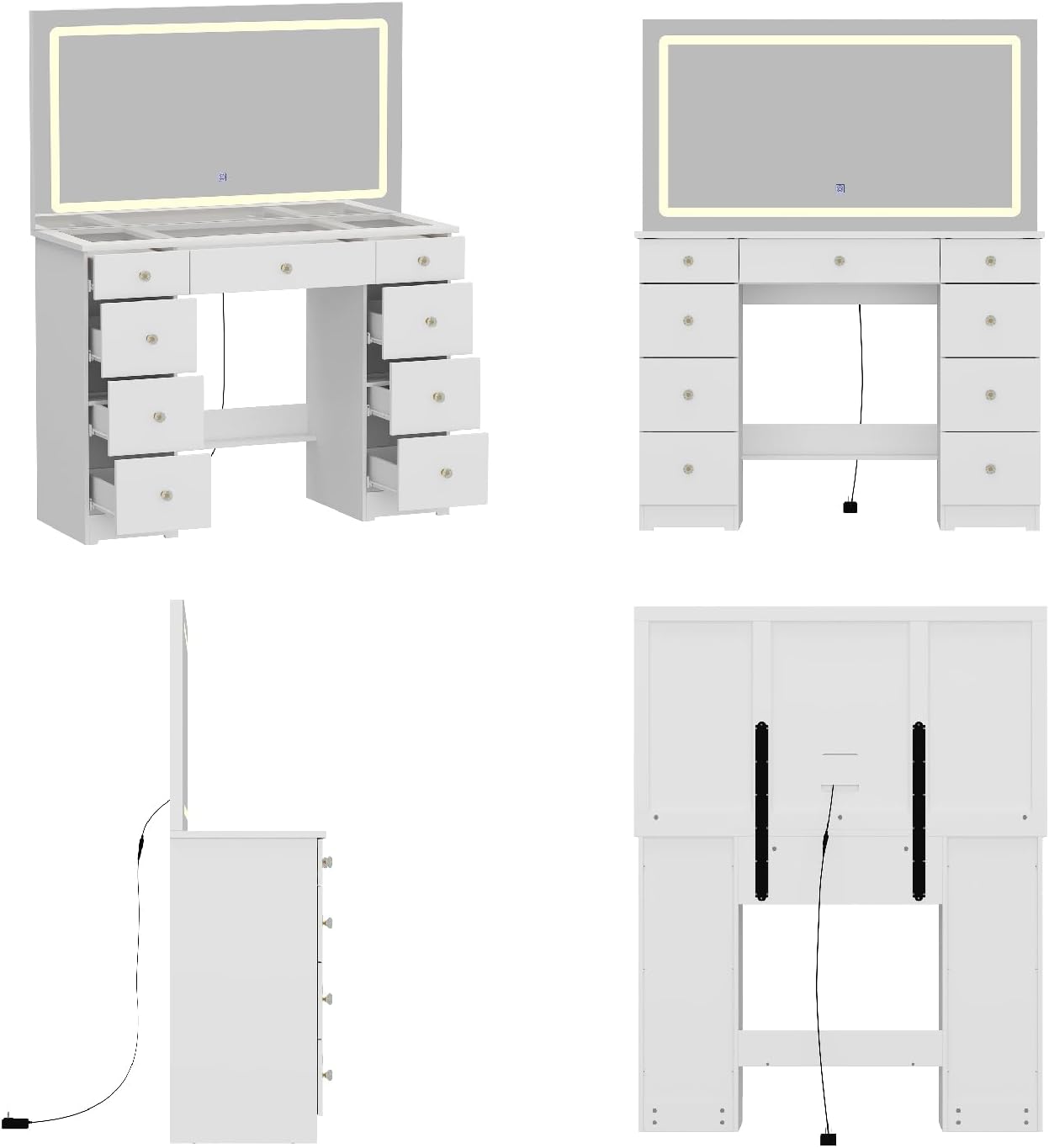
Figure 3.1: Rear view of the vanity desk, illustrating the mirror attachment and the power cable connection for the LED lights.
4. Operating Instructions
4.1. LED Mirror Lights Operation
The integrated LED lights around the mirror offer adjustable settings for optimal illumination.
- Power On/Off: Lightly touch the power icon on the mirror surface to turn the lights on or off.
- Color Temperature Adjustment: With the lights on, briefly touch the power icon to cycle through the three available color options: Cool Light, Natural Light, and Warm Light.
- Brightness Adjustment: To adjust the brightness, press and hold the power icon. The light intensity will gradually increase or decrease. Release when the desired brightness is achieved.

Figure 4.1: Diagram illustrating the three color temperature options (Cool, Neutral, Warm) and the brightness adjustment feature of the LED mirror lights.
4.2. Drawer Usage
The vanity features 9 spacious drawers for organized storage. The crystal handles and smooth slides ensure easy opening and closing.
- Gently pull the crystal handles to open the drawers.
- Push firmly to close the drawers completely.
- Avoid overloading drawers to ensure smooth operation and prevent damage to the slides.

Figure 4.2: The vanity desk with several drawers pulled open, demonstrating the ample storage space available for various items.
5. Maintenance
Proper care will extend the life and maintain the appearance of your vanity desk.
- Cleaning the Surface: Wipe the engineered wood surfaces with a soft, damp cloth. Avoid harsh chemicals or abrasive cleaners.
- Cleaning the Mirror and Glass: Use a glass cleaner and a lint-free cloth to clean the mirror and glass tabletop. Spray cleaner onto the cloth, not directly onto the mirror, to prevent liquid from seeping into the edges.
- Drawer Maintenance: Periodically check drawer slides for smooth operation. If they become stiff, a small amount of silicone lubricant can be applied.
- Electrical Components: Ensure the power adapter and cables are free from damage. Do not attempt to repair electrical components yourself.
6. Troubleshooting
| Problem | Possible Cause | Solution |
|---|---|---|
| LED lights not turning on. | Power adapter not connected or faulty; power outlet issue. | Ensure power adapter is securely plugged into the mirror and a working outlet. Test the outlet with another device. |
| Lights are dim or flickering. | Brightness setting too low; unstable power supply. | Press and hold the touch switch to increase brightness. Check power connection. |
| Drawers are difficult to open/close. | Overloaded drawer; debris in slides; misaligned slides. | Reduce drawer contents. Clean drawer slides. Check assembly to ensure slides are correctly aligned. |
| Vanity feels unstable. | Loose fasteners. | Tighten all assembly screws and bolts. Ensure the vanity is on a level surface. |
7. Specifications
- Brand: Timechee
- Model Number: YG-KF210308-02
- Product Dimensions: 15"D x 43.3"W x 55"H
- Frame Material: Engineered Wood
- Color: White
- Number of Drawers: 9
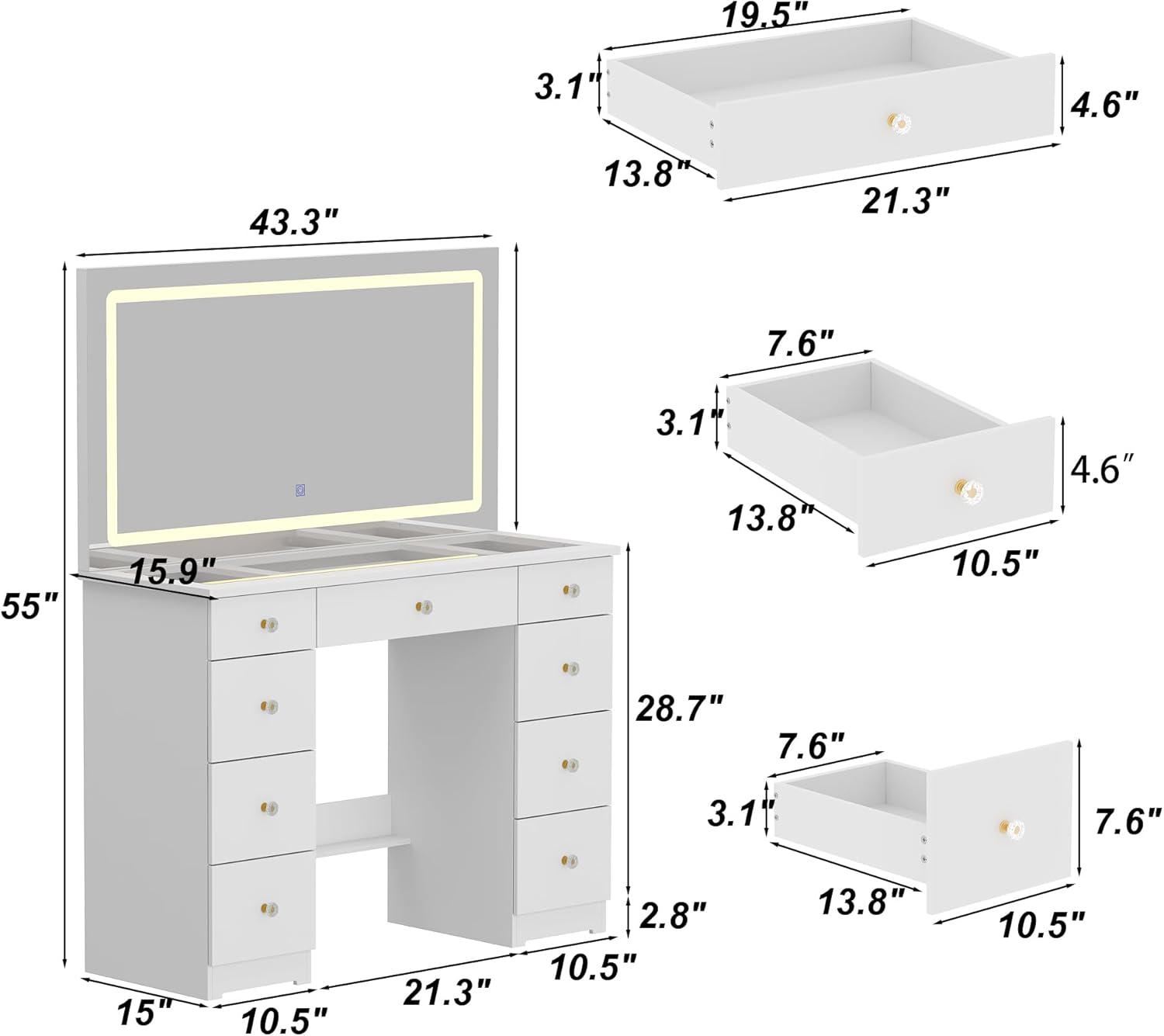
Figure 7.1: Detailed dimensions of the vanity desk and its individual drawers.
8. Warranty and Support
For specific warranty information regarding your Timechee Vanity Mirror with Lights, please refer to the warranty card included with your purchase or contact the manufacturer directly. For product support, assembly assistance, or to report missing/damaged parts, please contact the seller, Timechee US Store, through your purchase platform.
Note: Keep your purchase receipt as proof of purchase for any warranty claims.